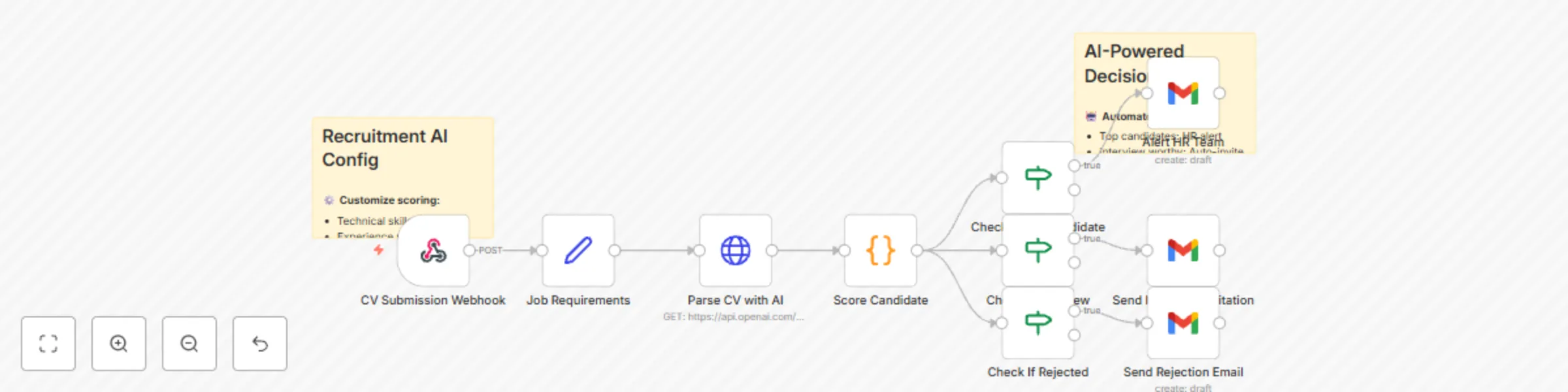
Block 1 - CV Submission Webhook
- Type / Role
- n8n-nodes-base.webhook - webhook
- Config choices
- Version 1


 Early Deal
This workflow is provided as-is. Please review and test before using in production.
How it works This comprehensive recruitment automation workflow transforms your hiring process from manual screening to intelligent candidate management. The system begins by automatically collecti...
n8n-nodes-base.webhook, n8n-nodes-base.stickynote, n8n-nodes-base.set, n8n-nodes-base.httprequest, n8n-nodes-base.code, n8n-nodes-base.if, n8n-nodes-base.gmail
This workflow is cataloged by N8N Workflows and links back to its original n8n.io source page by Rodrigue Gbadou.
Original n8n.io sourceThis comprehensive recruitment automation workflow transforms your hiring process from manual screening to intelligent candidate management. The system begins by automatically collecting CVs from multiple job boards and career platforms, immediately parsing each submission using advanced AI technology to extract key information including skills, experience levels, educational background, and career progression patterns.
Once parsed, the workflow employs predictive scoring algorithms that evaluate each candidate against your specific job requirements and company culture criteria. This multi-dimensional analysis considers technical skills alignment, experience relevance, cultural fit indicators, and career trajectory patterns to generate compatibility scores with remarkable accuracy.
The system then seamlessly transitions qualified candidates into automated interview scheduling, coordinating availability across hiring managers, team members, and candidates while optimizing for timezone considerations and calendar conflicts. Finally, successful candidates enter a personalized onboarding workflow that adapts to their role, department, and experience level, ensuring smooth integration into your organization.
This workflow is designed for HR departments, talent acquisition teams, and growing companies struggling with time-intensive recruitment processes. It specifically addresses the challenges of manual CV screening, subjective candidate evaluation, scheduling conflicts, and inconsistent onboarding experiences. Organizations processing high volumes of applications or seeking to eliminate recruitment bias while maintaining quality standards will benefit most from this automation.
Prerequisites: Ensure you have API access to your chosen AI parsing service (OpenAI, Affinda, or equivalent), active accounts on target job boards, and administrative access to your calendar and ATS systems.
Configure job board integrations: Connect your LinkedIn Recruiter, Indeed, and Glassdoor accounts using their respective APIs. Set up webhook endpoints to automatically capture new CV submissions and configure filtering criteria based on job titles, locations, and basic qualifications.
Establish AI parsing service: Choose and configure your CV analysis provider (OpenAI for natural language processing, Affinda for specialized CV parsing, or alternative services). Set up API credentials and define extraction templates for skills, experience, education, and custom fields relevant to your industry.
Integrate calendar systems: Connect Google Calendar, Outlook, or your preferred scheduling platform. Configure availability windows for all hiring team members, set interview duration templates, and establish buffer times between meetings.
Synchronize ATS platform: Link your Applicant Tracking System (Workday, BambooHR, Greenhouse, etc.) to ensure seamless candidate data flow. Map workflow fields to your ATS schema and establish status update triggers.
Connect interview tools: Integrate video conferencing platforms (Zoom, Microsoft Teams, Google Meet) for automatic meeting room creation and invitation distribution. Configure recording settings and waiting room preferences.
Link HRMS for onboarding: Connect your Human Resource Management System to trigger personalized onboarding sequences based on role type, department, and seniority level.
The workflow offers extensive customization capabilities including adjustable scoring weights for different criteria, industry-specific skill taxonomies, custom interview formats, and role-based onboarding paths. Organizations can configure approval workflows, set up custom notification templates, and establish specific integration parameters to match their unique recruitment processes and company culture.
This automation solution transforms recruitment from a time-intensive manual process into a strategic, data-driven system that improves both hiring quality and candidate experience while significantly reducing administrative overhead.
This catalog entry is organized from the workflow JSON. The node-level section below shows the executable blocks available for review before importing the template.
| Workflow | Automate candidate evaluation with GPT-4 scoring and Gmail notifications |
|---|---|
| Complexity | intermediate |
| Nodes | 12 |
| Categories | HR, AI Summarization |
| Author | Rodrigue Gbadou |
| Published | 16 Jul 2025 |
Use the JSON export at /data/workflows/6071/6071.json as the source template for this automation.
Open n8n, import the downloaded JSON, and review each node before activating the workflow.
Replace placeholder credentials, API keys, webhook URLs, account IDs, and environment-specific values with your own settings.
Run the workflow manually or in a staging workspace, inspect node output, and confirm downstream systems receive the expected data.
Enable the workflow only after testing, then monitor executions, errors, and rate limits during the first production runs.
Review imported nodes carefully before activation. This catalog entry is intended to help you inspect the workflow structure, understand required services, and find related templates faster.
Node names, credentials, schedules, webhook paths, and external service limits may need adjustment for your workspace.
How it works This comprehensive recruitment automation workflow transforms your hiring process from manual screening to intelligent candidate management. The system begins by automatically collecti...
Review the workflow JSON, configure any required credentials in n8n, and test the automation in a safe workspace before using it in production.
Yes. Use the block-by-block analysis and the downloadable JSON to inspect each node, then adjust credentials, prompts, schedules, filters, or destinations for your HR, AI Summarization use case.