Automate bounce email management for lead generation with Gmail and NocoDB

Workflow preview

Workflow preview
100%
Automate bounce email management for lead generation with Gmail and NocoDB preview
Open on n8n.io

Important notice

This workflow is provided as-is. Please review and test before using in production.

1. Workflow Overview

SPAM MANAGER FOR LEAD GENERATION Automatically identifies and manages spam replies from your outreach inbox; such as “Delivery failed” or “There was a problem with your delivery” which comes fro...

Best for

  • Lead Generation automation workflows
  • advanced n8n builders looking for reusable templates

Tools used

n8n-nodes-base.code, n8n-nodes-base.gmailtrigger, n8n-nodes-base.stickynote, n8n-nodes-base.nocodb, n8n-nodes-base.if, n8n-nodes-base.noop, n8n-nodes-base.splitinbatches, n8n-nodes-base.gmail

Source and attribution

This workflow is cataloged by N8N Workflows and links back to its original n8n.io source page by Itunu.

Original n8n.io source

1.1 Workflow description

Title
Automate bounce email management for lead generation with Gmail and NocoDB
Workflow name
Automate bounce email management for lead generation with Gmail and NocoDB

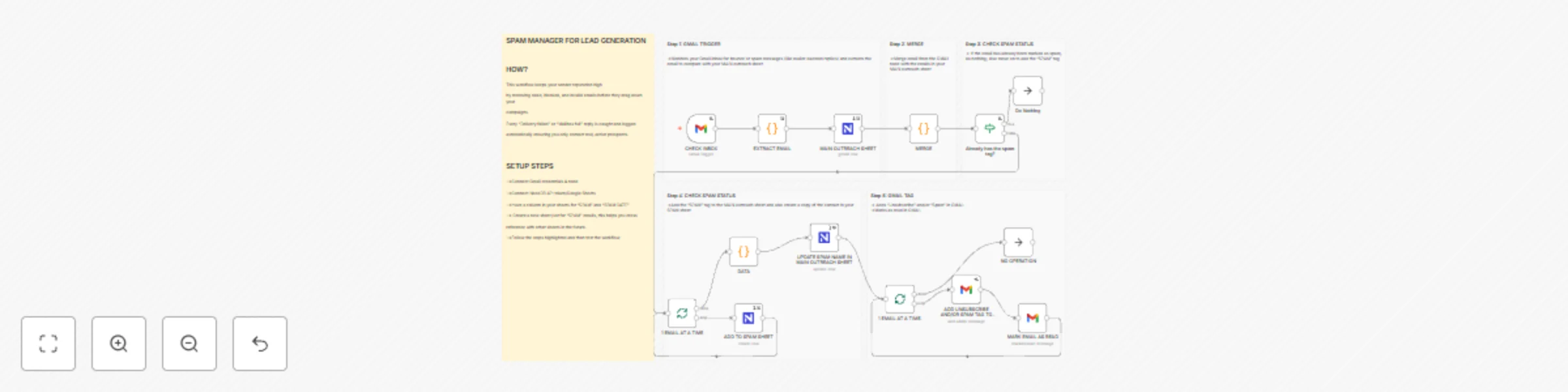
📬 SPAM MANAGER FOR LEAD GENERATION

Automatically identifies and manages spam replies from your outreach inbox; such as “Delivery failed” or “There was a problem with your delivery” which comes from "[email protected]" for Gmail. This is to remove these messages to keep your email lists clean and improve domain reputation.


🎯 Who it’s for

This workflow is designed for lead generation managers, outreach specialists, and freelancers who send cold or automated emails at scale.

It helps you automatically filter and manage bounce or spam responses without manually combing through your inbox, ensuring your sender domain stays healthy and your lead lists remain accurate.


⚙️ How it works

  1. Trigger: Watches your Gmail inbox for replies from system senders like [email protected].
  2. Extract Email: Pulls out the email address from each bounce or spam message.
  3. Merge: Compares the extracted address with your main lead sheet.
  4. Update Sheet:
    • If the email exists in your main sheet, it updates that record’s SPAM field to "YES".
    • Otherwise, it adds the address to a dedicated Unsubscribe or Bad Emails table.
  5. Mark as Read: Tags and marks the email as processed in Gmail for better visibility.

🧩 Requirements

To run this workflow, you’ll need:

  • Gmail Credentials → For reading and tagging emails.
  • NocoDB API Token → For reading and updating your lead list and spam records.(You can use Sheets, Airtable or any other DB you use).

Both can be securely added through the n8n Credentials Manager.


🧠 How to Customize

  • Sender Filter: Change the Gmail Trigger to include other mailer domains or error messages.
  • Data Storage: Replace NocoDB with Google Sheets or Airtable.
  • Tagging: Adjust or remove the Gmail label used for spam-marked messages.
  • Message Matching: Edit the MERGE code node to fit your column names (e.g., Email, Address, etc.).

💡 Why this workflow matters

By automating spam and bounce handling, you:

  • Keep your lead database clean and current
  • Reduce bounce rates and spam flags
  • Improve your email deliverability and sender score
  • Save time spent manually checking failed emails

🪄 Quick Setup Tips

  • Add your Gmail and DB credentials under the Credentials tab.
  • Update the DB project and table IDs in relevant nodes.
  • Test with a few known bounce messages to verify connection and matching.
  • Optional: Add a “SPAM” tag in Gmail for quick inbox filtering. "UNSUBSCRIBE" is used in this workflow.

🧾 Workflow Info

Workflow Name: SPAM MANAGER FOR LEAD GENERATION
Category: Email & Data Hygiene
Version: 1.0
Created for: Outreach and CRM Automation


Author: Itunu
Portfolio: Itunu’s Automation Portfolio

1.2 Logical Blocks

This catalog entry is organized from the workflow JSON. The node-level section below shows the executable blocks available for review before importing the template.

2. Block-by-Block Analysis

Block 1 - DATA

Type / Role
n8n-nodes-base.code - code
Config choices
Version 2

Block 2 - MERGE

Type / Role
n8n-nodes-base.code - code
Config choices
Version 2

Block 3 - EXTRACT EMAIL

Type / Role
n8n-nodes-base.code - code
Config choices
Version 2

Block 4 - CHECK INBOX

Type / Role
n8n-nodes-base.gmailTrigger - gmailTrigger
Config choices
Version 1.3

Block 5 - Sticky Note

Type / Role
n8n-nodes-base.stickyNote - stickyNote
Config choices
Version 1

Block 6 - Sticky Note1

Type / Role
n8n-nodes-base.stickyNote - stickyNote
Config choices
Version 1

Block 7 - Sticky Note4

Type / Role
n8n-nodes-base.stickyNote - stickyNote
Config choices
Version 1

Block 8 - Sticky Note8

Type / Role
n8n-nodes-base.stickyNote - stickyNote
Config choices
Version 1

Block 9 - MAIN OUTREACH SHEET

Type / Role
n8n-nodes-base.nocoDb - nocoDb
Config choices
Version 3

Block 10 - Sticky Note2

Type / Role
n8n-nodes-base.stickyNote - stickyNote
Config choices
Version 1

Block 11 - Sticky Note3

Type / Role
n8n-nodes-base.stickyNote - stickyNote
Config choices
Version 1

Block 12 - ADD TO SPAM SHEET

Type / Role
n8n-nodes-base.nocoDb - nocoDb
Config choices
Version 3

Block 13 - UPDATE SPAM NAME IN MAIN OUTREACH SHEET

Type / Role
n8n-nodes-base.nocoDb - nocoDb
Config choices
Version 3

Block 14 - Already has the spam tag?

Type / Role
n8n-nodes-base.if - if
Config choices
Version 2.2

Block 15 - Do Nothing

Type / Role
n8n-nodes-base.noOp - noOp
Config choices
Version 1

Block 16 - 1 EMAIL AT A TIME

Type / Role
n8n-nodes-base.splitInBatches - splitInBatches
Config choices
Version 3

Block 17 - 1 EMAIL AT A TIME.

Type / Role
n8n-nodes-base.splitInBatches - splitInBatches
Config choices
Version 3

Block 18 - ADD UNSUBSCRIBE AND/OR SPAM TAG TO EMAIL

Type / Role
n8n-nodes-base.gmail - gmail
Config choices
Version 2.1

Block 19 - MARK EMAIL AS READ

Type / Role
n8n-nodes-base.gmail - gmail
Config choices
Version 2.1

Block 20 - NO OPERATION

Type / Role
n8n-nodes-base.noOp - noOp
Config choices
Version 1

3. Summary Table

Workflow Automate bounce email management for lead generation with Gmail and NocoDB
Complexity advanced
Nodes 20
Categories Lead Generation
Author Itunu
Published 01 Nov 2025

4. Reproducing the Workflow from Scratch

  1. 1. Download the workflow JSON

    Use the JSON export at /data/workflows/10406/10406.json as the source template for this automation.

  2. 2. Import the template into n8n

    Open n8n, import the downloaded JSON, and review each node before activating the workflow.

  3. 3. Configure credentials and variables

    Replace placeholder credentials, API keys, webhook URLs, account IDs, and environment-specific values with your own settings.

  4. 4. Test with sample data

    Run the workflow manually or in a staging workspace, inspect node output, and confirm downstream systems receive the expected data.

  5. 5. Activate and monitor

    Enable the workflow only after testing, then monitor executions, errors, and rate limits during the first production runs.

5. General Notes & Resources

Review imported nodes carefully before activation. This catalog entry is intended to help you inspect the workflow structure, understand required services, and find related templates faster.

Node names, credentials, schedules, webhook paths, and external service limits may need adjustment for your workspace.

Frequently asked questions

What does Automate bounce email management for lead generation with Gmail and NocoDB do?

SPAM MANAGER FOR LEAD GENERATION Automatically identifies and manages spam replies from your outreach inbox; such as “Delivery failed” or “There was a problem with your delivery” which comes fro...

What do I need before importing this workflow?

Review the workflow JSON, configure any required credentials in n8n, and test the automation in a safe workspace before using it in production.

Can I customize this workflow?

Yes. Use the block-by-block analysis and the downloadable JSON to inspect each node, then adjust credentials, prompts, schedules, filters, or destinations for your Lead Generation use case.