Automate applicant tracking with GPT-4.1 CV parsing, Google Sheets and Gmail alerts

Workflow preview

Workflow preview
100%
Automate applicant tracking with GPT-4.1 CV parsing, Google Sheets and Gmail alerts preview
Open on n8n.io

Important notice

This workflow is provided as-is. Please review and test before using in production.

1. Workflow Overview

Template Description: Stop manually reading every CV and copy pasting data into a spreadsheet. This workflow acts as an AI recruiting assistant, automating your entire initial screening proces...

Best for

  • HR automation workflows
  • AI Summarization automation workflows
  • intermediate n8n builders looking for reusable templates

Tools used

n8n-nodes-base.code, n8n-nodes-base.noop, n8n-nodes-base.formtrigger, n8n-nodes-base.extractfromfile, @n8n/n8n-nodes-langchain.openai, n8n-nodes-base.googlesheets, n8n-nodes-base.if, n8n-nodes-base.gmail

Source and attribution

This workflow is cataloged by N8N Workflows and links back to its original n8n.io source page by Onur.

Original n8n.io source

1.1 Workflow description

Title
Automate applicant tracking with GPT-4.1 CV parsing, Google Sheets and Gmail alerts
Workflow name
Automate applicant tracking with GPT-4.1 CV parsing, Google Sheets and Gmail alerts

Template Description: > Stop manually reading every CV and copy-pasting data into a spreadsheet. This workflow acts as an AI recruiting assistant, automating your entire initial screening process. It captures applications from a public form, uses AI to read and understand PDF CVs, structures the candidate data, saves it to Google Sheets, and notifies all parties.

This template is designed to save HR professionals and small business owners countless hours, ensuring no applicant is missed and all data is consistently structured and stored.


🚀 What does this workflow do?

  • Provides a public web form for candidates to submit their name, email, experience, and PDF CV.
  • Automatically reads the text content from the uploaded PDF CV.
  • Uses an AI Agent (OpenAI) to intelligently parse the CV text, extracting key data like contact info, work experience, education, skills, and more.
  • Writes a concise summary of the CV, perfect for quick screening by HR.
  • Checks for duplicate applications based on the candidate's email address.
  • Saves all structured applicant data into a new row in a Google Sheet, creating a powerful candidate database.
  • Sends an automated confirmation email to the applicant.
  • Sends a new application alert with the CV summary to the recruiter.

🎯 Who is this for?

  • HR Departments & Recruiters: Streamline your hiring pipeline and build a structured candidate database.
  • Small Business Owners: Manage job applications professionally without dedicated HR software.
  • Hiring Managers: Quickly get a summarized overview of each candidate without reading the full CV initially.

✨ Benefits

  • Massive Time Savings: Drastically reduces the time spent on manual CV screening and data entry.
  • Structured Candidate Data: Turns every CV into a consistently formatted row in a spreadsheet, making it easy to compare candidates.
  • Never Miss an Applicant: Every submission is logged, and you're instantly notified.
  • Improved Candidate Experience: Applicants receive an immediate confirmation that their submission was successful.
  • AI-Powered Summaries: Get a quick, AI-generated summary of each CV delivered to your inbox.

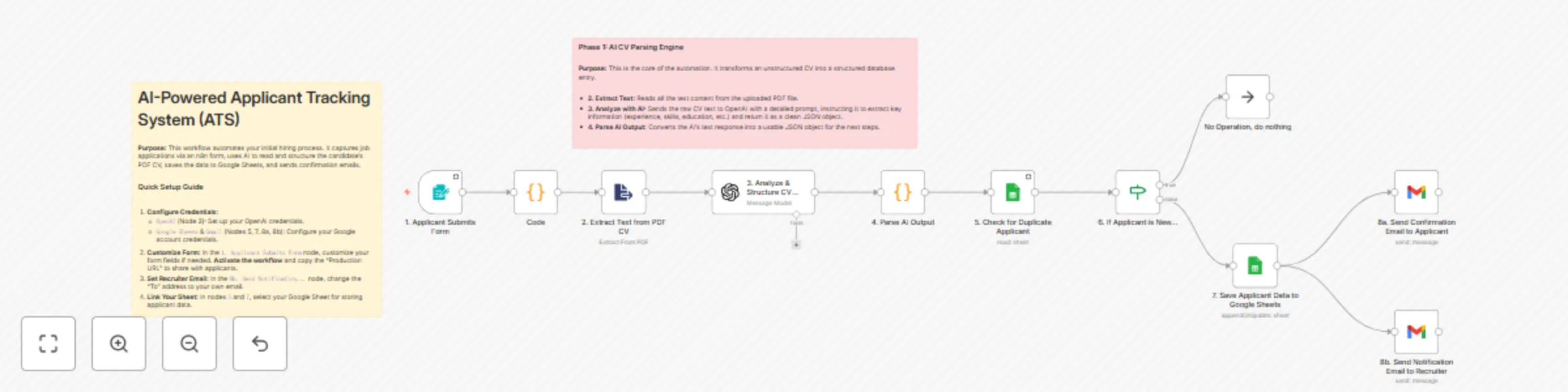
⚙️ How it Works

  1. Form Submission: A candidate fills out the n8n form and uploads their CV.
  2. PDF Extraction: The workflow extracts the raw text from the PDF file.
  3. AI Analysis: The text is sent to OpenAI with a prompt to structure all key information (experience, skills, etc.) into a JSON format.
  4. Duplicate Check: The workflow checks your Google Sheet to see if the applicant's email already exists. If so, it stops.
  5. Save to Database: If the applicant is new, their structured data is saved as a new row in Google Sheets.
  6. Send Notifications: Two emails are sent simultaneously: a confirmation to the applicant and a notification with the CV summary to the recruiter.

📋 n8n Nodes Used

  • Form Trigger
  • Extract From File
  • OpenAI
  • Code (or JSON Parser)
  • Google Sheets
  • If
  • Gmail

🔑 Prerequisites

  • An active n8n instance.
  • OpenAI Account & API Key.
  • Google Account with access to Google Sheets and Gmail (OAuth2 Credentials).
  • A Google Sheet prepared with columns to store the applicant data (e.g., name, email, experience, skills, cv_summary, etc.).

🛠️ Setup

  1. Import the workflow into your n8n instance.
  2. Configure Credentials: Connect your credentials for OpenAI and Google (for Sheets & Gmail) in their respective nodes.
  3. Customize the Form: In the 1. Applicant Submits Form node, you can add or remove fields as needed.
  4. Activate the workflow. Once active, copy the Production URL from the Form Trigger node and share it to receive applications.
  5. Set Your Email: In the 8b. Send Notification... (Gmail) node, change the "To" address to your own email address to receive alerts.
  6. Link Your Google Sheet: In the 5. Check for Duplicate... and 7. Save Applicant Data... nodes, select your spreadsheet and sheet.

1.2 Logical Blocks

This catalog entry is organized from the workflow JSON. The node-level section below shows the executable blocks available for review before importing the template.

2. Block-by-Block Analysis

Block 1 - Code

Type / Role
n8n-nodes-base.code - code
Config choices
Version 2

Block 2 - No Operation, do nothing

Type / Role
n8n-nodes-base.noOp - noOp
Config choices
Version 1

Block 3 - 1. Applicant Submits Form

Type / Role
n8n-nodes-base.formTrigger - formTrigger
Config choices
Version 2.3

Block 4 - 2. Extract Text from PDF CV

Type / Role
n8n-nodes-base.extractFromFile - extractFromFile
Config choices
Version 1

Block 5 - 3. Analyze & Structure CV with AI

Type / Role
@n8n/n8n-nodes-langchain.openAi - openAi
Config choices
Version 1.8

Block 6 - 4. Parse AI Output

Type / Role
n8n-nodes-base.code - code
Config choices
Version 2

Block 7 - 5. Check for Duplicate Applicant

Type / Role
n8n-nodes-base.googleSheets - googleSheets
Config choices
Version 4.7

Block 8 - 6. If Applicant is New...

Type / Role
n8n-nodes-base.if - if
Config choices
Version 2.2

Block 9 - 7. Save Applicant Data to Google Sheets

Type / Role
n8n-nodes-base.googleSheets - googleSheets
Config choices
Version 4.7

Block 10 - 8a. Send Confirmation Email to Applicant

Type / Role
n8n-nodes-base.gmail - gmail
Config choices
Version 2.1

Block 11 - 8b. Send Notification Email to Recruiter

Type / Role
n8n-nodes-base.gmail - gmail
Config choices
Version 2.1

Block 12 - Sticky Note

Type / Role
n8n-nodes-base.stickyNote - stickyNote
Config choices
Version 1

Block 13 - Sticky Note1

Type / Role
n8n-nodes-base.stickyNote - stickyNote
Config choices
Version 1

3. Summary Table

Workflow Automate applicant tracking with GPT-4.1 CV parsing, Google Sheets and Gmail alerts
Complexity intermediate
Nodes 13
Categories HR, AI Summarization
Author Onur
Published 19 Sept 2025

4. Reproducing the Workflow from Scratch

  1. 1. Download the workflow JSON

    Use the JSON export at /data/workflows/8751/8751.json as the source template for this automation.

  2. 2. Import the template into n8n

    Open n8n, import the downloaded JSON, and review each node before activating the workflow.

  3. 3. Configure credentials and variables

    Replace placeholder credentials, API keys, webhook URLs, account IDs, and environment-specific values with your own settings.

  4. 4. Test with sample data

    Run the workflow manually or in a staging workspace, inspect node output, and confirm downstream systems receive the expected data.

  5. 5. Activate and monitor

    Enable the workflow only after testing, then monitor executions, errors, and rate limits during the first production runs.

5. General Notes & Resources

Review imported nodes carefully before activation. This catalog entry is intended to help you inspect the workflow structure, understand required services, and find related templates faster.

Node names, credentials, schedules, webhook paths, and external service limits may need adjustment for your workspace.

Frequently asked questions

What does Automate applicant tracking with GPT-4.1 CV parsing, Google Sheets and Gmail alerts do?

Template Description: Stop manually reading every CV and copy pasting data into a spreadsheet. This workflow acts as an AI recruiting assistant, automating your entire initial screening proces...

What do I need before importing this workflow?

Review the workflow JSON, configure any required credentials in n8n, and test the automation in a safe workspace before using it in production.

Can I customize this workflow?

Yes. Use the block-by-block analysis and the downloadable JSON to inspect each node, then adjust credentials, prompts, schedules, filters, or destinations for your HR, AI Summarization use case.