Onur
Workflows by Onur
Job post to sales lead pipeline with Scrape.do, Apollo.io & OpenAI
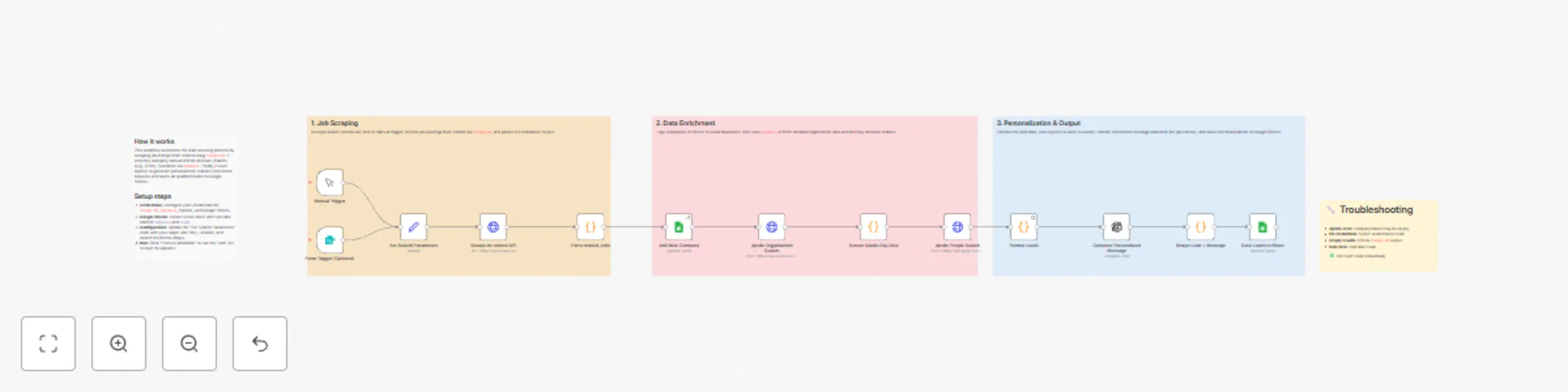
# Lead Sourcing by Job Posts For Outreach With Scrape.do API & Open AI & Google Sheets ## Overview This n8n workflow automates the complete lead generation process by scraping job postings from Indeed, enriching company data via Apollo.io, identifying decision-makers, and generating personalized LinkedIn outreach messages using OpenAI. It integrates with Scrape.do for reliable web scraping, Apollo.io for B2B data enrichment, OpenAI for AI-powered personalization, and Google Sheets for centralized data storage. **Perfect for:** Sales teams, recruiters, business development professionals, and marketing agencies looking to automate their outbound prospecting pipeline. --- ## Workflow Components ### 1. ⏰ Schedule Trigger | Property | Value | |----------|-------| | Type | Schedule Trigger | | Purpose | Automatically initiates workflow on a recurring schedule | | Frequency | Weekly (Every Monday) | | Time | 00:00 UTC | **Function:** Ensures consistent, hands-off lead generation by running the pipeline automatically without manual intervention. --- ### 2. 🔍 Scrape.do Indeed API | Property | Value | |----------|-------| | Type | HTTP Request (GET) | | Purpose | Scrapes job listings from Indeed via Scrape.do proxy API | | Endpoint | `https://api.scrape.do` | | Output Format | Markdown | **Request Parameters:** | Parameter | Value | Description | |-----------|-------|-------------| | token | API Token | Scrape.do authentication | | url | Indeed Search URL | Target job search page | | super | true | Uses residential proxies | | geoCode | us | US-based content | | render | true | JavaScript rendering enabled | | device | mobile | Mobile viewport for cleaner HTML | | output | markdown | Lightweight text output | **Function:** Fetches Indeed job listings with anti-bot bypass, returning clean markdown for easy parsing. --- ### 3. 📋 Parse Indeed Jobs | Property | Value | |----------|-------| | Type | Code Node (JavaScript) | | Purpose | Extracts structured job data from markdown | | Mode | Run once for all items | **Extracted Fields:** | Field | Description | Example | |-------|-------------|---------| | jobTitle | Position title | "Senior Data Engineer" | | jobUrl | Indeed job link | "https://indeed.com/viewjob?jk=abc123" | | jobId | Indeed job identifier | "abc123" | | companyName | Hiring company | "Acme Corporation" | | location | City, State | "San Francisco, CA" | | salary | Pay range | "$120,000 - $150,000" | | jobType | Employment type | "Full-time" | | source | Data source | "Indeed" | | dateFound | Scrape date | "2025-01-15" | **Function:** Parses markdown using regex patterns, filters invalid entries, and deduplicates by company name. --- ### 4. 📊 Add New Company (Google Sheets) | Property | Value | |----------|-------| | Type | Google Sheets Node | | Purpose | Stores parsed job postings for tracking | | Operation | Append rows | | Target Sheet | "Add New Company" | **Function:** Creates a historical record of all discovered job postings and companies for pipeline tracking. --- ### 5. 🏢 Apollo Organization Search | Property | Value | |----------|-------| | Type | HTTP Request (POST) | | Purpose | Enriches company data via Apollo.io API | | Endpoint | `https://api.apollo.io/v1/organizations/search` | | Authentication | HTTP Header Auth (x-api-key) | **Request Body:** ```json { "q_organization_name": "Company Name", "page": 1, "per_page": 1 } ``` **Response Fields:** | Field | Description | |-------|-------------| | id | Apollo organization ID | | name | Official company name | | website_url | Company website | | linkedin_url | LinkedIn company page | | industry | Business sector | | estimated_num_employees | Company size | | founded_year | Year established | | city, state, country | Location details | | short_description | Company overview | **Function:** Retrieves comprehensive company intelligence including LinkedIn profiles, industry classification, and employee count. --- ### 6. 📤 Extract Apollo Org Data | Property | Value | |----------|-------| | Type | Code Node (JavaScript) | | Purpose | Parses Apollo response and merges with original data | | Mode | Run once for each item | **Function:** Extracts relevant fields from Apollo API response and combines with job posting data for downstream processing. --- ### 7. 👥 Apollo People Search | Property | Value | |----------|-------| | Type | HTTP Request (POST) | | Purpose | Finds decision-makers at target companies | | Endpoint | `https://api.apollo.io/v1/mixed_people/search` | | Authentication | HTTP Header Auth (x-api-key) | **Request Body:** ```json { "organization_ids": ["apollo_org_id"], "person_titles": [ "CTO", "Chief Technology Officer", "VP Engineering", "Head of Engineering", "Engineering Manager", "Technical Director", "CEO", "Founder" ], "page": 1, "per_page": 3 } ``` **Response Fields:** | Field | Description | |-------|-------------| | first_name | Contact first name | | last_name | Contact last name | | title | Job title | | email | Email address | | linkedin_url | LinkedIn profile URL | | phone_number | Direct phone | **Function:** Identifies key stakeholders and decision-makers based on configurable title filters. --- ### 8. 📝 Format Leads | Property | Value | |----------|-------| | Type | Code Node (JavaScript) | | Purpose | Structures lead data for outreach | | Mode | Run once for all items | **Function:** Combines person data with company context, creating comprehensive lead profiles ready for personalization. --- ### 9. 🤖 Generate Personalized Message (OpenAI) | Property | Value | |----------|-------| | Type | OpenAI Node | | Purpose | Creates custom LinkedIn connection messages | | Model | gpt-4o-mini | | Max Tokens | 150 | | Temperature | 0.7 | **System Prompt:** ``` You are a professional outreach specialist. Write personalized LinkedIn connection request messages. Keep messages under 300 characters. Be friendly, professional, and mention a specific reason for connecting based on their role and company. ``` **User Prompt Variables:** | Variable | Source | |----------|--------| | Name | `$json.fullName` | | Title | `$json.title` | | Company | `$json.companyName` | | Industry | `$json.industry` | | Job Context | `$json.jobTitle` | **Function:** Generates unique, contextual outreach messages that reference specific hiring activity and company details. --- ### 10. 🔗 Merge Lead + Message | Property | Value | |----------|-------| | Type | Code Node (JavaScript) | | Purpose | Combines lead data with generated message | | Mode | Run once for each item | **Function:** Merges OpenAI response with lead profile, creating the final enriched record. --- ### 11. 💾 Save Leads to Sheet | Property | Value | |----------|-------| | Type | Google Sheets Node | | Purpose | Stores final lead data with personalized messages | | Operation | Append rows | | Target Sheet | "Leads" | **Data Mapping:** | Column | Data | |--------|------| | First Name | Lead's first name | | Last Name | Lead's last name | | Title | Job title | | Company | Company name | | LinkedIn URL | Profile link | | Country | Location | | Industry | Business sector | | Date Added | Timestamp | | Source | "Indeed + Apollo" | | Personalized Message | AI-generated outreach text | **Function:** Creates actionable lead database ready for outreach campaigns. --- ## Workflow Flow ``` ⏰ Schedule Trigger │ ▼ 🔍 Scrape.do Indeed API ──► Fetches job listings with JS rendering │ ▼ 📋 Parse Indeed Jobs ──► Extracts company names, job details │ ▼ 📊 Add New Company ──► Saves to Google Sheets (Companies) │ ▼ 🏢 Apollo Org Search ──► Enriches company data │ ▼ 📤 Extract Apollo Org Data ──► Parses API response │ ▼ 👥 Apollo People Search ──► Finds decision-makers │ ▼ 📝 Format Leads ──► Structures lead profiles │ ▼ 🤖 Generate Personalized Message ──► AI creates custom outreach │ ▼ 🔗 Merge Lead + Message ──► Combines all data │ ▼ 💾 Save Leads to Sheet ──► Final storage (Leads) ``` --- ## Configuration Requirements ### API Keys & Credentials | Credential | Purpose | Where to Get | |------------|---------|--------------| | Scrape.do API Token | Web scraping with anti-bot bypass | [scrape.do/dashboard](https://scrape.do) | | Apollo.io API Key | B2B data enrichment | [apollo.io/settings/integrations](https://apollo.io) | | OpenAI API Key | AI message generation | [platform.openai.com](https://platform.openai.com) | | Google Sheets OAuth2 | Data storage | n8n Credentials Setup | ### n8n Credential Setup | Credential Type | Configuration | |-----------------|---------------| | HTTP Header Auth (Apollo) | Header: `x-api-key`, Value: Your Apollo API key | | OpenAI API | API Key: Your OpenAI API key | | Google Sheets OAuth2 | Complete OAuth flow with Google | --- ## Key Features ### 🔍 Intelligent Job Scraping - **Anti-Bot Bypass:** Residential proxy rotation via Scrape.do - **JavaScript Rendering:** Full headless browser for dynamic content - **Mobile Optimization:** Cleaner HTML with mobile viewport - **Markdown Output:** Lightweight, easy-to-parse format ### 🏢 B2B Data Enrichment - **Company Intelligence:** Industry, size, location, LinkedIn - **Decision-Maker Discovery:** Title-based filtering - **Contact Information:** Email, phone, LinkedIn profiles - **Real-Time Data:** Fresh information from Apollo.io ### 🤖 AI-Powered Personalization - **Contextual Messages:** References specific hiring activity - **Character Limit:** Optimized for LinkedIn (300 chars) - **Variable Temperature:** Balanced creativity and consistency - **Role-Specific:** Tailored to recipient's title and company ### 📊 Automated Data Management - **Dual Sheet Storage:** Companies + Leads separation - **Timestamp Tracking:** Historical records - **Deduplication:** Prevents duplicate entries - **Ready for Export:** CSV-compatible format --- ## Use Cases ### 🎯 Sales Prospecting - Identify companies actively hiring in your target market - Find decision-makers at companies investing in growth - Generate personalized cold outreach at scale - Track pipeline from discovery to contact ### 👥 Recruiting & Talent Acquisition - Monitor competitor hiring patterns - Identify companies building specific teams - Connect with hiring managers directly - Build talent pipeline relationships ### 📈 Market Intelligence - Track industry hiring trends - Monitor competitor expansion signals - Identify emerging market opportunities - Benchmark salary ranges by role ### 🤝 Partnership Development - Find companies investing in complementary areas - Identify potential integration partners - Connect with technical leadership - Build strategic relationship pipeline --- ## Technical Notes | Specification | Value | |---------------|-------| | Processing Time | 2-5 minutes per run (depending on job count) | | Jobs per Run | ~25 unique companies | | API Calls per Run | 1 Scrape.do + ~25 Apollo Org + ~25 Apollo People + ~75 OpenAI | | Data Accuracy | 90%+ for company matching | | Success Rate | 99%+ with proper error handling | ### Rate Limits to Consider | Service | Free Tier Limit | Recommendation | |---------|-----------------|----------------| | Scrape.do | 1,000 credits/month | ~40 runs/month | | Apollo.io | 100 requests/day | Add Wait nodes if needed | | OpenAI | Based on usage | Monitor costs (~$0.01-0.05/run) | | Google Sheets | 300 requests/minute | No issues expected | --- ## Setup Instructions ### Step 1: Import Workflow 1. Copy the JSON workflow configuration 2. In n8n: **Workflows → Import from JSON** 3. Paste configuration and save ### Step 2: Configure Scrape.do 1. Sign up at [scrape.do](https://scrape.do) 2. Navigate to Dashboard → API Token 3. Copy your token 4. Token is embedded in URL query parameter (already configured) **To customize search:** ``` Change the `url` parameter in "Scrape.do Indeed API" node: - q=data+engineer (search term) - l=Remote (location) - fromage=7 (last 7 days) ``` ### Step 3: Configure Apollo.io 1. Sign up at [apollo.io](https://apollo.io) 2. Go to **Settings → Integrations → API Keys** 3. Create new API key 4. In n8n: **Credentials → Add Credential → Header Auth** - Name: `x-api-key` - Value: Your Apollo API key 5. Select this credential in both Apollo HTTP nodes ### Step 4: Configure OpenAI 1. Go to [platform.openai.com](https://platform.openai.com) 2. Create new API key 3. In n8n: **Credentials → Add Credential → OpenAI** 4. Paste API key 5. Select credential in "Generate Personalized Message" node ### Step 5: Configure Google Sheets 1. Create new Google Spreadsheet 2. Create two sheets: - **Sheet 1:** "Add New Company" - Columns: `companyName | jobTitle | jobUrl | location | salary | source | postedDate` - **Sheet 2:** "Leads" - Columns: `First Name | Last Name | Title | Company | LinkedIn URL | Country | Industry | Date Added | Source | Personalized Message` 3. Copy Sheet ID from URL 4. In n8n: **Credentials → Add Credential → Google Sheets OAuth2** 5. Update both Google Sheets nodes with your Sheet ID ### Step 6: Test and Activate 1. **Manual Test:** Click "Execute Workflow" button 2. **Verify Each Node:** Check outputs step by step 3. **Review Data:** Confirm data appears in Google Sheets 4. **Activate:** Toggle workflow to "Active" --- ## Error Handling ### Common Issues | Issue | Cause | Solution | |-------|-------|----------| | "Invalid character: [" | Empty/malformed company name | Check Parse Indeed Jobs output | | "Node does not have credentials" | Credential not linked | Open node → Select credential | | Empty Parse Results | Indeed HTML structure changed | Check Scrape.do raw output | | Apollo Rate Limit (429) | Too many requests | Add 5-10s Wait node between calls | | OpenAI Timeout | Too many tokens | Reduce batch size or max_tokens | | "Your request is invalid" | Malformed JSON body | Verify expression syntax in HTTP nodes | ### Troubleshooting Steps 1. **Verify Credentials:** Test each credential individually 2. **Check Node Outputs:** Use "Execute Node" for debugging 3. **Monitor API Usage:** Check Apollo and OpenAI dashboards 4. **Review Logs:** Check n8n execution history for details 5. **Test with Sample:** Use known company name to verify Apollo ### Recommended Error Handling Additions For production use, consider adding: ``` - IF node after Apollo Org Search to handle empty results - Error Workflow trigger for notifications - Wait nodes between API calls for rate limiting - Retry logic for transient failures ``` --- ## Performance Specifications | Metric | Value | |--------|-------| | Execution Time | 2-5 minutes per scheduled run | | Jobs Discovered | ~25 per Indeed page | | Leads Generated | 1-3 per company (based on title matches) | | Message Quality | Professional, contextual, <300 chars | | Data Freshness | Real-time from Indeed + Apollo | | Storage Format | Google Sheets (unlimited rows) | --- ## API Reference ### Scrape.do API | Endpoint | Method | Purpose | |----------|--------|---------| | `https://api.scrape.do` | GET | Direct URL scraping | **Documentation:** [scrape.do/documentation](https://scrape.do/documentation) ### Apollo.io API | Endpoint | Method | Purpose | |----------|--------|---------| | `/v1/organizations/search` | POST | Company lookup | | `/v1/mixed_people/search` | POST | People search | **Documentation:** [apolloio.github.io/apollo-api-docs](https://apolloio.github.io/apollo-api-docs) ### OpenAI API | Endpoint | Method | Purpose | |----------|--------|---------| | `/v1/chat/completions` | POST | Message generation | **Documentation:** [platform.openai.com
Scrape Yelp business data with Scrape.do API & Google Sheets storage
# Yelp Business Scraper by URL via [Scrape.do](https://scrape.do/?utm_source=n8n&utm_medium=yelp) API with Google Sheets Storage ## Overview This n8n workflow automates the process of scraping comprehensive business information from Yelp using individual business URLs. It integrates with [Scrape.do](https://scrape.do/?utm_source=n8n&utm_medium=yelp) for professional web scraping with anti-bot bypass capabilities and Google Sheets for centralized data storage, providing detailed business intelligence for market research, competitor analysis, and lead generation. --- ## Workflow Components ### 1. 📥 Form Trigger | Property | Value | |----------|-------| | **Type** | Form Trigger | | **Purpose** | Initiates the workflow with user-submitted Yelp business URL | | **Input Fields** | Yelp Business URL | | **Function** | Captures target business URL to start the scraping process | ### 2. 🔍 Create [Scrape.do](https://scrape.do/?utm_source=n8n&utm_medium=yelp) Job | Property | Value | |----------|-------| | **Type** | HTTP Request (POST) | | **Purpose** | Creates an async scraping job via [Scrape.do](https://scrape.do/?utm_source=n8n&utm_medium=yelp) API | | **Endpoint** | `https://q.scrape.do/api/v1/jobs` | | **Authentication** | X-Token header | **Request Parameters:** - **Targets**: Array containing the Yelp business URL - **Super**: `true` (uses residential/mobile proxies for better success rate) - **GeoCode**: `us` (targets US-based content) - **Device**: `desktop` - **Render**: JavaScript rendering enabled with `networkidle2` wait condition **Function**: Initiates comprehensive business data extraction from Yelp with headless browser rendering to handle dynamic content. ### 3. 🔧 Parse Yelp HTML | Property | Value | |----------|-------| | **Type** | Code Node (JavaScript) | | **Purpose** | Extracts structured business data from raw HTML | | **Mode** | Run once for each item | **Function**: Parses the scraped HTML content using regex patterns and JSON-LD extraction to retrieve: - Business name - Overall rating - Review count - Phone number - Full address - Price range - Categories - Website URL - Business hours - Image URLs ### 4. 📊 Store to Google Sheet | Property | Value | |----------|-------| | **Type** | Google Sheets Node | | **Purpose** | Stores scraped business data for analysis and storage | | **Operation** | Append rows | | **Target** | "Yelp Scraper Data - [Scrape.do](https://scrape.do/?utm_source=n8n&utm_medium=yelp)" sheet | **Data Mapping:** - Business Name, Overall Rating, Reviews Count - Business URL, Phone, Address - Price Range, Categories, Website - Hours, Images/Videos URLs, Scraped Timestamp --- ## Workflow Flow ``` Form Input → Create Scrape.do Job → Parse Yelp HTML → Store to Google Sheet │ │ │ │ ▼ ▼ ▼ ▼ User submits API creates job JavaScript code Data appended Yelp URL with JS rendering extracts fields to spreadsheet ``` --- ## Configuration Requirements ### API Keys & Credentials | Credential | Purpose | |------------|---------| | **[Scrape.do](https://scrape.do/?utm_source=n8n&utm_medium=yelp) API Token** | Required for Yelp business scraping with anti-bot bypass | | **Google Sheets OAuth2** | For data storage and export access | | **n8n Form Webhook** | For user input collection | ### Setup Parameters | Parameter | Description | |-----------|-------------| | `YOUR_SCRAPEDO_TOKEN` | Your [Scrape.do](https://scrape.do/?utm_source=n8n&utm_medium=yelp) API token (appears in 3 places) | | `YOUR_GOOGLE_SHEET_ID` | Target spreadsheet identifier | | `YOUR_GOOGLE_SHEETS_CREDENTIAL_ID` | OAuth2 authentication reference | --- ## Key Features ### 🛡️ Anti-Bot Bypass Technology - **Residential Proxy Rotation**: 110M+ proxies across 150 countries - **WAF Bypass**: Handles Cloudflare, Akamai, DataDome, and PerimeterX - **Dynamic TLS Fingerprinting**: Authentic browser signatures - **CAPTCHA Handling**: Automatic bypass for uninterrupted scraping ### 🌐 JavaScript Rendering - Full headless browser support for dynamic Yelp content - `networkidle2` wait condition ensures complete page load - Custom wait times for complex page elements - Real device fingerprints for detection avoidance ### 📊 Comprehensive Data Extraction | Field | Description | Example | |-------|-------------|---------| | `name` | Business name | "Joe's Pizza Restaurant" | | `overall_rating` | Average customer rating | "4.5" | | `reviews_count` | Total number of reviews | "247" | | `url` | Original Yelp business URL | "https://www.yelp.com/biz/..." | | `phone` | Business phone number | "(555) 123-4567" | | `address` | Full street address | "123 Main St, New York, NY 10001" | | `price_range` | Price indicator | "$$" | | `categories` | Business categories | "Pizza, Italian, Delivery" | | `website` | Business website URL | "https://joespizza.com" | | `hours` | Operating hours | "Mon-Fri 11:00-22:00" | | `images_videos_urls` | Media content links | "https://s3-media1.fl.yelpcdn.com/..." | | `scraped_at` | Extraction timestamp | "2025-01-15T10:30:00Z" | ### 🗂️ Centralized Data Storage - Automatic Google Sheets export - Organized business data format with 12 data fields - Historical scraping records with timestamps - Easy sharing and collaboration --- ## Use Cases ### 📈 Market Research - Competitor business analysis - Local market intelligence gathering - Industry benchmark establishment - Service offering comparison ### 🎯 Lead Generation - Business contact information extraction - Potential client identification - Market opportunity assessment - Sales prospect development ### 📊 Business Intelligence - Customer sentiment analysis through ratings - Competitor performance monitoring - Market positioning research - Brand reputation tracking ### 📍 Location Analysis - Geographic business distribution - Local competition assessment - Market saturation evaluation - Expansion opportunity identification --- ## Technical Notes | Specification | Value | |--------------|-------| | **Processing Time** | 15-45 seconds per business URL | | **Data Accuracy** | 95%+ for publicly available business information | | **Success Rate** | 99.98% ([Scrape.do](https://scrape.do/?utm_source=n8n&utm_medium=yelp) guarantee) | | **Proxy Pool** | 110M+ residential, mobile, and datacenter IPs | | **JS Rendering** | Full headless browser with `networkidle2` wait | | **Data Format** | JSON with structured field mapping | | **Storage Format** | Structured Google Sheets with 12 predefined columns | --- ## Setup Instructions ### Step 1: Import Workflow 1. Copy the JSON workflow configuration 2. Import into n8n: **Workflows → Import from JSON** 3. Paste configuration and save ### Step 2: Configure [Scrape.do](https://scrape.do/?utm_source=n8n&utm_medium=yelp) **Get your API token:** 1. Sign up at [Scrape.do](https://scrape.do/?utm_source=n8n&utm_medium=yelp) 2. Navigate to Dashboard → API Token 3. Copy your token **Update workflow references (3 places):** - `🔍 Create Scrape.do Job` node → Headers → X-Token - `📡 Check Job Status` node → Headers → X-Token - `📥 Fetch Task Results` node → Headers → X-Token Replace `YOUR_SCRAPEDO_TOKEN` with your actual API token. ### Step 3: Configure Google Sheets **Create target spreadsheet:** 1. Create new Google Sheet named "Yelp Business Data" or similar 2. Add header row with columns: ``` name | overall_rating | reviews_count | url | phone | address | price_range | categories | website | hours | images_videos_urls | scraped_at ``` 3. Copy the Sheet ID from URL (the long string between `/d/` and `/edit`) **Set up OAuth2 credentials:** 1. In n8n: **Credentials → Add Credential → Google Sheets OAuth2** 2. Complete the Google authentication process 3. Grant access to Google Sheets **Update workflow references:** - Replace `YOUR_GOOGLE_SHEET_ID` with your actual Sheet ID - Update `YOUR_GOOGLE_SHEETS_CREDENTIAL_ID` with credential reference ### Step 4: Test and Activate **Test with sample URL:** 1. Use a known Yelp business URL (e.g., `https://www.yelp.com/biz/example-business-city`) 2. Submit through the form trigger 3. Monitor execution progress in n8n 4. Verify data appears in Google Sheet **Activate workflow:** 1. Toggle workflow to "Active" 2. Share form URL with users --- ## Sample Business Data The workflow captures comprehensive business information including: | Category | Data Points | |----------|-------------| | **Basic Information** | Name, category, location | | **Performance Metrics** | Ratings, review counts, popularity | | **Contact Details** | Phone, website, address | | **Visual Content** | Photos, videos, gallery URLs | | **Operational Data** | Hours, services, price range | --- ## Advanced Configuration ### Batch Processing Modify the input to accept multiple URLs by updating the job creation body: ```json { "Targets": [ "https://www.yelp.com/biz/business-1", "https://www.yelp.com/biz/business-2", "https://www.yelp.com/biz/business-3" ], "Super": true, "GeoCode": "us", "Render": { "WaitUntil": "networkidle2", "CustomWait": 3000 } } ``` ### Enhanced Rendering Options For complex Yelp pages, add browser interactions: ```json { "Render": { "BlockResources": false, "WaitUntil": "networkidle2", "CustomWait": 5000, "WaitSelector": ".biz-page-header", "PlayWithBrowser": [ { "Action": "Scroll", "Direction": "down" }, { "Action": "Wait", "Timeout": 2000 } ] } } ``` ### Notification Integration Add alert mechanisms: - Email notifications for completed scrapes - Slack messages for team updates - Webhook triggers for external systems --- ## Error Handling ### Common Issues | Issue | Cause | Solution | |-------|-------|----------| | **Invalid URL** | URL is not a valid Yelp business page | Ensure URL format: `https://www.yelp.com/biz/...` | | **401 Unauthorized** | Invalid or missing API token | Verify `X-Token` header value | | **Job Timeout** | Page too complex or slow | Increase `CustomWait` value | | **Empty Data** | HTML parsing failed | Check page structure, update regex patterns | | **Rate Limiting** | Too many concurrent requests | Reduce request frequency or upgrade plan | ### Troubleshooting Steps 1. **Verify URLs**: Ensure Yelp business URLs are correctly formatted 2. **Check Credentials**: Validate [Scrape.do](https://scrape.do/?utm_source=n8n&utm_medium=yelp) token and Google OAuth 3. **Monitor Logs**: Review n8n execution logs for detailed errors 4. **Test Connectivity**: Verify network access to all external services 5. **Check Job Status**: Use [Scrape.do](https://scrape.do/?utm_source=n8n&utm_medium=yelp) dashboard to monitor job progress --- ## Performance Specifications | Metric | Value | |--------|-------| | **Processing Time** | 15-45 seconds per business URL | | **Data Accuracy** | 95%+ for publicly available information | | **Success Rate** | 99.98% (with [Scrape.do](https://scrape.do/?utm_source=n8n&utm_medium=yelp) anti-bot bypass) | | **Concurrent Processing** | Depends on [Scrape.do](https://scrape.do/?utm_source=n8n&utm_medium=yelp) plan limits | | **Storage Capacity** | Unlimited (Google Sheets based) | | **Proxy Pool** | 110M+ IPs across 150 countries | --- ## [Scrape.do](https://scrape.do/?utm_source=n8n&utm_medium=yelp) API Reference ### Async API Endpoints | Endpoint | Method | Purpose | |----------|--------|---------| | `/api/v1/jobs` | POST | Create new scraping job | | `/api/v1/jobs/{jobID}` | GET | Check job status | | `/api/v1/jobs/{jobID}/{taskID}` | GET | Retrieve task results | | `/api/v1/me` | GET | Get account information | ### Job Status Values | Status | Description | |--------|-------------| | `queuing` | Job is being prepared | | `queued` | Job is in queue waiting to be processed | | `pending` | Job is currently being processed | | `rotating` | Job is retrying with different proxies | | `success` | Job completed successfully | | `error` | Job failed | | `canceled` | Job was canceled by user | For complete API documentation, visit: [Scrape.do Documentation](https://scrape.do/?utm_source=n8n&utm_medium=yelp) --- ## Support & Resources - **[Scrape.do](https://scrape.do/?utm_source=n8n&utm_medium=yelp) Documentation**: https://scrape.do/documentation/ - **[Scrape.do](https://scrape.do/?utm_source=n8n&utm_medium=yelp) Dashboard**: https://dashboard.scrape.do/ - **n8n Documentation**: https://docs.n8n.io/ - **Google Sheets API**: https://developers.google.com/sheets/api --- *This workflow is powered by [Scrape.do](https://scrape.do/?utm_source=n8n&utm_medium=yelp) - Reliable, Scalable, Unstoppable Web Scraping*
Compare hotel prices across booking platforms with Scrape.do and Google Sheets
# 🏨 Hotel Price Comparison Workflow with Scrape.do This template requires a self-hosted n8n instance to run. A complete n8n automation that extracts hotel prices from multiple booking platforms (Booking.com, Hotels.com, Expedia, etc.) using [Scrape.do](https://scrape.do/) API, compares prices across platforms, and saves structured results into Google Sheets for price monitoring and decision-making. ## 📋 Overview This workflow provides an automated hotel price comparison solution that monitors hotel rates across different booking platforms for specific destinations and dates. Ideal for travel agencies, price comparison websites, travelers, and hospitality analysts who need real-time pricing insights without manual searching. ### Who is this for? - Travel agencies automating price comparisons - Price comparison website operators - Budget-conscious travelers tracking best deals - Hospitality analysts monitoring market pricing - Hotel managers tracking competitor rates - Travel bloggers researching accommodation options ### What problem does this workflow solve? - Eliminates manual price checking across multiple sites - Processes multiple hotels and date ranges automatically - Extracts structured pricing data (price, rating, amenities) - Identifies the cheapest option across platforms - Automates saving results into Google Sheets - Ensures consistent and repeatable price monitoring ## ⚙️ What this workflow does 1. **Manual Trigger** → Starts the workflow manually or on schedule 2. **Get Search Parameters from Sheet** → Reads hotel names, destinations, check-in/check-out dates from Google Sheet 3. **URL Encode Parameters** → Converts search parameters into URL-safe format 4. **Process Hotels in Batches** → Handles multiple searches sequentially to avoid rate limits 5. **Fetch Hotel Data from Multiple Platforms** → Calls [Scrape.do](https://scrape.do/) API to retrieve pricing from Booking.com, Hotels.com, and Expedia 6. **Extract and Structure Price Data** → Parses HTML into structured hotel data (name, price, rating, amenities) 7. **Compare Prices Across Platforms** → Identifies best price and calculates savings 8. **Append Results to Sheet** → Writes comparison results into Google Sheet ## 📊 Output Data Points | Field | Description | Example | |-------|-------------|---------| | Hotel Name | Name of the hotel | Hilton Garden Inn Downtown | | Destination | City or location | New York, NY | | Check-in Date | Arrival date | 2025-12-15 | | Check-out Date | Departure date | 2025-12-18 | | Nights | Number of nights | 3 | | Booking.com Price | Price from Booking.com | $450 | | Hotels.com Price | Price from Hotels.com | $425 | | Expedia Price | Price from Expedia | $440 | | Best Price | Lowest price found | $425 | | Best Platform | Platform with lowest price | Hotels.com | | Savings | Difference from highest price | $25 | | Average Rating | Average customer rating | 8.5/10 | | Total Reviews | Number of reviews | 1,247 | | Free Cancellation | Cancellation policy | Yes | | Breakfast Included | Breakfast availability | No | ## ⚙️ Setup ### Prerequisites - n8n instance (self-hosted) - Google account with Sheets access - [Scrape.do](https://scrape.do/) account with API token ### Google Sheet Structure This workflow uses one Google Sheet with two tabs: #### Input Tab: "Search Parameters" | Column | Type | Description | Example | |--------|------|-------------|---------| | Hotel Name | Text | Name of hotel (optional) | Hilton Garden Inn | | Destination | Text | City or location | New York, NY | | Check-in Date | Date | Arrival date (YYYY-MM-DD) | 2025-12-15 | | Check-out Date | Date | Departure date (YYYY-MM-DD) | 2025-12-18 | | Guests | Number | Number of guests | 2 | | Rooms | Number | Number of rooms | 1 | #### Output Tab: "Price Comparison" | Column | Type | Description | Example | |--------|------|-------------|---------| | Search Date | Timestamp | When search was performed | 2025-11-17 10:30:00 | | Hotel Name | Text | Name of the hotel | Hilton Garden Inn Downtown | | Destination | Text | City/location | New York, NY | | Check-in | Date | Arrival date | 2025-12-15 | | Check-out | Date | Departure date | 2025-12-18 | | Nights | Number | Number of nights | 3 | | Booking.com Price | Currency | Price from Booking.com | $450 | | Hotels.com Price | Currency | Price from Hotels.com | $425 | | Expedia Price | Currency | Price from Expedia | $440 | | Best Price | Currency | Lowest price | $425 | | Best Platform | Text | Cheapest platform | Hotels.com | | Savings | Currency | Potential savings | $25 | | Rating | Number | Average rating | 8.5 | | Reviews | Number | Total reviews | 1,247 | ## 🛠 Step-by-Step Setup 1. **Import Workflow**: Copy the JSON → n8n → Workflows → + Add → Import from JSON 2. **Configure [Scrape.do](https://scrape.do/) API**: - Endpoint: `https://api.scrape.do/` - Parameter: `token=YOUR_SCRAPEDO_TOKEN` - Add `render=true` for JavaScript-heavy booking sites - Add `country=US` (or target country) for localized results 3. **Configure Google Sheets**: - Create a sheet with two tabs: **Search Parameters** (input), **Price Comparison** (output) - Set up Google Sheets OAuth2 credentials in n8n - Replace placeholders: `YOUR_GOOGLE_SHEET_ID` and `YOUR_GOOGLE_SHEETS_CREDENTIAL_ID` 4. **Configure Platform URLs**: - Update base URLs for Booking.com, Hotels.com, Expedia in HTTP Request nodes - Customize search parameters based on platform URL structure 5. **Run & Test**: - Add test data in Search Parameters tab - Execute workflow → Check results in Price Comparison tab ## 🧰 How to Customize - **Add more platforms**: Include Agoda, Trivago, or direct hotel websites by adding new HTTP Request nodes - **Price alerts**: Add conditional logic to send email/Slack notification when price drops below threshold - **Historical tracking**: Store daily snapshots to track price trends over time - **Filtering**: Add filters for amenities (pool, gym, parking) or star ratings - **Batch Size**: Adjust "Process Hotels in Batches" based on API rate limits - **Rate Limiting**: Insert Wait nodes (20–30 seconds) between platform requests - **Currency conversion**: Add currency API integration for multi-currency comparison - **Scheduling**: Add Schedule Trigger to run automatically (daily/weekly) ## 📊 Use Cases - **Travel Planning**: Find the best hotel deals for upcoming trips - **Price Monitoring**: Track price changes for specific hotels over time - **Agency Operations**: Automate price research for client bookings - **Market Analysis**: Monitor competitor pricing in hospitality market - **Deal Alerts**: Get notified when prices drop below target threshold - **Budget Planning**: Compare costs across multiple destinations ## 📈 Performance & Limits - **Single Hotel (3 platforms)**: ~30–45 seconds (depends on [Scrape.do](https://scrape.do/) response) - **Batch of 10 hotels**: 8–12 minutes typical - **Large Sets (50+ hotels)**: 45–90 minutes depending on API credits & batching - **API Calls**: 3 [Scrape.do](https://scrape.do/) requests per hotel (one per platform) - **Reliability**: 90%+ extraction success, 95%+ price accuracy ## 🧩 Troubleshooting - **API error** → Check `YOUR_SCRAPEDO_TOKEN` and API credits on [Scrape.do](https://scrape.do/) dashboard - **No hotels loaded** → Verify Google Sheet ID & tab name = **Search Parameters** - **Permission denied** → Re-authenticate Google Sheets OAuth2 in n8n - **Empty prices** → Check if [Scrape.do](https://scrape.do/) rendered JavaScript (`render=true`) - **Parsing errors** → Booking sites change HTML structure; update CSS selectors in Extract nodes - **Workflow timeout** → Reduce batch size or add more Wait nodes between requests - **Wrong currency** → Add `country` parameter to [Scrape.do](https://scrape.do/) request for localized pricing ## 🤝 Support & Community - **n8n Forum**: https://community.n8n.io - **n8n Docs**: https://docs.n8n.io - **[Scrape.do](https://scrape.do/) Dashboard**: https://dashboard.scrape.do - **[Scrape.do](https://scrape.do/) Documentation**: https://scrape.do/docs ## 🎯 Final Notes This workflow provides a powerful foundation for automated hotel price comparison across multiple booking platforms using [Scrape.do](https://scrape.do/) and Google Sheets. You can extend it with: - Real-time price alerts via email/Slack - Historical price tracking and trend analysis - Integration with travel planning dashboards - Automated booking when price threshold is met - Multi-destination comparison for trip planning **Pro Tip**: Schedule this workflow to run daily to catch early-bird discounts and flash sales automatically!
Extract Zillow property data to Google Sheets with Scrape.do
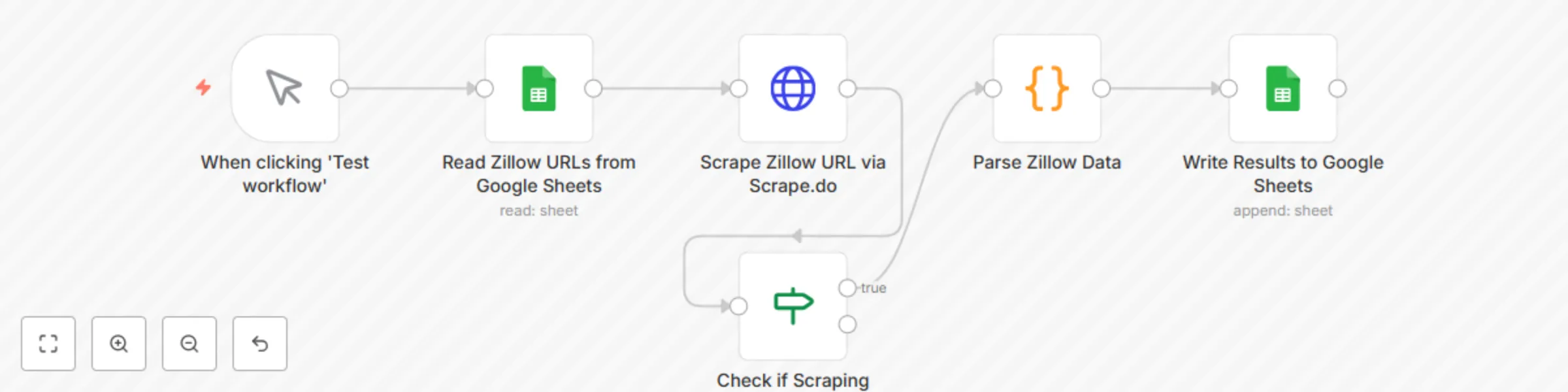
# 🏠 Extract Zillow Property Data to Google Sheets with Scrape.do This template requires a self-hosted n8n instance to run. A complete n8n automation that extracts property listing data from Zillow URLs using [Scrape.do](https://scrape.do/?utm_source=n8n&utm_medium=zillow_workflow) web scraping API, parses key property information, and saves structured results into Google Sheets for real estate analysis, market research, and property tracking. ## 📋 Overview This workflow provides a lightweight real estate data extraction solution that pulls property details from Zillow listings and organizes them into a structured spreadsheet. Ideal for real estate professionals, investors, market analysts, and property managers who need automated property data collection without manual effort. **Who is this for?** - Real estate investors tracking properties - Market analysts conducting property research - Real estate agents monitoring listings - Property managers organizing data - Data analysts building real estate databases **What problem does this workflow solve?** - Eliminates manual copy-paste from Zillow - Processes multiple property URLs in bulk - Extracts structured data (price, address, zestimate, etc.) - Automates saving results into Google Sheets - Ensures repeatable & consistent data collection ## ⚙️ What this workflow does 1. **Manual Trigger** → Starts the workflow manually 2. **Read Zillow URLs from Google Sheets** → Reads property URLs from a Google Sheet 3. **Scrape Zillow URL via [Scrape.do](https://scrape.do/?utm_source=n8n&utm_medium=zillow_workflow)** → Fetches full HTML from Zillow (bypasses PerimeterX protection) 4. **Parse Zillow Data** → Extracts structured property information from HTML 5. **Write Results to Google Sheets** → Saves parsed data into a results sheet ## 📊 Output Data Points | Field | Description | Example | |-------|-------------|---------| | URL | Original Zillow listing URL | https://www.zillow.com/homedetails/... | | Price | Property listing price | $300,000 | | Address | Street address | 8926 Silver City | | City | City name | San Antonio | | State | State abbreviation | TX | | Days on Zillow | How long listed | 5 | | Zestimate | Zillow's estimated value | $297,800 | | Scraped At | Timestamp of extraction | 2025-01-29T12:00:00.000Z | ## ⚙️ Setup ### Prerequisites - n8n instance (self-hosted) - Google account with Sheets access - [Scrape.do](https://scrape.do/?utm_source=n8n&utm_medium=zillow_workflow) account with API token ([Get 1000 free credits/month](https://dashboard.scrape.do/sign-up)) ### Google Sheet Structure This workflow uses one Google Sheet with two tabs: **Input Tab: "Sheet1"** | Column | Type | Description | Example | |--------|------|-------------|---------| | URLs | URL | Zillow listing URL | https://www.zillow.com/homedetails/123... | **Output Tab: "Results"** | Column | Type | Description | Example | |--------|------|-------------|---------| | URL | URL | Original listing URL | https://www.zillow.com/homedetails/... | | Price | Text | Property price | $300,000 | | Address | Text | Street address | 8926 Silver City | | City | Text | City name | San Antonio | | State | Text | State code | TX | | Days on Zillow | Number | Days listed | 5 | | Zestimate | Text | Estimated value | $297,800 | | Scraped At | Timestamp | When scraped | 2025-01-29T12:00:00.000Z | ## 🛠 Step-by-Step Setup 1. **Import Workflow**: Copy the JSON → n8n → Workflows → + Add → Import from JSON 2. **Configure [Scrape.do](https://scrape.do/?utm_source=n8n&utm_medium=zillow_workflow) API**: - Sign up at [Scrape.do Dashboard](https://dashboard.scrape.do/sign-up) - Get your API token - In HTTP Request node, replace `YOUR_SCRAPE_DO_TOKEN` with your actual token - The workflow uses `super=true` for premium residential proxies (10 credits per request) 3. **Configure Google Sheets**: - Create a new Google Sheet - Add two tabs: "Sheet1" (input) and "Results" (output) - In Sheet1, add header "URLs" in cell A1 - Add Zillow URLs starting from A2 - Set up Google Sheets OAuth2 credentials in n8n - Replace `YOUR_SPREADSHEET_ID` with your actual Google Sheet ID - Replace `YOUR_GOOGLE_SHEETS_CREDENTIAL_ID` with your credential ID 4. **Run & Test**: - Add 1-2 test Zillow URLs in Sheet1 - Click "Execute workflow" - Check results in Results tab ## 🧰 How to Customize - **Add more fields**: Extend parsing logic in "Parse Zillow Data" node to capture additional data (bedrooms, bathrooms, square footage) - **Filtering**: Add conditions to skip certain properties or price ranges - **Rate Limiting**: Insert a Wait node between requests if processing many URLs - **Error Handling**: Add error branches to handle failed scrapes gracefully - **Scheduling**: Replace Manual Trigger with Schedule Trigger for automated daily/weekly runs ## 📊 Use Cases - **Investment Analysis**: Track property prices and zestimates over time - **Market Research**: Analyze listing trends in specific neighborhoods - **Portfolio Management**: Monitor properties for sale in target areas - **Competitive Analysis**: Compare similar properties across locations - **Lead Generation**: Build databases of properties matching specific criteria ## 📈 Performance & Limits - **Single Property**: ~5-10 seconds per URL - **Batch of 10**: 1-2 minutes typical - **Large Sets (50+)**: 5-10 minutes depending on [Scrape.do](https://scrape.do/?utm_source=n8n&utm_medium=zillow_workflow) credits - **API Calls**: 1 [Scrape.do](https://scrape.do/?utm_source=n8n&utm_medium=zillow_workflow) request per URL (10 credits with `super=true`) - **Reliability**: 95%+ success rate with premium proxies ## 🧩 Troubleshooting | Problem | Solution | |---------|----------| | API error 400 | Check your [Scrape.do](https://scrape.do/?utm_source=n8n&utm_medium=zillow_workflow) token and credits | | URL showing "undefined" | Verify Google Sheet column name is "URLs" (capital U) | | No data parsed | Check if Zillow changed their HTML structure | | Permission denied | Re-authenticate Google Sheets OAuth2 in n8n | | 50000 character error | Verify Parse Zillow Data code is extracting fields, not returning raw HTML | | Price shows HTML/CSS | Update price extraction regex in Parse Zillow Data node | ## 🤝 Support & Community - [Scrape.do Documentation](https://scrape.do/documentation/?utm_source=n8n&utm_medium=zillow_workflow) - [Scrape.do Dashboard](https://dashboard.scrape.do/?utm_source=n8n&utm_medium=zillow_workflow) - [Scrape.do Zillow Scraping Guide](https://scrape.do/blog/zillow-scraping/?utm_source=n8n&utm_medium=zillow_workflow) - [n8n Forum](https://community.n8n.io) - [n8n Docs](https://docs.n8n.io) ## 🎯 Final Notes This workflow provides a repeatable foundation for extracting Zillow property data with [Scrape.do](https://scrape.do/?utm_source=n8n&utm_medium=zillow_workflow) and saving to Google Sheets. You can extend it with: - Historical tracking (append timestamps) - Price change alerts (compare with previous scrapes) - Multi-platform scraping (Redfin, Realtor.com) - Integration with CRM or reporting dashboards **Important**: [Scrape.do](https://scrape.do/?utm_source=n8n&utm_medium=zillow_workflow) handles all anti-bot bypassing (PerimeterX, CAPTCHAs) automatically with rotating residential proxies, so you only pay for successful requests. Always use `super=true` parameter for Zillow to ensure high success rates.
SERP competitor research with Scrape.do API & Google Sheets
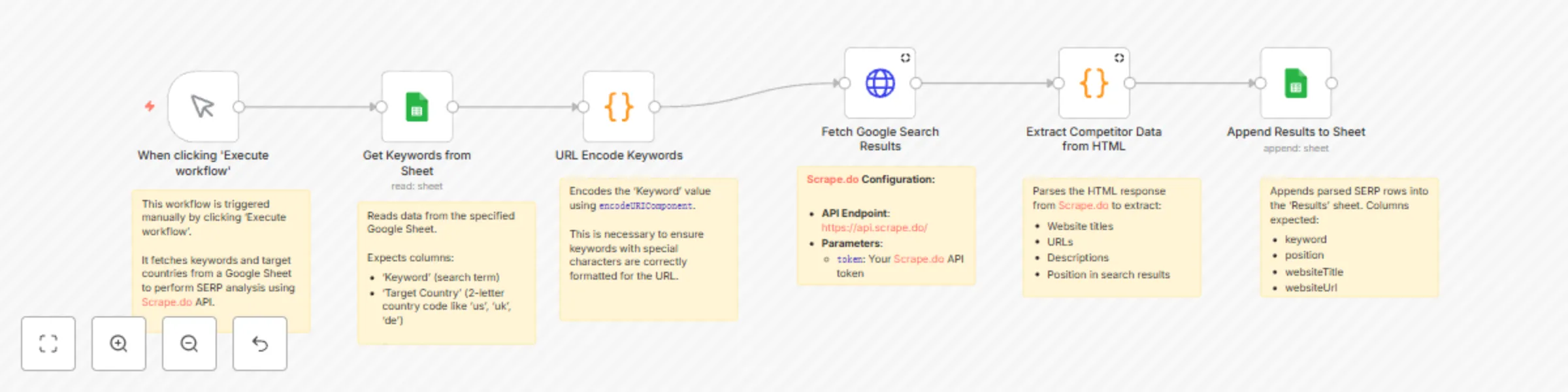
# 🔍 Extract Competitor SERP Rankings from Google Search to Sheets with [Scrape.do](https://scrape.do/) This template requires a self-hosted n8n instance to run. A complete n8n automation that extracts competitor data from Google search results for specific keywords and target countries using **[Scrape.do](https://scrape.do?fpr=99aed) SERP API**, and saves structured results into Google Sheets for SEO, competitive analysis, and market research. --- ## 📋 Overview This workflow provides a lightweight competitor analysis solution that identifies ranking websites for chosen keywords across different countries. Ideal for SEO specialists, content strategists, and digital marketers who need structured SERP insights without manual effort. **Who is this for?** - SEO professionals tracking keyword competitors - Digital marketers conducting market analysis - Content strategists planning based on SERP insights - Business analysts researching competitor positioning - Agencies automating SEO reporting **What problem does this workflow solve?** - Eliminates manual SERP scraping - Processes multiple keywords across countries - Extracts structured data (position, title, URL, description) - Automates saving results into Google Sheets - Ensures repeatable & consistent methodology --- ## ⚙️ What this workflow does 1. **Manual Trigger** → Starts the workflow manually 2. **Get Keywords from Sheet** → Reads keywords + target countries from a Google Sheet 3. **URL Encode Keywords** → Converts keywords into URL-safe format 4. **Process Keywords in Batches** → Handles multiple keywords sequentially to avoid rate limits 5. **Fetch Google Search Results** → Calls **[Scrape.do](https://scrape.do?fpr=99aed) SERP API** to retrieve raw HTML of Google SERPs 6. **Extract Competitor Data from HTML** → Parses HTML into structured competitor data (top 10 results) 7. **Append Results to Sheet** → Writes structured SERP results into a Google Sheet --- ## 📊 Output Data Points | Field | Description | Example | |--------------------|------------------------------------------|-------------------------------------------| | Keyword | Original search term | digital marketing services | | Target Country | 2-letter ISO code of target region | US | | position | Ranking position in search results | 1 | | websiteTitle | Page title from SERP result | Digital Marketing Software & Tools | | websiteUrl | Extracted website URL | https://www.hubspot.com/marketing | | websiteDescription | Snippet/description from search results | Grow your business with HubSpot’s tools… | --- ## ⚙️ Setup ### Prerequisites - n8n instance (self-hosted) - Google account with Sheets access - **[Scrape.do](https://scrape.do?fpr=99aed)** account with **SERP API token** ### Google Sheet Structure This workflow uses one Google Sheet with two tabs: **Input Tab: "Keywords"** | Column | Type | Description | Example | |----------|------|-------------|---------| | Keyword | Text | Search query | digital marketing | | Target Country | Text | 2-letter ISO code | US | **Output Tab: "Results"** | Column | Type | Description | Example | |--------------------|-------|-------------|---------| | Keyword | Text | Original search term | digital marketing | | position | Number| SERP ranking | 1 | | websiteTitle | Text | Title of the page | Digital Marketing Software & Tools | | websiteUrl | URL | Website/page URL | https://www.hubspot.com/marketing | | websiteDescription | Text | Snippet text | Grow your business with HubSpot’s tools | --- ## 🛠 Step-by-Step Setup 1. **Import Workflow**: Copy the JSON → n8n → Workflows → + Add → Import from JSON 2. **Configure **[Scrape.do](https://scrape.do?fpr=99aed)** API**: - Endpoint: `https://api.scrape.do/` - Parameter: `token=YOUR_SCRAPEDO_TOKEN` - Add `render=true` for full HTML rendering 3. **Configure Google Sheets**: - Create a sheet with two tabs: **Keywords** (input), **Results** (output) - Set up Google Sheets OAuth2 credentials in n8n - Replace placeholders: `YOUR_GOOGLE_SHEET_ID` and `YOUR_GOOGLE_SHEETS_CREDENTIAL_ID` 4. **Run & Test**: - Add test data in `Keywords` tab - Execute workflow → Check results in `Results` tab --- ## 🧰 How to Customize - **Add more fields**: Extend HTML parsing logic in the “Extract Competitor Data” node to capture extra data (e.g., domain, sitelinks). - **Filtering**: Exclude domains or results with custom rules. - **Batch Size**: Adjust “Process Keywords in Batches” for speed vs. rate-limits. - **Rate Limiting**: Insert a **Wait node** (e.g., 10–30 seconds) if API rate limits apply. - **Multi-Sheet Output**: Save per-country or per-keyword results into separate tabs. --- ## 📊 Use Cases - **SEO Competitor Analysis**: Identify top-ranking sites for target keywords - **Market Research**: See how SERPs differ by region - **Content Strategy**: Analyze titles & descriptions of competitor pages - **Agency Reporting**: Automate competitor SERP snapshots for clients --- ## 📈 Performance & Limits - **Single Keyword**: ~10–20 seconds (depends on **[Scrape.do](https://scrape.do?fpr=99aed)** response) - **Batch of 10**: 3–5 minutes typical - **Large Sets (50+)**: 20–40 minutes depending on API credits & batching - **API Calls**: 1 **[Scrape.do](https://scrape.do?fpr=99aed)** request per keyword - **Reliability**: 95%+ extraction success, 98%+ data accuracy --- ## 🧩 Troubleshooting - **API error** → Check `YOUR_SCRAPEDO_TOKEN` and API credits - **No keywords loaded** → Verify Google Sheet ID & tab name = `Keywords` - **Permission denied** → Re-authenticate Google Sheets OAuth2 in n8n - **Empty results** → Check parsing logic and verify search term validity - **Workflow stops early** → Ensure batching loop (`SplitInBatches`) is properly connected --- ## 🤝 Support & Community - n8n Forum: [https://community.n8n.io](https://community.n8n.io) - n8n Docs: [https://docs.n8n.io](https://docs.n8n.io) - [Scrape.do](https://scrape.do/) Dashboard: [https://dashboard.scrape.do](https://dashboard.scrape.do) --- ## 🎯 Final Notes This workflow provides a repeatable foundation for extracting **competitor SERP rankings** with **[Scrape.do](https://scrape.do?fpr=99aed)** and saving them to Google Sheets. You can extend it with filtering, richer parsing, or integration with reporting dashboards to create a fully automated SEO intelligence pipeline.
Automate applicant tracking with GPT-4.1 CV parsing, Google Sheets and Gmail alerts
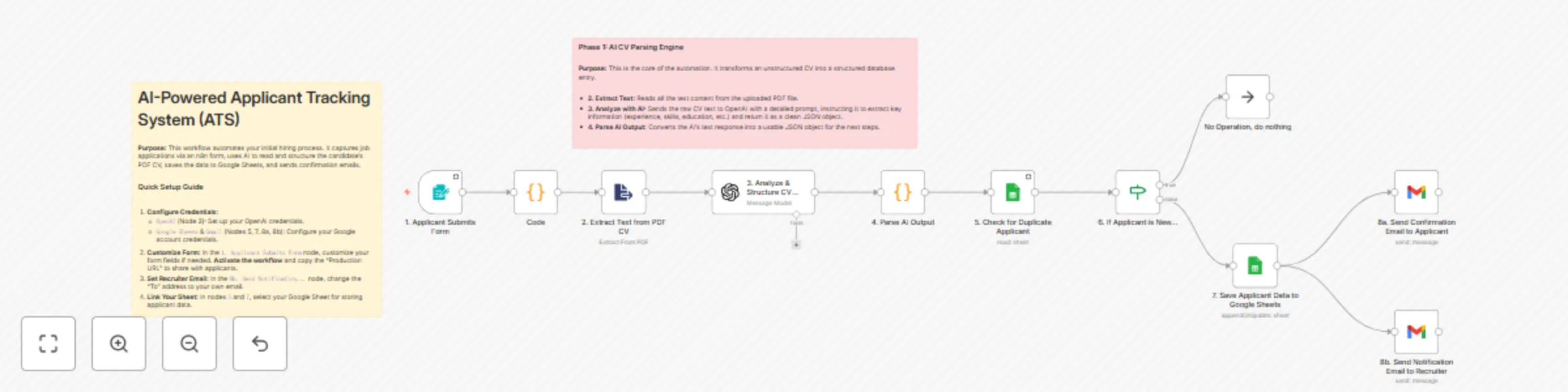
**Template Description:** > Stop manually reading every CV and copy-pasting data into a spreadsheet. This workflow acts as an AI recruiting assistant, automating your entire initial screening process. It captures applications from a public form, uses AI to read and understand PDF CVs, structures the candidate data, saves it to Google Sheets, and notifies all parties. This template is designed to save HR professionals and small business owners countless hours, ensuring no applicant is missed and all data is consistently structured and stored. --- **🚀 What does this workflow do?** * Provides a **public web form** for candidates to submit their name, email, experience, and PDF CV. * Automatically **reads the text content** from the uploaded PDF CV. * Uses an **AI Agent (OpenAI)** to intelligently parse the CV text, extracting key data like contact info, work experience, education, skills, and more. * **Writes a concise summary** of the CV, perfect for quick screening by HR. * **Checks for duplicate applications** based on the candidate's email address. * **Saves all structured applicant data** into a new row in a Google Sheet, creating a powerful candidate database. * Sends an **automated confirmation email** to the applicant. * Sends a **new application alert** with the CV summary to the recruiter. **🎯 Who is this for?** * **HR Departments & Recruiters:** Streamline your hiring pipeline and build a structured candidate database. * **Small Business Owners:** Manage job applications professionally without dedicated HR software. * **Hiring Managers:** Quickly get a summarized overview of each candidate without reading the full CV initially. **✨ Benefits** * **Massive Time Savings:** Drastically reduces the time spent on manual CV screening and data entry. * **Structured Candidate Data:** Turns every CV into a consistently formatted row in a spreadsheet, making it easy to compare candidates. * **Never Miss an Applicant:** Every submission is logged, and you're instantly notified. * **Improved Candidate Experience:** Applicants receive an immediate confirmation that their submission was successful. * **AI-Powered Summaries:** Get a quick, AI-generated summary of each CV delivered to your inbox. **⚙️ How it Works** 1. **Form Submission:** A candidate fills out the n8n form and uploads their CV. 2. **PDF Extraction:** The workflow extracts the raw text from the PDF file. 3. **AI Analysis:** The text is sent to OpenAI with a prompt to structure all key information (experience, skills, etc.) into a JSON format. 4. **Duplicate Check:** The workflow checks your Google Sheet to see if the applicant's email already exists. If so, it stops. 5. **Save to Database:** If the applicant is new, their structured data is saved as a new row in Google Sheets. 6. **Send Notifications:** Two emails are sent simultaneously: a confirmation to the applicant and a notification with the CV summary to the recruiter. **📋 n8n Nodes Used** * `Form Trigger` * `Extract From File` * `OpenAI` * `Code` (or `JSON Parser`) * `Google Sheets` * `If` * `Gmail` **🔑 Prerequisites** * An active n8n instance. * **OpenAI Account & API Key**. * **Google Account** with access to Google Sheets and Gmail (OAuth2 Credentials). * **A Google Sheet** prepared with columns to store the applicant data (e.g., name, email, experience, skills, cv_summary, etc.). **🛠️ Setup** 1. **Import the workflow** into your n8n instance. 2. **Configure Credentials:** Connect your credentials for OpenAI and Google (for Sheets & Gmail) in their respective nodes. 3. **Customize the Form:** In the `1. Applicant Submits Form` node, you can add or remove fields as needed. 4. **Activate the workflow.** Once active, **copy the Production URL** from the Form Trigger node and share it to receive applications. 5. **Set Your Email:** In the `8b. Send Notification...` (Gmail) node, change the "To" address to your own email address to receive alerts. 6. **Link Your Google Sheet:** In the `5. Check for Duplicate...` and `7. Save Applicant Data...` nodes, select your spreadsheet and sheet.
LinkedIn content factory with OpenAI research & Replicate branded images
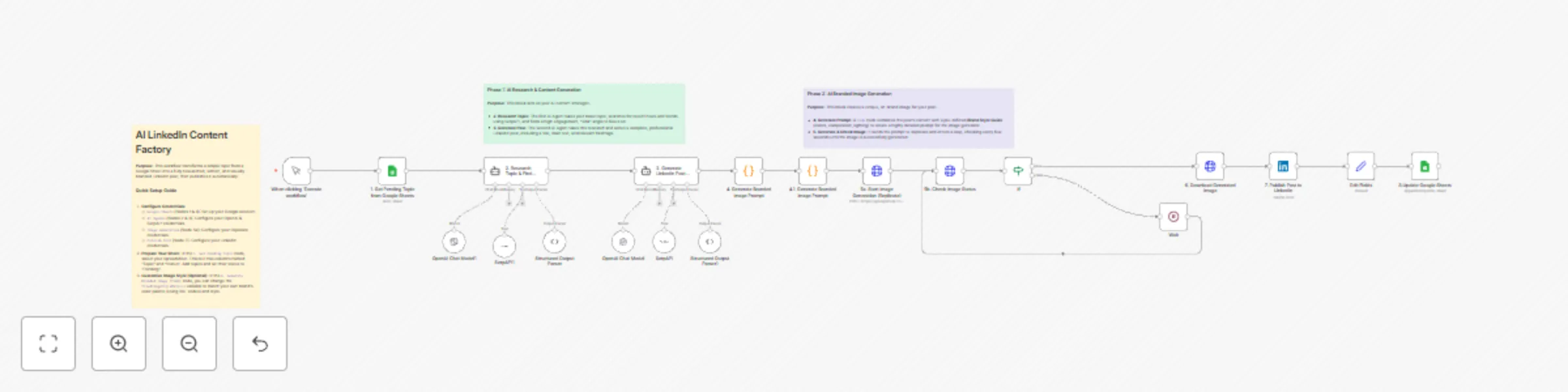
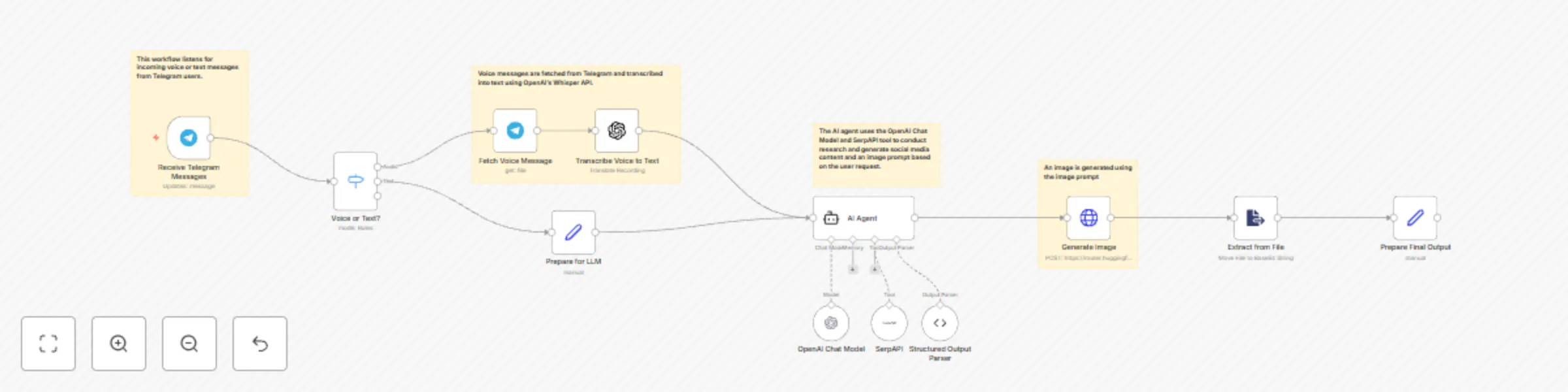
**Template Description:** > Never run out of high-quality LinkedIn content again. This workflow is a complete content factory that takes a simple topic from a Google Sheet, uses AI to research a trending angle, writes a full post, generates a unique and **on-brand** image, and publishes it directly to your LinkedIn profile. This template is designed for brands and creators who want to maintain a consistent, high-quality social media presence with minimal effort. The core feature is its ability to generate visuals that adhere to a specific, customizable brand style guide. --- **🚀 What does this workflow do?** * Pulls content ideas from a **Google Sheet** acting as your content calendar. * Uses an **AI Researcher (OpenAI + SerpAPI)** to find the most recent and engaging news or trends related to your topic. * Employs an **AI Writer** to draft a complete, professional LinkedIn post with a catchy title, engaging text, and relevant hashtags. * Generates a **unique, on-brand image** for every post using Replicate, based on a customizable style guide (colors, composition, mood) defined within the workflow. * **Publishes the post with its image** directly to your LinkedIn profile. * **Updates the status** in your Google Sheet to "done" to avoid duplicate posts. **🎯 Who is this for?** * **Marketing Teams:** Automate your content calendar and ensure brand consistency across all visuals. * **Social Media Managers:** Save hours of research, writing, and design work. * **Solopreneurs & Founders:** Maintain an active, professional LinkedIn presence without a dedicated content team. * **Content Creators:** Scale your content production and focus on strategy instead of execution. **✨ Benefits** * **End-to-End Automation:** From a single keyword to a published post, the entire process is automated. * **Brand Consistency:** The AI image generator follows a strict, customizable style guide, ensuring all your visuals feel like they belong to your brand. * **Always Relevant Content:** The AI research step ensures your posts are based on current trends and news, increasing engagement. * **Massive Time Savings:** Automates research, copywriting, and graphic design in one seamless flow. * **Content Calendar Integration:** Easily manage your content pipeline using a simple Google Sheet. **⚙️ How it Works** 1. **Get Topic:** The workflow fetches the next "Pending" topic from your Google Sheet. 2. **AI Research:** An AI Agent uses SerpAPI to research the topic and identify a viral angle. 3. **AI Writing:** A second AI Agent takes the research and writes the full LinkedIn post. 4. **Generate Image Prompt:** A `Code` node constructs a detailed prompt, merging the post's content with your defined brand style guide. 5. **Generate Image:** The prompt is sent to Replicate. The workflow waits and checks periodically until the image is ready. 6. **Publish:** The generated text and image are published to your LinkedIn account. 7. **Update Status:** The workflow archives the image to Google Drive and updates the topic's status in your Google Sheet to "done". **📋 n8n Nodes Used** * `Google Sheets` * `Langchain Agent` (with OpenAI & SerpAPI) * `Code` * `HTTP Request` * `Wait` / `If` * `LinkedIn` * `Google Drive` **🔑 Prerequisites** * An active n8n instance. * **Google Account** with Sheets & Drive access (OAuth2 Credentials). * **OpenAI Account & API Key**. * **SerpAPI Account & API Key** (for the research tool). * **Replicate Account & API Token**. * **LinkedIn Account** (OAuth2 Credentials). * **A Google Sheet** with "Topic" and "Status" columns. **🛠️ Setup** 1. **Import the workflow** into your n8n instance. 2. **Configure All Credentials:** Go through the workflow and connect your credentials for Google, OpenAI, SerpAPI, Replicate, and LinkedIn in their respective nodes. 3. **Link Your Google Sheet:** In the `1. Get Pending Topic...` node, select your spreadsheet and sheet. Do the same for the final `8. ...Update Status` node. 4. **Customize Your Brand Style (Highly Recommended):** In the `4. Generate Branded Image Prompt` (`Code`) node, edit the `fixedImageStyleDetails` variable. Change the RAL color codes and descriptive words to match your brand's visual identity. 5. **Populate Your Content Calendar:** Add topics to your Google Sheet and set their status to "Pending". 6. **Activate the workflow!**
Extract Amazon product data with Scrape.do, GPT-4 & Google Sheets
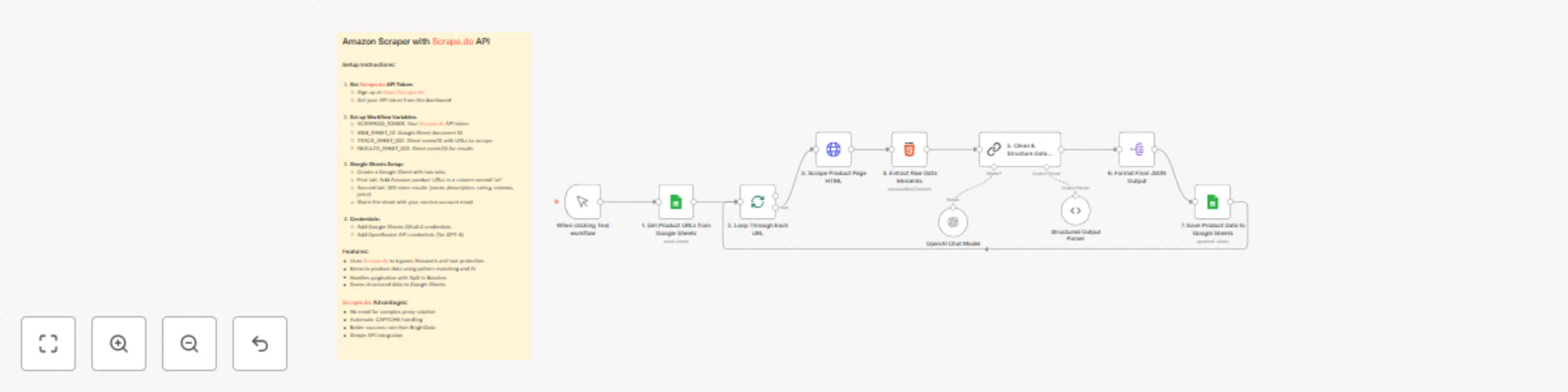
## Amazon Product Scraper with Scrape.do & AI Enrichment > This workflow is a fully automated Amazon product data extraction engine. It reads product URLs from a Google Sheet, uses Scrape.do to reliably fetch each product page’s HTML without getting blocked, and then applies an AI-powered extraction process to capture key product details such as name, price, rating, review count, and description. All structured results are neatly stored back into a Google Sheet for easy access and analysis. This template is designed for consistency and scalability—ideal for marketers, analysts, and e-commerce professionals who need clean product data at scale. --- ### 🚀 What does this workflow do? * **Reads Input URLs:** Pulls a list of Amazon product URLs from a Google Sheet. * **Scrapes HTML Reliably:** Uses **Scrape.do** to bypass Amazon’s anti-bot measures, ensuring the page HTML is always retrieved successfully. * **Cleans & Pre-processes HTML:** Strips scripts, styles, and unnecessary markup, isolating only relevant sections like title, price, ratings, and feature bullets. * **AI-Powered Data Extraction:** A LangChain/OpenRouter GPT-4 node verifies and enriches key fields—product name, price, rating, reviews, and description. * **Stores Structured Results:** Appends all extracted and verified product data to a results tab in Google Sheets. * **Batch & Loop Control:** Handles multiple URLs efficiently with `Split In Batches` to process as many products as you need. ### 🎯 Who is this for? * **E-commerce Sellers & Dropshippers:** Track competitor prices, ratings, and key product features automatically. * **Marketing & SEO Teams:** Collect product descriptions and reviews to optimize campaigns and content. * **Analysts & Data Teams:** Build accurate product databases without manual copy-paste work. ### ✨ Benefits * **High Success Rate:** **Scrape.do** handles proxy rotation and CAPTCHA challenges automatically, outperforming traditional scrapers. * **AI Validation:** LLM verification ensures data accuracy and fills in gaps when HTML elements vary. * **Full Automation:** Runs on-demand or on a schedule to keep product datasets fresh. * **Clean Output:** Results are neatly organized in Google Sheets, ready for reporting or integration with other tools. ### ⚙️ How it Works 1. **Manual or Scheduled Trigger:** Start the workflow manually or via a cron schedule. 2. **Input Source:** Fetch URLs from a Google Sheet (`TRACK_SHEET_GID`). 3. **Scrape with Scrape.do:** Retrieve full HTML from each Amazon product page using your `SCRAPEDO_TOKEN`. 4. **Clean & Pre-Extract:** Strip irrelevant code and use regex to pre-extract key fields. 5. **AI Extraction & Verification:** LangChain GPT-4 model refines and validates product name, description, price, rating, and reviews. 6. **Save Results:** Append enriched product data to the results sheet (`RESULTS_SHEET_GID`). ### 📋 n8n Nodes Used * `Manual Trigger` / `Schedule Trigger` * `Google Sheets` (read & append) * `Split In Batches` * `HTTP Request` (Scrape.do) * `Code` (clean & pre-extract HTML) * `LangChain LLM` (OpenRouter GPT-4) * `Structured Output Parser` ### 🔑 Prerequisites * Active n8n instance. * **Scrape.do API token** (bypasses Amazon anti-bot measures). * **Google Sheets** with: * `TRACK_SHEET_GID`: tab containing product URLs. * `RESULTS_SHEET_GID`: tab for results. * **Google Sheets OAuth2 credentials** shared with your service account. * **OpenRouter / OpenAI API credentials** for the GPT-4 model. ### 🛠️ Setup 1. **Import the Workflow** into your n8n instance. 2. **Set Workflow Variables:** * `SCRAPEDO_TOKEN` – your Scrape.do API key. * `WEB_SHEET_ID` – Google Sheet ID. * `TRACK_SHEET_GID` – sheet/tab name for input URLs. * `RESULTS_SHEET_GID` – sheet/tab name for results. 3. **Configure Credentials** for Google Sheets and OpenRouter. 4. **Map Columns** in the “add results” node to match your Google Sheet (e.g., name, price, rating, reviews, description). 5. **Run or Schedule:** Start manually or configure a schedule for continuous data extraction. --- This Amazon Product Scraper delivers fast, reliable, and AI-enriched product data, ensuring your e-commerce analytics, pricing strategies, or market research stay accurate and fully automated.
Automated B2B lead generation: Google Places, Scrape.do & AI enrichment
## Automated B2B Lead Generation: Google Places, Scrape.do & AI Enrichment This workflow is a powerful, fully automated B2B lead generation engine. It starts by finding businesses on Google Maps based on your criteria (*e.g., "dentists" in "Istanbul"*), assigns a quality score to each, and then uses **[Scrape.do](https://scrape.do?fpr=99aed)** to reliably access their websites. Finally, it leverages an AI agent to extract valuable contact information like emails and social media profiles. The final, enriched data is then neatly organized and saved directly into a Google Sheet. This template is built for reliability, using **[Scrape.do](https://scrape.do?fpr=99aed)** to handle the complexities of web scraping, ensuring you can consistently gather data without getting blocked. --- ### 🚀 What does this workflow do? * Automatically finds businesses using the **Google Places API** based on a category and location you define. * Calculates a `leadScore` for each business based on its rating, website presence, and operational status to **prioritize high-quality leads**. * **Filters out low-quality leads** to ensure you only focus on the most promising prospects. * Reliably scrapes the website of each high-quality lead using **[Scrape.do](https://scrape.do?fpr=99aed)** to bypass common blocking issues and retrieve the raw HTML. * Uses an **AI Agent (OpenAI)** to intelligently parse the website's HTML and extract hard-to-find contact details (emails, social media links, phone numbers). * **Saves all enriched lead data** to a Google Sheet, creating a clean, actionable list for your sales or marketing team. * **Runs on a schedule**, continuously finding new leads without any manual effort. ### 🎯 Who is this for? * **Sales & Business Development Teams:** Automate prospecting and build targeted lead lists. * **Marketing Agencies:** Generate leads for clients in specific industries and locations. * **Freelancers & Consultants:** Quickly find potential clients for your services. * **Startups & Small Businesses:** Build a customer database without spending hours on manual research. ### ✨ Benefits * **Full Automation:** Set it up once and let it run on a schedule to continuously fill your pipeline. * **AI-Powered Enrichment:** Go beyond basic business info. Get actual emails and social profiles that aren't available on Google Maps. * **Reliable Website Access:** Leverages **[Scrape.do](https://scrape.do?fpr=99aed)** to handle proxies and prevent IP blocks, ensuring consistent data gathering from target websites. * **High-Quality Leads:** The built-in scoring and filtering system ensures you don't waste time on irrelevant or incomplete listings. * **Centralized Database:** All your leads are automatically organized in a single, easy-to-access Google Sheet. ### ⚙️ How it Works 1. **Schedule Trigger:** The workflow starts automatically at your chosen interval (*e.g., daily*). 2. **Set Parameters:** You define the business type (`searchCategory`) and location (`locationName`) in a central `Set` node. 3. **Find Businesses:** It calls the **Google Places API** to get a list of businesses matching your criteria. 4. **Score & Filter:** A custom `Function` node scores each lead. An `IF` node then separates high-quality leads from low-quality ones. 5. **Loop & Enrich:** The workflow processes each high-quality lead one by one. * It uses a scraping service (**[Scrape.do](https://scrape.do?fpr=99aed)**) to reliably fetch the lead's website content. * An **AI Agent (OpenAI)** analyzes the website's footer to find contact and social media links. 6. **Save Data:** The final, enriched lead information is appended as a new row in your Google Sheet. ### 📋 n8n Nodes Used * `Schedule Trigger` * `Set` * `HTTP Request` (for Google Places & [Scrape.do](https://scrape.do?fpr=99aed)) * `Function` * `If` * `Split in Batches` (Loop Over Items) * `HTML` * `Langchain Agent` (with OpenAI Chat Model & Structured Output Parser) * `Google Sheets` ### 🔑 Prerequisites * An active n8n instance. * **Google Cloud Project** with the **Places API** enabled. * **Google Places API Key**, stored in n8n's Header Auth credentials. * **A [Scrape.do](https://scrape.do?fpr=99aed) Account and API Token**. This is essential for reliably scraping websites without your n8n server's IP getting blocked. * **OpenAI Account & API Key** for the AI-powered data extraction. * **Google Account** with access to Google Sheets. * **Google Sheets API Credentials (OAuth2)** configured in n8n. * **A Google Sheet** prepared with columns to store the lead data (*e.g., BusinessName, Address, Phone, Website, Email, Facebook, etc.*). ### 🛠️ Setup 1. **Import the workflow** into your n8n instance. 2. **Configure Credentials:** Create and/or select your credentials for: * **Google Places API:** In the `2. Find Businesses (Google Places)` node, select your Header Auth credential containing your API key. * **[Scrape.do](https://scrape.do?fpr=99aed):** In the `6a. Scrape Website HTML` node, configure credentials for your [Scrape.do](https://scrape.do?fpr=99aed) account. * **OpenAI:** In the `OpenAI Chat Model` node, select your OpenAI credentials. * **Google Sheets:** In the `7. Save to Google Sheets` node, select your Google Sheets OAuth2 credentials. 3. **Define Your Search:** In the `1. Set Search Parameters` node, update the `searchCategory` and `locationName` values to match your target market. 4. **Link Your Google Sheet:** In the `7. Save to Google Sheets` node, select your Spreadsheet and Sheet Name from the dropdown lists. Map the incoming data to the correct columns in your sheet. 5. **Set Your Schedule:** Adjust the `Schedule Trigger` to run as often as you like (*e.g., once a day*). 6. **Activate the workflow!** Your automated lead generation will begin on the next scheduled run.
Automated daily customer win-back campaign with AI offers
Proactively retain customers predicted to churn with this automated n8n workflow. Running daily, it identifies high-risk customers from your Google Sheet, uses Google Gemini to generate personalized win-back offers based on their churn score and preferences, sends these offers via Gmail, and logs all actions for tracking. ### What does this workflow do? This workflow automates the critical process of customer retention by: * **Running automatically every day** on a schedule you define. * **Fetching customer data** from a designated Google Sheet containing metrics like predicted churn scores and preferred categories. * **Filtering** to identify customers with a high churn risk (score > 0.7) who haven't recently received a specific campaign (based on the `created_campaign_date` field - *you might need to adjust this logic*). * Using **Google Gemini AI** to dynamically generate one of three types of win-back offers, personalized based on the customer's specific churn score and preferred product categories: * **Informational:** (Score 0.7-0.8) Highlights new items in preferred categories. * **Bonus Points:** (Score 0.8-0.9) Offers points for purchases in a target category (e.g., Books). * **Discount Percentage:** (Score 0.9-1.0) Offers a percentage discount in a target category (e.g., Books). * **Sending the personalized offer** directly to the customer via **Gmail**. * **Logging** each sent offer or the absence of eligible customers for the day in a separate 'SYSTEM_LOG' Google Sheet for monitoring and analysis. ### Who is this for? * **CRM Managers & Retention Specialists:** Automate personalized outreach to at-risk customers. * **Marketing Teams:** Implement data-driven retention campaigns with minimal manual effort. * **E-commerce Businesses & Subscription Services:** Proactively reduce churn and increase customer lifetime value. * **Anyone** using customer data (especially churn prediction scores) who wants to automate personalized retention efforts via email. ### Benefits * **Automated Retention:** Set it up once, and it runs daily to engage at-risk customers automatically. * **AI-Powered Personalization:** Go beyond generic offers; tailor messages based on churn risk and customer preferences using Gemini. * **Proactive Churn Reduction:** Intervene *before* customers leave by addressing high churn scores with relevant offers. * **Scalability:** Handle personalized outreach for many customers without manual intervention. * **Improved Customer Loyalty:** Show customers you value them with relevant, timely offers. * **Action Logging:** Keep track of which customers received offers and when the workflow ran. ### How it Works 1. **Daily Trigger:** The workflow starts automatically based on the schedule set (e.g., daily at 9 AM). 2. **Fetch Data:** Reads all customer data from your 'Customer Data' Google Sheet. 3. **Filter Customers:** Selects customers where `predicted_churn_score > 0.7` AND `created_campaign_date` is empty (*verify this condition fits your needs*). 4. **Check for Eligibility:** Determines if any customers passed the filter. 5. **IF Eligible Customers Found:** * **Loop:** Processes each eligible customer one by one. * **Generate Offer (Gemini):** Sends the customer's `predicted_churn_score` and `preferred_categories` to Gemini. Gemini analyzes these and the defined rules to create the appropriate offer type, value, title, and detailed message, returning it as structured JSON. * **Log Sent Offer:** Records `action_taken = SENT_WINBACK_OFFER`, the timestamp, and `customer_id` in the 'SYSTEM_LOG' sheet. * **Send Email:** Uses the Gmail node to send an email to the customer's `user_mail` with the generated `offer_title` as the subject and `offer_details` as the body. 6. **IF No Eligible Customers Found:** * **Set Status:** Creates a record indicating `system_log = NOT_FOUND`. * **Log Status:** Records this 'NOT_FOUND' status and the current timestamp in the 'SYSTEM_LOG' sheet. ### n8n Nodes Used * Schedule Trigger * Google Sheets (x3 - Read Customers, Log Sent Offer, Log Not Found) * Filter * If * SplitInBatches (Used for Looping) * Langchain Chain - LLM (Gemini Offer Generation) * Langchain Chat Model - Google Gemini * Langchain Output Parser - Structured * Set (Prepare 'Not Found' Log) * Gmail (Send Offer Email) ### Prerequisites * Active n8n instance (Cloud or Self-Hosted). * **Google Account** with access to Google Sheets and Gmail. * **Google Sheets API Credentials (OAuth2):** Configured in n8n. * **Two Google Sheets:** * **'Customer Data' Sheet:** Must contain columns like `customer_id`, `predicted_churn_score` (numeric), `preferred_categories` (string, e.g., `["Books", "Electronics"]`), `user_mail` (string), and potentially `created_campaign_date` (date/string). * **'SYSTEM_LOG' Sheet:** Should have columns like `system_log` (string), `date` (string/timestamp), and `customer_id` (string, optional for 'NOT_FOUND' logs). * **Google Cloud Project** with the Vertex AI API enabled. * **Google Gemini API Credentials:** Configured in n8n (usually via Google Vertex AI credentials). * **Gmail API Credentials (OAuth2):** Configured in n8n with permission to send emails. ### Setup 1. Import the workflow JSON into your n8n instance. 2. **Configure Schedule Trigger:** Set the desired daily run time (e.g., `Hours` set to `9`). 3. **Configure Google Sheets Nodes:** * Select your Google Sheets OAuth2 credentials for all three Google Sheets nodes. * **`1. Fetch Customer Data...`:** Enter your 'Customer Data' Spreadsheet ID and Sheet Name. * **`5b. Log Sent Offer...`:** Enter your 'SYSTEM_LOG' Spreadsheet ID and Sheet Name. Verify column mapping. * **`3b. Log 'Not Found'...`:** Enter your 'SYSTEM_LOG' Spreadsheet ID and Sheet Name. Verify column mapping. 4. **Configure Filter Node (`2. Filter High Churn Risk...`):** * **Crucially, review the second condition:** `{{ $json.created_campaign_date.isEmpty() }}`. Ensure this field and logic correctly identify customers who *should* receive the offer based on your campaign strategy. Modify or remove if necessary. 5. **Configure Google Gemini Nodes:** Select your configured Google Vertex AI / Gemini credentials in the `Google Gemini Chat Model` node. Review the prompt in the `5a. Generate Win-Back Offer...` node to ensure the offer logic matches your business rules (especially category names like "Books"). 6. **Configure Gmail Node (`5c. Send Win-Back Offer...`):** Select your Gmail OAuth2 credentials. 7. **Activate the workflow.** 8. Ensure your 'Customer Data' and 'SYSTEM_LOG' Google Sheets are correctly set up and populated. The workflow will run automatically at the next scheduled time. This workflow provides a powerful, automated way to engage customers showing signs of churn, using personalized AI-driven offers to encourage them to stay. Adapt the filtering and offer logic to perfectly match your business needs!
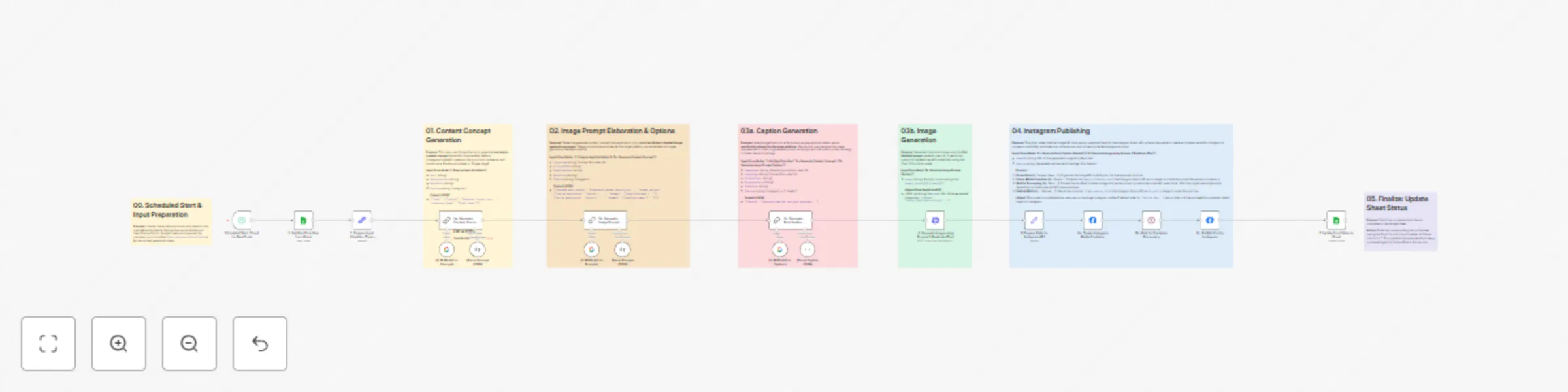
Automated AI content creation & Instagram publishing from Google Sheets
## Automated AI Content Creation & Instagram Publishing from Google Sheets This n8n workflow automates the creation and publishing of social media content directly to Instagram, using ideas stored in a Google Sheet. It leverages AI (Google Gemini and Replicate Flux) to generate concepts, image prompts, captions, and the final image, turning your content plan into reality with minimal manual intervention. **Think of this as the execution engine for your content strategy.** It assumes you have a separate process (whether manual entry, another workflow, or a different tool) for populating the Google Sheet with initial post ideas (including `Topic`, `Audience`, `Voice`, and `Platform`). This workflow takes those ideas and handles the rest, from AI generation to final publication. ### What does this workflow do? This workflow streamlines the content execution process by: * **Automatically fetching** unprocessed content ideas from a designated Google Sheet based on a schedule. * Using **Google Gemini** to generate a platform-specific content concept (specifically for a 'Single Image' format). * Generating **two distinct AI image prompt options** based on the concept using Gemini. * Writing an engaging, platform-tailored **caption** (including hashtags) using Gemini, based on the *first* prompt option. * Generating a **visual image** using the *first* prompt option via the **Replicate API** (using the Flux model). * **Publishing** the generated image and caption directly to a connected **Instagram Business account**. * **Updating the status** in the Google Sheet to mark the idea as completed, preventing reprocessing. ### Who is this for? * **Social Media Managers & Agencies:** Automate the execution of your content calendar stored in Google Sheets. * **Marketing Teams:** Streamline content production from planned ideas and ensure consistent posting schedules. * **Content Creators & Solopreneurs:** Save significant time by automating the generation and publishing process based on your pre-defined ideas. * **Anyone** using Google Sheets to plan social media content and wanting to automate the creative generation and posting steps with AI. ### Benefits * **Full Automation:** From fetching planned ideas to Instagram publishing, automate the entire content execution pipeline. * **AI-Powered Generation:** Leverage Google Gemini for creative concepts, prompts, and captions, and Replicate for image generation based on your initial topic. * **Content Calendar Execution:** Directly turn your Google Sheet plan into published posts. * **Time Savings:** Drastically reduce the manual effort involved in creating visuals and text for each planned post. * **Consistency:** Maintain a regular posting schedule by automatically processing your queue of ideas. * **Platform-Specific Content:** AI prompts are designed to tailor concepts, prompts, and captions for the platform specified in your sheet (e.g., Instagram or LinkedIn). ### How it Works 1. **Scheduled Trigger:** The workflow starts automatically based on the schedule you set (e.g., every hour, daily). 2. **Fetch Idea:** Reads the next row from your Google Sheet where the 'Status' column indicates it's pending (e.g., '0'). It only fetches one idea per run. 3. **Prepare Inputs:** Extracts `Topic`, `Audience`, `Voice`, and `Platform` from the sheet data. 4. **AI Concept Generation (Gemini):** Creates a single content concept suitable for a 'Single Image' post on the target platform. 5. **AI Prompt Generation (Gemini):** Develops two detailed, distinct image prompt options based on the concept. 6. **AI Caption Generation (Gemini):** Writes a caption tailored to the platform, using the *first* image prompt and other context. 7. **Image Generation (Replicate):** Sends the *first* prompt to the Replicate API (Flux model) to generate the image. 8. **Prepare for Instagram:** Formats the generated image URL and caption. 9. **Publish to Instagram:** Uses the Facebook Graph API in three steps: * Creates a media container by uploading the image URL and caption. * Waits for Instagram to process the container. * Publishes the processed container to your feed. 10. **Update Sheet:** Changes the 'Status' in the Google Sheet for the processed row (e.g., to '1') to mark it as complete. ### n8n Nodes Used * Schedule Trigger * Google Sheets (Read & Update operations) * Set (Multiple instances for data preparation) * Langchain Chain - LLM (Multiple instances for Gemini calls) * Langchain Chat Model - Google Gemini (Multiple instances) * Langchain Output Parser - Structured (Multiple instances) * HTTP Request (for Replicate API call) * Wait * Facebook Graph API (Multiple instances for Instagram publishing steps) ### Prerequisites * Active n8n instance (Cloud or Self-Hosted). * **Google Account** with access to Google Sheets. * **Google Sheets API Credentials (OAuth2):** Configured in n8n. * **A Google Sheet** structured with columns like `Topic`, `Audience`, `Voice`, `Platform`, `Status` (or similar). Ensure your 'pending' and 'completed' statuses are defined (e.g., '0' and '1'). * **Google Cloud Project** with the Vertex AI API enabled. * **Google Gemini API Credentials:** Configured in n8n (usually via Google Vertex AI credentials). * **Replicate Account** and API Token. * **Replicate API Credentials (Header Auth):** Configured in n8n. * **Facebook Developer Account**. * **Instagram Business Account** connected to a Facebook Page. * **Facebook App** with necessary permissions: `instagram_basic`, `instagram_content_publish`, `pages_read_engagement`, `pages_show_list`. * **Facebook Graph API Credentials (OAuth2):** Configured in n8n with the required permissions. ### Setup 1. Import the workflow JSON into your n8n instance. 2. **Configure Schedule Trigger:** Set the desired frequency (e.g., every 30 minutes, every 4 hours) for checking new ideas in the sheet. 3. **Configure Google Sheets Nodes:** * Select your Google Sheets OAuth2 credentials for both Google Sheets nodes. * In `1. Get Next Post Idea...`, enter your Spreadsheet ID and Sheet Name. Verify the `Status` filter matches your 'pending' value (e.g., `0`). * In `7. Update Post Status...`, enter the same Spreadsheet ID and Sheet Name. Ensure the `Matching Columns` (e.g., `Topic`) and the `Status` value to update match your 'completed' value (e.g., `1`). 4. **Configure Google Gemini Nodes:** Select your configured Google Vertex AI / Gemini credentials in all `Google Gemini Chat Model` nodes. 5. **Configure Replicate Node (`4. Generate Image...`):** Select your Replicate Header Auth credentials. The workflow uses `black-forest-labs/flux-1.1-pro-ultra` by default; you can change this if needed. 6. **Configure Facebook Graph API Nodes (`6a`, `6c`):** * Select your Facebook Graph API OAuth2 credentials. * **Crucially, update the Instagram Account ID** in the `Node` parameter of both Facebook Graph API nodes (`6a` and `6c`). The template uses a placeholder (`17841473009917118`); replace this with your actual Instagram Business Account ID. 7. **Adjust Wait Node (`6b`):** The default wait time might be sufficient, but if you encounter errors during publishing (especially with larger images/videos in the future), you might need to increase the wait duration. 8. **Activate the workflow.** 9. **Populate your Google Sheet:** Ensure you have rows with your content ideas and the correct 'pending' status (e.g., '0'). The workflow will pick them up on its next scheduled run. This workflow transforms your Google Sheet content plan into a fully automated AI-powered Instagram publishing engine. Start automating your social media presence today!
AI-powered research assistant for platform questions with GPT-4o and MCP
## Description This workflow empowers you to effortlessly get answers to your n8n platform questions through an AI-powered assistant. Simply send your query, and the assistant will search documentation, forum posts, and example workflows to provide comprehensive, accurate responses tailored to your specific needs. > **Note:** This workflow uses community nodes (n8n-nodes-mcp.mcpClientTool) and will only work on self-hosted n8n instances. You'll need to install the required community nodes before importing this workflow. ! ## What does this workflow do? This workflow streamlines the information retrieval process by automatically researching n8n platform documentation, community forums, and example workflows, providing you with relevant answers to your questions. ## Who is this for? - **New n8n Users**: Quickly get answers to basic platform questions and learn how to use n8n effectively - **Experienced Developers**: Find solutions to specific technical issues or discover advanced workflows - **Teams**: Boost productivity by automating the research process for n8n platform questions - **Anyone** looking to leverage AI for efficient and accurate n8n platform knowledge retrieval ## Benefits - **Effortless Research**: Automate the research process across n8n documentation, forum posts, and example workflows - **AI-Powered Intelligence**: Leverage the power of LLMs to understand context and generate helpful responses - **Increased Efficiency**: Save time and resources by automating the research process - **Quick Solutions**: Get immediate answers to your n8n platform questions - **Enhanced Learning**: Discover new workflows, features, and best practices to improve your n8n experience ## How It Works 1. **Receive Request**: The workflow starts when a chat message is received containing your n8n-related question 2. **AI Processing**: The AI agent powered by OpenAI GPT-4o analyzes your question 3. **Research and Information Gathering**: The system searches across multiple sources: - Official n8n documentation for general knowledge and how-to guides - Community forums for bug reports and specific issues - Example workflow repository for relevant implementations 4. **Response Generation**: The AI agent compiles the research and generates a clear, comprehensive answer 5. **Output**: The workflow provides you with the relevant information and step-by-step guidance when applicable ## n8n Nodes Used - When chat message received (Chat Trigger) - OpenAI Chat Model (GPT-4o mini) - N8N AI Agent - n8n-assistant tools (MCP Client Tool - Community Node) - n8n-assistant execute (MCP Client Tool - Community Node) ## Prerequisites - Self-hosted n8n instance - OpenAI API credentials - MCP client community node installed - MCP server configured to search n8n resources ## Setup 1. Import the workflow JSON into your n8n instance 2. Configure the OpenAI credentials 3. Configure your MCP client API credentials 4. In the n8n-assistant execute node, ensure the parameter is set to "specific" (corrected from "spesific") 5. Test the workflow by sending a message with an n8n-related question ## MCP Server Connection To connect to the MCP server that powers this assistant's research capabilities, you need to use the following URL: https://smithery.ai/server/@onurpolat05/n8n-assistant This MCP server is specifically designed to search across three types of n8n resources: 1. Official documentation for general platform information and workflow creation guidance 2. Community forums for bug-related issues and troubleshooting 3. Example workflow repositories for reference implementations Configure this URL in your MCP client credentials to enable the assistant to retrieve relevant information based on user queries. This workflow combines the convenience of chat with the power of AI to provide a seamless n8n platform research experience. Start getting instant answers to your n8n questions today!
Create social media content from Telegram with AI
**Description:** ## Create Social Media Content from Telegram with AI This n8n workflow empowers you to effortlessly generate social media content and captivating image prompts, all powered by AI. Simply send a topic request through Telegram (as a voice or text message), and watch as the workflow conducts research, crafts engaging social media posts, and creates detailed image prompts ready for use with your preferred AI art generation tool. ### What does this workflow do? This workflow streamlines the content creation process by automating research, social media content generation, and image prompt creation, triggered by a simple Telegram message. ### Who is this for? * **Social Media Managers:** Quickly generate engaging content and image ideas for various platforms. * **Content Creators:** Overcome writer's block and discover fresh content ideas with AI assistance. * **Marketing Teams:** Boost productivity by automating social media content research and drafting. * **Anyone** looking to leverage AI for efficient and creative social media content creation. ### Benefits * **Effortless Content and Image Prompt Generation:** Automate the creation of social media posts and detailed image prompts. * **AI-Powered Creativity:** Leverage the power of LLMs to generate original content ideas and captivating image prompts. * **Increased Efficiency:** Save time and resources by automating the research and content creation process. * **Voice-to-Content:** Use voice messages to request content, making content creation even more accessible. * **Enhanced Engagement:** Create high-quality, attention-grabbing content that resonates with your audience. ### How it Works 1. **Receive Request:** The workflow listens for incoming voice or text messages on Telegram containing your content request. 2. **Process Voice (if necessary):** If the message is a voice message, it's transcribed into text using OpenAI's Whisper API. 3. **AI Takes Over:** The AI agent, powered by an OpenAI Chat Model and SerpAPI, conducts online research based on your request. 4. **Content and Image Prompt Generation:** The AI agent generates engaging social media content and a detailed image prompt based on the research. 5. **Image Generation (Optional):** You can use the generated image prompt with your preferred AI art generation tool (e.g., DALL-E, Stable Diffusion) to create a visual. 6. **Output:** The workflow provides you with the social media content and the detailed image prompt, ready for you to use or refine. ### n8n Nodes Used * Telegram Trigger * Switch * Telegram (for fetching voice messages) * OpenAI (Whisper API for voice-to-text) * Set (for preparing variables) * AI Agent (with OpenAI Chat Model and SerpAPI tool) * HTTP Request (for optional image generation) * Extract from File (for optional image processing) * Set (for final output) ### Prerequisites * Active n8n instance * Telegram account with a bot * OpenAI API key * SerpAPI account * Hugging Face API key (if you want to generate images within the workflow) ### Setup 1. Import the workflow JSON into your n8n instance. 2. Configure the Telegram Trigger node with your Telegram bot token. 3. Set up the OpenAI and SerpAPI credentials in the respective nodes. 4. If you want to generate images directly within the workflow, configure the HTTP Request node with your Hugging Face API key. 5. Test the workflow by sending a voice or text message to your Telegram bot with a topic request. This workflow combines the convenience of Telegram with the power of AI to provide a seamless content creation experience. Start generating engaging social media content today!
Effortless task management: Create Todoist tasks directly from Telegram with AI
## Effortless Task Management: Create Todoist Tasks Directly from Telegram with AI This n8n workflow empowers you to seamlessly manage your tasks by creating Todoist entries directly from Telegram, using the power of AI. Simply send a voice or text message to your Telegram bot, and this workflow will transform it into actionable tasks in your Todoist account. ### Who is this for? * **Busy professionals** who need a quick and easy way to capture tasks on the go. * **Students** looking to streamline their assignments and project management. * **Anyone** who wants to leverage AI for effortless task management. ### What Problem Does it Solve? This workflow eliminates the need to manually enter tasks into Todoist. It automates the process of capturing, organizing, and prioritizing tasks, saving you time and effort. ### What are the Benefits? * **Seamless Integration:** Connect your Telegram and Todoist accounts for a frictionless workflow. * **AI-Powered Task Breakdown:** LLM AI intelligently analyzes your messages and breaks them down into manageable sub-tasks. * **Voice-to-Task:** Create tasks with voice messages for hands-free convenience. * **Increased Productivity:** Capture and organize tasks quickly, keeping you focused and productive. * **Accessibility:** Access your tasks from anywhere with Todoist's mobile app and Google extension. ### How it Works 1. **Send a message:** Send a voice or text message describing your task to your Telegram bot. 2. **AI analysis:** The workflow uses an LLM (OpenAI Chat Model) to analyze your message and break it down into sub-tasks. 3. **Task creation:** The workflow creates tasks in your Todoist account based on the AI's analysis. 4. **Notification:** You receive a Telegram notification with a link to your newly created tasks in Todoist. ### Nodes in the Workflow * **Telegram Trigger:** Listens for incoming messages on Telegram. * **Switch:** Routes messages based on their type (voice or text). * **Telegram:** Fetches voice messages from Telegram. * **OpenAI:** Transcribes voice messages to text using OpenAI's Whisper API. * **Edit Fields:** Prepares the text for the LLM. * **Basic LLM Chain:** Analyzes messages and generates sub-tasks using OpenAI's GPT model. * **Structured Output Parser:** Extracts sub-tasks from the LLM's response. * **Todoist:** Creates tasks in your Todoist account. * **Telegram:** Sends a notification with a link to your Todoist tasks. ### Requirements * Active n8n instance. * Telegram account with a bot. * Todoist account. * OpenAI API key. ### Setup Information 1. Import the workflow JSON into your n8n instance. 2. Configure the Telegram Trigger node with your bot token. 3. Set up the OpenAI credentials with your API key. 4. Connect your Todoist account in the Todoist node. 5. Customize the LLM prompt (optional) to fine-tune task creation. ### Additional Tips * Explore Todoist's features to further organize and manage your tasks. * Experiment with different LLM prompts to optimize task breakdown. * Use n8n's features to automate other aspects of your workflow. This workflow combines the convenience of Telegram with the power of AI and Todoist to provide a seamless task management experience. Start managing your tasks effortlessly today!
Turn BBC News articles into podcasts using Hugging Face and Google Gemini
# Turn BBC News Articles into Podcasts using Hugging Face and Google Gemini Effortlessly transform BBC news articles into engaging podcasts with this automated n8n workflow. ## Who is this for? This template is perfect for: * **Content creators** who want to quickly produce podcasts from current events. * **Students** looking for an efficient way to create audio content for projects or assignments. * **Individuals** interested in generating their own podcasts without technical expertise. ## Setup Information 1. **Install n8n:** If you haven't already, download and install n8n from [n8n.io](https://n8n.io/). 2. **Import the Workflow:** Copy the JSON code for this workflow and import it into your n8n instance. 3. **Configure Credentials:** * **Gemini API:** Set up your Gemini API credentials in the workflow's LLM nodes. * **Hugging Face Token:** Obtain an access token from Hugging Face and add it to the HTTP Request node for the text-to-speech model. 4. **Customize (Optional):** * **Filtering Criteria:** Adjust the News Classifier node to fine-tune the selection of news articles based on your preferences. * **Output Options:** Modify the workflow to save the generated audio file to a cloud storage service or publish it to a podcast hosting platform. ## Prerequisites * An active n8n instance. * Basic understanding of n8n workflows (no coding required). * API credentials for Gemini and a Hugging Face account with an access token. ## What problem does it solve? This workflow eliminates the manual effort involved in creating podcasts from news articles. It automates the entire process, from fetching and filtering news to generating the final audio file. ## What are the benefits? * **Time-saving:** Create podcasts in minutes, not hours. * **Easy to use:** No coding or technical skills required. * **Customizable:** Adapt the workflow to your specific needs and preferences. * **Cost-effective:** Leverage free or low-cost services like Gemini and Hugging Face. ## How does it work? 1. The workflow fetches news articles from the BBC website. 2. It filters articles based on their suitability for a podcast. 3. It extracts the full content of the selected articles. 4. It uses Gemini LLM to create a podcast script. 5. It converts the script to speech using Hugging Face's text-to-speech model. 6. The final podcast audio is ready for use. ## Nodes in the Workflow 1. **Fetch BBC News Page:** Retrieves the main BBC News page. 2. **News Classifier:** Categorizes news articles using Gemini LLM. 3. **Fetch BBC News Detail:** Extracts detailed content from suitable articles. 4. **Basic Podcast LLM Chain:** Generates a podcast script using Gemini LLM. 5. **HTTP Request:** Converts the script to speech using Hugging Face. ## Add Story I'm excited to share this workflow with the n8n community and help content creators and students easily produce engaging podcasts! ## Additional Tips * Explore the n8n documentation and community resources for more advanced customization options. * Experiment with different filtering criteria and LLM prompts to achieve your desired podcast style.