Auto-translate incoming Gmail emails to English with OpenAI GPT-3.5
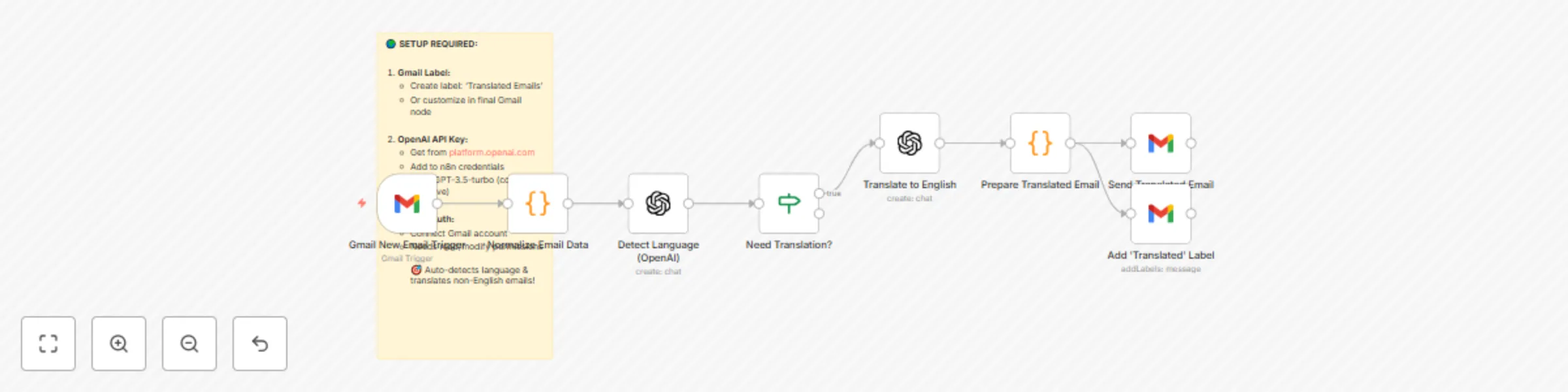
Workflow preview


 Early Deal
DISCOUNT 20%

Important notice
This workflow is provided as-is. Please review and test before using in production.
Overview
🌍 Auto-Translate Incoming Emails to English
This workflow automatically detects the language of every new Gmail email and translates non-English messages into English. The translated email is forwarded to your inbox with a clear "[TRANSLATED]" subject tag, and a label is added for easy filtering.
⚙️ How It Works
Gmail New Email Trigger
- Listens for new unread emails in your Gmail inbox.
- Captures subject, sender, body text, and metadata.
Normalize Email Data
- A Code node extracts the raw content from the email.
- Strips HTML, normalizes plain text, and prepares data for language detection.
Detect Language (OpenAI)
- Uses OpenAI GPT-3.5-turbo to detect the email’s language.
- If the language is English, workflow ends.
- If not, continues to translation.
Translate to English
- OpenAI translates the email body into clear English.
Prepare Translated Email
- Builds a forwarded email containing:
- Original sender & subject
- Received date
- Message ID
- Translated content (with formatting)
- Builds a forwarded email containing:
Send Translated Email
- A Gmail node sends the translated message to your inbox.
- Subject is prefixed with
[TRANSLATED]for easy recognition.
Add "Translated Emails" Label
- Automatically tags the original message in Gmail with "Translated Emails".
- Helps you filter all auto-translated emails later.
🛠️ Setup Steps
1. Gmail Label
- In Gmail, create a new label:
Translated Emails - Or update the label in the final Gmail node.
2. OpenAI API Key
- Get your key from platform.openai.com.
- Add credentials in n8n.
- Uses GPT-3.5-turbo (low cost, reliable).
3. Gmail OAuth
- In n8n, connect your Gmail account.
- Requires read/modify permissions.
📧 Example Output
Subject: [TRANSLATED] Meeting Proposal
Body:
🌍 AUTO-TRANSLATED EMAIL (Original Language: ES)
📧 Original From: [email protected]
📅 Received: 2025-08-29
🔗 Message ID: 123456abcdef
═══════════════════════════════════════ TRANSLATED CONTENT:
Hello, I wanted to ask if we can schedule the meeting for next week.
═══════════════════════════════════════
✨ This email was automatically translated by n8n workflow.
⚡ With this workflow, every foreign-language email is instantly translated and delivered to you in English — no manual copy-pasting into Google Translate again.