Auto-generate competitive battle cards from websites with Zoho CRM and Gemini AI
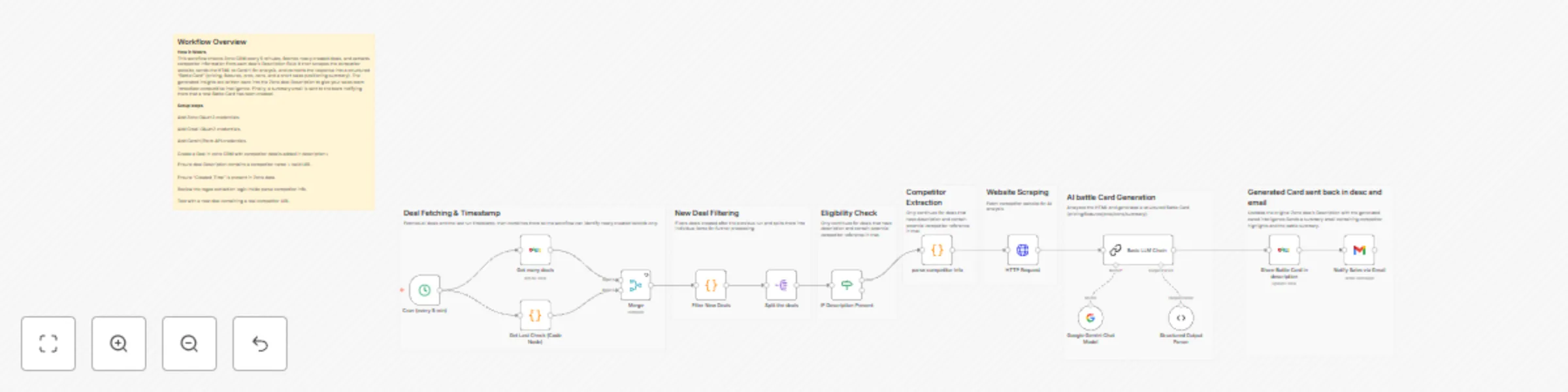
Workflow preview


 Early Deal
DISCOUNT 20%

Important notice
This workflow is provided as-is. Please review and test before using in production.
Overview
Zoho CRM → AI‑Generated Competitive Battle Card
This workflow automatically analyzes competitor websites, which inseted in description field and generates a clean, structured AI‑powered Battle Card for every new Zoho CRM deal. It reads the competitor URL from the deal Description, scrapes the site, runs an AI analysis pipeline and updates the deal with pricing, differentiators, pros/cons and a concise sales battle summary — all fully automated.
Quick Implementation Steps
- Add Zoho CRM + Gmail OAuth2 + AI API credentials.
- Import workflow into n8n.
- create a new deal in zoho CRM.
- While creating Deal,Add a competitor URL inside the Zoho deal Description.
- Activate the workflow.
- Wait 5 minutes → Deal updates with AI‑generated Battle Card.
What It Does
This workflow removes the manual effort of researching competitors during a sales cycle. Every time a new deal is created, it checks the Description field for a competitor name and website. After validating both, it automatically fetches the competitor webpage and feeds the content into an AI analysis pipeline powered by LangChain.
The AI transforms the messy, unstructured webpage HTML into a readable, structured and ready‑to‑use Battle Card — including pricing overview, differentiating features, advantages, disadvantages and a compact sales battle summary. This data is pushed directly into the Deal Description and emailed to the sales team. No web research, no copy‑pasting, no manual formatting — the AI does everything.
Who’s It For
- Sales teams wanting fast competitor intelligence.
- SDR/BDR teams prepping before first calls.
- Pre‑sales engineers making pitch notes.
- Founders/Product teams monitoring competitor positioning.
- Agencies building automation for CRM users.
Requirements
- n8n instance
- Zoho CRM OAuth2 credentials
- Gmail OAuth2 credentials
- AI model provider API key (Gemini / OpenAI / Claude — interchangeable)
- Deals containing a competitor name + competitor URL [Must Have]
How It Works & Setup
Step 1 — Cron Trigger
Runs every 5 minutes → pulls newly created deals and last run time.
Step 2 — Fetch Deals
Retrieves deals sorted by Created_Time.
Step 3 — Identify New Deals
Filters deals created after the last workflow run.
Step 4 — Validate Deal Description
Ensures the Description has:
- Competitor name
- Competitor website URL
Step 5 — Extract Competitor Info
Regex identifies and extracts the name + first valid URL in the Description.
Step 6 — Scrape Competitor Website
HTTP Request downloads the competitor webpage’s HTML.
Step 7 — AI‑Generated Battle Card Creation
The AI pipeline (LangChain + your chosen LLM) transforms HTML into a structured JSON output containing:
- Pricing Summary
- Key Features
- Pros
- Cons
- Battle Summary
- Competitor Name
Step 8 — Update Zoho Deal
The script saves the formatted AI Battle Card directly into the Deal Description.
Step 9 — Notify Sales
Gmail node sends a summary email to the sales team.
How to Customize Nodes
Change the AI Output
Edit LangChain prompt to:
- Add SWOT
- Include pricing tiers
- Include objections
- Add competitor positioning
- Add risk scoring
Change Where Battle Card Is Stored
Modify the Zoho Update node to store data in:
- Notes
- Custom fields
- Attachments
- Tags
- Tasks
Email Customization
Update subject, body, recipients, etc.
Filtering Logic
Modify filters to:
- Only process specific deal stages
- Only process certain pipelines
- Ignore internal test deals
Add‑Ons (Optional Enhancements)
- Auto‑generate a PDF Battle Card and attach it to the deal.
- Send Battle Cards to Slack, Teams, or a WhatsApp bot.
- Store all Battle Cards in Notion, Airtable, or Google Sheets.
- Add a competitor scoring system (price, features, risk level).
- Build a weekly digest of all competitors analyzed.
Use Case Examples
- Instant competitor breakdown when a new lead or deal is created.
- Rapid sales call preparation with AI summarizing the competition.
- Automated enrichment of CRM records with meaningful intelligence.
- Internal competitive intelligence dashboards fed by AI outputs.
- Pitch deck automation where Battle Cards update slides automatically.
There are many more possible use cases depending on your CRM setup and AI strategy.
Troubleshooting Guide
| Issue | Possible Cause | Solution |
|---|---|---|
| No Battle Card generated | No URL found in Description | Add valid http/https competitor URL |
| Deal skipped | Time filtering excluded it | Adjust lookback window in code |
| AI output incomplete | HTML unreadable or blocked | Try different competitor URL |
| Zoho update fails | OAuth scope missing | Reconnect Zoho with full CRM access |
| Email not sent | Gmail OAuth expired | Reconnect Gmail |
| AI output wrong format | Prompt mismatched | Update output schema and prompt |
Need Help?
If you need help customizing prompts, enhancing automations or building full‑scale AI workflows, then our n8n automation developers at WeblineIndia can support:
- AI automations
- LangChain pipelines
- CRM integrations
- n8n workflow development
- Competitive intelligence tooling
- And so much more.