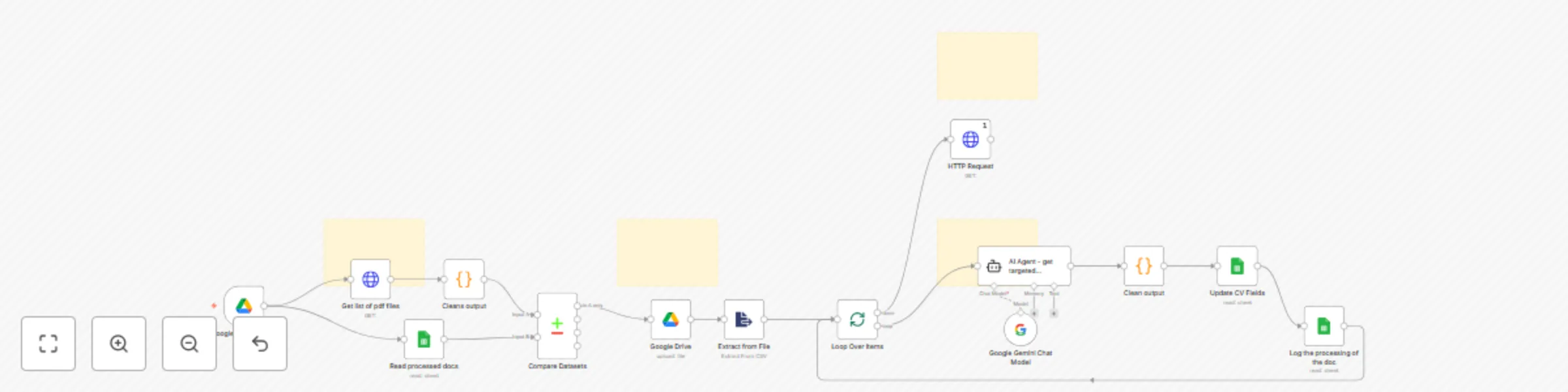
đź“‘ Anonymize & reformat CVs with Gemini AI, Google Sheets & Apps Script

Workflow preview

Workflow preview
100%
đź“‘ Anonymize & reformat CVs with Gemini AI, Google Sheets & Apps Script preview
Open on n8n.io

Important notice

This workflow is provided as-is. Please review and test before using in production.

1. Workflow Overview

CV Anonymization & Reformatting Automation An advanced N8N workflow to anonymize and reformat resumes for internal or external distribution Overview This template automates the anonymization,...

Best for

  • HR automation workflows
  • AI Summarization automation workflows
  • advanced n8n builders looking for reusable templates

Tools used

n8n-nodes-base.comparedatasets, n8n-nodes-base.googledrive, n8n-nodes-base.extractfromfile, @n8n/n8n-nodes-langchain.lmchatgooglegemini, n8n-nodes-base.splitinbatches, n8n-nodes-base.googlesheets, n8n-nodes-base.code, n8n-nodes-base.httprequest

Source and attribution

This workflow is cataloged by N8N Workflows and links back to its original n8n.io source page by Louis.

Original n8n.io source

1.1 Workflow description

Title
đź“‘ Anonymize & reformat CVs with Gemini AI, Google Sheets & Apps Script
Workflow name
đź“‘ Anonymize & reformat CVs with Gemini AI, Google Sheets & Apps Script

đź§ľ CV Anonymization & Reformatting Automation

An advanced N8N workflow to anonymize and reformat resumes for internal or external distribution

🔍 Overview

This template automates the anonymization, structuring, and reformatting of CVs/resumes using a combination of AI, PDF parsing, and Google Apps Script. It’s ideal for companies or teams that need to showcase their workforce—while ensuring candidate privacy and presenting the information in a standardized format.

👥 Who it's for

  • HR departments
  • Consulting agencies
  • Project managers needing anonymized candidate profiles
  • Any enterprise team required to share CVs in a consistent, brand-compliant, and privacy-conscious way

⚙️ What it does

  1. Watches a Folder for new PDFs (CVs) Extracts Content from the PDF 2.Uses Gemini Flash 2.0 to intelligently structure the resume content
  2. Stores the structured data in a Google Sheet
  3. Generates a New CV from a customizable template via Google Apps Script
  4. Anonymizes Names (e.g. “John Doe” → “J. D.”)
  5. (Optional) Sends or downloads the final anonymized version

🛠️ Setup Requirements

To use this workflow, you’ll need to configure:

  • Your input/output folders Field mappings (e.g. what to extract)
  • A Google Apps Script endpoint for PDF generation
  • A Google Sheet acting as your structured data database
  • A Gemini API key and access (or any other LLM)

đź’ˇ Templates are customizable: you can define your own layout as long as the placeholders match your database field names.

✨ Customization Ideas

Automatically email the anonymized CV to a recipient Use conditional logic to switch templates (e.g. for different roles or departments) Add a second formatting layer for internal vs external audiences

1.2 Logical Blocks

This catalog entry is organized from the workflow JSON. The node-level section below shows the executable blocks available for review before importing the template.

2. Block-by-Block Analysis

Block 1 - Compare Datasets

Type / Role
n8n-nodes-base.compareDatasets - compareDatasets
Config choices
Version 2.3

Block 2 - Google Drive

Type / Role
n8n-nodes-base.googleDrive - googleDrive
Config choices
Version 3

Block 3 - Extract from File

Type / Role
n8n-nodes-base.extractFromFile - extractFromFile
Config choices
Version 1

Block 4 - Google Gemini Chat Model

Type / Role
@n8n/n8n-nodes-langchain.lmChatGoogleGemini - lmChatGoogleGemini
Config choices
Version 1

Block 5 - Loop Over Items

Type / Role
n8n-nodes-base.splitInBatches - splitInBatches
Config choices
Version 3

Block 6 - Update CV Fields

Type / Role
n8n-nodes-base.googleSheets - googleSheets
Config choices
Version 4.5

Block 7 - Clean output

Type / Role
n8n-nodes-base.code - code
Config choices
Version 2

Block 8 - Log the processing of the doc

Type / Role
n8n-nodes-base.googleSheets - googleSheets
Config choices
Version 4.5

Block 9 - Cleans output

Type / Role
n8n-nodes-base.code - code
Config choices
Version 2

Block 10 - Get list of pdf files

Type / Role
n8n-nodes-base.httpRequest - httpRequest
Config choices
Version 4.2

Block 11 - Read processed docs

Type / Role
n8n-nodes-base.googleSheets - googleSheets
Config choices
Version 4.5

Block 12 - Sticky Note

Type / Role
n8n-nodes-base.stickyNote - stickyNote
Config choices
Version 1

Block 13 - Sticky Note1

Type / Role
n8n-nodes-base.stickyNote - stickyNote
Config choices
Version 1

Block 14 - AI Agent - get targeted elements from text

Type / Role
@n8n/n8n-nodes-langchain.agent - agent
Config choices
Version 1.9

Block 15 - Sticky Note2

Type / Role
n8n-nodes-base.stickyNote - stickyNote
Config choices
Version 1

Block 16 - HTTP Request

Type / Role
n8n-nodes-base.httpRequest - httpRequest
Config choices
Version 4.2

Block 17 - Sticky Note3

Type / Role
n8n-nodes-base.stickyNote - stickyNote
Config choices
Version 1

Block 18 - Google Drive Trigger

Type / Role
n8n-nodes-base.googleDriveTrigger - googleDriveTrigger
Config choices
Version 1

3. Summary Table

Workflow đź“‘ Anonymize & reformat CVs with Gemini AI, Google Sheets & Apps Script
Complexity advanced
Nodes 18
Categories HR, AI Summarization
Author Louis
Published 05 Jun 2025

4. Reproducing the Workflow from Scratch

  1. 1. Download the workflow JSON

    Use the JSON export at /data/workflows/4708/4708.json as the source template for this automation.

  2. 2. Import the template into n8n

    Open n8n, import the downloaded JSON, and review each node before activating the workflow.

  3. 3. Configure credentials and variables

    Replace placeholder credentials, API keys, webhook URLs, account IDs, and environment-specific values with your own settings.

  4. 4. Test with sample data

    Run the workflow manually or in a staging workspace, inspect node output, and confirm downstream systems receive the expected data.

  5. 5. Activate and monitor

    Enable the workflow only after testing, then monitor executions, errors, and rate limits during the first production runs.

5. General Notes & Resources

Review imported nodes carefully before activation. This catalog entry is intended to help you inspect the workflow structure, understand required services, and find related templates faster.

Node names, credentials, schedules, webhook paths, and external service limits may need adjustment for your workspace.

Frequently asked questions

What does đź“‘ Anonymize & reformat CVs with Gemini AI, Google Sheets & Apps Script do?

CV Anonymization & Reformatting Automation An advanced N8N workflow to anonymize and reformat resumes for internal or external distribution Overview This template automates the anonymization,...

What do I need before importing this workflow?

Review the workflow JSON, configure any required credentials in n8n, and test the automation in a safe workspace before using it in production.

Can I customize this workflow?

Yes. Use the block-by-block analysis and the downloadable JSON to inspect each node, then adjust credentials, prompts, schedules, filters, or destinations for your HR, AI Summarization use case.