Alert on equipment health issues with Google Sheets and MS Teams integration
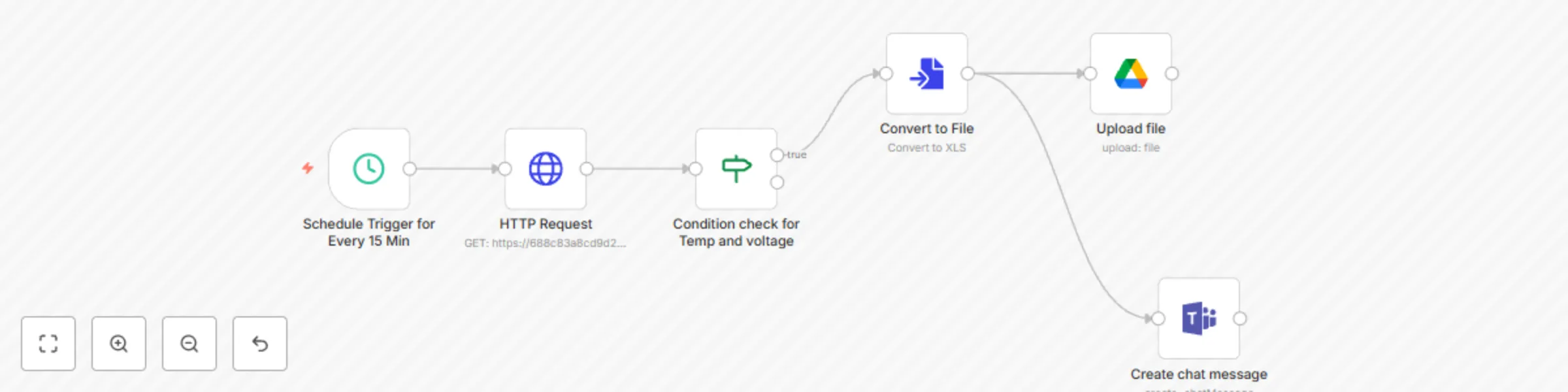
Workflow preview

$20/month : Unlimited workflows
2500 executions/month

THE #1 IN WEB SCRAPING
Scrape any website without limits
HOSTINGER  Early Deal
DISCOUNT 20% Try free
Early DealDISCOUNT 20%
Self-hosted n8n
Unlimited workflows - from $4.99/mo

#1 hub for scraping, AI & automation
6000+ actors - $5 credits/mo
Important notice
This workflow is provided as-is. Please review and test before using in production.
Overview
⚙️ Advanced Equipment Health Monitor with MS Teams Integration (n8n | API | Google Sheets | MSTeams)
This n8n workflow automatically monitors equipment health by fetching real-time metrics like temperature, voltage and operational status. If any of these parameters cross critical thresholds, an alert is instantly sent to a Microsoft Teams channel and the event is logged in Google Sheets. The workflow runs every 15 minutes by default.
⚡ Quick Implementation Steps
- Import the workflow JSON into your n8n instance.
- Open the "Set Config" node and update:
- API endpoint
- Teams webhook URL
- Threshold values
- Google Sheet ID
- Activate the workflow to start receiving alerts every 15 minutes.
🎯 Who’s It For
- Renewable energy site operators (solar, wind)
- Plant maintenance and operations teams
- Remote infrastructure monitoring services
- IoT-integrated energy platforms
- Enterprise environments using Microsoft Teams
🛠 Requirements
| Tool | Purpose |
|---|---|
| n8n Instance | To run and schedule automation |
| HTTP API | Access to your equipment or IoT platform health API |
| Microsoft Teams | Incoming Webhook URL configured |
| Google Sheets | Logging and analytics |
| SMTP (optional) | For email-based alternatives or expansions |
🧠 What It Does
- Runs every 15 minutes to check the latest equipment metrics.
- Compares values (temperature, voltage, status) against configured thresholds.
- Triggers a Microsoft Teams message when a threshold is breached.
- Appends the alert data to a Google Sheet for logging and review.
🧩 Workflow Components
- Set Node: Configures thresholds, endpoints, webhook URL and Sheet ID.
- Cron Node: Triggers the check every 15 minutes.
- HTTP Request Node: Pulls data from your equipment health monitoring API.
- IF Node: Evaluates if conditions are within or outside defined limits.
- MS Teams Alert Node: Sends structured alerts using a Teams incoming webhook.
- Google Sheets Node: Logs alert details for recordkeeping and analytics.
🔧 How To Set Up – Step-by-Step
Import Workflow:
- In n8n, click Import and upload the provided
.jsonfile.
- In n8n, click Import and upload the provided
Update Configurations:
- Open the Set Config node.
- Replace the placeholder values:
apiEndpoint: URL to fetch equipment data.teamsWebhookUrl: Your MS Teams channel webhook.temperatureThreshold: Example = 80voltageThreshold: Example = 400googleSheetId: Google Sheet ID (must be shared with n8n service account).
Check Webhook Integration:
- Ensure your MS Teams webhook is properly authorized and points to a live channel.
Run & Monitor:
- Enable the workflow and view logs/alerts.
- Adjust thresholds as needed.
🧪 How To Customize
| Customization | How |
|---|---|
| Add more parameters (humidity, pressure) | Extend the HTTP + IF node conditions |
| Change alert frequency | Edit the Cron node |
| Use Slack or Email instead of Teams | Replace MS Teams node with Slack or Email node |
| Add PDF Report Generation | Use HTML → PDF node and email the report |
| Export to Database | Add a PostgreSQL or MySQL node instead of Google Sheets |
➕ Add‑ons (Advanced)
| Add-on | Description |
|---|---|
| 📦 Auto-Ticketing | Auto-create issues in Jira, Trello or ClickUp for serious faults |
| 📊 Dashboard Sync | Send real-time logs to BigQuery or InfluxDB |
| 🧠 Predictive Alerts | Use machine learning APIs to flag anomalies |
| 🗂 Daily Digest | Compile all incidents into a daily summary email or Teams post |
| 📱 Mobile Alert | Integrate Twilio for SMS alerts or WhatsApp notifications |
📈 Example Use Cases
- Monitor solar inverter health for overheating or voltage drops.
- Alert field engineers via Teams when a wind turbine sensor fails.
- Log and visualize hardware issues for weekly analytics.
- Automate SLA compliance tracking through timely notifications.
- Ensure distributed infrastructure (e.g., substations) are always in operational range.
🧯 Troubleshooting Guide
| Issue | Possible Cause | Solution |
|---|---|---|
| No Teams alert | Incorrect webhook URL or formatting | Recheck the Teams webhook and payload |
| Workflow not triggering | Cron node misconfigured | Ensure it’s set to run every 15 mins and workflow is active |
| Google Sheet not updating | Sheet ID is wrong or not shared | Share Sheet with your n8n Google service account |
| No data from API | Endpoint URL is down or wrong | Test the endpoint manually with Postman or browser |
📞 Need Assistance?
Need help tailoring this to your exact equipment type or expanding the workflow? 👉 Contact WeblineIndia – Expert automation partners for renewable energy, infrastructure and enterprise workflows.