Block 1 - HTTP Request
- Type / Role
- n8n-nodes-base.httpRequest - httpRequest
- Config choices
- Version 4.2


 Early Deal
This workflow is provided as-is. Please review and test before using in production.
️ Advanced Equipment Health Monitor with MS Teams Integration (n8n API Google Sheets MSTeams) This n8n workflow automatically monitors equipment health by fetching real time metrics like tem...
n8n-nodes-base.httprequest, n8n-nodes-base.converttofile, n8n-nodes-base.googledrive, n8n-nodes-base.if, n8n-nodes-base.scheduletrigger, n8n-nodes-base.microsoftteams
This workflow is cataloged by N8N Workflows and links back to its original n8n.io source page by WeblineIndia.
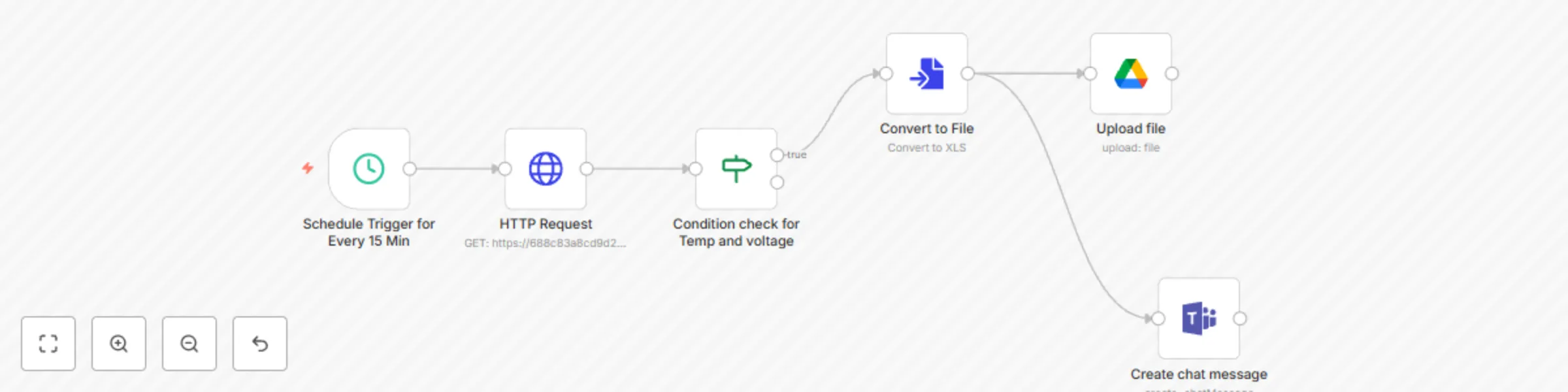
Original n8n.io sourceThis n8n workflow automatically monitors equipment health by fetching real-time metrics like temperature, voltage and operational status. If any of these parameters cross critical thresholds, an alert is instantly sent to a Microsoft Teams channel and the event is logged in Google Sheets. The workflow runs every 15 minutes by default.
| Tool | Purpose |
|---|---|
| n8n Instance | To run and schedule automation |
| HTTP API | Access to your equipment or IoT platform health API |
| Microsoft Teams | Incoming Webhook URL configured |
| Google Sheets | Logging and analytics |
| SMTP (optional) | For email-based alternatives or expansions |
Import Workflow:
.json file.Update Configurations:
apiEndpoint: URL to fetch equipment data.teamsWebhookUrl: Your MS Teams channel webhook.temperatureThreshold: Example = 80voltageThreshold: Example = 400googleSheetId: Google Sheet ID (must be shared with n8n service account).Check Webhook Integration:
Run & Monitor:
| Customization | How |
|---|---|
| Add more parameters (humidity, pressure) | Extend the HTTP + IF node conditions |
| Change alert frequency | Edit the Cron node |
| Use Slack or Email instead of Teams | Replace MS Teams node with Slack or Email node |
| Add PDF Report Generation | Use HTML → PDF node and email the report |
| Export to Database | Add a PostgreSQL or MySQL node instead of Google Sheets |
| Add-on | Description |
|---|---|
| 📦 Auto-Ticketing | Auto-create issues in Jira, Trello or ClickUp for serious faults |
| 📊 Dashboard Sync | Send real-time logs to BigQuery or InfluxDB |
| 🧠 Predictive Alerts | Use machine learning APIs to flag anomalies |
| 🗂 Daily Digest | Compile all incidents into a daily summary email or Teams post |
| 📱 Mobile Alert | Integrate Twilio for SMS alerts or WhatsApp notifications |
| Issue | Possible Cause | Solution |
|---|---|---|
| No Teams alert | Incorrect webhook URL or formatting | Recheck the Teams webhook and payload |
| Workflow not triggering | Cron node misconfigured | Ensure it’s set to run every 15 mins and workflow is active |
| Google Sheet not updating | Sheet ID is wrong or not shared | Share Sheet with your n8n Google service account |
| No data from API | Endpoint URL is down or wrong | Test the endpoint manually with Postman or browser |
Need help tailoring this to your exact equipment type or expanding the workflow? 👉 Contact WeblineIndia – Expert automation partners for renewable energy, infrastructure and enterprise workflows.
This catalog entry is organized from the workflow JSON. The node-level section below shows the executable blocks available for review before importing the template.
| Workflow | Alert on equipment health issues with Google Sheets and MS Teams integration |
|---|---|
| Complexity | intermediate |
| Nodes | 6 |
| Categories | DevOps |
| Author | WeblineIndia |
| Published | 04 Aug 2025 |
Use the JSON export at /data/workflows/6958/6958.json as the source template for this automation.
Open n8n, import the downloaded JSON, and review each node before activating the workflow.
Replace placeholder credentials, API keys, webhook URLs, account IDs, and environment-specific values with your own settings.
Run the workflow manually or in a staging workspace, inspect node output, and confirm downstream systems receive the expected data.
Enable the workflow only after testing, then monitor executions, errors, and rate limits during the first production runs.
Review imported nodes carefully before activation. This catalog entry is intended to help you inspect the workflow structure, understand required services, and find related templates faster.
Node names, credentials, schedules, webhook paths, and external service limits may need adjustment for your workspace.
️ Advanced Equipment Health Monitor with MS Teams Integration (n8n API Google Sheets MSTeams) This n8n workflow automatically monitors equipment health by fetching real time metrics like tem...
Review the workflow JSON, configure any required credentials in n8n, and test the automation in a safe workspace before using it in production.
Yes. Use the block-by-block analysis and the downloadable JSON to inspect each node, then adjust credentials, prompts, schedules, filters, or destinations for your DevOps use case.