Block 1 - README
- Type / Role
- n8n-nodes-base.stickyNote - stickyNote
- Config choices
- Version 1


 Early Deal
Automatically back up and sync your n8n workflows to GitHub with unlimited version control. This workflow ensures your repository always reflects the latest state of your n8n instance by creating, ...
n8n-nodes-base.stickynote, n8n-nodes-base.scheduletrigger, n8n-nodes-base.github, n8n-nodes-base.aggregate, n8n-nodes-base.n8n, n8n-nodes-base.code, n8n-nodes-base.converttofile, n8n-nodes-base.extractfromfile
This workflow is cataloged by N8N Workflows and links back to its original n8n.io source page by Ucartz Online.
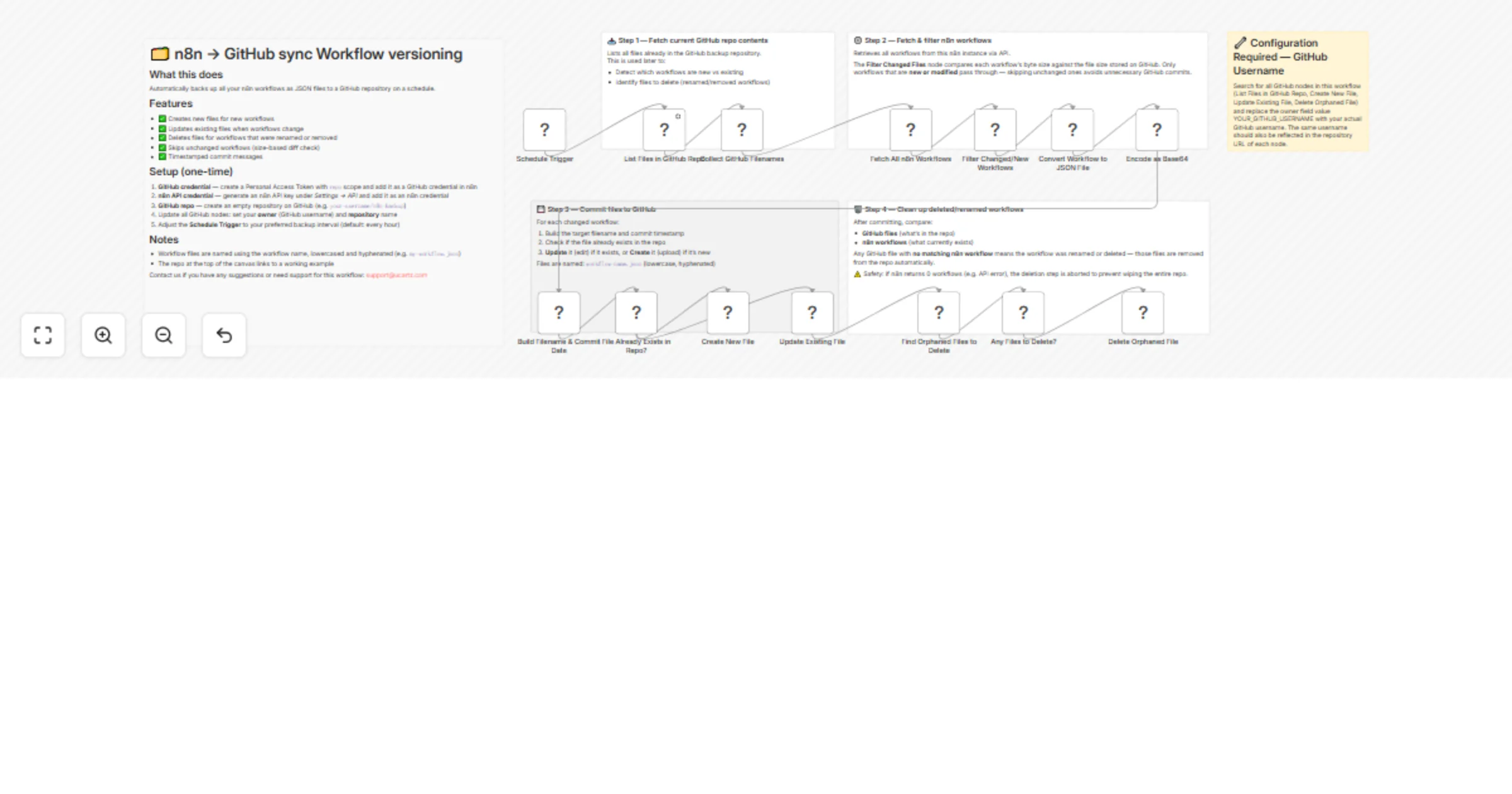
Original n8n.io sourceAutomatically back up and sync your n8n workflows to GitHub with unlimited version control. This workflow ensures your repository always reflects the latest state of your n8n instance by creating, updating, and deleting workflow files as needed.
Ideal for developers, teams, and DevOps use cases where workflow backup, versioning, and audit tracking are important.
This workflow enables unlimited version control using GitHub, solving the limitation of version history that is not available in the self-hosted free version of n8n.
Every workflow change is stored as a Git commit, allowing you to:
Track full history of changes Roll back to previous versions anytime Maintain a reliable audit trail
🔄 Automatic Sync – Runs on a schedule to keep workflows updated 🆕 Create New Workflows – Automatically adds new workflows to GitHub ✏️ Update Only When Changed – Detects and updates modified workflows 🧹 Auto Cleanup – Removes deleted or renamed workflows from GitHub ⚡ Smart Diff Check – Skips unchanged workflows to avoid unnecessary commits 🕒 Timestamped Commits – Clear and trackable commit history ♾️ Unlimited Version Control – Store unlimited workflow versions in GitHub
Fetch existing files from your GitHub repository Retrieve all workflows from your n8n instance via API Compare workflows using size-based change detection Create or update workflow JSON files in GitHub Remove orphaned files (deleted or renamed workflows)
GitHub Personal Access Token (with repo scope) n8n API Key (Settings → API) A GitHub repository for storing workflow backups Update GitHub nodes with your repository name and owner Configure the schedule trigger as needed
Workflows are stored as: workflow-name.json (lowercase, hyphen-separated)
Includes a safety check to prevent accidental deletion of all files if the n8n API returns zero workflows (e.g., due to an error).
Backup and restore n8n workflows Version control and change tracking Team collaboration via GitHub CI/CD integration for workflow management
Contact us for suggestions or support: [email protected]
This catalog entry is organized from the workflow JSON. The node-level section below shows the executable blocks available for review before importing the template.
| Workflow | Sync self-hosted workflow backups to GitHub for version control |
|---|---|
| Complexity | advanced |
| Nodes | 20 |
| Categories | DevOps |
| Author | Ucartz Online |
| Published | 08 Apr 2026 |
Use the JSON export at /data/workflows/14925/14925.json as the source template for this automation.
Open n8n, import the downloaded JSON, and review each node before activating the workflow.
Replace placeholder credentials, API keys, webhook URLs, account IDs, and environment-specific values with your own settings.
Run the workflow manually or in a staging workspace, inspect node output, and confirm downstream systems receive the expected data.
Enable the workflow only after testing, then monitor executions, errors, and rate limits during the first production runs.
Review imported nodes carefully before activation. This catalog entry is intended to help you inspect the workflow structure, understand required services, and find related templates faster.
Node names, credentials, schedules, webhook paths, and external service limits may need adjustment for your workspace.
Automatically back up and sync your n8n workflows to GitHub with unlimited version control. This workflow ensures your repository always reflects the latest state of your n8n instance by creating, ...
Review the workflow JSON, configure any required credentials in n8n, and test the automation in a safe workspace before using it in production.
Yes. Use the block-by-block analysis and the downloadable JSON to inspect each node, then adjust credentials, prompts, schedules, filters, or destinations for your DevOps use case.