Block 1 - When clicking ‘Execute workflow’
- Type / Role
- n8n-nodes-base.manualTrigger - manualTrigger
- Config choices
- Version 1


 Early Deal
This workflow is provided as-is. Please review and test before using in production.
Description Automate your AI powered outreach and follow up pipeline end to end with GPT 4o, Gmail, and Google Sheets. This workflow personalizes emails for each lead, manages follow ups autom...
n8n-nodes-base.manualtrigger, @n8n/n8n-nodes-langchain.lmchatazureopenai, n8n-nodes-base.googlesheets, n8n-nodes-base.if, @n8n/n8n-nodes-langchain.agent, n8n-nodes-base.code, n8n-nodes-base.gmail, n8n-nodes-base.wait
This workflow is cataloged by N8N Workflows and links back to its original n8n.io source page by Rahul Joshi.
Original n8n.io sourceAutomate your AI-powered outreach and follow-up pipeline end-to-end with GPT-4o, Gmail, and Google Sheets. 🤖📬 This workflow personalizes emails for each lead, manages follow-ups automatically, tracks client replies, and updates CRM records in real time — all from a single Google Sheet. Ideal for sales and growth teams looking to convert leads faster without manual effort. ⚙️🚀
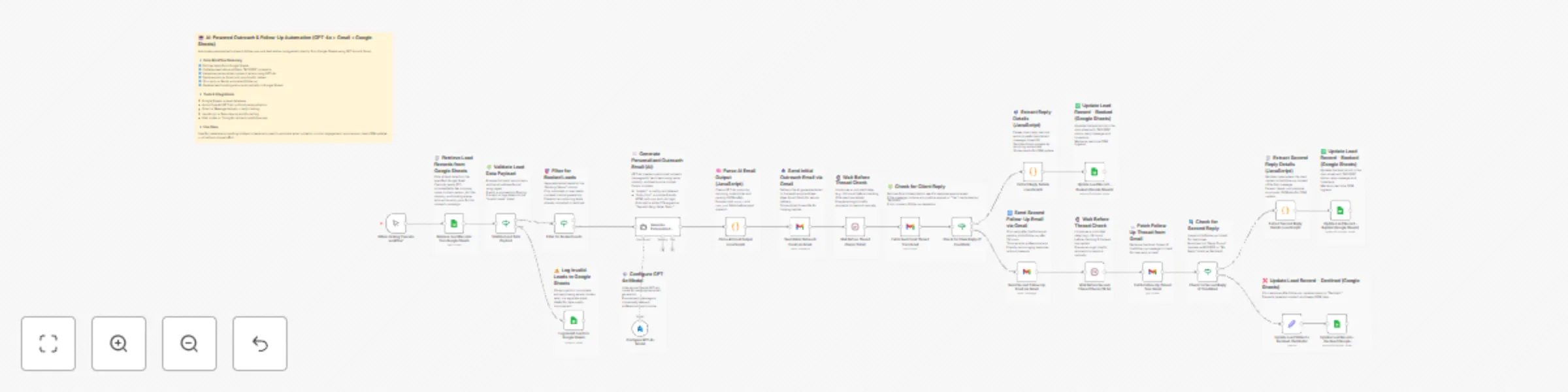
1️⃣ Starts manually when you click “Execute workflow.” 🕹️ 2️⃣ Fetches all leads from the Google Sheet (sample_leads_50). 📊 3️⃣ Validates email format and filters only active (unbooked) leads. 🔍 4️⃣ Uses Azure OpenAI GPT-4o to generate short, personalized outreach emails in HTML. ✉️ 5️⃣ Cleans and parses the AI output (subject + HTML body). 🧠 6️⃣ Sends the first outreach email via Gmail and stores its thread ID. 📤 7️⃣ Waits 24 hours, then checks for a client reply in the Gmail thread. ⏱️ 8️⃣ If a positive reply is found → marks lead as BOOKED and updates in Sheets. ✅ 9️⃣ If no reply → triggers a polite follow-up email, waits again 24 hours, and checks the thread a second time. 🔁 🔟 If a second reply is found → marks BOOKED and logs the client message.
1️⃣1️⃣ If still no response → updates status to Declined in Google Sheets. ❌
1️⃣2️⃣ Logs invalid or incomplete leads to a separate sheet for data cleanup. 🧾
✅ Eliminates manual outreach and follow-up effort. ✅ Produces personalized, context-aware AI emails for every lead. ✅ Auto-tracks replies and updates CRM status with zero input. ✅ Prevents duplicate or repeated contact with booked clients. ✅ Keeps lead database synchronized and audit-ready.
💼 Sales and Business Development teams automating outreach. 📈 Marketing and Growth teams running re-engagement campaigns. 🤖 Automation and RevOps teams integrating AI lead workflows. 💬 Freelancers and agencies managing large prospect lists. 📊 Operations teams maintaining CRM cleanliness and tracking.
1️⃣ Connect your Google Sheets, Azure OpenAI, and Gmail credentials. 2️⃣ Set your Google Sheet ID and tab name (outreach automation). 3️⃣ Update the GPT-4o system prompt to match your tone and signature. 4️⃣ Verify column headers (Company Name, Email, Booking Status, etc.). 5️⃣ Test the email validation branch with sample data. 6️⃣ Run once manually to confirm Gmail thread creation and reply detection. 7️⃣ Confirm successful CRM updates in Google Sheets. 8️⃣ Activate for continuous lead outreach and follow-up automation. ✅
This catalog entry is organized from the workflow JSON. The node-level section below shows the executable blocks available for review before importing the template.
Showing the first 24 of 42 workflow blocks. Download the JSON for the full node graph.
| Workflow | AI-powered outreach & follow-up automation (GPT-4o + Gmail + Google Sheets) |
|---|---|
| Complexity | advanced |
| Nodes | 42 |
| Categories | Lead Nurturing, Multimodal AI |
| Author | Rahul Joshi |
| Published | 14 Nov 2025 |
Use the JSON export at /data/workflows/10827/10827.json as the source template for this automation.
Open n8n, import the downloaded JSON, and review each node before activating the workflow.
Replace placeholder credentials, API keys, webhook URLs, account IDs, and environment-specific values with your own settings.
Run the workflow manually or in a staging workspace, inspect node output, and confirm downstream systems receive the expected data.
Enable the workflow only after testing, then monitor executions, errors, and rate limits during the first production runs.
Review imported nodes carefully before activation. This catalog entry is intended to help you inspect the workflow structure, understand required services, and find related templates faster.
Node names, credentials, schedules, webhook paths, and external service limits may need adjustment for your workspace.
Description Automate your AI powered outreach and follow up pipeline end to end with GPT 4o, Gmail, and Google Sheets. This workflow personalizes emails for each lead, manages follow ups autom...
Review the workflow JSON, configure any required credentials in n8n, and test the automation in a safe workspace before using it in production.
Yes. Use the block-by-block analysis and the downloadable JSON to inspect each node, then adjust credentials, prompts, schedules, filters, or destinations for your Lead Nurturing, Multimodal AI use case.