AI-powered candidate shortlisting automation for ERPNext

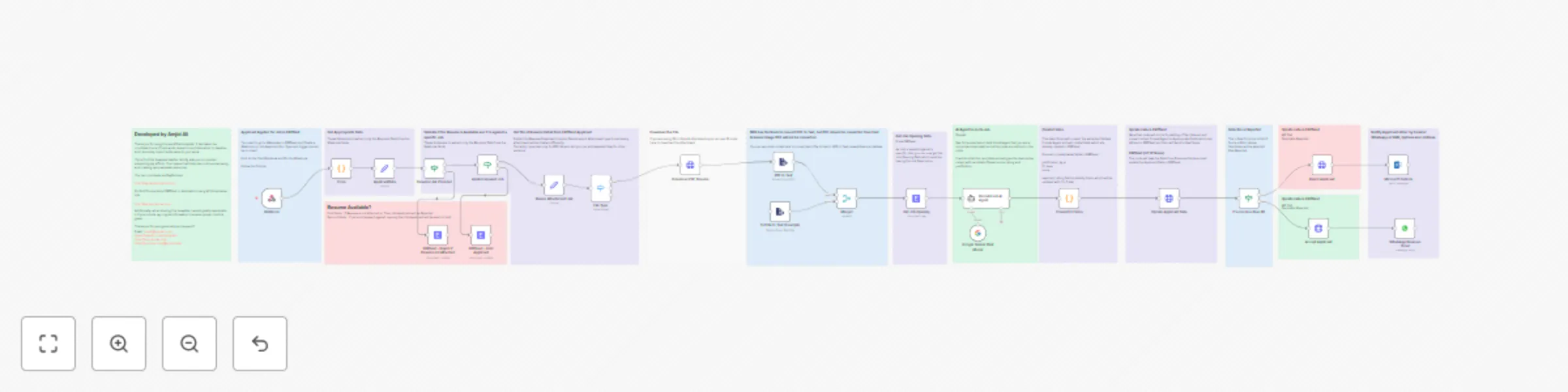
Workflow preview

Workflow preview
100%
AI-powered candidate shortlisting automation for ERPNext preview
Open on n8n.io

Important notice

This workflow is provided as-is. Please review and test before using in production.

1. Workflow Overview

Template Guide for Employee Shortlisting AI Agent Automation Overview This template automates the process of shortlisting job applicants using ERPNext, n8n, and AI powered decision making tools lik...

Best for

  • HR automation workflows
  • AI Summarization automation workflows
  • advanced n8n builders looking for reusable templates

Tools used

n8n-nodes-base.stickynote, n8n-nodes-base.code, n8n-nodes-base.set, n8n-nodes-base.erpnext, n8n-nodes-base.if, @n8n/n8n-nodes-langchain.lmchatgooglegemini, n8n-nodes-base.httprequest, n8n-nodes-base.webhook

Source and attribution

This workflow is cataloged by N8N Workflows and links back to its original n8n.io source page by Amjid Ali.

Original n8n.io source

1.1 Workflow description

Title
AI-powered candidate shortlisting automation for ERPNext
Workflow name
AI-powered candidate shortlisting automation for ERPNext

Template Guide for Employee Shortlisting AI Agent Automation

Overview

This template automates the process of shortlisting job applicants using ERPNext, n8n, and AI-powered decision-making tools like Google Gemini and OpenAI. It reduces manual effort, ensures fast evaluations, and provides justifiable decisions about applicants. This is ideal for businesses aiming to streamline their recruitment process while maintaining accuracy and professionalism.


What Does This Template Do?

  1. Webhook Integration with ERPNext: Automatically triggers the workflow when a job application is created in ERPNext.
  2. Resume Validation: Ensures resumes are attached and correctly processes various file formats like PDF and DOC.
  3. AI-Powered Evaluation: Uses AI to compare resumes against job descriptions and provides a:
    • Fit Level (Strong, Moderate, or Weak)
    • Score (0–100)
    • Justification for the decision.
  4. Automated Decision Making: Based on AI-generated scores:
    • Candidates with a score of 80 or higher are Accepted.
    • Candidates below 80 are Rejected.
    • Applications missing required fields or attachments are put On Hold.
  5. ERPNext Integration: Updates applicant records in ERPNext, including custom fields such as justification, fit level, and scores.
  6. Notifications: Notifies candidates via email, WhatsApp, or SMS about their application status.

Step-by-Step Guide

Step 1: Set Up ERPNext Webhook
  • Go to Webhooks in ERPNext.
  • Create a webhook for the Job Applicant DocType.
  • Set the trigger to Insert.
  • Pin and test the webhook to ensure proper data flow.
Step 2: Import the Template into n8n
  • Open your n8n instance.
  • Import the provided workflow template.
  • Check all nodes for proper configuration.
Step 3: Configure Credentials
  • Add your ERPNext API credentials to the ERPNext nodes.
  • Add credentials for AI services like OpenAI or Google Gemini.
  • Configure additional services like WhatsApp or email if you plan to use them for notifications.
Step 4: Test Resume Validation
  • Test how the workflow handles different file types (e.g., PDF, DOC, JPG).
  • Ensure resumes without the proper format or attachment are flagged and rejected.
Step 5: AI Evaluation
  • The AI model (Google Gemini or OpenAI) will evaluate resumes against job descriptions.
  • Customize the AI prompt to suit your job evaluation needs.
  • The output will include a Fit Level, Score, Rating, and Justification.
Step 6: Decision Automation
  • The workflow automatically categorizes applicants:
    • Accepted for scores ≥ 80.
    • Rejected for scores < 80.
    • On Hold if essential fields or attachments are missing.
Step 7: Update ERPNext Records
  • The workflow updates the Job Applicant record in ERPNext with:
    • Status (Accepted, Rejected, On Hold)
    • AI-generated Fit Level, Score, Rating, and Justification.
Step 8: Notify Candidates
  • Configure notification nodes (email, WhatsApp, or SMS).
  • Inform candidates about their application status and include feedback if required.

How It Works

  1. Trigger: The workflow starts when a job application is submitted in ERPNext.
  2. Validation: Checks if the resume is attached and in the correct format.
  3. AI Evaluation: Compares the resume with the job description and generates a decision.
  4. ERPNext Update: Updates the applicant's record with the decision and justification.
  5. Notification: Sends a personalized notification to the candidate.

Dos and Don’ts

Dos:
  • Customize Prompts: Tailor the AI prompt to match your specific job evaluation requirements.
  • Test the Workflow: Run sample data to ensure the process works as intended.
  • Secure Your Credentials: Keep your API credentials safe and do not share them publicly.
  • Optimize for Different Formats: Ensure the workflow can handle all types of resumes you expect.
Don’ts:
  • Avoid Manual Intervention: Let the workflow handle most of the tasks to ensure efficiency.
  • Do Not Skip Testing: Always test the workflow with various scenarios to avoid errors.
  • Do Not Overlook Notifications: Ensure candidates are notified promptly to maintain professionalism.

Customization Options

  • Add logic for more file types (e.g., scanned images using OCR).
  • Enhance the AI prompts to analyze more complex resume data.
  • Integrate additional tools like Slack or Trello for recruitment tracking.

Resources

GET n8n Now

N8N COURSE

n8n Book


Support

If you encounter issues or want to explore more possibilities with AI-driven automation, feel free to reach out:


Let me know if you'd like further details or modifications to the guide!

1.2 Logical Blocks

This catalog entry is organized from the workflow JSON. The node-level section below shows the executable blocks available for review before importing the template.

2. Block-by-Block Analysis

Block 1 - Sticky Note4

Type / Role
n8n-nodes-base.stickyNote - stickyNote
Config choices
Version 1

Block 2 - Sticky Note6

Type / Role
n8n-nodes-base.stickyNote - stickyNote
Config choices
Version 1

Block 3 - Sticky Note

Type / Role
n8n-nodes-base.stickyNote - stickyNote
Config choices
Version 1

Block 4 - Code

Type / Role
n8n-nodes-base.code - code
Config choices
Version 2

Block 5 - Sticky Note2

Type / Role
n8n-nodes-base.stickyNote - stickyNote
Config choices
Version 1

Block 6 - ApplicantData

Type / Role
n8n-nodes-base.set - set
Config choices
Version 3.4

Block 7 - ERPNext - Reject if Resume not Attached

Type / Role
n8n-nodes-base.erpNext - erpNext
Config choices
Version 1

Block 8 - Applied Against Job

Type / Role
n8n-nodes-base.if - if
Config choices
Version 2.2

Block 9 - ERPNext - Hold Applicant

Type / Role
n8n-nodes-base.erpNext - erpNext
Config choices
Version 1

Block 10 - Sticky Note5

Type / Role
n8n-nodes-base.stickyNote - stickyNote
Config choices
Version 1

Block 11 - Get Job Opening

Type / Role
n8n-nodes-base.erpNext - erpNext
Config choices
Version 1

Block 12 - Sticky Note7

Type / Role
n8n-nodes-base.stickyNote - stickyNote
Config choices
Version 1

Block 13 - Sticky Note8

Type / Role
n8n-nodes-base.stickyNote - stickyNote
Config choices
Version 1

Block 14 - Google Gemini Chat Model

Type / Role
@n8n/n8n-nodes-langchain.lmChatGoogleGemini - lmChatGoogleGemini
Config choices
Version 1

Block 15 - Convert to Fields

Type / Role
n8n-nodes-base.code - code
Config choices
Version 2

Block 16 - Sticky Note9

Type / Role
n8n-nodes-base.stickyNote - stickyNote
Config choices
Version 1

Block 17 - If score less than 80

Type / Role
n8n-nodes-base.if - if
Config choices
Version 2.2

Block 18 - Reject Applicant

Type / Role
n8n-nodes-base.httpRequest - httpRequest
Config choices
Version 4.2

Block 19 - Update Applicant Data

Type / Role
n8n-nodes-base.httpRequest - httpRequest
Config choices
Version 4.2

Block 20 - Reume Attachment Link

Type / Role
n8n-nodes-base.set - set
Config choices
Version 3.4

Block 21 - Sticky Note10

Type / Role
n8n-nodes-base.stickyNote - stickyNote
Config choices
Version 1

Block 22 - Resume Link Provided

Type / Role
n8n-nodes-base.if - if
Config choices
Version 2.2

Block 23 - Accept Applicant

Type / Role
n8n-nodes-base.httpRequest - httpRequest
Config choices
Version 4.2

Block 24 - Sticky Note11

Type / Role
n8n-nodes-base.stickyNote - stickyNote
Config choices
Version 1

Showing the first 24 of 39 workflow blocks. Download the JSON for the full node graph.

3. Summary Table

Workflow AI-powered candidate shortlisting automation for ERPNext
Complexity advanced
Nodes 39
Categories HR, AI Summarization
Author Amjid Ali
Published 20 Jan 2025

4. Reproducing the Workflow from Scratch

  1. 1. Download the workflow JSON

    Use the JSON export at /data/workflows/2757/2757.json as the source template for this automation.

  2. 2. Import the template into n8n

    Open n8n, import the downloaded JSON, and review each node before activating the workflow.

  3. 3. Configure credentials and variables

    Replace placeholder credentials, API keys, webhook URLs, account IDs, and environment-specific values with your own settings.

  4. 4. Test with sample data

    Run the workflow manually or in a staging workspace, inspect node output, and confirm downstream systems receive the expected data.

  5. 5. Activate and monitor

    Enable the workflow only after testing, then monitor executions, errors, and rate limits during the first production runs.

5. General Notes & Resources

Review imported nodes carefully before activation. This catalog entry is intended to help you inspect the workflow structure, understand required services, and find related templates faster.

Node names, credentials, schedules, webhook paths, and external service limits may need adjustment for your workspace.

Frequently asked questions

What does AI-powered candidate shortlisting automation for ERPNext do?

Template Guide for Employee Shortlisting AI Agent Automation Overview This template automates the process of shortlisting job applicants using ERPNext, n8n, and AI powered decision making tools lik...

What do I need before importing this workflow?

Review the workflow JSON, configure any required credentials in n8n, and test the automation in a safe workspace before using it in production.

Can I customize this workflow?

Yes. Use the block-by-block analysis and the downloadable JSON to inspect each node, then adjust credentials, prompts, schedules, filters, or destinations for your HR, AI Summarization use case.