Block 1 - On form submission
- Type / Role
- n8n-nodes-base.formTrigger - formTrigger
- Config choices
- Version 2.2


 Early Deal
This workflow is provided as-is. Please review and test before using in production.
How it Works This workflow automates the process of handling job applications by extracting relevant information from submitted CVs, analyzing the candidate's qualifications against a predefined pr...
n8n-nodes-base.formtrigger, n8n-nodes-base.extractfromfile, @n8n/n8n-nodes-langchain.informationextractor, @n8n/n8n-nodes-langchain.chainsummarization, n8n-nodes-base.merge, n8n-nodes-base.set, n8n-nodes-base.googlesheets, @n8n/n8n-nodes-langchain.outputparserstructured
This workflow is cataloged by N8N Workflows and links back to its original n8n.io source page by Davide.
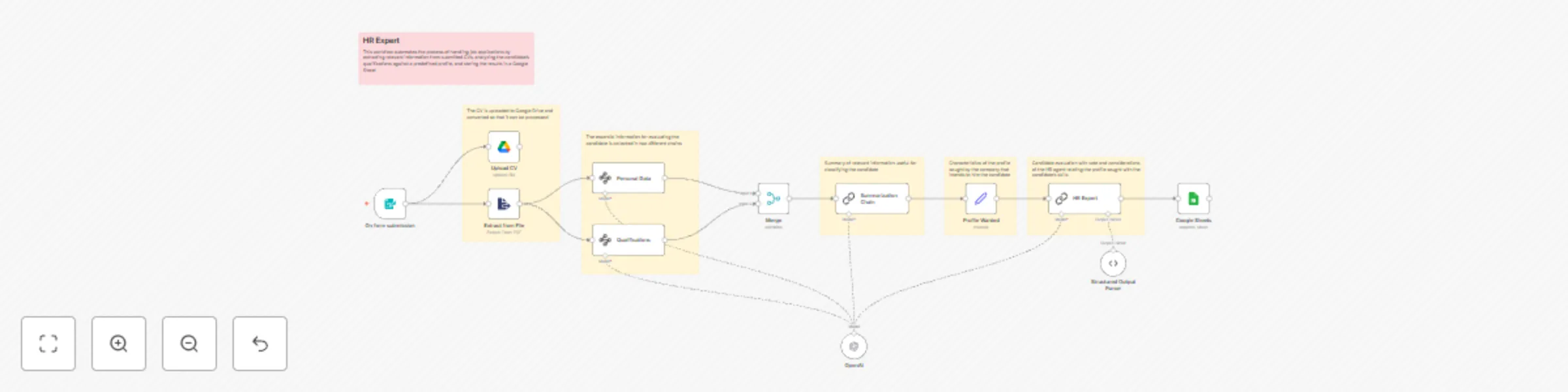
Original n8n.io sourceThis workflow automates the process of handling job applications by extracting relevant information from submitted CVs, analyzing the candidate's qualifications against a predefined profile, and storing the results in a Google Sheet. Here’s how it operates:
Data Collection and Extraction:
On form submission node), which triggers the extraction of data from the uploaded CV file using the Extract from File node.informationExtractor nodes (Qualifications and Personal Data) are used to parse specific details such as educational background, work history, skills, city, birthdate, and telephone number from the text content of the CV.Processing and Evaluation:
Merge node combines the extracted personal and qualification data into a single output.Summarization Chain that generates a concise summary of the candidate’s profile.HR Expert chain evaluates the candidate against a desired profile (Profile Wanted), assigning a score and providing considerations for hiring.Google Sheets node for further review or reporting purposes [[9]].To replicate this workflow within your own n8n environment, follow these steps:
Configuration:
Customization:
formTrigger node to match what kind of information you wish to collect from applicants.Qualifications, Summarization Chain, and HR Expert so they align with the type of analyses you want performed on the candidates' profiles.Google Sheets node to point towards your own spreadsheet where you would like the final outputs recorded.Contact me for consulting and support or add me on Linkedin.
This catalog entry is organized from the workflow JSON. The node-level section below shows the executable blocks available for review before importing the template.
| Workflow | AI automated HR workflow for CV analysis and candidate evaluation |
|---|---|
| Complexity | advanced |
| Nodes | 18 |
| Categories | HR, AI Summarization |
| Author | Davide |
| Published | 07 Feb 2025 |
Use the JSON export at /data/workflows/2860/2860.json as the source template for this automation.
Open n8n, import the downloaded JSON, and review each node before activating the workflow.
Replace placeholder credentials, API keys, webhook URLs, account IDs, and environment-specific values with your own settings.
Run the workflow manually or in a staging workspace, inspect node output, and confirm downstream systems receive the expected data.
Enable the workflow only after testing, then monitor executions, errors, and rate limits during the first production runs.
Review imported nodes carefully before activation. This catalog entry is intended to help you inspect the workflow structure, understand required services, and find related templates faster.
Node names, credentials, schedules, webhook paths, and external service limits may need adjustment for your workspace.
How it Works This workflow automates the process of handling job applications by extracting relevant information from submitted CVs, analyzing the candidate's qualifications against a predefined pr...
Review the workflow JSON, configure any required credentials in n8n, and test the automation in a safe workspace before using it in production.
Yes. Use the block-by-block analysis and the downloadable JSON to inspect each node, then adjust credentials, prompts, schedules, filters, or destinations for your HR, AI Summarization use case.