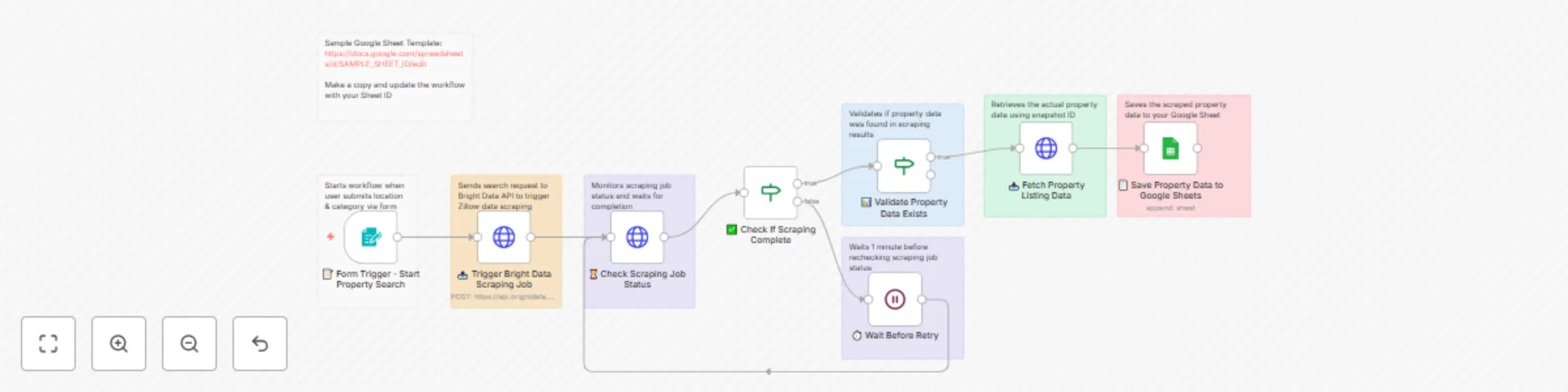
Zillow property scraper by location via Bright Data & Google Sheets

Workflow preview

Workflow preview
100%
Zillow property scraper by location via Bright Data & Google Sheets preview
Open on n8n.io

Important notice

This workflow is provided as-is. Please review and test before using in production.

1. Workflow Overview

Google Maps Business Phone Number Scraper Using Bright Data API & Google Sheets Integration This template requires a self hosted n8n instance to run. An automated workflow that extracts business...

Best for

  • Lead Generation automation workflows
  • advanced n8n builders looking for reusable templates

Tools used

n8n-nodes-base.formtrigger, n8n-nodes-base.httprequest, n8n-nodes-base.stickynote, n8n-nodes-base.wait, n8n-nodes-base.googlesheets, n8n-nodes-base.if

Source and attribution

This workflow is cataloged by N8N Workflows and links back to its original n8n.io source page by Incrementors.

Original n8n.io source

1.1 Workflow description

Title
Zillow property scraper by location via Bright Data & Google Sheets
Workflow name
Zillow property scraper by location via Bright Data & Google Sheets

🛒 Google Maps Business Phone Number Scraper Using Bright Data API & Google Sheets Integration

This template requires a self-hosted n8n instance to run.

An automated workflow that extracts business information including phone numbers from Google Maps using Bright Data's API and saves the data to Google Sheets for easy access and analysis.

📋 Overview

This workflow provides an automated solution for extracting business contact information from Google Maps based on location and keyword searches. Perfect for lead generation, market research, competitor analysis, and business directory creation.

✨ Key Features

  • 🎯 Form-Based Input: Easy-to-use form for location and keyword submission
  • 🗺️ Google Maps Integration: Uses Bright Data's Google Maps dataset for accurate business data
  • 📊 Comprehensive Data Extraction: Extracts business names, addresses, phone numbers, ratings, and more
  • 📧 Automated Processing: Handles the entire scraping process automatically
  • 📈 Google Sheets Storage: Automatically saves extracted data to organized spreadsheets
  • 🔄 Smart Status Checking: Monitors scraping progress with automatic retry logic
  • Fast & Reliable: Professional scraping with built-in error handling
  • 🎯 Customizable Output: Configurable data fields for specific business needs

🎯 What This Workflow Does

Input

  • Location: Geographic area to search (city, state, country)
  • Keywords: Business type or industry keywords

Processing

  1. Form Submission: User submits location and keywords through web form
  2. API Request: Sends scraping request to Bright Data's Google Maps dataset
  3. Status Monitoring: Continuously checks scraping progress
  4. Data Retrieval: Fetches completed business data when ready
  5. Data Storage: Saves extracted information to Google Sheets
  6. Error Handling: Implements retry logic for failed requests

Output Data Points

Field Description Example
Business Name Official business name from Google Maps "Joe's Pizza Restaurant"
Phone Number Contact phone number "+1-555-123-4567"
Address Complete business address "123 Main St, New York, NY 10001"
Rating Google Maps rating score 4.5
URL Google Maps listing URL "https://maps.google.com/..."

🚀 Setup Instructions

Prerequisites

  • n8n instance (self-hosted or cloud)
  • Google account with Sheets access
  • Bright Data account with Google Maps dataset access
  • 5-10 minutes for setup

Step 1: Import the Workflow

  1. Copy the JSON workflow code from the provided file
  2. In n8n: Workflows → + Add workflow → Import from JSON
  3. Paste JSON and click Import

Step 2: Configure Bright Data

  1. Set up Bright Data credentials:
    • In n8n: Credentials → + Add credential → HTTP Request Auth
    • Enter your Bright Data API key
    • Test the connection
  2. Configure dataset:
    • Ensure you have access to Google Maps dataset (gd_m8ebnr0q2qlklc02fz)
    • Verify dataset permissions in Bright Data dashboard

Step 3: Configure Google Sheets Integration

  1. Create a Google Sheet:
    • Go to Google Sheets
    • Create a new spreadsheet named "Business Data" or similar
    • Copy the Sheet ID from URL: https://docs.google.com/spreadsheets/d/SHEET_ID_HERE/edit
  2. Set up Google Sheets credentials:
    • In n8n: Credentials → + Add credential → Google Sheets OAuth2 API
    • Complete OAuth setup and test connection
  3. Prepare your data sheet with columns:
    • Column A: Name
    • Column B: Address
    • Column C: Rating
    • Column D: Phone Number
    • Column E: URL

Step 4: Update Workflow Settings

  1. Update Google Sheets node:
    • Open "Save to Google Sheets" node
    • Replace the document ID with your Sheet ID
    • Select your Google Sheets credential
    • Choose the correct sheet/tab name
  2. Update Bright Data nodes:
    • Open HTTP Request nodes
    • Replace BRIGHT_DATA_API_KEY with your actual API key
    • Verify dataset ID matches your subscription

Step 5: Test & Activate

  1. Test the workflow:
    • Activate workflow (toggle switch)
    • Submit test form with location: "New York" and keywords: "restaurants"
    • Verify data appears in Google Sheet
    • Check for proper phone number extraction

📖 Usage Guide

Submitting Search Requests

  1. Access the form URL provided by n8n
  2. Enter the desired location (city, state, or country)
  3. Enter relevant keywords (business type, industry, etc.)
  4. Submit the form and wait for processing

Understanding the Results

Your Google Sheet will populate with business data including:

  • Complete business contact information
  • Verified phone numbers from Google Maps
  • Accurate addresses and ratings
  • Direct links to Google Maps listings

🔧 Customization Options

Adding More Data Points

Edit the "Bright Data API - Request Business Data" node to capture additional fields:

  • Business descriptions
  • Operating hours
  • Reviews count
  • Website URLs
  • Photos and videos

Modifying Search Parameters

Customize the search behavior:

  • Adjust "limit_per_input" for more or fewer results
  • Modify search type and discovery method
  • Add geographical coordinates for precise targeting

🚨 Troubleshooting

Common Issues & Solutions

1. "Bright Data connection failed"
  • Cause: Invalid API credentials or dataset access
  • Solution: Verify credentials in Bright Data dashboard, check dataset permissions
2. "No business data extracted"
  • Cause: Invalid search parameters or no results found
  • Solution: Try broader keywords or different locations, verify dataset availability
3. "Google Sheets permission denied"
  • Cause: Incorrect credentials or sheet permissions
  • Solution: Re-authenticate Google Sheets, check sheet sharing settings
4. "Workflow execution timeout"
  • Cause: Large search results or slow API response
  • Solution: Reduce search scope, increase timeout settings, check internet connection

📊 Use Cases & Examples

1. Lead Generation

  • Goal: Find potential customers in specific areas
  • Search for businesses by industry and location
  • Extract contact information for outreach campaigns
  • Build targeted prospect lists

2. Market Research

  • Goal: Analyze local business landscape
  • Study competitor density in target markets
  • Identify market gaps and opportunities
  • Gather business intelligence for strategic planning

3. Directory Creation

  • Goal: Build comprehensive business directories
  • Create industry-specific business listings
  • Maintain updated contact databases
  • Support local business communities

📈 Performance & Limits

Expected Performance

  • Processing time: 1-5 minutes per search depending on results
  • Data accuracy: 95%+ for active Google Maps listings
  • Success rate: 90%+ for accessible businesses
  • Concurrent requests: Depends on Bright Data plan limits

Resource Usage

  • Memory: ~50MB per execution
  • Storage: Minimal (data stored in Google Sheets)
  • API calls: 2-3 Bright Data calls + 1 Google Sheets call per search
  • Bandwidth: ~1-2MB per search request
  • Execution time: 2-5 minutes for typical searches

Scaling Considerations

  • Rate limiting: Respect Bright Data API limits
  • Error handling: Implement retry logic for failed requests
  • Data validation: Add checks for incomplete business data
  • Cost optimization: Monitor API usage to control expenses
  • Batch processing: Group multiple searches for efficiency

🤝 Support & Community

Getting Help

  • n8n Community Forum: community.n8n.io
  • Documentation: docs.n8n.io
  • Bright Data Support: Contact through your dashboard
  • GitHub Issues: Report bugs and feature requests

Contributing

  • Share improvements with the community
  • Report issues and suggest enhancements
  • Create variations for specific use cases
  • Document best practices and lessons learned

🎯 Ready to Use!

This workflow provides a solid foundation for automated Google Maps business data extraction. Customize it to fit your specific needs and use cases.

Your workflow URL: https://your-n8n-instance.com/workflow/google-maps-scraper

For any questions or support, please contact:
[email protected]
or fill out this form: https://www.incrementors.com/contact-us/

1.2 Logical Blocks

This catalog entry is organized from the workflow JSON. The node-level section below shows the executable blocks available for review before importing the template.

2. Block-by-Block Analysis

Block 1 - 📝 Form Trigger - Start Property Search

Type / Role
n8n-nodes-base.formTrigger - formTrigger
Config choices
Version 2.2

Block 2 - 📤 Trigger Bright Data Scraping Job

Type / Role
n8n-nodes-base.httpRequest - httpRequest
Config choices
Version 4.2

Block 3 - Form Submission Note

Type / Role
n8n-nodes-base.stickyNote - stickyNote
Config choices
Version 1

Block 4 - API Trigger Note

Type / Role
n8n-nodes-base.stickyNote - stickyNote
Config choices
Version 1

Block 5 - Status Check Note

Type / Role
n8n-nodes-base.stickyNote - stickyNote
Config choices
Version 1

Block 6 - ⏳ Check Scraping Job Status

Type / Role
n8n-nodes-base.httpRequest - httpRequest
Config choices
Version 4.2

Block 7 - Wait Timer Note

Type / Role
n8n-nodes-base.stickyNote - stickyNote
Config choices
Version 1

Block 8 - ⏱️ Wait Before Retry

Type / Role
n8n-nodes-base.wait - wait
Config choices
Version 1.1

Block 9 - Data Validation Note

Type / Role
n8n-nodes-base.stickyNote - stickyNote
Config choices
Version 1

Block 10 - Data Retrieval Note

Type / Role
n8n-nodes-base.stickyNote - stickyNote
Config choices
Version 1

Block 11 - 📥 Fetch Property Listing Data

Type / Role
n8n-nodes-base.httpRequest - httpRequest
Config choices
Version 4.2

Block 12 - Google Sheets Save Note

Type / Role
n8n-nodes-base.stickyNote - stickyNote
Config choices
Version 1

Block 13 - 📄 Save Property Data to Google Sheets

Type / Role
n8n-nodes-base.googleSheets - googleSheets
Config choices
Version 4.6

Block 14 - ✅ Check If Scraping Complete

Type / Role
n8n-nodes-base.if - if
Config choices
Version 2.2

Block 15 - 📊 Validate Property Data Exists

Type / Role
n8n-nodes-base.if - if
Config choices
Version 2.2

Block 16 - Google Sheet Template Note

Type / Role
n8n-nodes-base.stickyNote - stickyNote
Config choices
Version 1

3. Summary Table

Workflow Zillow property scraper by location via Bright Data & Google Sheets
Complexity advanced
Nodes 16
Categories Lead Generation
Author Incrementors
Published 18 Jun 2025

4. Reproducing the Workflow from Scratch

  1. 1. Download the workflow JSON

    Use the JSON export at /data/workflows/5019/5019.json as the source template for this automation.

  2. 2. Import the template into n8n

    Open n8n, import the downloaded JSON, and review each node before activating the workflow.

  3. 3. Configure credentials and variables

    Replace placeholder credentials, API keys, webhook URLs, account IDs, and environment-specific values with your own settings.

  4. 4. Test with sample data

    Run the workflow manually or in a staging workspace, inspect node output, and confirm downstream systems receive the expected data.

  5. 5. Activate and monitor

    Enable the workflow only after testing, then monitor executions, errors, and rate limits during the first production runs.

5. General Notes & Resources

Review imported nodes carefully before activation. This catalog entry is intended to help you inspect the workflow structure, understand required services, and find related templates faster.

Node names, credentials, schedules, webhook paths, and external service limits may need adjustment for your workspace.

Frequently asked questions

What does Zillow property scraper by location via Bright Data & Google Sheets do?

Google Maps Business Phone Number Scraper Using Bright Data API & Google Sheets Integration This template requires a self hosted n8n instance to run. An automated workflow that extracts business...

What do I need before importing this workflow?

Review the workflow JSON, configure any required credentials in n8n, and test the automation in a safe workspace before using it in production.

Can I customize this workflow?

Yes. Use the block-by-block analysis and the downloadable JSON to inspect each node, then adjust credentials, prompts, schedules, filters, or destinations for your Lead Generation use case.