Weekly OKR alignment report with Gmail, Google Calendar, Notion, and GPT-4.1
Workflow preview

$20/month : Unlimited workflows
2500 executions/month

THE #1 IN WEB SCRAPING
Scrape any website without limits
HOSTINGER  Early Deal
DISCOUNT 20% Try free
Early DealDISCOUNT 20%
Self-hosted n8n
Unlimited workflows - from $4.99/mo

#1 hub for scraping, AI & automation
6000+ actors - $5 credits/mo
Important notice
This workflow is provided as-is. Please review and test before using in production.
Overview
How it works
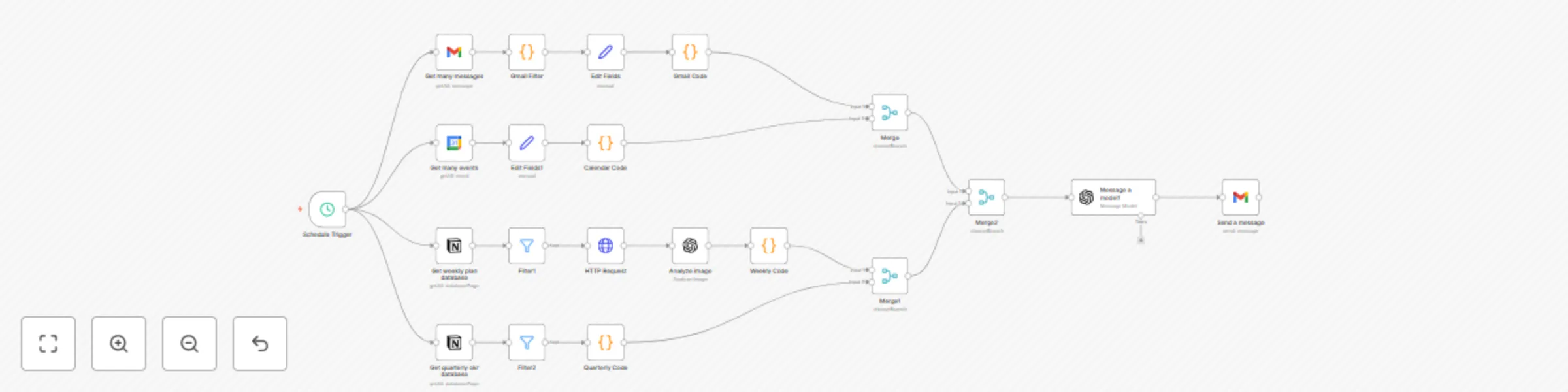
This workflow is your personal CEO Brain. Every Saturday night, it automatically collects the past week’s activity across:
- 📩 Gmail: filters out spam, promos, receipts, etc.
- 📅 Google Calendar: grabs past week and upcoming month
- 🗒️ Notion Weekly Plan: pulls and analyzes a photo of your weekly plan (e.g., taken from a paper planner/notebook) using GPT-4o
- 🎯 Notion OKRs: fetches quarterly OKRs and formats them for summary
It sends all the data to GPT-4.1, which generates a smart weekly report — including progress check, misalignments, overdue follow-ups, and next steps — then emails it to you as a Weekly OKR Report.
Set up steps
- 🧠 Add your Gmail, Google Calendar, Notion, and OpenAI credentials
- 📅 The Notion Weekly Plan should have a date property and an image field that holds a photo of your planner/notebook page
- 🎯 The Notion OKR database should include objective, key result, and status fields
- 🔁 Schedule is preset to every Saturday at 20:30 HK time (cron
0 30 20 * * 6). Also set the workflow timezone in n8n and, if self-hosting, the server/container TZ (e.g.,TZ=Asia/Hong_Kong) to ensure correct triggering - 💬 You can modify the AI prompts inside the LLM nodes for more customized outputs