Website intelligence & lead scoring with ScrapeGraphAI, HubSpot and Slack

Workflow preview

Workflow preview
100%
Website intelligence & lead scoring with ScrapeGraphAI, HubSpot and Slack preview
Open on n8n.io

Important notice

This workflow is provided as-is. Please review and test before using in production.

1. Workflow Overview

How it works This workflow automatically analyzes website visitors in real time, enriches their data with company intelligence, and provides lead scoring and sales alerts. Key Steps 1. Webhook Trig...

Best for

  • Lead Generation automation workflows
  • AI Summarization automation workflows
  • intermediate n8n builders looking for reusable templates

Tools used

n8n-nodes-base.webhook, n8n-nodes-scrapegraphai.scrapegraphai, n8n-nodes-base.code, n8n-nodes-base.hubspot, n8n-nodes-base.slack, n8n-nodes-base.stickynote

Source and attribution

This workflow is cataloged by N8N Workflows and links back to its original n8n.io source page by vinci-king-01.

Original n8n.io source

1.1 Workflow description

Title
Website intelligence & lead scoring with ScrapeGraphAI, HubSpot and Slack
Workflow name
Website intelligence & lead scoring with ScrapeGraphAI, HubSpot and Slack

How it works

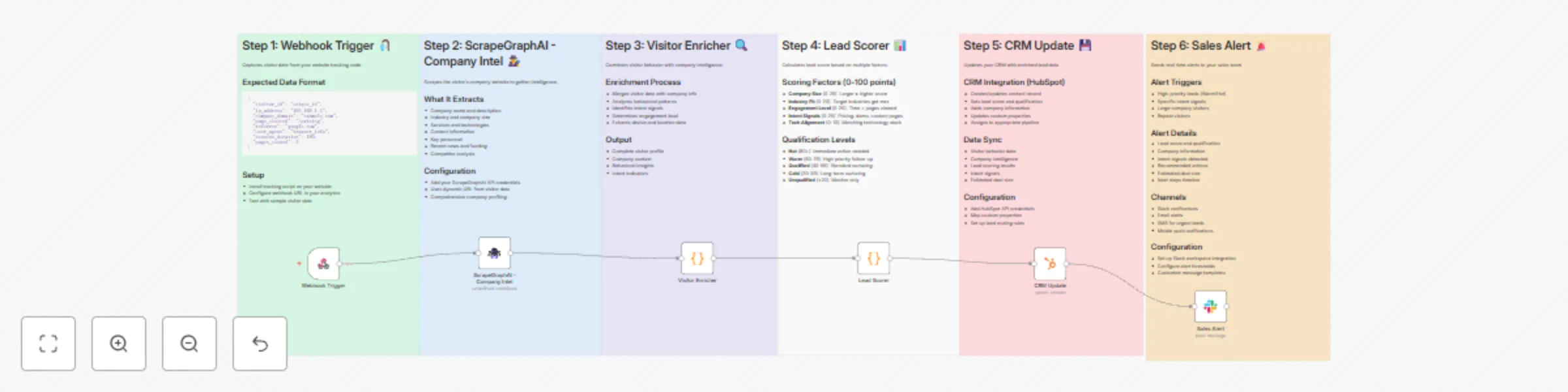
This workflow automatically analyzes website visitors in real-time, enriches their data with company intelligence, and provides lead scoring and sales alerts.

Key Steps

  1. Webhook Trigger - Receives visitor data from your website tracking system.
  2. AI-Powered Company Intelligence - Uses ScrapeGraphAI to extract comprehensive company information from visitor domains.
  3. Visitor Enrichment - Combines visitor behavior data with company intelligence to create detailed visitor profiles.
  4. Lead Scoring - Automatically scores leads based on company size, industry, engagement, and intent signals.
  5. CRM Integration - Updates your CRM with enriched visitor data and lead scores.
  6. Sales Alerts - Sends real-time notifications to your sales team for high-priority leads.

Set up steps

Setup time: 10-15 minutes

  1. Configure ScrapeGraphAI credentials - Add your ScrapeGraphAI API key for company intelligence gathering.
  2. Set up HubSpot connection - Connect your HubSpot CRM to automatically update contact records.
  3. Configure Slack integration - Set up your Slack workspace and specify the sales alert channel.
  4. Customize lead scoring criteria - Adjust the scoring algorithm to match your target customer profile.
  5. Set up website tracking - Configure your website to send visitor data to the webhook endpoint.
  6. Test the workflow - Verify all integrations are working correctly with a test visitor.

Key Features

  • Real-time visitor analysis with company intelligence enrichment
  • Automated lead scoring based on multiple factors (company size, industry, engagement)
  • Intent signal detection (pricing interest, demo requests, contact intent)
  • Priority-based sales alerts with recommended actions
  • CRM integration for seamless lead management
  • Deal size estimation based on company characteristics

1.2 Logical Blocks

This catalog entry is organized from the workflow JSON. The node-level section below shows the executable blocks available for review before importing the template.

2. Block-by-Block Analysis

Block 1 - Webhook Trigger

Type / Role
n8n-nodes-base.webhook - webhook
Config choices
Version 1.1

Block 2 - ScrapeGraphAI - Company Intel

Type / Role
n8n-nodes-scrapegraphai.scrapegraphAi - scrapegraphAi
Config choices
Version 1

Block 3 - Visitor Enricher

Type / Role
n8n-nodes-base.code - code
Config choices
Version 2

Block 4 - Lead Scorer

Type / Role
n8n-nodes-base.code - code
Config choices
Version 2

Block 5 - CRM Update

Type / Role
n8n-nodes-base.hubspot - hubspot
Config choices
Version 2

Block 6 - Sales Alert

Type / Role
n8n-nodes-base.slack - slack
Config choices
Version 2.1

Block 7 - Sticky Note 1

Type / Role
n8n-nodes-base.stickyNote - stickyNote
Config choices
Version 1

Block 8 - Sticky Note 2

Type / Role
n8n-nodes-base.stickyNote - stickyNote
Config choices
Version 1

Block 9 - Sticky Note 3

Type / Role
n8n-nodes-base.stickyNote - stickyNote
Config choices
Version 1

Block 10 - Sticky Note 4

Type / Role
n8n-nodes-base.stickyNote - stickyNote
Config choices
Version 1

Block 11 - Sticky Note 5

Type / Role
n8n-nodes-base.stickyNote - stickyNote
Config choices
Version 1

Block 12 - Sticky Note 6

Type / Role
n8n-nodes-base.stickyNote - stickyNote
Config choices
Version 1

3. Summary Table

Workflow Website intelligence & lead scoring with ScrapeGraphAI, HubSpot and Slack
Complexity intermediate
Nodes 12
Categories Lead Generation, AI Summarization
Author vinci-king-01
Published 28 Jul 2025

4. Reproducing the Workflow from Scratch

  1. 1. Download the workflow JSON

    Use the JSON export at /data/workflows/6570/6570.json as the source template for this automation.

  2. 2. Import the template into n8n

    Open n8n, import the downloaded JSON, and review each node before activating the workflow.

  3. 3. Configure credentials and variables

    Replace placeholder credentials, API keys, webhook URLs, account IDs, and environment-specific values with your own settings.

  4. 4. Test with sample data

    Run the workflow manually or in a staging workspace, inspect node output, and confirm downstream systems receive the expected data.

  5. 5. Activate and monitor

    Enable the workflow only after testing, then monitor executions, errors, and rate limits during the first production runs.

5. General Notes & Resources

Review imported nodes carefully before activation. This catalog entry is intended to help you inspect the workflow structure, understand required services, and find related templates faster.

Node names, credentials, schedules, webhook paths, and external service limits may need adjustment for your workspace.

Frequently asked questions

What does Website intelligence & lead scoring with ScrapeGraphAI, HubSpot and Slack do?

How it works This workflow automatically analyzes website visitors in real time, enriches their data with company intelligence, and provides lead scoring and sales alerts. Key Steps 1. Webhook Trig...

What do I need before importing this workflow?

Review the workflow JSON, configure any required credentials in n8n, and test the automation in a safe workspace before using it in production.

Can I customize this workflow?

Yes. Use the block-by-block analysis and the downloadable JSON to inspect each node, then adjust credentials, prompts, schedules, filters, or destinations for your Lead Generation, AI Summarization use case.