Use a custom URL for recurring Zoom meetings
Workflow preview


 Early Deal
DISCOUNT 20%

Important notice
This workflow is provided as-is. Please review and test before using in production.
Overview
Use case
Instead of this:
https://us06web.zoom.us/j/83456429326?pwd=1hVesbyHCsOfstyVU3z4CR6D46A8K.1
share this:
mydomain.com/meet-me
Do you ever wish you had one, simple URL that you can share with people to hop on a Zoom meeting? 😃
You could waste time: 👎👎
- creating a recurring Zoom meeting 😫
- saving the link somewhere 😵💫
- finding it, copying it each time you need it 😭
- sharing an ugly long link with everyone 🤢
Or...
You could create a 🌹 beautiful link using your own domain/website that redirects to your Zoom meeting, and share that beautified URL with everyone. 😌 And it will be easy for you to remember 💡
> NOTE Zoom now forces a one-year max lifetime on recurring videos. 😐 So I created this simple workflow to solve a few headaches. ☺️
What this workflow does
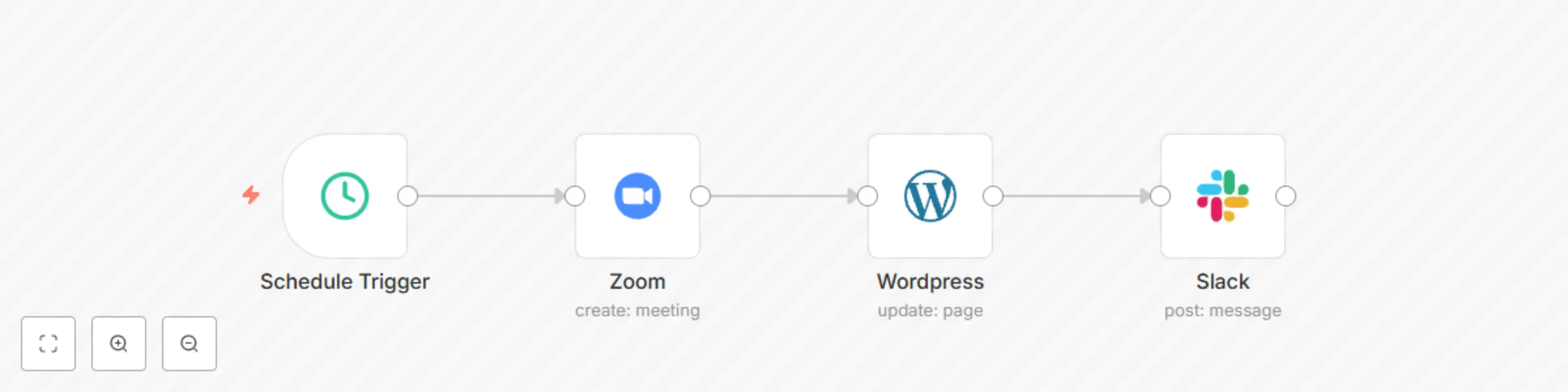
- Triggers once, annually (360 days)
- Creates a new, recurring meeting in Zoom
- Updates a redirect script with the new Zoom URL on a Wordpress Page
- Notifies you in a Slack channel
What this workflow lacks in breakthrough innovation, it makes up for with usefulness and peace of mind.
Have fun and make it your own!
Setup
- Add your credentials in each node
- this pre-requires you have a Zoom, Wordpress and Slack account, and have gotten API access on those accounts
- Create a Page in Wordpress, and get its ID. (Or create a new Page in WP.)
- Configure node parameters according to your needs.
- TEST!!!! Don't ever skip this step. Ever.
- Set it and forget it.
> NOTE You can replace the Wordpress node with another website CMS node, or generic HTTP request for a non-wordpress site. You can also remove or replace the Slack node with other notification functionality (eg. sms, whatsapp, email...)
Template was created in n8n v1.58.2