Turn closed-won HubSpot deals into lookalike prospects with CompanyEnrich

Workflow preview

Workflow preview
100%
Turn closed-won HubSpot deals into lookalike prospects with CompanyEnrich preview
Open on n8n.io

Important notice

This workflow is provided as-is. Please review and test before using in production.

1. Workflow Overview

This n8n template automates turning your Closed Won HubSpot deals into lookalike prospects using the CompanyEnrich Similar Companies API. Instead of manually guessing who looks like your best custo...

Best for

  • Lead Generation automation workflows
  • intermediate n8n builders looking for reusable templates

Tools used

n8n-nodes-base.hubspot, n8n-nodes-base.function, n8n-nodes-base.httprequest, n8n-nodes-base.splitinbatches, n8n-nodes-base.splitout, n8n-nodes-base.set, n8n-nodes-base.googlesheets, n8n-nodes-base.stickynote

Source and attribution

This workflow is cataloged by N8N Workflows and links back to its original n8n.io source page by CompanyEnrich.

Original n8n.io source

1.1 Workflow description

Title
Turn closed-won HubSpot deals into lookalike prospects with CompanyEnrich
Workflow name
Turn closed-won HubSpot deals into lookalike prospects with CompanyEnrich

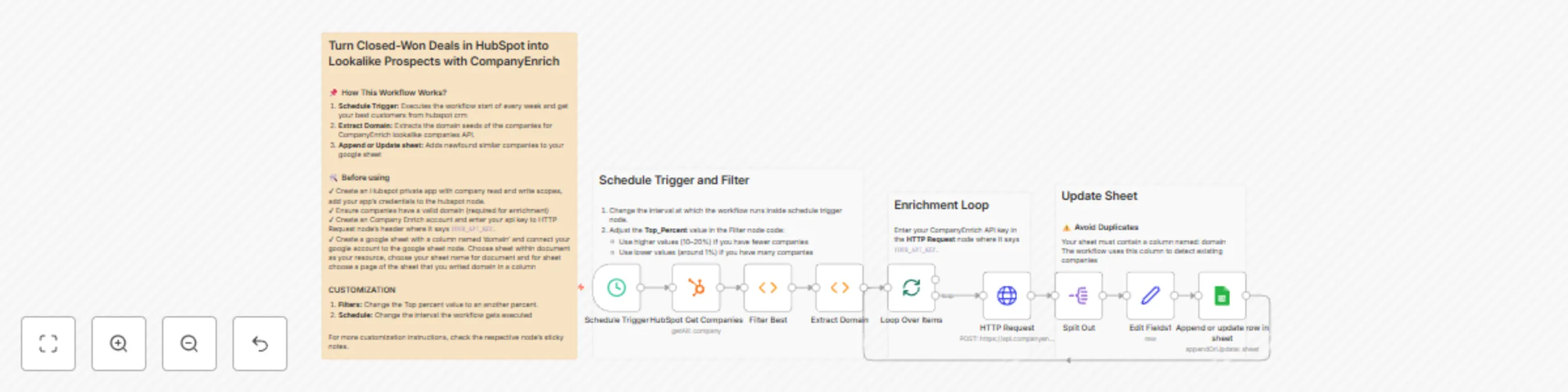
This n8n template automates turning your Closed-Won HubSpot deals into lookalike prospects using the CompanyEnrich Similar Companies API.

Instead of manually guessing who looks like your best customers, this workflow takes your top-performing companies from HubSpot, finds highly similar companies and pushes the results into a Google Sheet ready for outreach or further enrichment.

It’s ideal for GTM, sales, and growth teams who want to scale what already works.

Good to know

  • This workflow uses company domains as seeds for lookalike generation. Make sure your HubSpot company records have valid domains.
  • Lookalike results are query-based, meaning the same company can appear in different runs if it matches the input at that moment.
  • The Google Sheet uses the domain column to avoid duplicates when appending or updating rows.
  • Credit usage depends on the number of similar companies returned by the CompanyEnrich API.

How it works

  1. The Schedule Trigger runs the workflow on a defined interval (weekly by default).
  2. HubSpot companies are fetched using the HubSpot Get Companies node.
  3. A custom filter selects the top-performing companies (based on revenue percentile).
  4. Company domains are extracted and passed into the CompanyEnrich Similar Companies API.
  5. Similar companies are returned and split into individual rows.
  6. The enriched company data is cleaned and normalized.
  7. Results are appended or updated in a connected Google Sheet.

How to use

  • Connect your HubSpot app with company read access.
  • Add your CompanyEnrich API key to the HTTP Request node.
  • Connect your Google Sheets account and select a sheet with a domain column.
  • Adjust the schedule or top-percentage filter if needed.
  • Activate the workflow and let it run automatically.

Requirements

  • HubSpot app (Company read access)
  • CompanyEnrich API key
  • Google Sheets account
  • n8n instance with HTTP and HubSpot nodes enabled

Customising this workflow

  • Change the Top_Percent value to control how many of your best customers are used as seeds.
  • Modify the schedule interval to run daily, weekly, or on demand.
  • Extend the workflow to push results into a CRM, enrichment pipeline, or outbound tool.
  • Add additional filters (industry, location, employee size) before writing to Sheets.

1.2 Logical Blocks

This catalog entry is organized from the workflow JSON. The node-level section below shows the executable blocks available for review before importing the template.

2. Block-by-Block Analysis

Block 1 - HubSpot Get Companies

Type / Role
n8n-nodes-base.hubspot - hubspot
Config choices
Version 1

Block 2 - Extract Domain

Type / Role
n8n-nodes-base.function - function
Config choices
Version 1

Block 3 - HTTP Request

Type / Role
n8n-nodes-base.httpRequest - httpRequest
Config choices
Version 4.2

Block 4 - Loop Over Items

Type / Role
n8n-nodes-base.splitInBatches - splitInBatches
Config choices
Version 3

Block 5 - Split Out

Type / Role
n8n-nodes-base.splitOut - splitOut
Config choices
Version 1

Block 6 - Edit Fields1

Type / Role
n8n-nodes-base.set - set
Config choices
Version 3.4

Block 7 - Append or update row in sheet

Type / Role
n8n-nodes-base.googleSheets - googleSheets
Config choices
Version 4.7

Block 8 - Sticky Note

Type / Role
n8n-nodes-base.stickyNote - stickyNote
Config choices
Version 1

Block 9 - Schedule Trigger

Type / Role
n8n-nodes-base.scheduleTrigger - scheduleTrigger
Config choices
Version 1.2

Block 10 - Filter Best

Type / Role
n8n-nodes-base.function - function
Config choices
Version 1

Block 11 - Sticky Note1

Type / Role
n8n-nodes-base.stickyNote - stickyNote
Config choices
Version 1

Block 12 - Sticky Note2

Type / Role
n8n-nodes-base.stickyNote - stickyNote
Config choices
Version 1

Block 13 - Sticky Note3

Type / Role
n8n-nodes-base.stickyNote - stickyNote
Config choices
Version 1

3. Summary Table

Workflow Turn closed-won HubSpot deals into lookalike prospects with CompanyEnrich
Complexity intermediate
Nodes 13
Categories Lead Generation
Author CompanyEnrich
Published 27 Dec 2025

4. Reproducing the Workflow from Scratch

  1. 1. Download the workflow JSON

    Use the JSON export at /data/workflows/12227/12227.json as the source template for this automation.

  2. 2. Import the template into n8n

    Open n8n, import the downloaded JSON, and review each node before activating the workflow.

  3. 3. Configure credentials and variables

    Replace placeholder credentials, API keys, webhook URLs, account IDs, and environment-specific values with your own settings.

  4. 4. Test with sample data

    Run the workflow manually or in a staging workspace, inspect node output, and confirm downstream systems receive the expected data.

  5. 5. Activate and monitor

    Enable the workflow only after testing, then monitor executions, errors, and rate limits during the first production runs.

5. General Notes & Resources

Review imported nodes carefully before activation. This catalog entry is intended to help you inspect the workflow structure, understand required services, and find related templates faster.

Node names, credentials, schedules, webhook paths, and external service limits may need adjustment for your workspace.

Frequently asked questions

What does Turn closed-won HubSpot deals into lookalike prospects with CompanyEnrich do?

This n8n template automates turning your Closed Won HubSpot deals into lookalike prospects using the CompanyEnrich Similar Companies API. Instead of manually guessing who looks like your best custo...

What do I need before importing this workflow?

Review the workflow JSON, configure any required credentials in n8n, and test the automation in a safe workspace before using it in production.

Can I customize this workflow?

Yes. Use the block-by-block analysis and the downloadable JSON to inspect each node, then adjust credentials, prompts, schedules, filters, or destinations for your Lead Generation use case.