C

CompanyEnrich

4
Workflows

Workflows by CompanyEnrich

Workflow preview: Find similar B2B companies to your best customers with Google Sheets and CompanyEnrich
Free intermediate

Find similar B2B companies to your best customers with Google Sheets and CompanyEnrich

This workflow allows you to automatically expand your B2B target lists by discovering companies similar to your existing leads. Instead of manually searching for competitors or lookalikes, you can input a list of domains into Google Sheets and let the CompanyEnrich API generate high-quality lookalike suggestions along with similarity scores. ## Who is this for? This template is ideal for **GTM Engineers**, **Sales Teams**, and **Growth Hackers** who want to enrich their lead databases and find new prospecting opportunities based on their current ideal customer profile (ICP). ## What it does 1. **Reads Source:** It pulls a list of company domains from a specified Google Sheet. 2. **Enriches:** It sends each domain to the CompanyEnrich API to find similar companies (competitors/lookalikes). 3. **Processes:** It merges the new data with your original list and formats the JSON response. 4. **Saves:** It appends the results (Similar Company Name, Domain, and Similarity Score) back into a new tab in your Google Sheet. ## Requirements * **Google Sheets:** A spreadsheet with a column named `Domain` containing the websites you want to analyze. * **CompanyEnrich API Key:** You need an API key from [CompanyEnrich](https://companyenrich.com). * **n8n Credentials:** Connected Google Sheets account. ## How to set up 1. **Prepare Sheet:** Create a Google Sheet with two tabs. In the first tab, create a column header named `Domain` and add your target websites. Leave the second tab empty for results. 2. **Configure Nodes:** Open the "Read Source List" and "Write Results" nodes to select your spreadsheet file and the respective tabs. 3. **Add API Key:** Open the "Fetch Similar Companies" node. In the **Header Parameters** section, replace `YOUR_API_TOKEN` with your actual API key (keep the `Bearer ` prefix). ## How to customize * **Filter by Score:** You can add an "If" node after the API call to filter out results with a low similarity score. * **Change Destination:** Instead of Google Sheets, you can easily swap the final node to write results to Airtable, Notion, or your CRM (HubSpot/Pipedrive).

C
CompanyEnrich
Lead Generation
30 Dec 2025
11
0
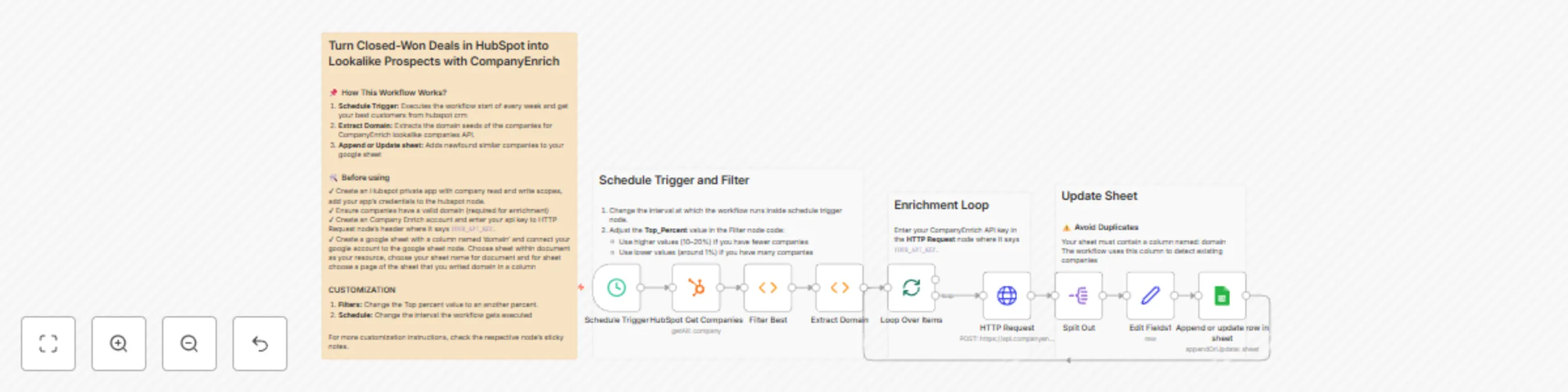
Workflow preview: Turn closed-won HubSpot deals into lookalike prospects with CompanyEnrich
Free intermediate

Turn closed-won HubSpot deals into lookalike prospects with CompanyEnrich

This n8n template automates turning your Closed-Won HubSpot deals into lookalike prospects using the CompanyEnrich Similar Companies API. Instead of manually guessing who looks like your best customers, this workflow takes your top-performing companies from HubSpot, finds highly similar companies and pushes the results into a Google Sheet ready for outreach or further enrichment. It’s ideal for GTM, sales, and growth teams who want to scale what already works. ## Good to know - This workflow uses company domains as seeds for lookalike generation. Make sure your HubSpot company records have valid domains. - Lookalike results are query-based, meaning the same company can appear in different runs if it matches the input at that moment. - The Google Sheet uses the domain column to avoid duplicates when appending or updating rows. - Credit usage depends on the number of similar companies returned by the CompanyEnrich API. ## How it works 1. The Schedule Trigger runs the workflow on a defined interval (weekly by default). 2. HubSpot companies are fetched using the HubSpot Get Companies node. 3. A custom filter selects the top-performing companies (based on revenue percentile). 4. Company domains are extracted and passed into the CompanyEnrich Similar Companies API. 5. Similar companies are returned and split into individual rows. 6. The enriched company data is cleaned and normalized. 7. Results are appended or updated in a connected Google Sheet. ## How to use - Connect your HubSpot app with company read access. - Add your CompanyEnrich API key to the HTTP Request node. - Connect your Google Sheets account and select a sheet with a domain column. - Adjust the schedule or top-percentage filter if needed. - Activate the workflow and let it run automatically. ## Requirements - HubSpot app (Company read access) - CompanyEnrich API key - Google Sheets account - n8n instance with HTTP and HubSpot nodes enabled ## Customising this workflow - Change the Top_Percent value to control how many of your best customers are used as seeds. - Modify the schedule interval to run daily, weekly, or on demand. - Extend the workflow to push results into a CRM, enrichment pipeline, or outbound tool. - Add additional filters (industry, location, employee size) before writing to Sheets.

C
CompanyEnrich
Lead Generation
28 Dec 2025
25
0

Workflow preview: Enrich company data in Google Sheets with CompanyEnrich
Free intermediate

Enrich company data in Google Sheets with CompanyEnrich

This workflow automates enriching company profiles by taking a domain name from a Google Sheet, fetching firmographic data via the CompanyEnrich API, and updating the sheet with the results. ## Who is this for? * **Sales Teams:** To enrich lead lists with better data * **Marketing Professionals:** To segment potential accounts based on industry or location * **Recruiters:** To gather background information on target companies * **Data Analysts:** To rapidly clean and populate missing firmographic datasets ## What it does 1. The workflow pulls rows from a specified Google Sheet 2. It checks a "Status" column to ensure it only processes rows that haven't been completed yet (skips rows marked "Done"). 3. Using the company `Domain` column, it queries the CompanyEnrich API 4. A custom code node flattens the JSON response and automatically matches the API data to the columns currently existing in your Google Sheet 5. It writes the enriched data back to the row and marks the status as "Done" ## Requirements * A Google account with access to Sheets. * You will need an API key from [CompanyEnrich](https://companyenrich.com/). ## How to set up 1. **Prepare your Google Sheet:** Create a sheet with the following mandatory headers: `Domain`, `Status`, and `Last Updated`. 2. **Add Data Columns:** Add headers for the data you want to fetch (e.g., `revenue`, `employees`, `location_city_name`, `socials_linkedin_url`). 3. **Configure Credentials:** Connect your Google Sheets account in the "Get row(s)" and "Update row" nodes. 4. **Select the Sheet:** Update the `Document` and `Sheet Name` in both Google Sheets nodes to point to your specific file. 5. **Add API Key:** Open the "Fetch Company Data" node and replace the placeholder in the `Authorization` header with your actual API Key (format: `Bearer YOUR_API_KEY`). ## How to customize * **Fetch Specific Data:** Because of the dynamic Javascript logic, you do not need to edit the workflow to get different data. Simply add a new column header to your Google Sheet that matches the API field name (e.g., adding a column named `industries` will automatically fetch and fill that data). * **Adjust Throttling:** If you have a large dataset, you may need to adjust the "SplitInBatches" node to process fewer items at once to avoid API rate limits.

C
CompanyEnrich
Lead Generation
23 Dec 2025
9
0
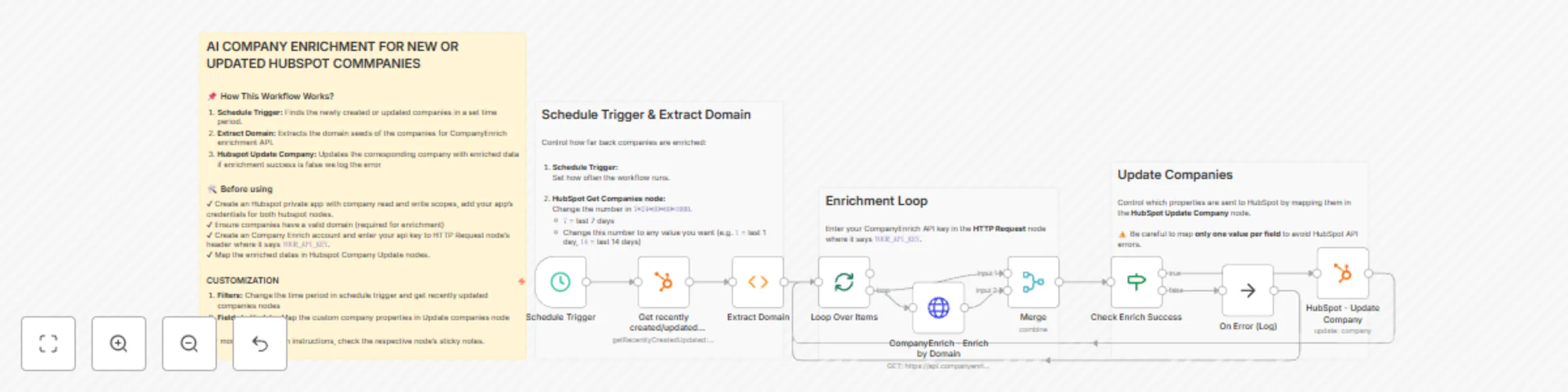
Workflow preview: Automated CRM enrichment: Enrich HubSpot companies with CompanyEnrich
Free intermediate

Automated CRM enrichment: Enrich HubSpot companies with CompanyEnrich

This n8n template automatically enriches HubSpot company records using CompanyEnrich and keeps your CRM data up to date without manual work. This workflow is ideal for RevOps, Sales Ops, and GTM teams who want cleaner CRM data for segmentation, scoring, and outbound workflows. ## Good to know - Company enrichment is performed by domain, so a valid company domain is required. - The workflow processes companies in batches to avoid rate limits. - Enrichment is only applied when the API request is successful. ## How it works 1. A Schedule Trigger runs the workflow on a recurring basis (weekly by default). 2. The workflow fetches recently created or updated companies from HubSpot. 3. The company domain is safely extracted, even if stored in different fields. 4. Each domain is sent to the CompanyEnrich enrichment API. 5. The workflow checks whether the enrichment request was successful. 6. Enriched data is mapped into HubSpot-compatible fields. 7. The corresponding HubSpot company record is updated. 8. The workflow continues looping until all companies are processed. ## How to use - Configure your HubSpot App Token with company read/write access. - Add your CompanyEnrich API key as an HTTP credential. - Adjust the schedule if you want the workflow to run daily or on-demand. - Make sure your HubSpot companies have a domain set. - Once active, the workflow will keep your company data enriched automatically. ## Requirements - HubSpot account with App Token authentication - CompanyEnrich account and API key - n8n instance with HTTP and HubSpot nodes enabled ## Customising this workflow - Change the schedule to run more frequently or trigger via webhook. - Add filters to enrich only specific company segments or pipelines. - Map additional enriched fields to custom HubSpot properties.

C
CompanyEnrich
Lead Generation
18 Dec 2025
9
0