Transcribing Telegram voice messages using Whisper and Gemini with a fallback mechanism
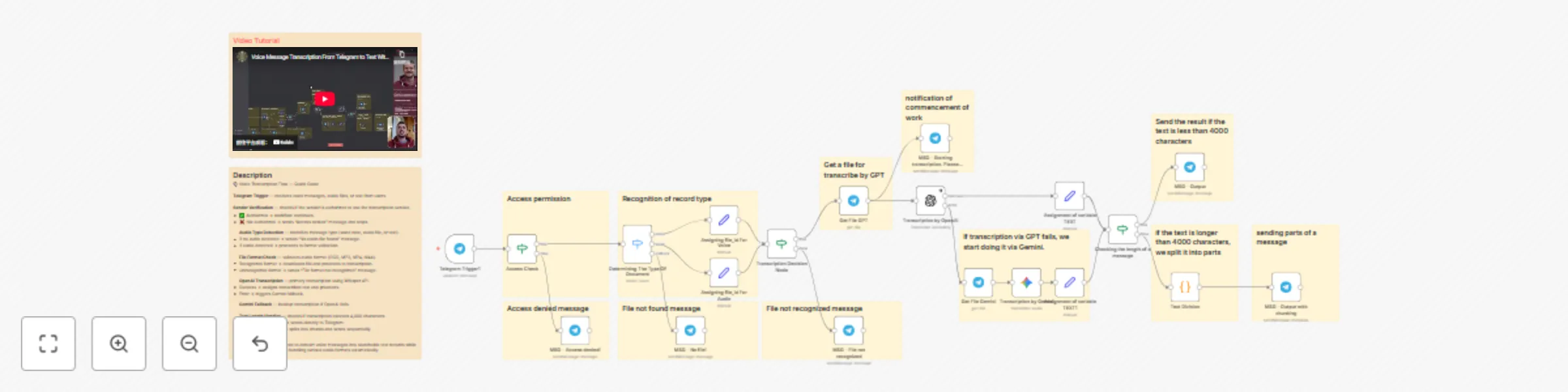
Workflow preview


 Early Deal
DISCOUNT 20%

Important notice
This workflow is provided as-is. Please review and test before using in production.
Overview
🎙️ n8n Workflow: Voice Message Transcription with Access Control
This n8n workflow enables automated transcription of voice messages in Telegram groups with built-in access control and intelligent fallback mechanisms. It's designed for teams that need to convert audio messages to text while maintaining security and handling various audio formats.
📌 Section 1: Trigger & Access Control
⚡ Receive Message (Telegram Trigger)
Purpose: Captures incoming messages from users in your Telegram group.
How it works: When a user sends a message (voice, audio, or text), the workflow is triggered and the sender's information is captured.
Benefit: Serves as the entry point for the entire transcription pipeline.
🔐 Sender Verification
Purpose: Validates whether the sender has permission to use the transcription service.
Logic: Check sender against authorized users list If authorized → Proceed to next step If not authorized → Send "Access denied" message and stop workflow
Benefit: Prevents unauthorized users from consuming AI credits and accessing the service.
📌 Section 2: Message Type Detection
🎵 Audio/Voice Recognition
Purpose: Identifies the type of incoming message and audio format.
Why it's needed: Telegram handles different audio types with different statuses:
- Voice notes (voice messages)
- Audio files (standard audio attachments)
- Text messages (no audio content)
Process:
- Check if message contains audio/voice content
- If no audio file detected → Send "No audio file found" message
- If audio detected → Assign file ID and proceed to format detection
🧩 File Type Determination (IF Node)
Purpose: Identifies the specific audio format for proper processing.
Supported formats:
- OGG (Telegram voice messages)
- MPEG/MP3
- MP4/M4A
- Other audio formats
Logic:
If format recognized → Proceed to transcription If format not recognized → Send "File format not recognized" message
Benefit: Ensures compatibility with transcription services by validating file types upfront.
📌 Section 3: Primary Transcription (OpenAI)
📥 File Download
Purpose: Downloads the audio file from Telegram for processing.
🤖 OpenAI Transcription
Purpose: Transcribes audio to text using OpenAI's Whisper API.
Why OpenAI: High-quality transcription with cost-effective pricing.
Process:
- Send downloaded file to OpenAI transcription API
- Simultaneously send notification: "Transcription started"
- If successful → Assign transcribed text to variable and proceed
- If error occurs → Trigger fallback mechanism
Benefit: Fast, accurate transcription with multi-language support.
📌 Section 4: Fallback Transcription (Gemini)
🛟 Gemini Backup Transcription
Purpose: Provides a safety net if OpenAI transcription fails.
Process:
- Receives file only if OpenAI node returns an error
- Downloads and processes the same audio file
- Sends to Google Gemini for transcription
- Assigns transcribed text to the same text variable
Benefit: Ensures high reliability—if one service fails, the other takes over automatically.
📌 Section 5: Message Length Handling
📏 Text Length Check (IF Node)
Purpose: Determines if the transcribed text exceeds Telegram's character limit.
Logic:
If text ≤ 4000 characters → Send directly to Telegram If text > 4000 characters → Split into chunks
Why: Telegram has a 4,000-character limit per message.
✂️ Text Splitting (Code Node)
Purpose: Breaks long transcriptions into 4,000-character segments.
Process:
- Receives text longer than 4,000 characters
- Splits text into chunks of ≤4,000 characters
- Maintains readability by avoiding mid-word breaks
- Outputs array of text chunks
📌 Section 6: Response Delivery
💬 Send Transcription (Telegram Node)
Purpose: Delivers the transcribed text back to the Telegram group.
Behavior:
- Short messages: Sent as a single message
- Long messages: Sent as multiple sequential messages
Benefit: Users receive complete transcriptions regardless of length, ensuring no content is lost.
📊 Workflow Overview Table
| Section | Node Name | Purpose |
|---|---|---|
| 1. Trigger | Receive Message | Captures incoming Telegram messages |
| 2. Access Control | Sender Verification | Validates user permissions |
| 3. Detection | Audio/Voice Recognition | Identifies message type and audio format |
| 4. Validation | File Type Check | Verifies supported audio formats |
| 5. Download | File Download | Retrieves audio file from Telegram |
| 6. Primary AI | OpenAI Transcription | Main transcription service |
| 7. Fallback AI | Gemini Transcription | Backup transcription service |
| 8. Processing | Text Length Check | Determines if splitting is needed |
| 9. Splitting | Code Node | Breaks long text into chunks |
| 10. Response | Send to Telegram | Delivers transcribed text |
🎯 Key Benefits
- 🔐 Secure access control: Only authorized users can trigger transcriptions
- 💰 Cost management: Prevents unauthorized credit consumption
- 🎵 Multi-format support: Handles various Telegram audio types
- 🛡️ High reliability: Dual-AI fallback ensures transcription success
- 📱 Telegram-optimized: Automatically handles message length limits
- 🌍 Multi-language: Both AI services support numerous languages
- ⚡ Real-time notifications: Users receive status updates during processing
- 🔄 Automatic chunking: Long transcriptions are intelligently split
- 🧠 Smart routing: Files are processed through the optimal path
- 📊 Complete delivery: No content loss regardless of transcription length
🚀 Use Cases
- Team meetings: Transcribe voice notes from team discussions
- Client communications: Convert client voice messages to searchable text
- Documentation: Create text records of verbal communications
- Accessibility: Make audio content accessible to all team members
- Multi-language teams: Leverage AI transcription for various languages