Yehor EGMS
Workflows by Yehor EGMS
Role-based access control (RBAC) for Telegram automations
# 🔐 n8n Workflow: Role-Based Access Control (RBAC) for Telegram Automations This n8n workflow lets you control access to your internal Telegram bots and automation systems based on user roles and departments. It ensures that only authorized team members — defined in your employee database — can interact with specific parts of your workflow. Perfect for agencies, internal tools, or multi-team organizations where permissions differ across roles (e.g., Marketing, Sales, Administration). ## 📌 Section 1: Trigger & Input ⚡ Receive Message (Telegram Trigger) Purpose: Captures incoming messages from users interacting with your Telegram bot. ### How it works: When a user sends any message to the bot, the workflow retrieves their Telegram username and triggers the process. ### Benefit: Provides a secure and instant entry point for validating user identity before running any internal logic. ## 📌 Section 2: Role Lookup 📋 Employee Database (Data Table Node) Purpose: Fetches user details such as Position and Type from your internal employee table. Structure Example: UserName===Position===Type User_1===Marketing===SEO User_2===Administration===Manager User_3===Marketing===Target ### Benefit: Centralized employee management — you can update access levels (roles or departments) directly in the data table without editing the workflow. ## 📌 Section 3: Position & Role Check ### 🧩 Choose Position (Switch Node) Purpose: Determines the user’s department or role level (e.g., Marketing, Sales, Administration). ### 🧩 Check Role Type (Switch Node) Purpose: Performs a second-level check — filters users by Type (e.g., SEO, SMM, Target). ### Logic: Marketing → SEO → Send to SEO workflow branch Marketing → Target → Send to Ads branch Administration → Manager → Grant full access Sales → Employee → Limited access ### Benefit: Allows multi-level, role-based logic with different automation paths for each team or position. ## 📌 Section 4: Action Routing 💬 No Operation Nodes (Placeholders) Purpose: Represent different action branches — each can later be replaced with the logic specific to that department. ### Examples: “Target” branch → connect to ad performance automation “SEO” branch → connect to Google Search Console reports “Sales” branch → connect to CRM updates ### Benefit: A flexible access framework — ready to integrate with any process per department. 📊 Workflow Overview Table Section Node Name Purpose 1. Trigger Telegram Trigger Captures user messages 2. Lookup Employee Database Fetches user position and type 3. Check Choose Position / Role Switch Defines access path based on role 4. Routing No Operation Nodes Separate workflows per department ## 🎯 Key Benefits 🔐 Granular Access Control: Multi-level permission logic (Position + Role). ⚙️ Dynamic Role Management: Update access directly in your data table — no redeployment needed. 🧱 Modular Design: Add or replace department branches without affecting core logic. 🚀 Scalable Foundation: Perfect base for enterprise-grade permission systems or multi-team bots. 📈 Cross-Platform Ready: Can be adapted for Slack, Discord, or internal chat tools.
Transcribing Telegram voice messages using Whisper and Gemini with a fallback mechanism
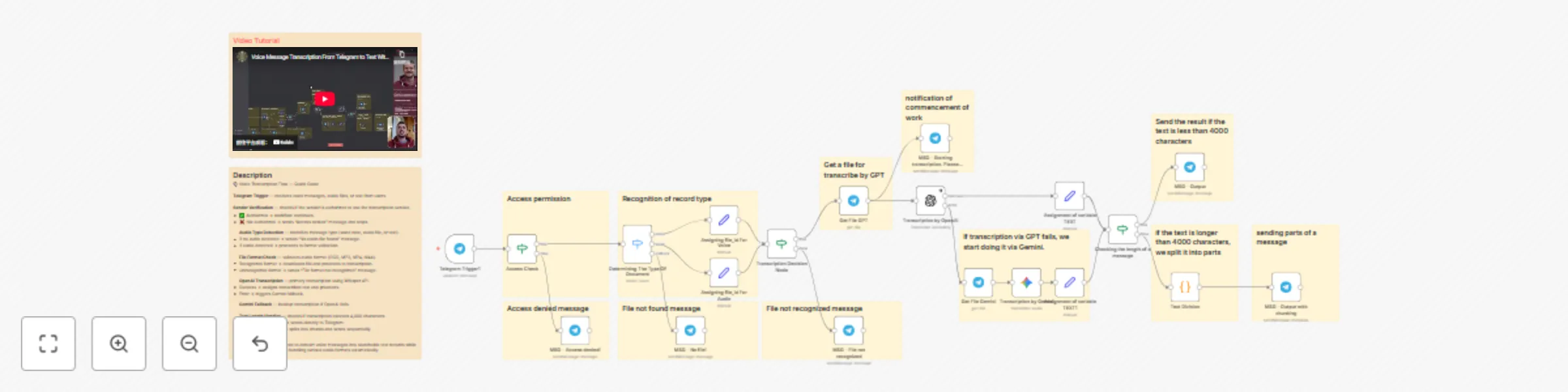
# 🎙️ n8n Workflow: Voice Message Transcription with Access Control This n8n workflow enables automated transcription of voice messages in Telegram groups with built-in access control and intelligent fallback mechanisms. It's designed for teams that need to convert audio messages to text while maintaining security and handling various audio formats. --- ## 📌 Section 1: Trigger & Access Control ### ⚡ Receive Message (Telegram Trigger) **Purpose:** Captures incoming messages from users in your Telegram group. **How it works:** When a user sends a message (voice, audio, or text), the workflow is triggered and the sender's information is captured. **Benefit:** Serves as the entry point for the entire transcription pipeline. ### 🔐 Sender Verification **Purpose:** Validates whether the sender has permission to use the transcription service. **Logic:** Check sender against authorized users list If authorized → Proceed to next step If not authorized → Send "Access denied" message and stop workflow **Benefit:** Prevents unauthorized users from consuming AI credits and accessing the service. --- ## 📌 Section 2: Message Type Detection ### 🎵 Audio/Voice Recognition **Purpose:** Identifies the type of incoming message and audio format. **Why it's needed:** Telegram handles different audio types with different statuses: - Voice notes (voice messages) - Audio files (standard audio attachments) - Text messages (no audio content) **Process:** 1. Check if message contains audio/voice content 2. If no audio file detected → Send "No audio file found" message 3. If audio detected → Assign file ID and proceed to format detection ### 🧩 File Type Determination (IF Node) **Purpose:** Identifies the specific audio format for proper processing. **Supported formats:** - OGG (Telegram voice messages) - MPEG/MP3 - MP4/M4A - Other audio formats **Logic:** If format recognized → Proceed to transcription If format not recognized → Send "File format not recognized" message **Benefit:** Ensures compatibility with transcription services by validating file types upfront. --- ## 📌 Section 3: Primary Transcription (OpenAI) ### 📥 File Download **Purpose:** Downloads the audio file from Telegram for processing. ### 🤖 OpenAI Transcription **Purpose:** Transcribes audio to text using OpenAI's Whisper API. **Why OpenAI:** High-quality transcription with cost-effective pricing. **Process:** 1. Send downloaded file to OpenAI transcription API 2. Simultaneously send notification: "Transcription started" 3. If successful → Assign transcribed text to variable and proceed 4. If error occurs → Trigger fallback mechanism **Benefit:** Fast, accurate transcription with multi-language support. --- ## 📌 Section 4: Fallback Transcription (Gemini) ### 🛟 Gemini Backup Transcription **Purpose:** Provides a safety net if OpenAI transcription fails. **Process:** 1. Receives file only if OpenAI node returns an error 2. Downloads and processes the same audio file 3. Sends to Google Gemini for transcription 4. Assigns transcribed text to the same text variable **Benefit:** Ensures high reliability—if one service fails, the other takes over automatically. --- ## 📌 Section 5: Message Length Handling ### 📏 Text Length Check (IF Node) **Purpose:** Determines if the transcribed text exceeds Telegram's character limit. **Logic:** If text ≤ 4000 characters → Send directly to Telegram If text > 4000 characters → Split into chunks **Why:** Telegram has a 4,000-character limit per message. ### ✂️ Text Splitting (Code Node) **Purpose:** Breaks long transcriptions into 4,000-character segments. **Process:** 1. Receives text longer than 4,000 characters 2. Splits text into chunks of ≤4,000 characters 3. Maintains readability by avoiding mid-word breaks 4. Outputs array of text chunks --- ## 📌 Section 6: Response Delivery ### 💬 Send Transcription (Telegram Node) **Purpose:** Delivers the transcribed text back to the Telegram group. **Behavior:** - **Short messages:** Sent as a single message - **Long messages:** Sent as multiple sequential messages **Benefit:** Users receive complete transcriptions regardless of length, ensuring no content is lost. --- ## 📊 Workflow Overview Table | Section | Node Name | Purpose | |---------|-----------|---------| | 1. Trigger | Receive Message | Captures incoming Telegram messages | | 2. Access Control | Sender Verification | Validates user permissions | | 3. Detection | Audio/Voice Recognition | Identifies message type and audio format | | 4. Validation | File Type Check | Verifies supported audio formats | | 5. Download | File Download | Retrieves audio file from Telegram | | 6. Primary AI | OpenAI Transcription | Main transcription service | | 7. Fallback AI | Gemini Transcription | Backup transcription service | | 8. Processing | Text Length Check | Determines if splitting is needed | | 9. Splitting | Code Node | Breaks long text into chunks | | 10. Response | Send to Telegram | Delivers transcribed text | --- ## 🎯 Key Benefits * 🔐 **Secure access control:** Only authorized users can trigger transcriptions * 💰 **Cost management:** Prevents unauthorized credit consumption * 🎵 **Multi-format support:** Handles various Telegram audio types * 🛡️ **High reliability:** Dual-AI fallback ensures transcription success * 📱 **Telegram-optimized:** Automatically handles message length limits * 🌍 **Multi-language:** Both AI services support numerous languages * ⚡ **Real-time notifications:** Users receive status updates during processing * 🔄 **Automatic chunking:** Long transcriptions are intelligently split * 🧠 **Smart routing:** Files are processed through the optimal path * 📊 **Complete delivery:** No content loss regardless of transcription length --- ## 🚀 Use Cases - **Team meetings:** Transcribe voice notes from team discussions - **Client communications:** Convert client voice messages to searchable text - **Documentation:** Create text records of verbal communications - **Accessibility:** Make audio content accessible to all team members - **Multi-language teams:** Leverage AI transcription for various languages
Telegram chat access control with user permission database
# 🔐 n8n Workflow: Access Control for Internal Chats or Chatbots This n8n workflow helps you restrict access to your internal chats or chatbots so that only authorized team members can interact with them. It's perfect for setups using Telegram, Slack, or other corporate messengers, where you need to prevent unauthorized users from triggering internal automations. --- ## 📌 Section 1: Trigger & Input ### ⚡ Receive Message (Telegram Trigger) **Purpose:** Captures every incoming message from a user interacting with your Telegram bot (or another messenger). **How it works:** When a user sends a message, it instantly triggers the workflow and passes their username or ID as input data. **Benefit:** Acts as the entry point for verifying whether a user is allowed to proceed. --- ## 📌 Section 2: Access Table Lookup ### 📋 User Access Table (Data Node / Spreadsheet / DB Query) **Purpose:** Stores all your team members and their current access status. **Structure Example:** | Username | Access Status | |----------|---------------| | user1 | granted | | user2 | denied | | user3 | granted | **Benefit:** Centralized access control — you can easily update user permissions without editing the workflow. --- ## 📌 Section 3: Permission Check ### 🧩 Check Access (IF Node) **Purpose:** Compares the incoming user's name or ID against the access table. **Logic:** ``` If status = granted → Allow message to continue If status = denied → Stop workflow execution ``` **Benefit:** Ensures only approved users can interact with your automations or receive responses. --- ## 📌 Section 4: Response Handling ### 💬 Send Reply (Telegram Node) **Purpose:** Sends a message back to the user depending on their access level. **Paths:** * ✅ **Granted:** Sends the normal bot response or triggers the main process. * ❌ **Denied:** Sends no reply (or an optional "Access denied" message). **Benefit:** Prevents unauthorized access while maintaining a seamless experience for approved users. --- ## 📊 Workflow Overview Table | Section | Node Name | Purpose | |---------|-----------|---------| | 1. Trigger | Receive Message | Captures incoming messages | | 2. Access Table | User Access Table | Stores usernames + permissions | | 3. Check | Check Access | Verifies if user has permission | | 4. Response | Send Reply | Sends or blocks response based on status | --- ## 🎯 Key Benefits * 🔐 **Secure access control:** Only trusted users can trigger your internal automations. * ⚙️ **Dynamic management:** Easily update user permissions from a table or database. * 🧠 **Lightweight setup:** Just three nodes create a fully functional access gate. * 🚀 **Scalable foundation:** Extend it with role-based access or activity logging later.