Block 1 - Telegram Trigger1
- Type / Role
- n8n-nodes-base.telegramTrigger - telegramTrigger
- Config choices
- Version 1.2


 Early Deal
This workflow is provided as-is. Please review and test before using in production.
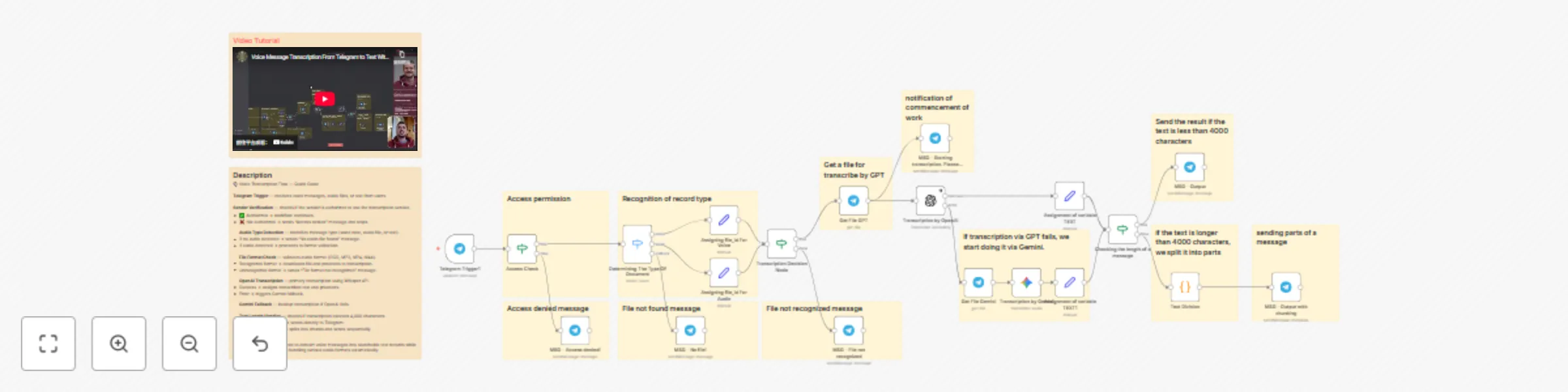
️ n8n Workflow: Voice Message Transcription with Access Control This n8n workflow enables automated transcription of voice messages in Telegram groups with built in access control and intelligent...
n8n-nodes-base.telegramtrigger, n8n-nodes-base.telegram, n8n-nodes-base.stickynote, n8n-nodes-base.if, n8n-nodes-base.switch, n8n-nodes-base.set, @n8n/n8n-nodes-langchain.openai, @n8n/n8n-nodes-langchain.googlegemini
This workflow is cataloged by N8N Workflows and links back to its original n8n.io source page by Yehor EGMS.
Original n8n.io sourceThis n8n workflow enables automated transcription of voice messages in Telegram groups with built-in access control and intelligent fallback mechanisms. It's designed for teams that need to convert audio messages to text while maintaining security and handling various audio formats.
Purpose: Captures incoming messages from users in your Telegram group.
How it works: When a user sends a message (voice, audio, or text), the workflow is triggered and the sender's information is captured.
Benefit: Serves as the entry point for the entire transcription pipeline.
Purpose: Validates whether the sender has permission to use the transcription service.
Logic: Check sender against authorized users list If authorized → Proceed to next step If not authorized → Send "Access denied" message and stop workflow
Benefit: Prevents unauthorized users from consuming AI credits and accessing the service.
Purpose: Identifies the type of incoming message and audio format.
Why it's needed: Telegram handles different audio types with different statuses:
Process:
Purpose: Identifies the specific audio format for proper processing.
Supported formats:
Logic:
If format recognized → Proceed to transcription If format not recognized → Send "File format not recognized" message
Benefit: Ensures compatibility with transcription services by validating file types upfront.
Purpose: Downloads the audio file from Telegram for processing.
Purpose: Transcribes audio to text using OpenAI's Whisper API.
Why OpenAI: High-quality transcription with cost-effective pricing.
Process:
Benefit: Fast, accurate transcription with multi-language support.
Purpose: Provides a safety net if OpenAI transcription fails.
Process:
Benefit: Ensures high reliability—if one service fails, the other takes over automatically.
Purpose: Determines if the transcribed text exceeds Telegram's character limit.
Logic:
If text ≤ 4000 characters → Send directly to Telegram If text > 4000 characters → Split into chunks
Why: Telegram has a 4,000-character limit per message.
Purpose: Breaks long transcriptions into 4,000-character segments.
Process:
Purpose: Delivers the transcribed text back to the Telegram group.
Behavior:
Benefit: Users receive complete transcriptions regardless of length, ensuring no content is lost.
| Section | Node Name | Purpose |
|---|---|---|
| 1. Trigger | Receive Message | Captures incoming Telegram messages |
| 2. Access Control | Sender Verification | Validates user permissions |
| 3. Detection | Audio/Voice Recognition | Identifies message type and audio format |
| 4. Validation | File Type Check | Verifies supported audio formats |
| 5. Download | File Download | Retrieves audio file from Telegram |
| 6. Primary AI | OpenAI Transcription | Main transcription service |
| 7. Fallback AI | Gemini Transcription | Backup transcription service |
| 8. Processing | Text Length Check | Determines if splitting is needed |
| 9. Splitting | Code Node | Breaks long text into chunks |
| 10. Response | Send to Telegram | Delivers transcribed text |
This catalog entry is organized from the workflow JSON. The node-level section below shows the executable blocks available for review before importing the template.
Showing the first 24 of 33 workflow blocks. Download the JSON for the full node graph.
| Workflow | Transcribing Telegram voice messages using Whisper and Gemini with a fallback mechanism |
|---|---|
| Complexity | advanced |
| Nodes | 33 |
| Categories | Document Extraction, Multimodal AI |
| Author | Yehor EGMS |
| Published | 14 Oct 2025 |
Use the JSON export at /data/workflows/9625/9625.json as the source template for this automation.
Open n8n, import the downloaded JSON, and review each node before activating the workflow.
Replace placeholder credentials, API keys, webhook URLs, account IDs, and environment-specific values with your own settings.
Run the workflow manually or in a staging workspace, inspect node output, and confirm downstream systems receive the expected data.
Enable the workflow only after testing, then monitor executions, errors, and rate limits during the first production runs.
Review imported nodes carefully before activation. This catalog entry is intended to help you inspect the workflow structure, understand required services, and find related templates faster.
Node names, credentials, schedules, webhook paths, and external service limits may need adjustment for your workspace.
️ n8n Workflow: Voice Message Transcription with Access Control This n8n workflow enables automated transcription of voice messages in Telegram groups with built in access control and intelligent...
Review the workflow JSON, configure any required credentials in n8n, and test the automation in a safe workspace before using it in production.
Yes. Use the block-by-block analysis and the downloadable JSON to inspect each node, then adjust credentials, prompts, schedules, filters, or destinations for your Document Extraction, Multimodal AI use case.