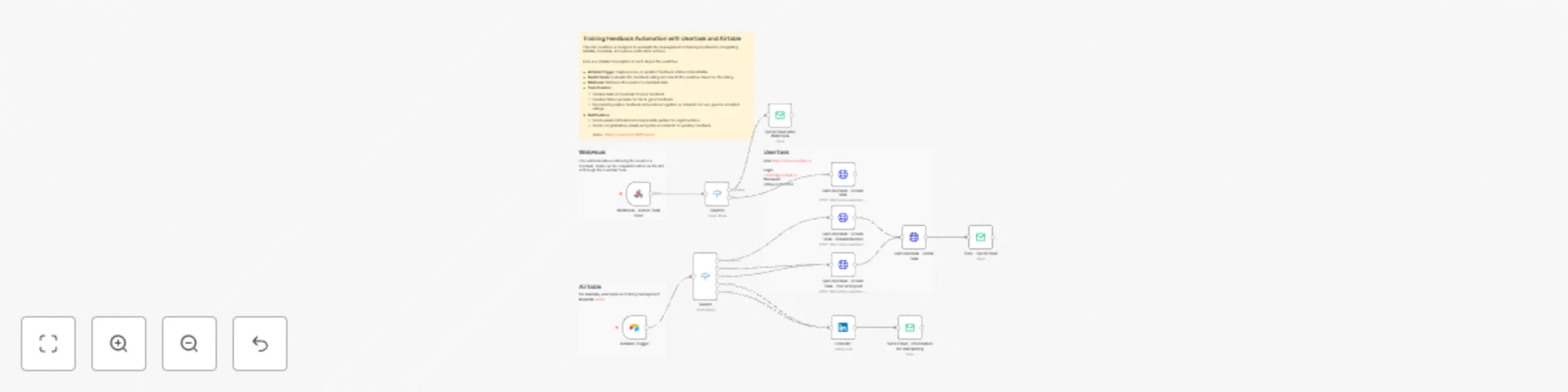
Training feedback automation with Usertask and Airtable

Workflow preview

Workflow preview
100%
Training feedback automation with Usertask and Airtable preview
Open on n8n.io

Important notice

This workflow is provided as-is. Please review and test before using in production.

1. Workflow Overview

Who is this template for? This workflow template is designed for teams involved in training management and feedback analysis. It is particularly useful for: HR Departments : Automating the collecti...

Best for

  • HR automation workflows
  • advanced n8n builders looking for reusable templates

Tools used

n8n-nodes-base.airtabletrigger, n8n-nodes-base.webhook, n8n-nodes-base.switch, n8n-nodes-base.linkedin, n8n-nodes-base.emailsend, n8n-nodes-base.httprequest, n8n-nodes-base.stickynote

Source and attribution

This workflow is cataloged by N8N Workflows and links back to its original n8n.io source page by NonoCode.

Original n8n.io source

1.1 Workflow description

Title
Training feedback automation with Usertask and Airtable
Workflow name
Training feedback automation with Usertask and Airtable

Who is this template for?

This workflow template is designed for teams involved in training management and feedback analysis. It is particularly useful for:

  • HR Departments: Automating the collection and response to training feedback.
  • Training Managers: Streamlining the process of handling feedback and ensuring timely follow-up.
  • Corporate Trainers: Receiving direct feedback and taking actions to improve training sessions.

This workflow offers a comprehensive solution for automating feedback management, ensuring timely responses, and improving the quality of training programs.


How it works

This workflow operates with an Airtable trigger but can be easily adapted to work with other triggers like webhooks from external applications.

Once feedback data is captured, the workflow evaluates the feedback and directs it to the appropriate channel for action. Tasks are created in Usertask based on the feedback rating, and notifications are sent to relevant parties.

Here’s a brief overview of this n8n workflow template:

  • Airtable Trigger: Captures new or updated feedback entries from Airtable.
  • Switch Node: Evaluates the feedback rating and directs the workflow based on the rating.
  • Webhook: Retrieves the result of a Usertask task.
  • Task Creation:
    • Creates tasks in Usertask for poor feedback.
    • Creates follow-up tasks for fair to good feedback.
    • Documents positive feedback and posts recognition on LinkedIn for very good to excellent ratings.
  • Notifications:
    • Sends email notifications to responsible parties for urgent actions.
    • Sends congratulatory emails and posts on LinkedIn for positive feedback.

To summarize

  • Flexible Integration: This workflow can be triggered by various methods like Airtable updates or webhooks from other applications.
  • Automated Task Management: It creates tasks in Usertask based on feedback ratings to ensure timely follow-up.
  • Multichannel Notifications: Sends notifications via email and LinkedIn to keep stakeholders informed and recognize successes.
  • Comprehensive Feedback Handling: Automates the evaluation and response to training feedback, improving efficiency and response time.

Instructions:

  1. Set Up Airtable: Create a table in Airtable to capture training feedback.
  2. Configure n8n: Set up the Airtable trigger in n8n to capture new or updated feedback entries.
  3. Set Up Usertask: Configure the Usertask nodes in n8n to create and manage tasks based on feedback ratings.
  4. Configure Email and LinkedIn Nodes: Set up the email and LinkedIn nodes to send notifications and post updates.
  5. Test the Workflow: Run tests to ensure the workflow captures feedback, creates tasks, and sends notifications correctly.

Video : https://youtu.be/U14MhTcpqeY

Remember, this template was created in n8n v1.38.2.

1.2 Logical Blocks

This catalog entry is organized from the workflow JSON. The node-level section below shows the executable blocks available for review before importing the template.

2. Block-by-Block Analysis

Block 1 - Airtable Trigger

Type / Role
n8n-nodes-base.airtableTrigger - airtableTrigger
Config choices
Version 1

Block 2 - Webhook - Action Task Poor

Type / Role
n8n-nodes-base.webhook - webhook
Config choices
Version 1.1

Block 3 - Switch1

Type / Role
n8n-nodes-base.switch - switch
Config choices
Version 3

Block 4 - LinkedIn

Type / Role
n8n-nodes-base.linkedIn - linkedIn
Config choices
Version 1

Block 5 - Poor - Send Email

Type / Role
n8n-nodes-base.emailSend - emailSend
Config choices
Version 2.1

Block 6 - Call Usertask - Create task

Type / Role
n8n-nodes-base.httpRequest - httpRequest
Config choices
Version 4.1

Block 7 - Call Usertask - Create Task - Pair and good

Type / Role
n8n-nodes-base.httpRequest - httpRequest
Config choices
Version 4.1

Block 8 - Send Email after WebHook

Type / Role
n8n-nodes-base.emailSend - emailSend
Config choices
Version 2.1

Block 9 - Sticky Note

Type / Role
n8n-nodes-base.stickyNote - stickyNote
Config choices
Version 1

Block 10 - Call Usertask - Detail Task

Type / Role
n8n-nodes-base.httpRequest - httpRequest
Config choices
Version 4.1

Block 11 - Send Email - Information for marcketing

Type / Role
n8n-nodes-base.emailSend - emailSend
Config choices
Version 2.1

Block 12 - Sticky Note1

Type / Role
n8n-nodes-base.stickyNote - stickyNote
Config choices
Version 1

Block 13 - Sticky Note2

Type / Role
n8n-nodes-base.stickyNote - stickyNote
Config choices
Version 1

Block 14 - Sticky Note3

Type / Role
n8n-nodes-base.stickyNote - stickyNote
Config choices
Version 1

Block 15 - Switch

Type / Role
n8n-nodes-base.switch - switch
Config choices
Version 3

Block 16 - Call Usertask - Create Task - Dissatisfaction

Type / Role
n8n-nodes-base.httpRequest - httpRequest
Config choices
Version 4.1

3. Summary Table

Workflow Training feedback automation with Usertask and Airtable
Complexity advanced
Nodes 16
Categories HR
Author NonoCode
Published 02 Jun 2024

4. Reproducing the Workflow from Scratch

  1. 1. Download the workflow JSON

    Use the JSON export at /data/workflows/2277/2277.json as the source template for this automation.

  2. 2. Import the template into n8n

    Open n8n, import the downloaded JSON, and review each node before activating the workflow.

  3. 3. Configure credentials and variables

    Replace placeholder credentials, API keys, webhook URLs, account IDs, and environment-specific values with your own settings.

  4. 4. Test with sample data

    Run the workflow manually or in a staging workspace, inspect node output, and confirm downstream systems receive the expected data.

  5. 5. Activate and monitor

    Enable the workflow only after testing, then monitor executions, errors, and rate limits during the first production runs.

5. General Notes & Resources

Review imported nodes carefully before activation. This catalog entry is intended to help you inspect the workflow structure, understand required services, and find related templates faster.

Node names, credentials, schedules, webhook paths, and external service limits may need adjustment for your workspace.

Frequently asked questions

What does Training feedback automation with Usertask and Airtable do?

Who is this template for? This workflow template is designed for teams involved in training management and feedback analysis. It is particularly useful for: HR Departments : Automating the collecti...

What do I need before importing this workflow?

Review the workflow JSON, configure any required credentials in n8n, and test the automation in a safe workspace before using it in production.

Can I customize this workflow?

Yes. Use the block-by-block analysis and the downloadable JSON to inspect each node, then adjust credentials, prompts, schedules, filters, or destinations for your HR use case.