Block 1 - Schedule Trigger
- Type / Role
- n8n-nodes-base.scheduleTrigger - scheduleTrigger
- Config choices
- Version 1.2


 Early Deal
This workflow is provided as-is. Please review and test before using in production.
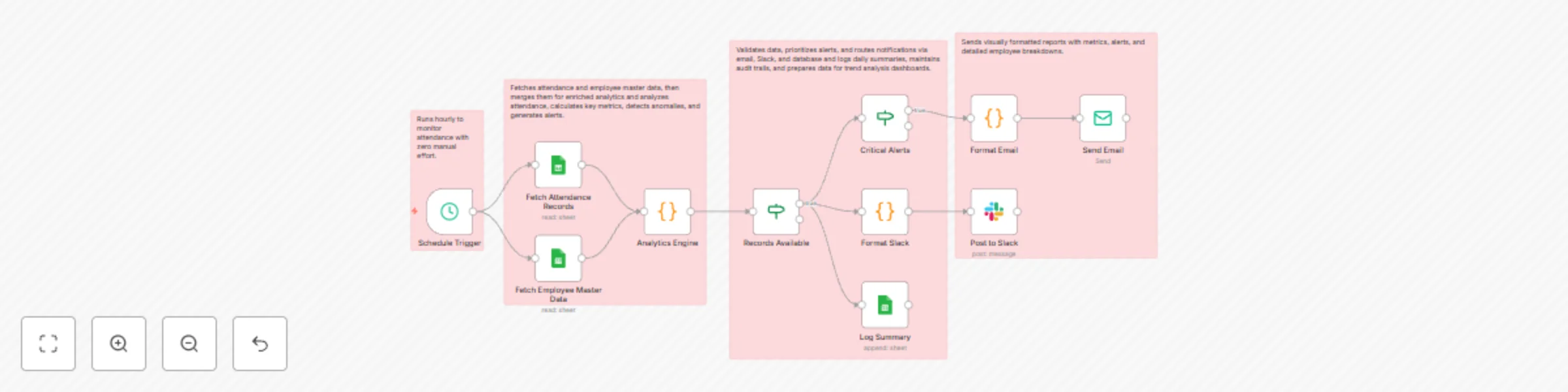
Transform your attendance management with this enterprise grade automated workflow featuring AI powered analytics, multi dimensional insights, and intelligent alerting. Running hourly, it integrate...
n8n-nodes-base.scheduletrigger, n8n-nodes-base.googlesheets, n8n-nodes-base.code, n8n-nodes-base.if, n8n-nodes-base.emailsend, n8n-nodes-base.slack, n8n-nodes-base.stickynote
This workflow is cataloged by N8N Workflows and links back to its original n8n.io source page by Oneclick AI Squad.
Original n8n.io sourceTransform your attendance management with this enterprise-grade automated workflow featuring AI-powered analytics, multi-dimensional insights, and intelligent alerting. Running hourly, it integrates multiple data sources (attendance logs + employee master data), performs sophisticated statistical analysis, detects anomalies, generates department-specific insights, and delivers beautiful HTML reports via email and Slack. Get real-time visibility into attendance patterns, punctuality trends, and actionable alerts for HR, management, and department heads. 📊🎯✨
| Column | Type | Description | Example |
|---|---|---|---|
| EmployeeID | Text | Unique employee identifier | EMP001 |
| EmployeeName | Text | Full name | John Doe |
| Date | Date | Attendance date (YYYY-MM-DD) | 2025-01-15 |
| Status | Text | Present/Absent/Late/Leave/WFH/Half-Day | Present |
| CheckInTime | Time | Arrival time (HH:MM) | 09:15 |
| CheckOutTime | Time | Departure time (HH:MM) | 18:00 |
| Notes | Text | Optional comments | Doctor appointment |
| Column | Type | Description | Example |
|---|---|---|---|
| EmployeeID | Text | Unique identifier (matches AttendanceLogs) | EMP001 |
| EmployeeName | Text | Full name | John Doe |
| Department | Text | Department name | Engineering |
| Manager | Text | Reporting manager name | Jane Smith |
| Shift | Text | Day/Night/Evening | Day |
| Work email address | [email protected] | ||
| ContractType | Text | Full-Time/Part-Time/Contract | Full-Time |
| Column | Type | Description |
|---|---|---|
| Date | Date | Report date |
| Hour | Number | Hour of day (0-23) |
| Present | Number | Present count |
| Absent | Number | Absent count |
| Late | Number | Late count |
| AttendanceRate | Number | Attendance percentage |
Google Sheets OAuth2 API
SMTP Email Account
Slack Bot Token
chat:write, chat:write.publicxoxb-)| Placeholder | Where to Find | Example |
|---|---|---|
YOUR_ATTENDANCE_SPREADSHEET_ID |
Google Sheets URL | 1BxiMVs0XRA5nFMdKvBdBZjgmUUqptlbs74OgvE2upms |
YOUR_EMPLOYEE_SPREADSHEET_ID |
Google Sheets URL | 1BxiMVs0XRA5nFMdKvBdBZjgmUUqptlbs74OgvE2upms |
YOUR_SUMMARY_SPREADSHEET_ID |
Google Sheets URL | 1BxiMVs0XRA5nFMdKvBdBZjgmUUqptlbs74OgvE2upms |
C12345678 |
Slack → Right-click channel → Copy link → Extract ID | C05XXXXXXXX |
[email protected] |
Your HR email | [email protected] |
[email protected] |
Management distribution list | [email protected] |
In the Analytics Engine node, find these lines:
const lateThreshold = metrics.totalEmployees * 0.1; // Change 0.1 to 0.15 for 15%
const absentThreshold = metrics.totalEmployees * 0.15; // Change to 0.20 for 20%
In the Analytics Engine node, add to the switch statement:
case 'Remote':
  statusCount.remote++;
  break;
In the Format Email node, modify the emailHtml variable:
<img src="https://yourcompany.com/logo.png" />grid-template-columns: repeat(5, 1fr);🚨 ${data.absent} employees absent today. Review required.Modify Analytics Engine to group by Location field:
const locationMetrics = {};
todayRecords.forEach(record => {
  const location = employee.location;
  if (!locationMetrics[location]) {
    locationMetrics[location] = { present: 0, absent: 0, late: 0 };
  }
  // ... aggregate by location
});
Add logic to compare check-in times against shift schedules:
const shiftTimes = {
  'Day': '09:00',
  'Night': '21:00',
  'Evening': '14:00'
};
const expectedTime = shiftTimes[employee.shift];
Add HTTP Request node to push data to:
Add Python or R nodes for:
Export data to visualization platforms:
"Could not find node"
$('Node Name').all() syntax"No records found"
YYYY-MM-DD in Google Sheets"Email not sending"
"Slack message failed"
chat:write permission scopeDiscover more workflows – Get in touch with us
This catalog entry is organized from the workflow JSON. The node-level section below shows the executable blocks available for review before importing the template.
| Workflow | Track employee attendance with analytics, email reports & Slack alerts using Google Sheets |
|---|---|
| Complexity | advanced |
| Nodes | 15 |
| Categories | HR |
| Author | Oneclick AI Squad |
| Published | 24 Oct 2025 |
Use the JSON export at /data/workflows/10106/10106.json as the source template for this automation.
Open n8n, import the downloaded JSON, and review each node before activating the workflow.
Replace placeholder credentials, API keys, webhook URLs, account IDs, and environment-specific values with your own settings.
Run the workflow manually or in a staging workspace, inspect node output, and confirm downstream systems receive the expected data.
Enable the workflow only after testing, then monitor executions, errors, and rate limits during the first production runs.
Review imported nodes carefully before activation. This catalog entry is intended to help you inspect the workflow structure, understand required services, and find related templates faster.
Node names, credentials, schedules, webhook paths, and external service limits may need adjustment for your workspace.
Transform your attendance management with this enterprise grade automated workflow featuring AI powered analytics, multi dimensional insights, and intelligent alerting. Running hourly, it integrate...
Review the workflow JSON, configure any required credentials in n8n, and test the automation in a safe workspace before using it in production.
Yes. Use the block-by-block analysis and the downloadable JSON to inspect each node, then adjust credentials, prompts, schedules, filters, or destinations for your HR use case.