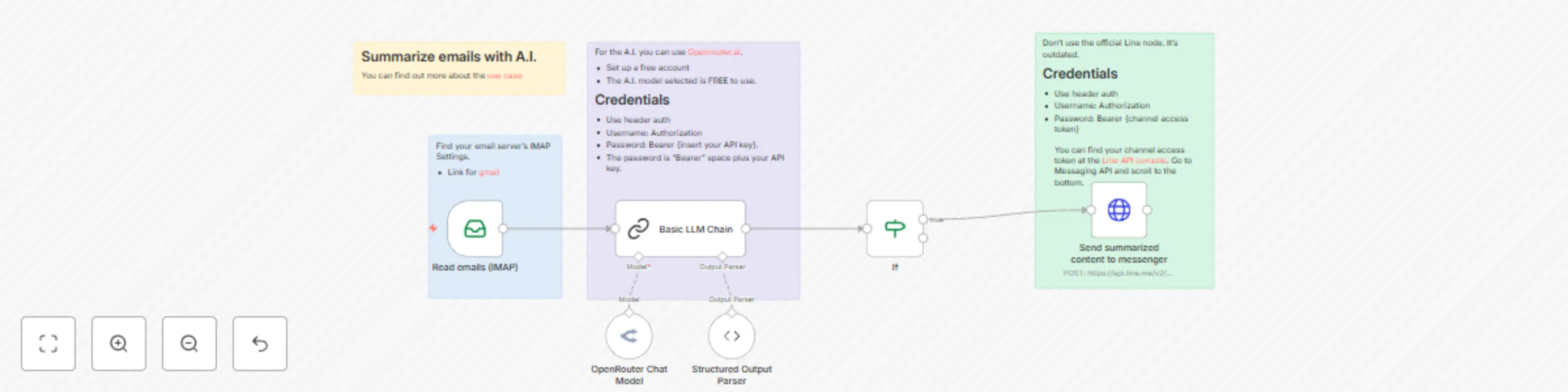
Summarize your emails with A.I. (via Openrouter) and send to Line messenger
Workflow preview

$20/month : Unlimited workflows
2500 executions/month

THE #1 IN WEB SCRAPING
Scrape any website without limits
HOSTINGER  Early Deal
DISCOUNT 20% Try free
Early DealDISCOUNT 20%
Self-hosted n8n
Unlimited workflows - from $4.99/mo

#1 hub for scraping, AI & automation
6000+ actors - $5 credits/mo
Important notice
This workflow is provided as-is. Please review and test before using in production.
Overview
Who is this template for?
- Anyone who is drowning in emails
- Busy parents who has alot of school emails
- Busy executives with too many emails
Case Study
I get too many emails from my kid's school about soccer practice, lunch orders and parent events. I use this workflow to read all the emails and tell me what is important and what requires actioning.
What this workflow does
- It uses IMAP to read the emails from your email account (i.e. Gmail).
- It then passes the email to Openrouter.ai and uses a free A.I. model to read and summarize the email.
- It then sends the summary as a message to your messenger (i.e. Line).
Setup
- You need to find your email server IMAP credentials.
- Input your openrouter.ai API credentials or replace the HTTP request node with an A.I. node such as OpenAI.
- Input your messenger credentials. I use Line but you can change the node to another messenger line Telegram.
- You need to change the message ID to your ID inside the http request. You can find your user ID inside the https://developers.line.biz/console/. Change the "to": {insert your user ID}.
How to adjust it to your needs
- You can change the A.I. prompt to fit your needs by telling it to mark emails from a certain address as important.
- You can change the A.I. model from the current meta-llama/llama-3.1-70b-instruct:free to a paid model or other free models.
- You can change the messenger node to telegram or any other messenger app you like.