Split in batches node noItemsLeft example
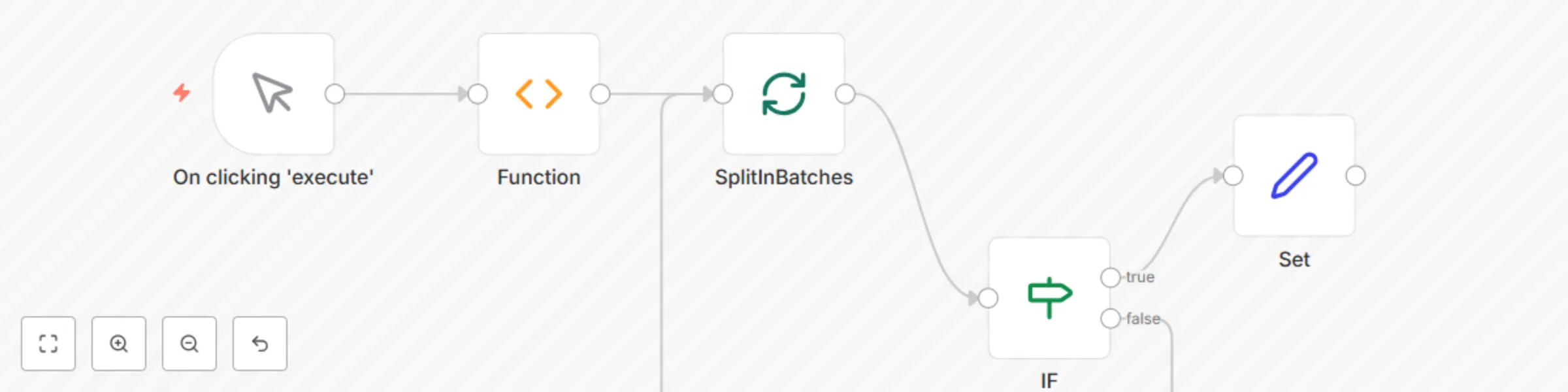
Workflow preview


 Early Deal
DISCOUNT 20%

Important notice
This workflow is provided as-is. Please review and test before using in production.
Overview
This workflow demonstrates how to use noItemsLeft to check if there are items left to be processed by the SplitInBatches node.
Function node: This node generates mock data for the workflow. Replace it with the node whose data you want to split into batches.
SplitInBatches node: This node splits the data with the batch size equal to 1. Based on your use-case, set the value of the Batch Size.
IF node: This node check if all the data by the SplitInBatches are not processed or not. It uses the expression {{$node["SplitInBatches"].context["noItemsLeft"]}} which returns a boolean value.
If there is data yet to be processed, the expression will return false, otherwise true.
Set node: This node prints a message No Items Left. Based on your use-case, connect the false output of the IF node to the input of the node you want to execute, after the data is processed by the SplitInBatches node.