Social media auto-posting to Instagram, Facebook & LinkedIn from Google Sheets
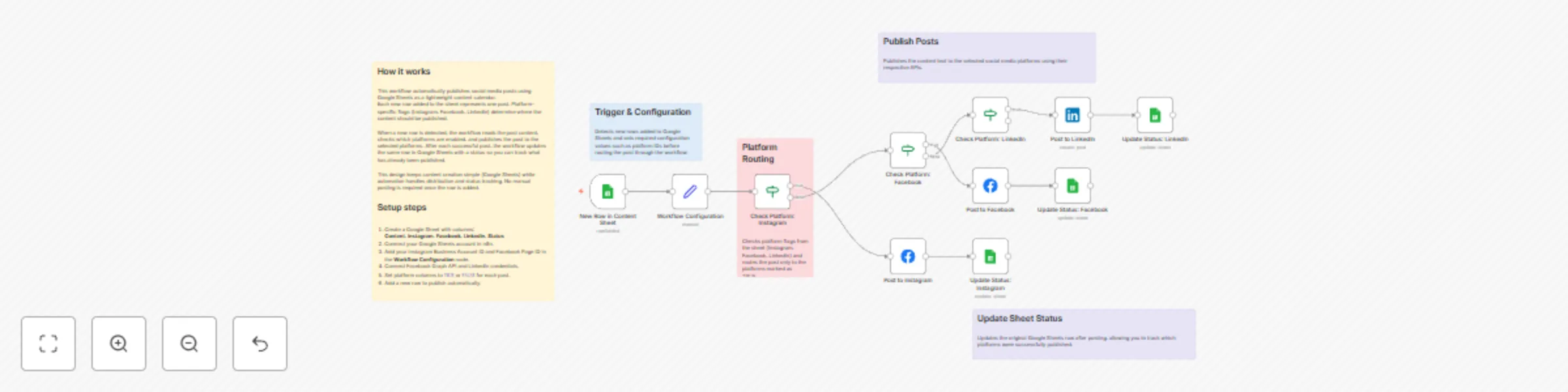
Workflow preview


 Early Deal
DISCOUNT 20%

Important notice
This workflow is provided as-is. Please review and test before using in production.
Overview
📌 Workflow Overview
This workflow enables multi-platform social media posting using Google Sheets as the control center.
Whenever a new row is added to the sheet, the workflow automatically posts the content to Instagram, Facebook, and/or LinkedIn based on platform flags, then updates the post status to prevent duplicates.
Supported Platforms
- Instagram (Business)
- Facebook Pages
- LinkedIn Pages
🧠 Key Concept
Google Sheets acts as a lightweight CMS and automation trigger.
Each row represents one post, and simple TRUE/FALSE columns decide where that post should be published.
📄 Required Google Sheets Columns
The content sheet must include the following columns:
- Content – Text to publish
- Instagram – TRUE / FALSE
- Facebook – TRUE / FALSE
- LinkedIn – TRUE / FALSE
- Status – Updated after posting
- Row Number – Used for precise updates
⚙️ How This Workflow Works
1️⃣ Trigger: New Content Added
- The workflow starts when a new row is added to Google Sheets.
- This allows near real-time publishing without manual execution.
2️⃣ Configuration Setup
- Platform-specific values like:
- Instagram Business Account ID
- Facebook Page ID
- Are defined once in a configuration node for easy reuse and maintenance.
3️⃣ Platform Routing Logic
- IF nodes check each platform column:
- Instagram = TRUE → post to Instagram
- Facebook = TRUE → post to Facebook
- LinkedIn = TRUE → post to LinkedIn
- One row can trigger posting to multiple platforms.
4️⃣ Platform Posting
- Posts are published using:
- Facebook Graph API (Instagram + Facebook)
- LinkedIn API (LinkedIn Pages)
- The Content column is used directly as the post body.
5️⃣ Status Update (Per Platform)
- After posting:
- The workflow updates the same row using Row Number
- Marks the post as completed for that platform
- This prevents duplicate or accidental re-posts.
🔄 Current Capabilities
- Multi-platform posting from one sheet
- Platform-specific routing logic
- Real-time execution on new content
- Safe status updates using row matching
🚀 Designed for Easy Expansion
This workflow is intentionally modular and can be extended with:
- Scheduled posting (date/time columns)
- Image & media handling
- AI-generated captions
- Hashtag optimization
- Engagement analytics
- Retry & error handling logic
✅ Best Practices
- Use TRUE / FALSE consistently in platform columns
- Keep Google Sheets as the single source of truth
- Add validation or approval columns if used by teams
📦 Ideal Use Cases
- Social media managers
- Marketing teams
- Founders & creators
- Agencies handling multiple platforms
This workflow provides a scalable foundation for social media automation while remaining simple, transparent, and easy to maintain.