Smart Gmail inbox management with Gemini: Auto-label and draft replies
Workflow preview

$20/month : Unlimited workflows
2500 executions/month

THE #1 IN WEB SCRAPING
Scrape any website without limits
HOSTINGER  Early Deal
DISCOUNT 20% Try free
Early DealDISCOUNT 20%
Self-hosted n8n
Unlimited workflows - from $4.99/mo

#1 hub for scraping, AI & automation
6000+ actors - $5 credits/mo
Important notice
This workflow is provided as-is. Please review and test before using in production.
Overview
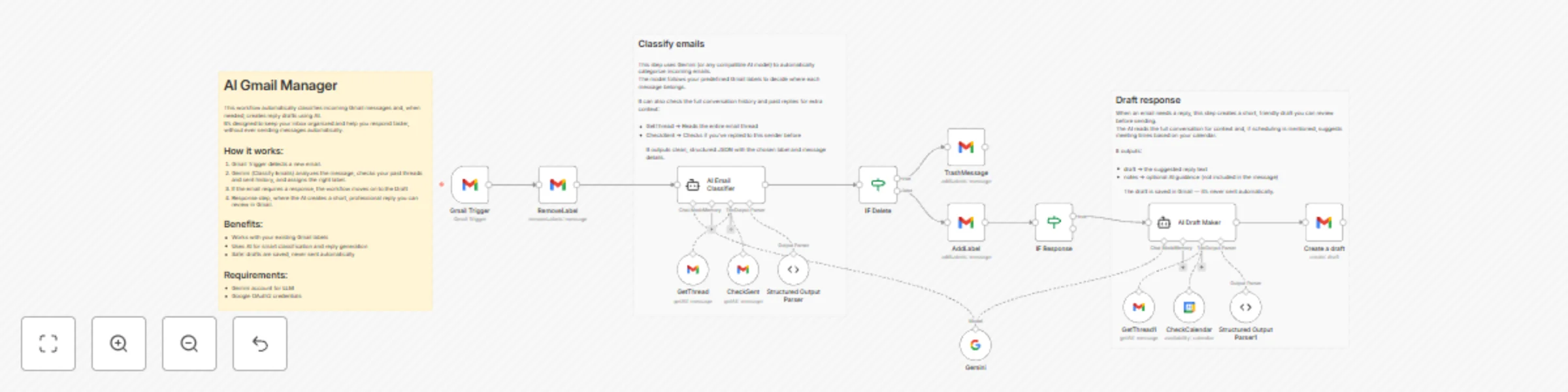
Keep your Gmail inbox organized and stress-free with this AI-powered workflow. Ideal for freelancers, small business owners, and productivity enthusiasts who receive a high volume of mixed emails. This template automatically sorts messages into predefined labels and drafts a professional reply when follow-up is needed.
How it works
- Gmail Trigger starts the workflow whenever a new email arrives.
- AI Classifier (Gemini or compatible model) analyzes the message, checks your previous conversations and sent emails, and assigns the correct Gmail label.
- Smart rules ensure irrelevant messages are deleted or archived, while actionable ones are prepared for a response.
- AI Draft Node creates a concise, friendly, and professional draft reply — stored safely in your Gmail drafts folder (never auto-sent).
- Optional tools like CheckCalendar can suggest time slots for meetings automatically.
Together, these steps make your inbox work for you: sorting, prioritizing, and drafting responses.
Set up steps
- Connect your Gmail account and ensure your label categories already exist.
- Connect your Gemini (or other AI) credentials.
- (Optional) Enable CheckCalendar for scheduling suggestions.
- Adjust the labeling rules and prompt text to match your personal or business workflow.
Requirements
- Gemini account for LLM
- Google OAuth2 credentials