Sign PDF documents with X.509 certificates using PAdES standards
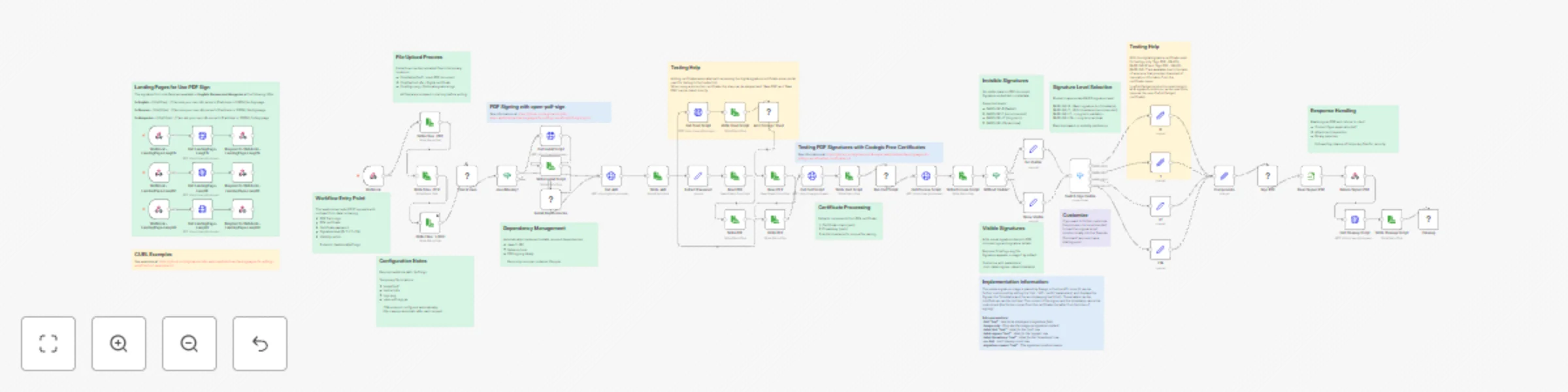
Workflow preview


 Early Deal
DISCOUNT 20%

Important notice
This workflow is provided as-is. Please review and test before using in production.
Overview
PDF Digital Signature API with PAdES Compliance
Sign PDF documents with legally-compliant digital signatures using X.509 certificates. Supports multiple PAdES signature levels (B, T, LT, LTA) with optional visible stamps.
What this workflow does
This workflow creates a professional PDF signing service that:
- Accepts PDF files via webhook API
- Signs documents using X.509 certificates (PFX format)
- Returns cryptographically signed PDFs compliant with EU eIDAS standards
- Supports both visible and invisible signatures
- Provides multi-language landing pages for easy testing
Perfect for contracts, invoices, legal documents, and any PDF requiring digital authentication.
Use Cases
- Legal Document Signing: Sign contracts and agreements with legally-binding digital signatures
- Invoice Authentication: Add cryptographic signatures to invoices for validation
- Regulatory Compliance: Meet EU eIDAS and other digital signature requirements
- Document Archival: Create long-term valid signatures for permanent storage
- Automated Signing Pipeline: Integrate PDF signing into your existing workflows
How it Works
Workflow Process
- File Upload: Receives PDF, certificate (PFX), and password via webhook
- Dependency Check: Automatically installs Java and signing tool if needed
- Certificate Processing: Extracts certificate and private key from PFX
- Signature Selection: Routes to appropriate signing method based on level
- PDF Signing: Signs document using open-pdf-sign tool
- Response: Returns signed PDF and cleans up temporary files
Signature Levels Explained
Choose the signature level based on your needs:
BASELINE-B (Basic, 2-3 seconds)
- Fastest option
- Short-term validity (months)
- Best for: Testing, internal documents
BASELINE-T (Timestamp, 3-5 seconds) - Recommended
- Includes trusted timestamp
- Medium-term validity (years)
- Best for: Contracts, invoices, business documents
BASELINE-LT (Long-Term, 5-10 seconds)
- Includes revocation information
- Long-term validity (decades)
- Best for: Banking, healthcare, government
BASELINE-LTA (Archival, 8-12 seconds)
- Maximum compliance level
- Permanent validity
- Best for: Critical legal documents
Visible vs Invisible Signatures
Invisible (default):
- No visual mark on document
- Preserves original appearance
- Signature in document metadata
Visible:
- Shows signature stamp on PDF
- Includes logo and signature details
- More reassuring for recipients
- Add
isVisible=trueandlogoFileto request
Customization
Change Signature Level
Modify the signLevel parameter in your request:
B- BasicT- Timestamp (default)LT- Long-termLTA- Archival
Customize Visible Signature
Upload a logo and add customization parameters to the signing command nodes:
--hint "Digitally Signed"           # Custom text
--page 2                            # Sign on page 2
--label-signee "Signed by"          # Custom label
--label-timestamp "Date"            # Custom timestamp label
--no-hint                           # Hide hint row
--signature-reason "Contract Approval"  # Reason text
Adjust File Paths
Modify these nodes to change temporary file locations:
Write Files : PDF- PDF storage pathWrite Files : PFX- Certificate storage pathWrite Files : LOGO- Logo storage path
Add Authentication
For production use, add authentication before the webhook:
- Insert HTTP Request node to validate API key
- Add rate limiting
- Log signature operations
Technical Details
What Gets Installed
The workflow automatically installs:
- OpenJDK 11 JRE (Java runtime)
- curl (for downloading)
- open-pdf-sign v0.3.0 (signing tool)
Certificate Processing
Uses OpenSSL to extract:
- X.509 certificate chain (.pem)
- Private key (.pem)
All files use timestamped names to prevent conflicts.
Security Features
- Automatic cleanup of sensitive files after each request
- No persistent storage of certificates or keys
- HTTPS recommended for production
- Supports password-protected certificates
Standards Compliance
Implements ETSI EN 319 142 PAdES standards:
- EU eIDAS regulation compliant
- Validates in Adobe Acrobat Reader
- Verifiable at EU DSS Demo webapp
FAQ
Q: Where do I get certificates? A: For testing, use free certificates from Codegic. For production, purchase from DigiCert, GlobalSign, or Sectigo.
Q: What PDF sizes are supported? A: Up to 50MB by default. Adjust n8n configuration for larger files.
Q: Can I sign multiple PDFs at once? A: Call the API once per PDF, or modify the workflow to accept multiple files.
Q: Will signatures work in Adobe Reader? A: Yes, if using certificates from trusted CAs. Self-signed certificates will show warnings.
Q: How do I verify signed PDFs? A: Open in Adobe Acrobat Reader and check the signature panel, or use the EU DSS validation tool webapp.
Q: Can I use this commercially? A: Yes, the workflow is free for personal and commercial use.
Support
- Documentation: See workflow sticky notes for detailed information
- Tool Source: open-pdf-sign on GitHub
- Standards: ETSI PAdES specifications
- Community: n8n Community Forum
License: Free for personal and commercial use
Dependencies: OpenJDK 11, OpenSSL, curl, open-pdf-sign v0.3.0 (Apache 2.0)