Sign PDF documents with X.509 certificates using PAdES standards

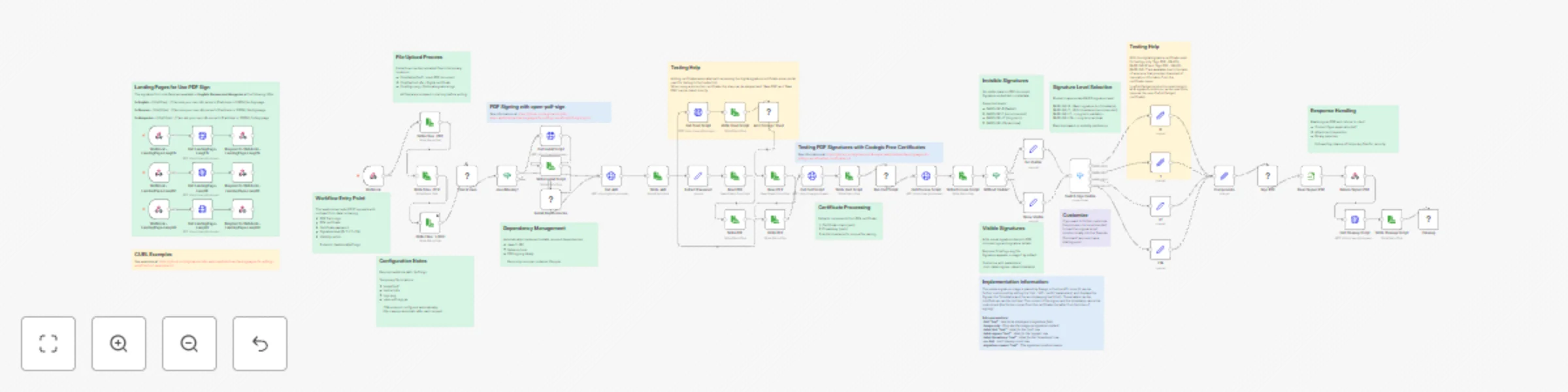
Workflow preview

Workflow preview
100%
Sign PDF documents with X.509 certificates using PAdES standards preview
Open on n8n.io

Important notice

This workflow is provided as-is. Please review and test before using in production.

1. Workflow Overview

PDF Digital Signature API with PAdES Compliance Sign PDF documents with legally compliant digital signatures using X.509 certificates. Supports multiple PAdES signature levels (B, T, LT, LTA) with ...

Best for

  • Document Extraction automation workflows
  • advanced n8n builders looking for reusable templates

Tools used

n8n-nodes-base.executecommand, n8n-nodes-base.if, n8n-nodes-base.httprequest, n8n-nodes-base.readwritefile, n8n-nodes-base.set, n8n-nodes-base.readbinaryfile, n8n-nodes-base.respondtowebhook, n8n-nodes-base.switch

Source and attribution

This workflow is cataloged by N8N Workflows and links back to its original n8n.io source page by Vigh Sandor.

Original n8n.io source

1.1 Workflow description

Title
Sign PDF documents with X.509 certificates using PAdES standards
Workflow name
Sign PDF documents with X.509 certificates using PAdES standards

PDF Digital Signature API with PAdES Compliance

Sign PDF documents with legally-compliant digital signatures using X.509 certificates. Supports multiple PAdES signature levels (B, T, LT, LTA) with optional visible stamps.

What this workflow does

This workflow creates a professional PDF signing service that:

  • Accepts PDF files via webhook API
  • Signs documents using X.509 certificates (PFX format)
  • Returns cryptographically signed PDFs compliant with EU eIDAS standards
  • Supports both visible and invisible signatures
  • Provides multi-language landing pages for easy testing

Perfect for contracts, invoices, legal documents, and any PDF requiring digital authentication.

Use Cases

  • Legal Document Signing: Sign contracts and agreements with legally-binding digital signatures
  • Invoice Authentication: Add cryptographic signatures to invoices for validation
  • Regulatory Compliance: Meet EU eIDAS and other digital signature requirements
  • Document Archival: Create long-term valid signatures for permanent storage
  • Automated Signing Pipeline: Integrate PDF signing into your existing workflows

How it Works

Workflow Process

  1. File Upload: Receives PDF, certificate (PFX), and password via webhook
  2. Dependency Check: Automatically installs Java and signing tool if needed
  3. Certificate Processing: Extracts certificate and private key from PFX
  4. Signature Selection: Routes to appropriate signing method based on level
  5. PDF Signing: Signs document using open-pdf-sign tool
  6. Response: Returns signed PDF and cleans up temporary files

Signature Levels Explained

Choose the signature level based on your needs:

BASELINE-B (Basic, 2-3 seconds)

  • Fastest option
  • Short-term validity (months)
  • Best for: Testing, internal documents

BASELINE-T (Timestamp, 3-5 seconds) - Recommended

  • Includes trusted timestamp
  • Medium-term validity (years)
  • Best for: Contracts, invoices, business documents

BASELINE-LT (Long-Term, 5-10 seconds)

  • Includes revocation information
  • Long-term validity (decades)
  • Best for: Banking, healthcare, government

BASELINE-LTA (Archival, 8-12 seconds)

  • Maximum compliance level
  • Permanent validity
  • Best for: Critical legal documents

Visible vs Invisible Signatures

Invisible (default):

  • No visual mark on document
  • Preserves original appearance
  • Signature in document metadata

Visible:

  • Shows signature stamp on PDF
  • Includes logo and signature details
  • More reassuring for recipients
  • Add isVisible=true and logoFile to request

Customization

Change Signature Level

Modify the signLevel parameter in your request:

  • B - Basic
  • T - Timestamp (default)
  • LT - Long-term
  • LTA - Archival

Customize Visible Signature

Upload a logo and add customization parameters to the signing command nodes:

--hint "Digitally Signed"           # Custom text
--page 2                            # Sign on page 2
--label-signee "Signed by"          # Custom label
--label-timestamp "Date"            # Custom timestamp label
--no-hint                           # Hide hint row
--signature-reason "Contract Approval"  # Reason text

Adjust File Paths

Modify these nodes to change temporary file locations:

  • Write Files : PDF - PDF storage path
  • Write Files : PFX - Certificate storage path
  • Write Files : LOGO - Logo storage path

Add Authentication

For production use, add authentication before the webhook:

  1. Insert HTTP Request node to validate API key
  2. Add rate limiting
  3. Log signature operations

Technical Details

What Gets Installed

The workflow automatically installs:

  • OpenJDK 11 JRE (Java runtime)
  • curl (for downloading)
  • open-pdf-sign v0.3.0 (signing tool)

Certificate Processing

Uses OpenSSL to extract:

  • X.509 certificate chain (.pem)
  • Private key (.pem)

All files use timestamped names to prevent conflicts.

Security Features

  • Automatic cleanup of sensitive files after each request
  • No persistent storage of certificates or keys
  • HTTPS recommended for production
  • Supports password-protected certificates

Standards Compliance

Implements ETSI EN 319 142 PAdES standards:

  • EU eIDAS regulation compliant
  • Validates in Adobe Acrobat Reader
  • Verifiable at EU DSS Demo webapp

FAQ

Q: Where do I get certificates? A: For testing, use free certificates from Codegic. For production, purchase from DigiCert, GlobalSign, or Sectigo.

Q: What PDF sizes are supported? A: Up to 50MB by default. Adjust n8n configuration for larger files.

Q: Can I sign multiple PDFs at once? A: Call the API once per PDF, or modify the workflow to accept multiple files.

Q: Will signatures work in Adobe Reader? A: Yes, if using certificates from trusted CAs. Self-signed certificates will show warnings.

Q: How do I verify signed PDFs? A: Open in Adobe Acrobat Reader and check the signature panel, or use the EU DSS validation tool webapp.

Q: Can I use this commercially? A: Yes, the workflow is free for personal and commercial use.

Support

  • Documentation: See workflow sticky notes for detailed information
  • Tool Source: open-pdf-sign on GitHub
  • Standards: ETSI PAdES specifications
  • Community: n8n Community Forum

License: Free for personal and commercial use
Dependencies: OpenJDK 11, OpenSSL, curl, open-pdf-sign v0.3.0 (Apache 2.0)

1.2 Logical Blocks

This catalog entry is organized from the workflow JSON. The node-level section below shows the executable blocks available for review before importing the template.

2. Block-by-Block Analysis

Block 1 - Check Java

Type / Role
n8n-nodes-base.executeCommand - executeCommand
Config choices
Version 1

Block 2 - Java Missing?

Type / Role
n8n-nodes-base.if - if
Config choices
Version 1

Block 3 - Get Install Script

Type / Role
n8n-nodes-base.httpRequest - httpRequest
Config choices
Version 4.2

Block 4 - Write Install Script

Type / Role
n8n-nodes-base.readWriteFile - readWriteFile
Config choices
Version 1

Block 5 - Install Dependencies

Type / Role
n8n-nodes-base.executeCommand - executeCommand
Config choices
Version 1

Block 6 - Extract Password

Type / Role
n8n-nodes-base.set - set
Config choices
Version 3.3

Block 7 - Read Signed PDF

Type / Role
n8n-nodes-base.readBinaryFile - readBinaryFile
Config choices
Version 1

Block 8 - Return Signed PDF

Type / Role
n8n-nodes-base.respondToWebhook - respondToWebhook
Config choices
Version 1

Block 9 - Get Cleanup Script

Type / Role
n8n-nodes-base.httpRequest - httpRequest
Config choices
Version 4.2

Block 10 - Write Cleanup Script

Type / Role
n8n-nodes-base.readWriteFile - readWriteFile
Config choices
Version 1

Block 11 - Cleanup

Type / Role
n8n-nodes-base.executeCommand - executeCommand
Config choices
Version 1

Block 12 - Add Codegic Trust

Type / Role
n8n-nodes-base.executeCommand - executeCommand
Config choices
Version 1

Block 13 - Without Visible?

Type / Role
n8n-nodes-base.if - if
Config choices
Version 2.2

Block 14 - Switch Sign Visible

Type / Role
n8n-nodes-base.switch - switch
Config choices
Version 3.2

Block 15 - Write Files : PDF

Type / Role
n8n-nodes-base.readWriteFile - readWriteFile
Config choices
Version 1

Block 16 - Write Files : PFX

Type / Role
n8n-nodes-base.readWriteFile - readWriteFile
Config choices
Version 1

Block 17 - Write Files : LOGO

Type / Role
n8n-nodes-base.readWriteFile - readWriteFile
Config choices
Version 1

Block 18 - Write JAR

Type / Role
n8n-nodes-base.readWriteFile - readWriteFile
Config choices
Version 1

Block 19 - Get JAR

Type / Role
n8n-nodes-base.httpRequest - httpRequest
Config choices
Version 4.2

Block 20 - Get Process Script

Type / Role
n8n-nodes-base.httpRequest - httpRequest
Config choices
Version 4.2

Block 21 - Write Process Script

Type / Role
n8n-nodes-base.readWriteFile - readWriteFile
Config choices
Version 1

Block 22 - Get Trust Script

Type / Role
n8n-nodes-base.httpRequest - httpRequest
Config choices
Version 4.2

Block 23 - Write Trust Script

Type / Role
n8n-nodes-base.readWriteFile - readWriteFile
Config choices
Version 1

Block 24 - Get Cert Script

Type / Role
n8n-nodes-base.httpRequest - httpRequest
Config choices
Version 4.2

Showing the first 24 of 65 workflow blocks. Download the JSON for the full node graph.

3. Summary Table

Workflow Sign PDF documents with X.509 certificates using PAdES standards
Complexity advanced
Nodes 65
Categories Document Extraction
Author Vigh Sandor
Published 07 Nov 2025

4. Reproducing the Workflow from Scratch

  1. 1. Download the workflow JSON

    Use the JSON export at /data/workflows/10606/10606.json as the source template for this automation.

  2. 2. Import the template into n8n

    Open n8n, import the downloaded JSON, and review each node before activating the workflow.

  3. 3. Configure credentials and variables

    Replace placeholder credentials, API keys, webhook URLs, account IDs, and environment-specific values with your own settings.

  4. 4. Test with sample data

    Run the workflow manually or in a staging workspace, inspect node output, and confirm downstream systems receive the expected data.

  5. 5. Activate and monitor

    Enable the workflow only after testing, then monitor executions, errors, and rate limits during the first production runs.

5. General Notes & Resources

Review imported nodes carefully before activation. This catalog entry is intended to help you inspect the workflow structure, understand required services, and find related templates faster.

Node names, credentials, schedules, webhook paths, and external service limits may need adjustment for your workspace.

Frequently asked questions

What does Sign PDF documents with X.509 certificates using PAdES standards do?

PDF Digital Signature API with PAdES Compliance Sign PDF documents with legally compliant digital signatures using X.509 certificates. Supports multiple PAdES signature levels (B, T, LT, LTA) with ...

What do I need before importing this workflow?

Review the workflow JSON, configure any required credentials in n8n, and test the automation in a safe workspace before using it in production.

Can I customize this workflow?

Yes. Use the block-by-block analysis and the downloadable JSON to inspect each node, then adjust credentials, prompts, schedules, filters, or destinations for your Document Extraction use case.