Send Gmail messages with custom aliases and attachments via API
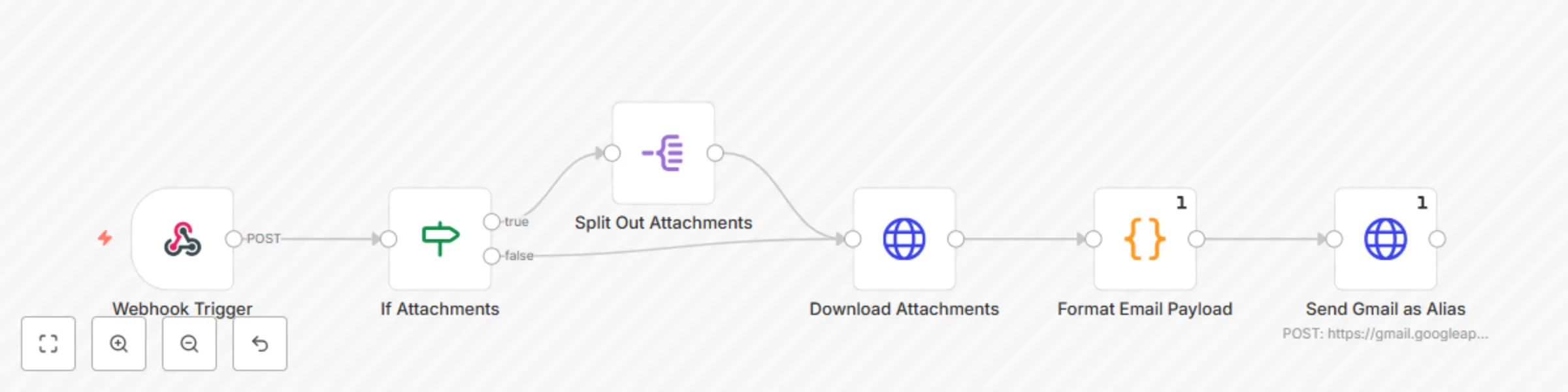
Workflow preview

$20/month : Unlimited workflows
2500 executions/month

THE #1 IN WEB SCRAPING
Scrape any website without limits
HOSTINGER  Early Deal
DISCOUNT 20% Try free
Early DealDISCOUNT 20%
Self-hosted n8n
Unlimited workflows - from $4.99/mo

#1 hub for scraping, AI & automation
6000+ actors - $5 credits/mo
Important notice
This workflow is provided as-is. Please review and test before using in production.
Overview
This n8n template allows you to send emails with a custom alias from your Gmail account
Since the native Gmail node has some limitations regarding use of email aliases, this template allows you to set up your own internal endpoint/sub-workflow to send emails as an email alias .
How it works
This workflow uses a Code node and the Gmail API via an HTTP node to format the email content and send using an alias on your Gmail account.
Setup instructions
- You must have added the email address as an alias you wish to send as in your Gmail account, guide on how to do so here.
- You must have created a Gmail credential in N8N, guide on how to do so here.
- Use your Gmail OAuth Credential in the HTTP node.
- Use this template as an API endpoint or a sub-workflow, and send this payload to it via POST:
{
  "senderName": "SENDER NAME HERE",
  "fromEmail": "FROM EMAIL HERE",
  "replyTo": "REPLY TO EMAIL HERE",
  "toEmail": "[email protected]",
  "subject": "SUBJECT LINE HERE",
  "htmlBody": "HTML BODY HERE - MUST BE JSON STRINGIFIED",
  "file_urls": [
    "FILE URLS FOR ATTACHMENTS HERE"
  ]
}
Notes
Only the following are required fields:
- fromEmail
- toEmail
- subject
- htmlBody
Customizing this workflow
You can easily convert this to a sub-workflow by swapping out the Webhook trigger for a "When executed by another workflow" trigger