Jacob @ vwork Digital
Workflows by Jacob @ vwork Digital
Record payout from Stripe in Wave Accounting
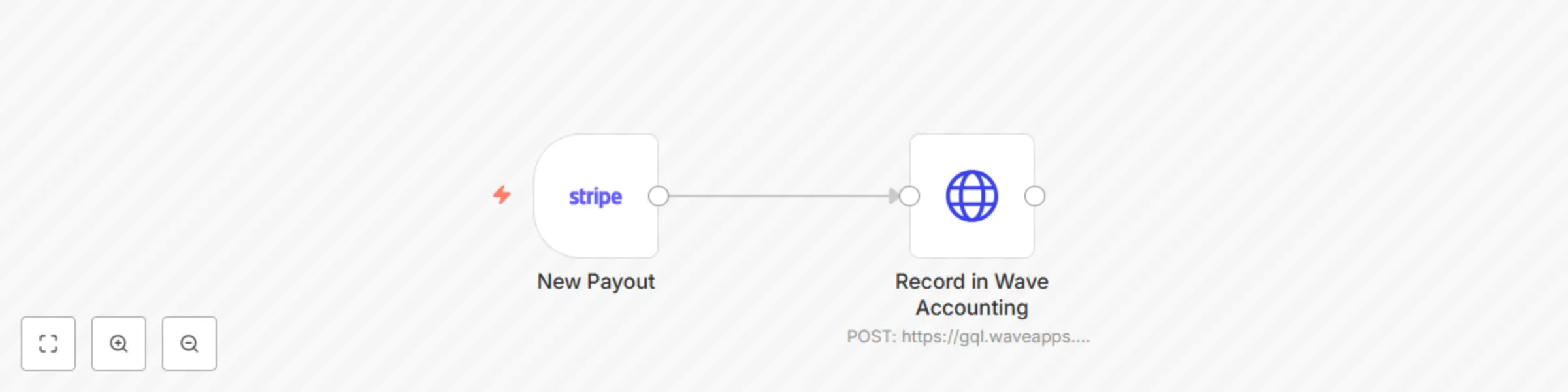
# This workflow helps small business owners using Wave Apps to easily access the Wave Accounting API using n8n In this example, the workflow is triggered from a new payout from Stripe. It then logs the transaction as a journal entry in Wave Accounting, helping you automate your accounting without needing to pay for expensive subscriptions! ## What this workflow template does This workflow triggers when a payout is paid in Stripe and sends a GraphQL request to the Wave Accounting API recording the payout as a journal entry automatically. The benefits of this worklow are to instantaneously keep your books up to date and to ensure accuracy. ## How to setup 1. Setup your Stripe credential in n8n using the native Stripe nodes. 2. [Follow this guide](https://developer.waveapps.com/hc/en-us/articles/360018856751-Authentication) to get your Wave Apps authorization token. 3. Setup the node with the correct header auth -> **{"Authorization": "Bearer TOKEN-HERE"}** 4. Get your account IDs from Wave 5. The payload uses GraphQL so ensure to update it accordingly with what you are trying to achieve, the current example creates a journal entry. ## Tips ### Getting Wave account and IDs - It is easiest to use network logs to obtain the right account IDs from Wave, especially if you have created custom accounts (default Wave account IDs can be obtained via making that API call). - Go to Wave and make a new dummy transaction using the accounts you want to use in n8n. - Have the network logs open while you do this. - Search network logs for the name of the account you are trying to use. - You should see account IDs in the log data. ### Sales tax - This example uses sales tax baked into the total Stripe payout amount (5%) - You can find the sales tax account IDs the same way as you found the Wave account IDs using network logs ### Use AI to help you with your API call - Ask Claude or ChatGPT to draft you your ideal payload
Send Gmail messages with custom aliases and attachments via API
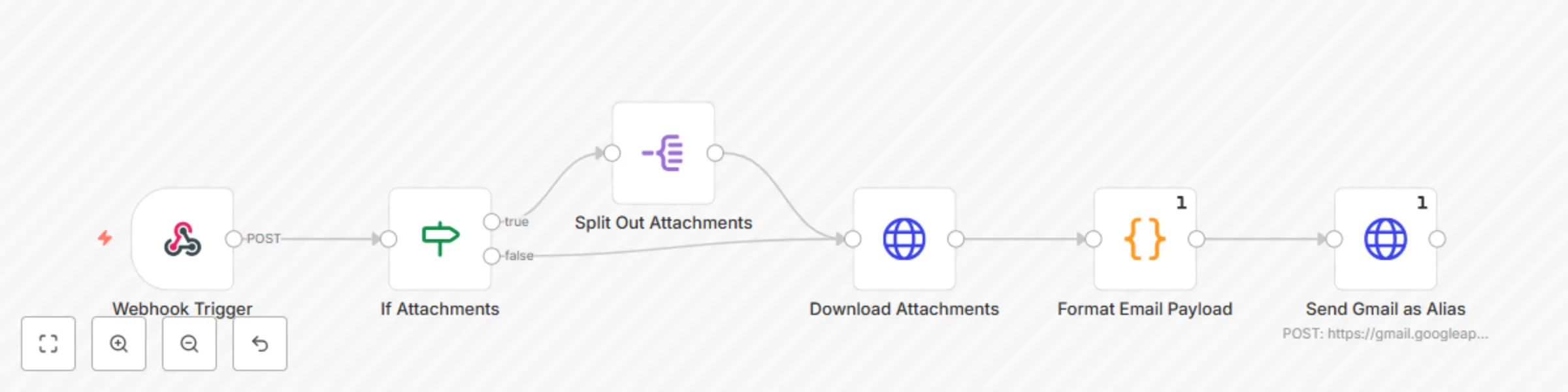
# This n8n template allows you to send emails with a custom alias from your Gmail account Since the native Gmail node has some limitations regarding use of email aliases, this template allows you to set up your own internal endpoint/sub-workflow to send emails as an email alias . # How it works This workflow uses a Code node and the Gmail API via an HTTP node to format the email content and send using an alias on your Gmail account. # Setup instructions 1. You must have added the email address as an alias you wish to send as in your Gmail account, guide on how to do so [here](https://support.google.com/mail/answer/22370?hl=en). 2. You must have created a Gmail credential in N8N, guide on how to do so [here](https://docs.n8n.io/integrations/builtin/credentials/google/). 3. Use your Gmail OAuth Credential in the HTTP node. 4. Use this template as an API endpoint or a sub-workflow, and send this payload to it via POST: ``` { "senderName": "SENDER NAME HERE", "fromEmail": "FROM EMAIL HERE", "replyTo": "REPLY TO EMAIL HERE", "toEmail": "[email protected]", "subject": "SUBJECT LINE HERE", "htmlBody": "HTML BODY HERE - MUST BE JSON STRINGIFIED", "file_urls": [ "FILE URLS FOR ATTACHMENTS HERE" ] } ``` # Notes Only the following are required fields: - fromEmail - toEmail - subject - htmlBody # Customizing this workflow You can easily convert this to a sub-workflow by swapping out the Webhook trigger for a "When executed by another workflow" trigger