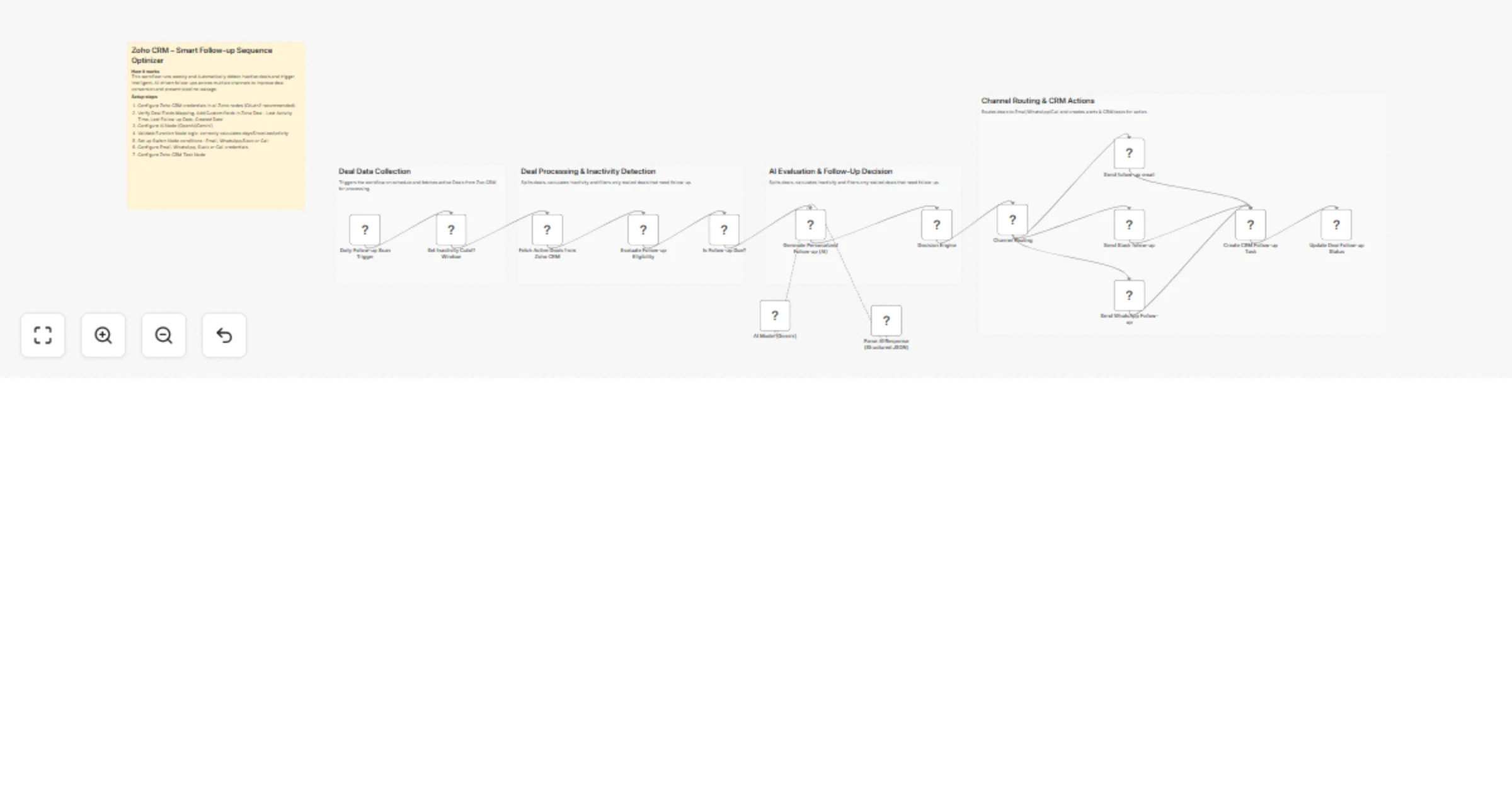
Send AI-personalized deal follow-ups from Zoho CRM via email, Slack and WhatsApp with Gemini

Workflow preview

Workflow preview
100%
Send AI-personalized deal follow-ups from Zoho CRM via email, Slack and WhatsApp with Gemini preview
Open on n8n.io

1. Workflow Overview

Intelligent Deal Follow Up Automation (n8n + Zoho CRM + AI) This workflow automatically detects inactive deals in Zoho CRM and triggers AI driven follow ups across multiple channels. It analyzes de...

Best for

  • Lead Nurturing automation workflows
  • AI Summarization automation workflows
  • advanced n8n builders looking for reusable templates

Tools used

n8n-nodes-base.cron, n8n-nodes-base.set, n8n-nodes-base.zohocrm, n8n-nodes-base.code, n8n-nodes-base.if, @n8n/n8n-nodes-langchain.chainllm, @n8n/n8n-nodes-langchain.lmchatgooglegemini, @n8n/n8n-nodes-langchain.outputparserstructured

Source and attribution

This workflow is cataloged by N8N Workflows and links back to its original n8n.io source page by WeblineIndia.

Original n8n.io source

1.1 Workflow description

Title
Send AI-personalized deal follow-ups from Zoho CRM via email, Slack and WhatsApp with Gemini
Workflow name
Send AI-personalized deal follow-ups from Zoho CRM via email, Slack and WhatsApp with Gemini

Intelligent Deal Follow-Up Automation (n8n + Zoho CRM + AI)

This workflow automatically detects inactive deals in Zoho CRM and triggers AI-driven follow-ups across multiple channels. It analyzes deal activity, determines the optimal follow-up method, generates personalized communication using AI, routes execution through Email/WhatsApp/Call and updates CRM records to maintain a continuous engagement cycle.

Quick Implementation Steps

  1. Configure Zoho CRM, Gmail/SMTP and AI API credentials.
  2. Import the workflow into n8n.
  3. Ensure deals contain activity tracking fields (Last Activity Time, Follow-up fields).
  4. Activate the workflow.
  5. Workflow runs on schedule and processes inactive deals automatically.
  6. Follow-ups are triggered and CRM records are updated.

What It Does

This workflow eliminates manual follow-up tracking by continuously monitoring deal activity within Zoho CRM. It identifies inactive deals based on configurable inactivity thresholds and processes them through an AI-powered decision pipeline.

The system evaluates deal inactivity, determines urgency and selects the most appropriate follow-up channel using a hybrid approach of rule-based logic and AI recommendations. It then generates personalized follow-up content tailored to the deal context.

Once generated, the workflow routes execution through the appropriate communication channel, sends notifications, creates CRM tasks when necessary and updates deal records to maintain a consistent engagement history.

Who’s It For

  • Sales teams managing large deal pipelines
  • SDR/BDR teams handling outbound follow-ups
  • CRM administrators automating engagement workflows
  • Founders monitoring deal progression
  • Agencies building automation systems for CRM clients

Requirements

  • n8n instance
  • Zoho CRM OAuth2 credentials
  • Email provider (Gmail / SMTP / API-based service)
  • AI model API key (Gemini / OpenAI / Claude)
  • Deals with activity tracking fields configured

How It Works & Setup

Step 1 - Cron Trigger

Runs on a scheduled basis to initiate deal evaluation.

Step 2 - Fetch Deals

Retrieves active deals from Zoho CRM.

Step 3 - Process Deal Data

Splits and normalizes deal records for individual processing.

Step 4 - Inactivity Detection

Calculates days since last activity and filters stalled deals.

Step 5 - AI Content Generation

Sends deal context to AI and generates structured follow-up content.

Step 6 - Follow-Up Decision Logic

Combines AI recommendations with inactivity rules to determine channel and priority.

Step 7 - Channel Routing

Routes deals via Switch node into Email, WhatsApp or Call workflows.

Step 8 - Execute Follow-Up

Sends communication or creates follow-up tasks.

Step 9 - Update CRM Records

Updates deal fields including follow-up status, timestamp and channel.

How to Customize Nodes

Change Follow-Up Logic

Modify inactivity thresholds and decision rules in the Function node.

Change AI Output

Adjust AI prompt to include:

  • Sentiment scoring
  • Objection handling
  • Deal risk classification
  • Multi-step follow-up sequences

Change Communication Channels

Replace or extend nodes for:

  • WhatsApp API
  • Slack / Teams
  • SMS providers

Modify CRM Updates

Update Zoho node to store data in:

  • Custom fields
  • Notes
  • Activities
  • Tags

Add-Ons (Optional Enhancements)

  • Multi-touch follow-up sequences (Touch-1, Touch-2, Touch-3)
  • Business-hours-based scheduling
  • Response tracking and engagement scoring
  • AI-driven deal risk prediction
  • Weekly summary reports for sales teams
  • Integration with dashboards (Notion, Airtable, Google Sheets)

Use Case Examples

  1. Automatic follow-up for deals with no activity for 7+ days
  2. Prioritized engagement for high-value or high-risk deals
  3. AI-generated personalized outreach messages
  4. CRM enrichment with follow-up history
  5. Consistent and scalable sales engagement automation

Troubleshooting Guide

Issue Possible Cause Solution
No follow-up triggered Inactivity condition not met Adjust threshold logic
Missing AI output API error or invalid prompt Validate AI configuration
Wrong channel selection Rule override logic issue Verify decision logic
CRM update failed OAuth or field mismatch Reconnect and validate fields
Email not sent Email credentials expired Re-authenticate provider
Duplicate follow-ups Status not updated Ensure update node runs after execution

Need Help?

Our n8n automation developers at WeblineIndia are happy to assist if you need any assistance with workflow optimization, AI prompt engineering or CRM automation scaling:

  • AI workflow design.
  • n8n automation development.
  • Zoho CRM integration.
  • Multi-channel communication systems.
  • Sales automation strategy.

Contact WeblineIndia Services: Process automation, n8n, AI automation, RevOps engineering, Business workflow automation, Zoho CRM automation

1.2 Logical Blocks

This catalog entry is organized from the workflow JSON. The node-level section below shows the executable blocks available for review before importing the template.

2. Block-by-Block Analysis

Block 1 - Daily Follow-up Scan Trigger

Type / Role
n8n-nodes-base.cron - cron
Config choices
Version 1

Block 2 - Set Inactivity Cutoff Window

Type / Role
n8n-nodes-base.set - set
Config choices
Version 3.4

Block 3 - Fetch Active Deals from Zoho CRM

Type / Role
n8n-nodes-base.zohoCrm - zohoCrm
Config choices
Version 1

Block 4 - Evaluate Follow-up Eligibility

Type / Role
n8n-nodes-base.code - code
Config choices
Version 2

Block 5 - Is Follow-up Due?

Type / Role
n8n-nodes-base.if - if
Config choices
Version 2.2

Block 6 - Generate Personalized Follow-up (AI)

Type / Role
@n8n/n8n-nodes-langchain.chainLlm - chainLlm
Config choices
Version 1.7

Block 7 - AI Model (Gemini)

Type / Role
@n8n/n8n-nodes-langchain.lmChatGoogleGemini - lmChatGoogleGemini
Config choices
Version 1

Block 8 - Parse AI Response (Structured JSON)

Type / Role
@n8n/n8n-nodes-langchain.outputParserStructured - outputParserStructured
Config choices
Version 1.3

Block 9 - Decision Engine

Type / Role
n8n-nodes-base.code - code
Config choices
Version 2

Block 10 - Channel Routing

Type / Role
n8n-nodes-base.switch - switch
Config choices
Version 3.3

Block 11 - Send follow-up email

Type / Role
n8n-nodes-base.gmail - gmail
Config choices
Version 2.1

Block 12 - Send Slack follow-up

Type / Role
n8n-nodes-base.slack - slack
Config choices
Version 2.3

Block 13 - Send WhatsApp Follow-up

Type / Role
n8n-nodes-base.whatsApp - whatsApp
Config choices
Version 1.1

Block 14 - Create CRM Follow-up Task

Type / Role
n8n-nodes-base.httpRequest - httpRequest
Config choices
Version 4.3

Block 15 - Update Deal Follow-up Status

Type / Role
n8n-nodes-base.zohoCrm - zohoCrm
Config choices
Version 1

Block 16 - Sticky Note

Type / Role
n8n-nodes-base.stickyNote - stickyNote
Config choices
Version 1

Block 17 - Sticky Note1

Type / Role
n8n-nodes-base.stickyNote - stickyNote
Config choices
Version 1

Block 18 - Sticky Note2

Type / Role
n8n-nodes-base.stickyNote - stickyNote
Config choices
Version 1

Block 19 - Sticky Note3

Type / Role
n8n-nodes-base.stickyNote - stickyNote
Config choices
Version 1

Block 20 - Sticky Note4

Type / Role
n8n-nodes-base.stickyNote - stickyNote
Config choices
Version 1

3. Summary Table

Workflow Send AI-personalized deal follow-ups from Zoho CRM via email, Slack and WhatsApp with Gemini
Complexity advanced
Nodes 20
Categories Lead Nurturing, AI Summarization
Author WeblineIndia
Published 06 Apr 2026

4. Reproducing the Workflow from Scratch

  1. 1. Download the workflow JSON

    Use the JSON export at /data/workflows/14803/14803.json as the source template for this automation.

  2. 2. Import the template into n8n

    Open n8n, import the downloaded JSON, and review each node before activating the workflow.

  3. 3. Configure credentials and variables

    Replace placeholder credentials, API keys, webhook URLs, account IDs, and environment-specific values with your own settings.

  4. 4. Test with sample data

    Run the workflow manually or in a staging workspace, inspect node output, and confirm downstream systems receive the expected data.

  5. 5. Activate and monitor

    Enable the workflow only after testing, then monitor executions, errors, and rate limits during the first production runs.

5. General Notes & Resources

Review imported nodes carefully before activation. This catalog entry is intended to help you inspect the workflow structure, understand required services, and find related templates faster.

Node names, credentials, schedules, webhook paths, and external service limits may need adjustment for your workspace.

Frequently asked questions

What does Send AI-personalized deal follow-ups from Zoho CRM via email, Slack and WhatsApp with Gemini do?

Intelligent Deal Follow Up Automation (n8n + Zoho CRM + AI) This workflow automatically detects inactive deals in Zoho CRM and triggers AI driven follow ups across multiple channels. It analyzes de...

What do I need before importing this workflow?

Review the workflow JSON, configure any required credentials in n8n, and test the automation in a safe workspace before using it in production.

Can I customize this workflow?

Yes. Use the block-by-block analysis and the downloadable JSON to inspect each node, then adjust credentials, prompts, schedules, filters, or destinations for your Lead Nurturing, AI Summarization use case.