Scrape & track dentist leads from Google Maps with ScrapeOps, Sheets & notifications

Workflow preview

Workflow preview
100%
Scrape & track dentist leads from Google Maps with ScrapeOps, Sheets & notifications preview
Open on n8n.io

Important notice

This workflow is provided as-is. Please review and test before using in production.

1. Workflow Overview

This n8n template automates the generation of local business leads by scraping Google Maps. It goes beyond basic search results by visiting individual business pages to extract detailed contact inf...

Best for

  • Lead Generation automation workflows
  • advanced n8n builders looking for reusable templates

Tools used

n8n-nodes-base.formtrigger, n8n-nodes-base.set, @scrapeops/n8n-nodes-scrapeops.scrapeops, n8n-nodes-base.code, n8n-nodes-base.googlesheets, n8n-nodes-base.if, n8n-nodes-base.gmail, n8n-nodes-base.stickynote

Source and attribution

This workflow is cataloged by N8N Workflows and links back to its original n8n.io source page by Ian Kerins.

Original n8n.io source

1.1 Workflow description

Title
Scrape & track dentist leads from Google Maps with ScrapeOps, Sheets & notifications
Workflow name
Scrape & track dentist leads from Google Maps with ScrapeOps, Sheets & notifications

Overview

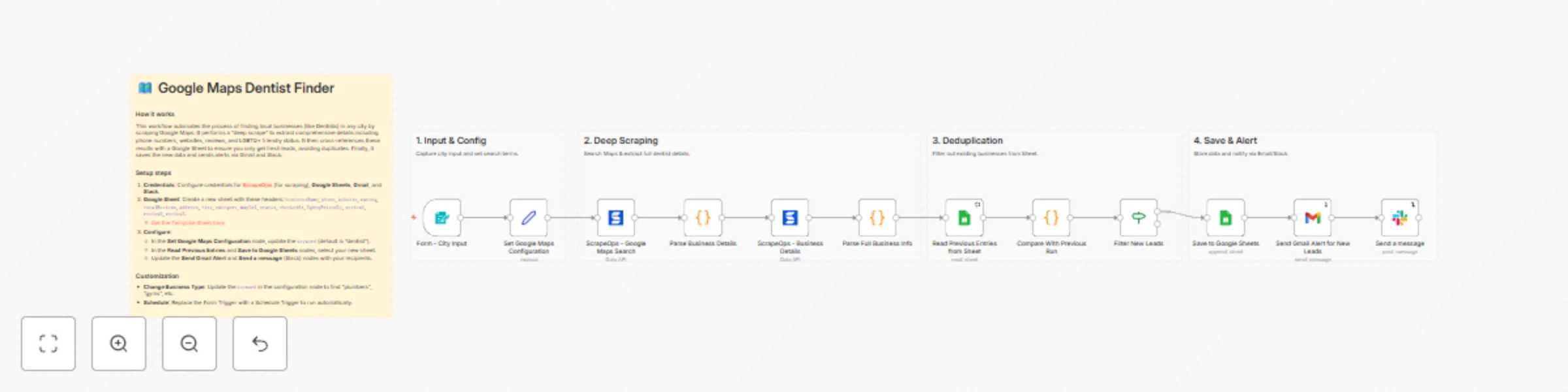
This n8n template automates the generation of local business leads by scraping Google Maps. It goes beyond basic search results by visiting individual business pages to extract detailed contact information, reviews, and attributes (like LGBTQ+ friendly status). It includes built-in deduplication against a Google Sheet to ensure you only receive alerts for new leads.

Who is this for?

  • Marketing Agencies: Finding local clients for services.
  • Sales Teams: Building lists of prospects in specific cities.
  • Recruiters: Finding businesses in specific niches.
  • Researchers: Gathering data on local business landscapes.

What problems it solves

  • Manual Data Entry: Eliminates the need to copy-paste business details from Maps.
  • Duplicate Leads: Automatically checks against your database to prevent duplicate entries.
  • Incomplete Data: Performs a "deep scrape" to get data often missing from list views (websites, full phone numbers, reviews).
  • Delayed Action: Sends instant alerts via Gmail and Slack so you can act on new leads immediately.

How it works

  1. Input: Takes a city name via a form (or can be scheduled).
  2. Search: Uses ScrapeOps to search Google Maps for your target keyword (e.g., "Dentist").
  3. Deep Extraction: Visits each business profile to scrape phone numbers, websites, ratings, and reviews.
  4. Validation: Compares found businesses with your existing Google Sheet database.
  5. Action: Saves new leads to the sheet and notifies you via Gmail and Slack.

Set up steps (~ 10-15 minutes)

  1. ScrapeOps Account: Register for a free API key at ScrapeOps.
  2. Google Sheet:
    • Create a new Google Sheet.
    • Add these headers: businessName, phone, website, rating, totalReviews, address, city, category, mapUrl, status, checkedAt, lgbtqFriendly, review1, review2, review3.
    • Or duplicate this Template Sheet.
  3. Configure Nodes:
    • Set Google Maps Configuration: Set your keyword (e.g., "dentist", "plumber").
    • Google Sheets Nodes: Connect your account and select the sheet you created.
    • Gmail & Slack Nodes: Update with your email address and Slack channel.

Pre-conditions

  • An n8n instance (Cloud or Self-hosted).
  • A ScrapeOps API Key (Free tier available).
  • Google Cloud Console project with Gmail and Sheets APIs enabled (for credentials).

Disclaimer

This template uses ScrapeOps as a community node. You are responsible for complying with Google's Terms of Use, robots directives, and applicable laws in your jurisdiction. Scraping targets may change at any time; adjust render/scroll/wait settings and parsers as needed. Use responsibly for legitimate business purposes.

Key Features

The ScrapeOps n8n node provides access to three main APIs:

1. Proxy API

Access to ScrapeOps' proxy aggregator for reliable web scraping:

  • Smart proxy rotation across multiple providers
  • JavaScript rendering support
  • Anti-bot bypass capabilities
  • Geo-targeting options
  • Mobile and residential proxy support

Full Documentation: n8n Proxy API Aggregator

2. Parser API

Extract structured data from popular websites without maintaining your own parsers:

  • Supported Sites: Amazon, eBay, Walmart, Indeed, Redfin
  • Page Types: Product pages, search results, reviews, categories
  • Returns clean, structured JSON data

Full Documentation: n8n Parser API

3. Data API

Direct access to structured data endpoints:

  • Amazon Product API: Get product details by ASIN or URL
  • Amazon Search API: Search products and get structured results

Full Documentation: n8n Data APIs

1.2 Logical Blocks

This catalog entry is organized from the workflow JSON. The node-level section below shows the executable blocks available for review before importing the template.

2. Block-by-Block Analysis

Block 1 - Form - City Input

Type / Role
n8n-nodes-base.formTrigger - formTrigger
Config choices
Version 1

Block 2 - Set Google Maps Configuration

Type / Role
n8n-nodes-base.set - set
Config choices
Version 3.2

Block 3 - ScrapeOps - Google Maps Search

Type / Role
@scrapeops/n8n-nodes-scrapeops.ScrapeOps - ScrapeOps
Config choices
Version 1

Block 4 - Parse Business Details

Type / Role
n8n-nodes-base.code - code
Config choices
Version 2

Block 5 - ScrapeOps - Business Details

Type / Role
@scrapeops/n8n-nodes-scrapeops.ScrapeOps - ScrapeOps
Config choices
Version 1

Block 6 - Parse Full Business Info

Type / Role
n8n-nodes-base.code - code
Config choices
Version 2

Block 7 - Read Previous Entries from Sheet

Type / Role
n8n-nodes-base.googleSheets - googleSheets
Config choices
Version 4.4

Block 8 - Compare With Previous Run

Type / Role
n8n-nodes-base.code - code
Config choices
Version 2

Block 9 - Filter New Leads

Type / Role
n8n-nodes-base.if - if
Config choices
Version 1

Block 10 - Send Gmail Alert for New Leads

Type / Role
n8n-nodes-base.gmail - gmail
Config choices
Version 2.1

Block 11 - Save to Google Sheets

Type / Role
n8n-nodes-base.googleSheets - googleSheets
Config choices
Version 4.4

Block 12 - Sticky Note

Type / Role
n8n-nodes-base.stickyNote - stickyNote
Config choices
Version 1

Block 13 - Sticky Note1

Type / Role
n8n-nodes-base.stickyNote - stickyNote
Config choices
Version 1

Block 14 - Sticky Note4

Type / Role
n8n-nodes-base.stickyNote - stickyNote
Config choices
Version 1

Block 15 - Sticky Note2

Type / Role
n8n-nodes-base.stickyNote - stickyNote
Config choices
Version 1

Block 16 - Sticky Note3

Type / Role
n8n-nodes-base.stickyNote - stickyNote
Config choices
Version 1

Block 17 - Send a message

Type / Role
n8n-nodes-base.slack - slack
Config choices
Version 2.3

3. Summary Table

Workflow Scrape & track dentist leads from Google Maps with ScrapeOps, Sheets & notifications
Complexity advanced
Nodes 17
Categories Lead Generation
Author Ian Kerins
Published 03 Dec 2025

4. Reproducing the Workflow from Scratch

  1. 1. Download the workflow JSON

    Use the JSON export at /data/workflows/11456/11456.json as the source template for this automation.

  2. 2. Import the template into n8n

    Open n8n, import the downloaded JSON, and review each node before activating the workflow.

  3. 3. Configure credentials and variables

    Replace placeholder credentials, API keys, webhook URLs, account IDs, and environment-specific values with your own settings.

  4. 4. Test with sample data

    Run the workflow manually or in a staging workspace, inspect node output, and confirm downstream systems receive the expected data.

  5. 5. Activate and monitor

    Enable the workflow only after testing, then monitor executions, errors, and rate limits during the first production runs.

5. General Notes & Resources

Review imported nodes carefully before activation. This catalog entry is intended to help you inspect the workflow structure, understand required services, and find related templates faster.

Node names, credentials, schedules, webhook paths, and external service limits may need adjustment for your workspace.

Frequently asked questions

What does Scrape & track dentist leads from Google Maps with ScrapeOps, Sheets & notifications do?

This n8n template automates the generation of local business leads by scraping Google Maps. It goes beyond basic search results by visiting individual business pages to extract detailed contact inf...

What do I need before importing this workflow?

Review the workflow JSON, configure any required credentials in n8n, and test the automation in a safe workspace before using it in production.

Can I customize this workflow?

Yes. Use the block-by-block analysis and the downloadable JSON to inspect each node, then adjust credentials, prompts, schedules, filters, or destinations for your Lead Generation use case.