Ian Kerins
Workflows by Ian Kerins
Track GitHub trending repositories with ScrapeOps & Google Sheets
## Overview This n8n template tracks **GitHub Trending repositories** (daily/weekly/monthly), parses the trending page into structured data (rank, repo name, stars, language, etc.), and stores results in **Google Sheets** with **automatic deduping**. It’s designed for teams who want a simple “trending feed” for engineering research, developer tooling discovery, and weekly reporting. ## Who is this for? - Developers, PMs, DevRel, and tooling teams who want a lightweight trend radar - Anyone building a curated list of fast-rising open source projects - Teams who want Sheets-based tracking without manual copy/paste ## What problems it solves - Automatically collects GitHub Trending data on a schedule - Prevents duplicate rows using a stable `dedupe_key` - Updates existing rows when values change (rank/stars/score) ## How it works 1. A schedule triggers the workflow. 2. Inputs define the trending window (`daily`, `weekly`, or `monthly`) and optional languages. 3. ScrapeOps fetches the GitHub Trending HTML reliably. 4. The workflow parses repositories and ranks from the HTML. 5. Cleaned rows are written to Google Sheets using **Append or Update Row** matching on `dedupe_key`. ## Setup steps (~5–10 minutes) 1) **ScrapeOps** - Register & get an API key: [https://scrapeops.io/app/register/n8n](https://scrapeops.io/app/register/n8n) - Read the n8n overview: [https://scrapeops.io/docs/n8n/overview/](https://scrapeops.io/docs/n8n/overview/) - (Optional) Learn ScrapeOps Proxy API features: [https://scrapeops.io/docs/n8n/proxy-api/](https://scrapeops.io/docs/n8n/proxy-api/) 2) **Google Sheets** - [Duplicate this sheet](https://docs.google.com/spreadsheets/d/1GhCbbPilZXMVDox0hQ0Ncqf5-g3AdFFy55Ld30gPD-E/edit?gid=0#gid=0)/create a Sheet and add a `trending_raw` tab. - Add columns used by the workflow (e.g. captured_at, since, source_url, rank_on_page, full_name, repo_url, stars_total, forks_total, stars_in_period, score, dedupe_key). - In the Google Sheets node, choose **Append or Update Row** and set **Column to match on = dedupe_key**. 3) **Customize** - Change `since` to daily/weekly/monthly in the Inputs node. - Add languages via `languages_csv` (example: `any,python,go,rust`). - Adjust delay if needed. ## Pre-conditions - ScrapeOps account + API key configured in n8n - Google Sheets credentials connected in n8n - A Sheet tab named `trending_raw` with matching columns ## Disclaimer This template uses **ScrapeOps as a community node**. You are responsible for complying with GitHub’s Terms of Service, robots directives, and applicable laws in your jurisdiction. Scraping targets can change at any time; you may need to update wait times and parsing logic accordingly. Use responsibly for legitimate business purposes.
Automate niche research with Wikipedia, GPT-4o-mini, and Google Sheets
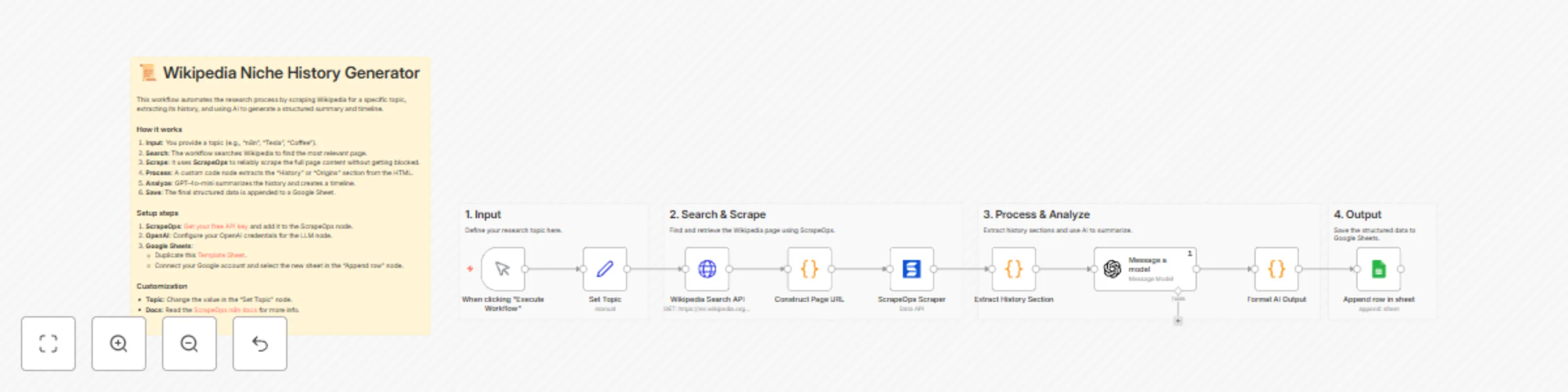
## Overview This n8n template automates the process of researching niche topics. It searches for a topic on Wikipedia, scrapes the relevant page using **ScrapeOps**, extracts the history or background section, and uses AI to generate a concise summary and timeline. The results are automatically saved to Google Sheets for easy content planning. ## Who is this for? - **Content Creators**: Quickly gather background info for videos or articles. - **Marketers**: Research niche markets and product histories. - **Educators/Students**: Generate timelines and summaries for study topics. - **Researchers**: Automate the initial data gathering phase. ## What problems it solves - **Time Consumption**: Manually reading and summarizing Wikipedia pages takes time. - **Blocking**: Scraping Wikipedia directly can sometimes lead to IP blocks; ScrapeOps handles this. - **Unstructured Data**: Raw HTML is hard to use; this workflow converts it into a clean, structured format (JSON/CSV). ## How it works 1. **Define Topic**: You set a keyword in the workflow. 2. **Locate Page**: The workflow queries the Wikipedia API to find the correct page URL. 3. **Smart Scraping**: It uses the [ScrapeOps Proxy API](https://scrapeops.io/docs/n8n/proxy-api/) to fetch the page content reliably. 4. **Extraction**: A code node intelligently parses the HTML to find "History", "Origins", or "Background" sections. 5. **AI Processing**: GPT-4o-mini summarizes the text and extracts key dates for a timeline. 6. **Storage**: The structured data is appended to a Google Sheet. ## Setup steps (~ 5-10 minutes) 1. **ScrapeOps Account**: - Register for a free API key at [ScrapeOps](https://scrapeops.io/app/register/n8n). - Configure the **ScrapeOps Scraper** node with your API key. 2. **OpenAI Account**: - Add your OpenAI credentials to the **Message a model** node. 3. **Google Sheets**: - Create a Google Sheet. You can duplicate this [Template Sheet](https://docs.google.com/spreadsheets/d/1P0wZ449wVNndhSa6cJtK3VA3Aulv1k18zdpwWYY13gE/edit?gid=0#gid=0) (copy the headers). - Connect your Google account to the **Append row in sheet** node and select your new sheet. ## Pre-conditions - An active ScrapeOps account. - An OpenAI API key (or another LLM credential). - A Google account for Sheets access. ## Disclaimer This template uses ScrapeOps as a community node. You are responsible for complying with Wikipedia's Terms of Use, robots directives, and applicable laws in your jurisdiction. Scraping targets may change at any time; adjust render/scroll/wait settings and parsers as needed. Use responsibly for legitimate business purposes.
Scrape & track dentist leads from Google Maps with ScrapeOps, Sheets & notifications
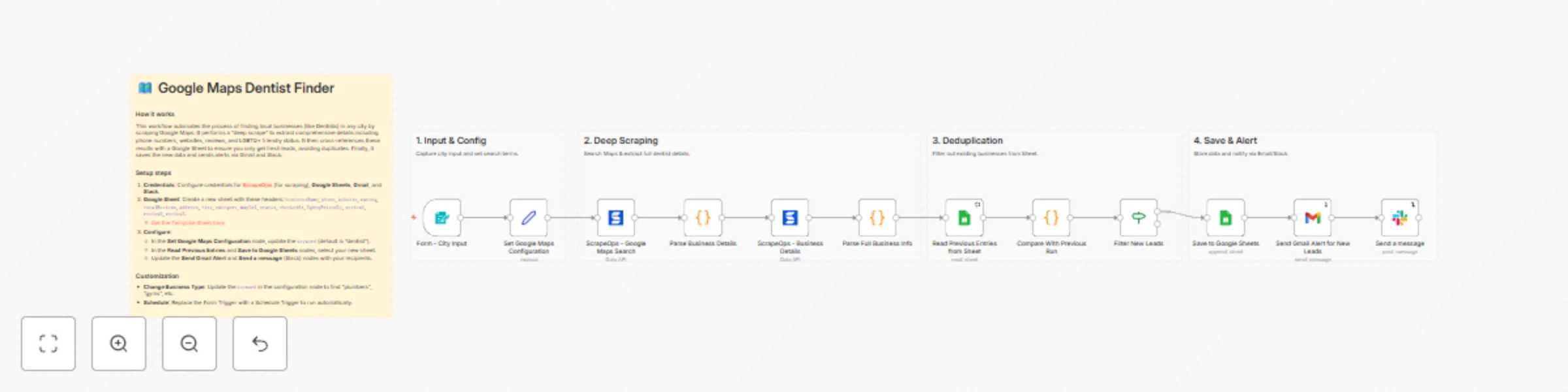
## Overview This n8n template automates the generation of local business leads by scraping Google Maps. It goes beyond basic search results by visiting individual business pages to extract detailed contact information, reviews, and attributes (like LGBTQ+ friendly status). It includes built-in deduplication against a Google Sheet to ensure you only receive alerts for *new* leads. ## Who is this for? - **Marketing Agencies**: Finding local clients for services. - **Sales Teams**: Building lists of prospects in specific cities. - **Recruiters**: Finding businesses in specific niches. - **Researchers**: Gathering data on local business landscapes. ## What problems it solves - **Manual Data Entry**: Eliminates the need to copy-paste business details from Maps. - **Duplicate Leads**: Automatically checks against your database to prevent duplicate entries. - **Incomplete Data**: Performs a "deep scrape" to get data often missing from list views (websites, full phone numbers, reviews). - **Delayed Action**: Sends instant alerts via Gmail and Slack so you can act on new leads immediately. ## How it works 1. **Input**: Takes a city name via a form (or can be scheduled). 2. **Search**: Uses **ScrapeOps** to search Google Maps for your target keyword (e.g., "Dentist"). 3. **Deep Extraction**: Visits each business profile to scrape phone numbers, websites, ratings, and reviews. 4. **Validation**: Compares found businesses with your existing Google Sheet database. 5. **Action**: Saves new leads to the sheet and notifies you via Gmail and Slack. ## Set up steps (~ 10-15 minutes) 1. **ScrapeOps Account**: Register for a free API key at [ScrapeOps](https://scrapeops.io/app/register/n8n). 2. **Google Sheet**: - Create a new Google Sheet. - Add these headers: `businessName`, `phone`, `website`, `rating`, `totalReviews`, `address`, `city`, `category`, `mapUrl`, `status`, `checkedAt`, `lgbtqFriendly`, `review1`, `review2`, `review3`. - Or duplicate this [Template Sheet](https://docs.google.com/spreadsheets/d/1HYO6pw9PigmNKzrnmE9s9JcNVSvZAcIHGF1ZJQ9kfks/edit?gid=0#gid=0). 3. **Configure Nodes**: - **Set Google Maps Configuration**: Set your `keyword` (e.g., "dentist", "plumber"). - **Google Sheets Nodes**: Connect your account and select the sheet you created. - **Gmail & Slack Nodes**: Update with your email address and Slack channel. ## Pre-conditions - An n8n instance (Cloud or Self-hosted). - A [ScrapeOps API Key](https://scrapeops.io/app/register/n8n) (Free tier available). - Google Cloud Console project with Gmail and Sheets APIs enabled (for credentials). ## Disclaimer This template uses ScrapeOps as a community node. You are responsible for complying with Google's Terms of Use, robots directives, and applicable laws in your jurisdiction. Scraping targets may change at any time; adjust render/scroll/wait settings and parsers as needed. Use responsibly for legitimate business purposes. ## Key Features The ScrapeOps n8n node provides access to three main APIs: ### 1. Proxy API Access to ScrapeOps' proxy aggregator for reliable web scraping: - Smart proxy rotation across multiple providers - JavaScript rendering support - Anti-bot bypass capabilities - Geo-targeting options - Mobile and residential proxy support **Full Documentation:** [n8n Proxy API Aggregator](https://scrapeops.io/docs/n8n/proxy-api/) ### 2. Parser API Extract structured data from popular websites without maintaining your own parsers: - **Supported Sites:** Amazon, eBay, Walmart, Indeed, Redfin - **Page Types:** Product pages, search results, reviews, categories - Returns clean, structured JSON data **Full Documentation:** [n8n Parser API](https://scrapeops.io/docs/n8n/parser-api/) ### 3. Data API Direct access to structured data endpoints: - **Amazon Product API:** Get product details by ASIN or URL - **Amazon Search API:** Search products and get structured results **Full Documentation:** [n8n Data APIs](https://scrapeops.io/docs/n8n/data-api/)
Automate Indeed job tracking with ScrapeOps, Google Sheets & Slack alerts
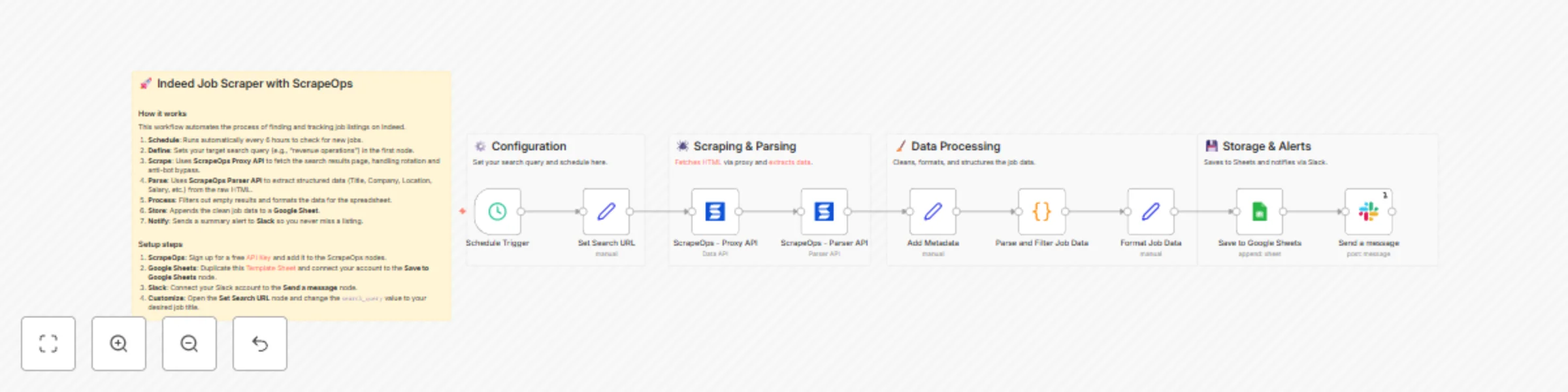
## Overview This n8n template automates the process of scraping job listings from Indeed, parsing the data into a structured format, and saving it to Google Sheets for easy tracking. It also includes a Slack notification system to alert you when new jobs are found. Built with **ScrapeOps**, it handles the complexities of web scraping - such as proxy rotation, anti-bot bypassing, and HTML parsing - so you can focus on the data. ## Who is this for? - **Job Seekers**: Automate your daily job search and get instant alerts for new postings. - **Recruiters & HR Agencies**: Track hiring trends and find new leads for candidate placement. - **Sales & Marketing Teams**: Monitor companies that are hiring to identify growth signals and lead opportunities. - **Data Analysts**: Gather labor market data for research and competitive analysis. ## What problems it solves - **Manual Searching**: Eliminates the need to manually refresh Indeed and copy-paste job details. - **Data Structure**: Converts messy HTML into clean, organized rows in a spreadsheet. - **Blocking & Captchas**: Uses ScrapeOps residential proxies to bypass Indeed's anti-bot protections reliably. - **Missed Opportunities**: Automated scheduling ensures you are the first to know about new listings. ## How it works 1. **Trigger**: The workflow runs on a schedule (default: every 6 hours). 2. **Configuration**: You define your search query (e.g., "Software Engineer") in the `Set Search URL` node. 3. **Scraping**: The **ScrapeOps Proxy API** fetches the Indeed search results page using a residential proxy to avoid detection. 4. **Parsing**: The **ScrapeOps Parser API** takes the raw HTML and extracts key details like Job Title, Company, Location, Salary, and URL. 5. **Filtering**: A code node filters out invalid results and structures the data. 6. **Storage**: Valid jobs are appended to a Google Sheet. 7. **Notification**: A message is sent to Slack confirming the update. ## Setup steps (~ 10-15 minutes) 1. **ScrapeOps Account**: - Register for a free [ScrapeOps API Key](https://scrapeops.io/app/register/n8n). - In n8n, open the **ScrapeOps** nodes and create a new credential with your API key. 2. **Google Sheets**: - Duplicate this [Google Sheet Template](https://docs.google.com/spreadsheets/d/1r_ZMwAli50Bes9quxZtB37WE7S9HwlYOcj50bZzbOAM/edit?gid=0#gid=0). - Open the **Save to Google Sheets** node. - Connect your Google account and select your duplicated sheet. 3. **Slack Setup**: - Open the **Send a message** node. - Connect your Slack account and select the channel where you want to receive alerts. 4. **Customize Search**: - Open the **Set Search URL** node. - Update the `search_query` value to the job title or keyword you want to track. ## Pre-conditions - An active [ScrapeOps account](https://scrapeops.io/app/register/n8n) (Free tier available). - A Google Cloud account with Google Sheets API enabled (for n8n connection). - A Slack workspace for notifications. ## Disclaimer This template uses ScrapeOps as a community node. You are responsible for complying with Indeed's Terms of Use, robots directives, and applicable laws in your jurisdiction. Scraping targets may change at any time; adjust render/scroll/wait settings and parsers as needed. Use responsibly for legitimate business purposes. ## Resources - [ScrapeOps n8n Overview](https://scrapeops.io/docs/n8n/overview/) - [ScrapeOps Proxy API Documentation](https://scrapeops.io/docs/n8n/proxy-api/) - [ScrapeOps Parser API Documentation](https://scrapeops.io/docs/n8n/parser-api/)
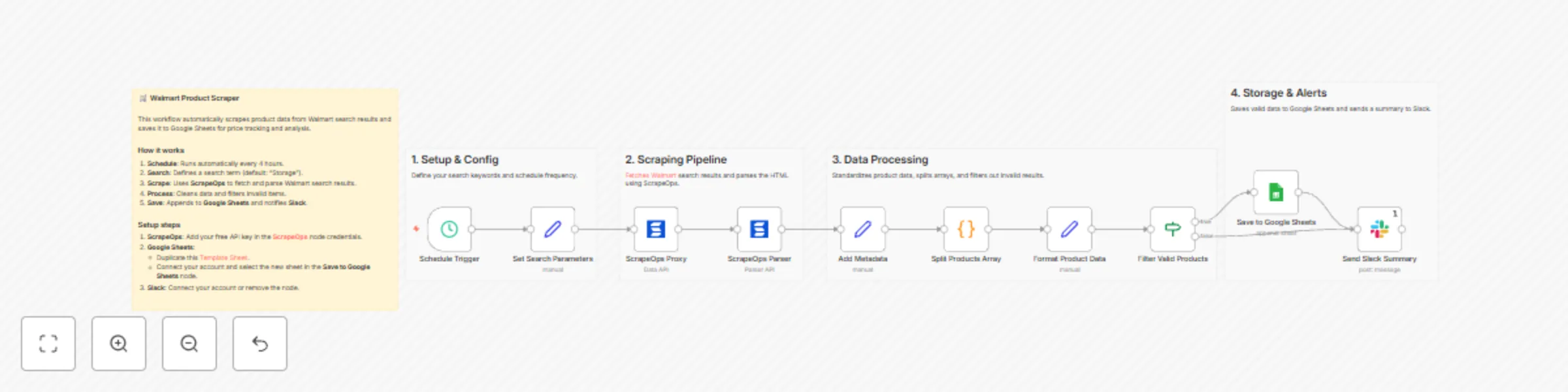
Scheduled Walmart product scraping to Google Sheets with ScrapeOps
## Overview This n8n template automates Walmart product discovery and sends clean results to Google Sheets on a fixed schedule (default: every 4 hours). It uses **ScrapeOps Proxy API** for resilient page fetches (with JS render + scroll) and **ScrapeOps Parser API** for structured data extraction (title, price, rating, reviews, image, URL, sponsored flag). The result is a repeatable, low-maintenance workflow for market research, price monitoring, and assortment tracking; ideal for ops and growth teams that need fresh data without babysitting scrapers. ## Who is this for? * **E-commerce operators** tracking price & inventory signals * **Market/competitive analysts** building price baskets and trend views * **Growth & SEO teams** validating product coverage and SERP facets * **No-code/low-code builders** who prefer visual pipelines over custom code ## What problems it solves * **Reliability:** Offloads JS rendering and scrolling to ScrapeOps to reduce breakage. * **Structure:** Normalizes fields for analysis-ready rows in Sheets. * **Scale:** Runs on a timer; no manual downloading or copy-paste. * **Speed to value:** Simple setup, minimal credentials, immediate output. ## How it works 1. **Schedule** triggers every 4 hours. 2. **Keyword** builds a Walmart search URL. 3. **ScrapeOps Proxy API** fetches HTML (render + scroll). 4. **ScrapeOps Parser API** extracts structured product fields. 5. **Validate & format** rows; drop empties/bad prices. 6. **Append to Google Sheets** for reporting/dashboards. 7. *(Optional)* **Slack** posts a summary with your results link. ## Set up steps *(~5–10 minutes)* * **Google Sheets:** Duplicate the **[template](https://docs.google.com/spreadsheets/d/1WbIzWaXjuQeTxrn_C7PjGMNNibUyLIgY2hdeWh3gOLA/edit?gid=0#gid=0)** and paste your link in the Google Sheets node. * **ScrapeOps API:** Get a free key **[here](https://scrapeops.io/app/register/main/)** and add it under **Credentials → ScrapeOps API**. See **[docs](https://scrapeops.io/docs/n8n/overview/)**. * **Keyword:** Update the search term in **Set Search Parameters**. * *(Optional)* Configure the **Slack** node or remove it. ## Pre-conditions * n8n instance running with outbound internet access. * Google account with access to the destination Sheet. * ScrapeOps account + API key with sufficient quota. * Basic familiarity with editing node parameters in n8n. ## Disclaimer This template uses ScrapeOps as a community node. You are responsible for complying with Walmart’s Terms of Use, robots directives, and applicable laws in your jurisdiction. Scraping targets may change at any time; adjust render/scroll/wait settings and parsers as needed. Use responsibly for legitimate business purposes.