Track Redfin real estate listings with ScrapeOps, Google Sheets, and Slack

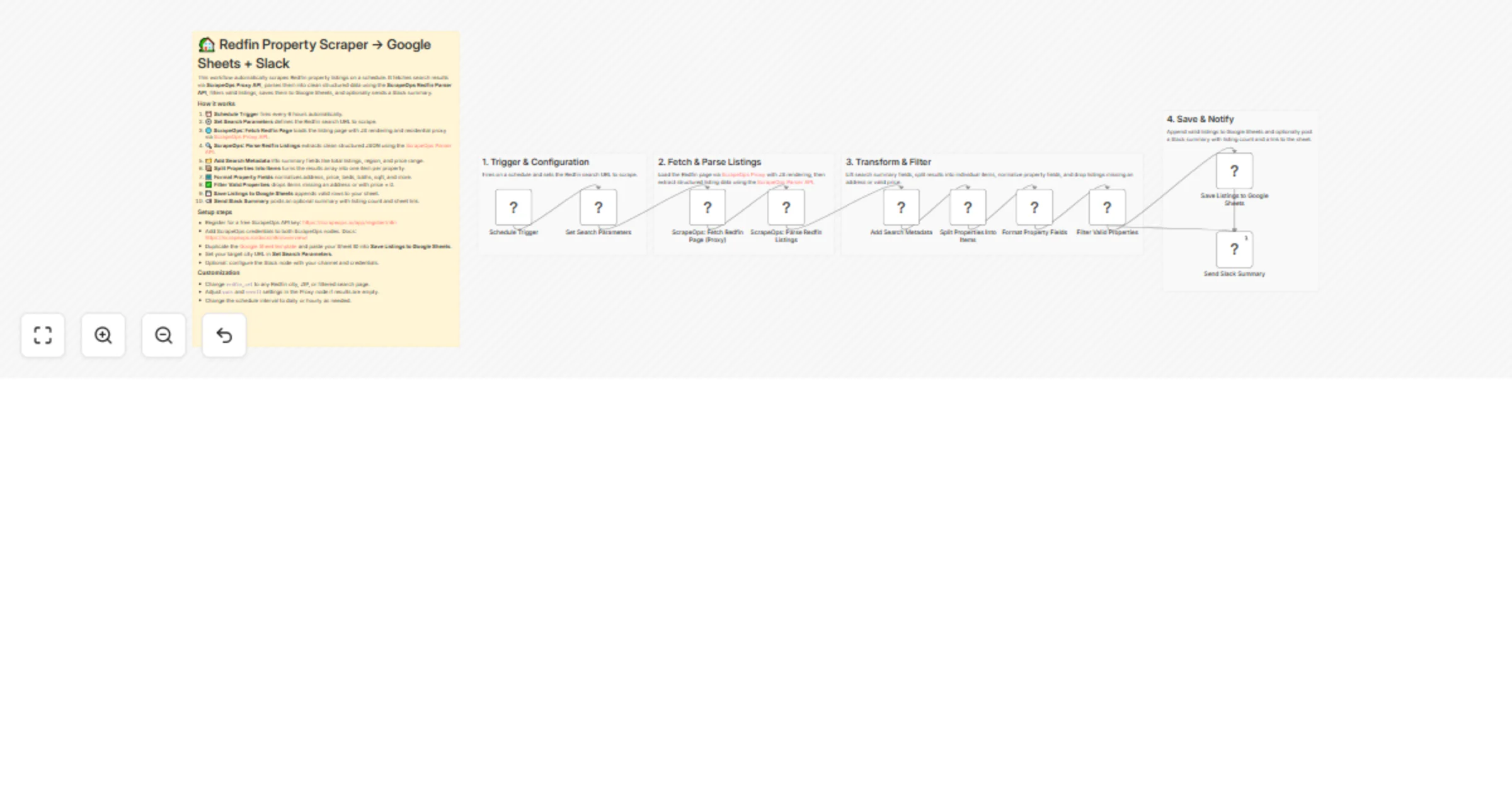
Workflow preview

Workflow preview
100%
Track Redfin real estate listings with ScrapeOps, Google Sheets, and Slack preview
Open on n8n.io

1. Workflow Overview

Overview This n8n template automates scraping Redfin property listings on a schedule. Using ScrapeOps Proxy API for reliable page fetching and the ScrapeOps Redfin Parser API for structured data ex...

Best for

  • Market Research automation workflows
  • advanced n8n builders looking for reusable templates

Tools used

n8n-nodes-base.set, n8n-nodes-base.if, n8n-nodes-base.slack, n8n-nodes-base.stickynote, n8n-nodes-base.scheduletrigger, @scrapeops/n8n-nodes-scrapeops.scrapeops, n8n-nodes-base.code, n8n-nodes-base.googlesheets

Source and attribution

This workflow is cataloged by N8N Workflows and links back to its original n8n.io source page by Ian Kerins.

Original n8n.io source

1.1 Workflow description

Title
Track Redfin real estate listings with ScrapeOps, Google Sheets, and Slack
Workflow name
Track Redfin real estate listings with ScrapeOps, Google Sheets, and Slack

Overview

This n8n template automates scraping Redfin property listings on a schedule. Using ScrapeOps Proxy API for reliable page fetching and the ScrapeOps Redfin Parser API for structured data extraction, it saves clean listing rows to Google Sheets and sends an optional Slack summary.

Who is this for?

  • Real estate investors monitoring listings in target markets
  • Agents and brokers tracking new properties across cities or ZIP codes
  • Analysts building property datasets without manual data entry
  • Anyone who wants automated, scheduled Redfin data in a spreadsheet

What problem does it solve?

Manually checking Redfin for new listings is slow and inconsistent. This workflow runs on a schedule, scrapes your target search page, parses and filters valid listings, and keeps your Google Sheet updated automatically; no browser or manual copy-paste needed.

How it works

  1. A schedule triggers the workflow every 6 hours.
  2. ScrapeOps Proxy fetches the Redfin search page with JS rendering and residential proxy support.
  3. ScrapeOps Parser API extracts clean structured JSON from the HTML.
  4. Search metadata (total listings, region, price range) is lifted and stored.
  5. The results array is split into one item per property.
  6. Property fields are normalized: address, price, beds, baths, sqft, status, and more.
  7. Invalid listings (missing address or price = 0) are filtered out.
  8. Valid listings are appended to Google Sheets.
  9. An optional Slack message posts a summary with listing count and sheet link.

Set up steps (~10–15 minutes)

  1. Register for a free ScrapeOps API key: https://scrapeops.io/app/register/n8n
  2. Add ScrapeOps credentials to both ScrapeOps nodes. Docs: https://scrapeops.io/docs/n8n/overview/
  3. Duplicate the Google Sheet template and paste your Sheet ID into Save Listings to Google Sheets.
  4. In Set Search Parameters, update redfin_url to your target city or ZIP search page.
  5. Optional: open Send Slack Summary, select your Slack credential, and set your channel.
  6. Run once manually to confirm results, then activate.

Pre-conditions

Disclaimer

This template uses ScrapeOps as a community node. You are responsible for complying with Redfin's Terms of Use, robots.txt directives, and applicable laws in your jurisdiction. Scraping targets may change at any time; adjust render, scroll, and wait settings and parsers as needed. Use responsibly and only for legitimate business purposes.

1.2 Logical Blocks

This catalog entry is organized from the workflow JSON. The node-level section below shows the executable blocks available for review before importing the template.

2. Block-by-Block Analysis

Block 1 - Set Search Parameters

Type / Role
n8n-nodes-base.set - set
Config choices
Version 3.2

Block 2 - Filter Valid Properties

Type / Role
n8n-nodes-base.if - if
Config choices
Version 2

Block 3 - Send Slack Summary

Type / Role
n8n-nodes-base.slack - slack
Config choices
Version 2.1

Block 4 - Sticky Note

Type / Role
n8n-nodes-base.stickyNote - stickyNote
Config choices
Version 1

Block 5 - Schedule Trigger

Type / Role
n8n-nodes-base.scheduleTrigger - scheduleTrigger
Config choices
Version 1.1

Block 6 - ScrapeOps: Fetch Redfin Page (Proxy)

Type / Role
@scrapeops/n8n-nodes-scrapeops.ScrapeOps - ScrapeOps
Config choices
Version 1

Block 7 - ScrapeOps: Parse Redfin Listings

Type / Role
@scrapeops/n8n-nodes-scrapeops.ScrapeOps - ScrapeOps
Config choices
Version 1

Block 8 - Add Search Metadata

Type / Role
n8n-nodes-base.set - set
Config choices
Version 3.2

Block 9 - Split Properties Into Items

Type / Role
n8n-nodes-base.code - code
Config choices
Version 2

Block 10 - Format Property Fields

Type / Role
n8n-nodes-base.set - set
Config choices
Version 3.2

Block 11 - Save Listings to Google Sheets

Type / Role
n8n-nodes-base.googleSheets - googleSheets
Config choices
Version 4.4

Block 12 - Sticky Note1

Type / Role
n8n-nodes-base.stickyNote - stickyNote
Config choices
Version 1

Block 13 - Sticky Note2

Type / Role
n8n-nodes-base.stickyNote - stickyNote
Config choices
Version 1

Block 14 - Sticky Note3

Type / Role
n8n-nodes-base.stickyNote - stickyNote
Config choices
Version 1

Block 15 - Sticky Note4

Type / Role
n8n-nodes-base.stickyNote - stickyNote
Config choices
Version 1

3. Summary Table

Workflow Track Redfin real estate listings with ScrapeOps, Google Sheets, and Slack
Complexity advanced
Nodes 15
Categories Market Research
Author Ian Kerins
Published 11 Mar 2026

4. Reproducing the Workflow from Scratch

  1. 1. Download the workflow JSON

    Use the JSON export at /data/workflows/13991/13991.json as the source template for this automation.

  2. 2. Import the template into n8n

    Open n8n, import the downloaded JSON, and review each node before activating the workflow.

  3. 3. Configure credentials and variables

    Replace placeholder credentials, API keys, webhook URLs, account IDs, and environment-specific values with your own settings.

  4. 4. Test with sample data

    Run the workflow manually or in a staging workspace, inspect node output, and confirm downstream systems receive the expected data.

  5. 5. Activate and monitor

    Enable the workflow only after testing, then monitor executions, errors, and rate limits during the first production runs.

5. General Notes & Resources

Review imported nodes carefully before activation. This catalog entry is intended to help you inspect the workflow structure, understand required services, and find related templates faster.

Node names, credentials, schedules, webhook paths, and external service limits may need adjustment for your workspace.

Frequently asked questions

What does Track Redfin real estate listings with ScrapeOps, Google Sheets, and Slack do?

Overview This n8n template automates scraping Redfin property listings on a schedule. Using ScrapeOps Proxy API for reliable page fetching and the ScrapeOps Redfin Parser API for structured data ex...

What do I need before importing this workflow?

Review the workflow JSON, configure any required credentials in n8n, and test the automation in a safe workspace before using it in production.

Can I customize this workflow?

Yes. Use the block-by-block analysis and the downloadable JSON to inspect each node, then adjust credentials, prompts, schedules, filters, or destinations for your Market Research use case.