Automate Indeed job tracking with ScrapeOps, Google Sheets & Slack alerts

Workflow preview

Workflow preview
100%
Automate Indeed job tracking with ScrapeOps, Google Sheets & Slack alerts preview
Open on n8n.io

Important notice

This workflow is provided as-is. Please review and test before using in production.

1. Workflow Overview

This n8n template automates the process of scraping job listings from Indeed, parsing the data into a structured format, and saving it to Google Sheets for easy tracking. It also includes a Slack n...

Best for

  • Market Research automation workflows
  • intermediate n8n builders looking for reusable templates

Tools used

n8n-nodes-base.set, @scrapeops/n8n-nodes-scrapeops.scrapeops, n8n-nodes-base.googlesheets, n8n-nodes-base.scheduletrigger, n8n-nodes-base.stickynote, n8n-nodes-base.slack, n8n-nodes-base.code

Source and attribution

This workflow is cataloged by N8N Workflows and links back to its original n8n.io source page by Ian Kerins.

Original n8n.io source

1.1 Workflow description

Title
Automate Indeed job tracking with ScrapeOps, Google Sheets & Slack alerts
Workflow name
Automate Indeed job tracking with ScrapeOps, Google Sheets & Slack alerts

Overview

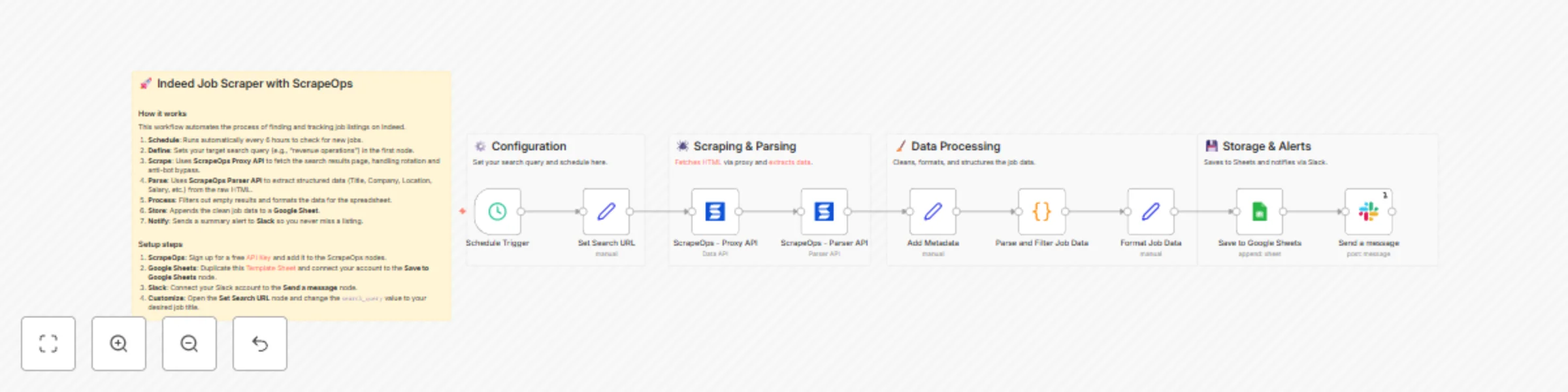
This n8n template automates the process of scraping job listings from Indeed, parsing the data into a structured format, and saving it to Google Sheets for easy tracking. It also includes a Slack notification system to alert you when new jobs are found.

Built with ScrapeOps, it handles the complexities of web scraping - such as proxy rotation, anti-bot bypassing, and HTML parsing - so you can focus on the data.

Who is this for?

  • Job Seekers: Automate your daily job search and get instant alerts for new postings.
  • Recruiters & HR Agencies: Track hiring trends and find new leads for candidate placement.
  • Sales & Marketing Teams: Monitor companies that are hiring to identify growth signals and lead opportunities.
  • Data Analysts: Gather labor market data for research and competitive analysis.

What problems it solves

  • Manual Searching: Eliminates the need to manually refresh Indeed and copy-paste job details.
  • Data Structure: Converts messy HTML into clean, organized rows in a spreadsheet.
  • Blocking & Captchas: Uses ScrapeOps residential proxies to bypass Indeed's anti-bot protections reliably.
  • Missed Opportunities: Automated scheduling ensures you are the first to know about new listings.

How it works

  1. Trigger: The workflow runs on a schedule (default: every 6 hours).
  2. Configuration: You define your search query (e.g., "Software Engineer") in the Set Search URL node.
  3. Scraping: The ScrapeOps Proxy API fetches the Indeed search results page using a residential proxy to avoid detection.
  4. Parsing: The ScrapeOps Parser API takes the raw HTML and extracts key details like Job Title, Company, Location, Salary, and URL.
  5. Filtering: A code node filters out invalid results and structures the data.
  6. Storage: Valid jobs are appended to a Google Sheet.
  7. Notification: A message is sent to Slack confirming the update.

Setup steps (~ 10-15 minutes)

  1. ScrapeOps Account:

    • Register for a free ScrapeOps API Key.
    • In n8n, open the ScrapeOps nodes and create a new credential with your API key.
  2. Google Sheets:

    • Duplicate this Google Sheet Template.
    • Open the Save to Google Sheets node.
    • Connect your Google account and select your duplicated sheet.
  3. Slack Setup:

    • Open the Send a message node.
    • Connect your Slack account and select the channel where you want to receive alerts.
  4. Customize Search:

    • Open the Set Search URL node.
    • Update the search_query value to the job title or keyword you want to track.

Pre-conditions

  • An active ScrapeOps account (Free tier available).
  • A Google Cloud account with Google Sheets API enabled (for n8n connection).
  • A Slack workspace for notifications.

Disclaimer

This template uses ScrapeOps as a community node. You are responsible for complying with Indeed's Terms of Use, robots directives, and applicable laws in your jurisdiction. Scraping targets may change at any time; adjust render/scroll/wait settings and parsers as needed. Use responsibly for legitimate business purposes.

Resources

1.2 Logical Blocks

This catalog entry is organized from the workflow JSON. The node-level section below shows the executable blocks available for review before importing the template.

2. Block-by-Block Analysis

Block 1 - Set Search URL

Type / Role
n8n-nodes-base.set - set
Config choices
Version 3.2

Block 2 - ScrapeOps - Proxy API

Type / Role
@scrapeops/n8n-nodes-scrapeops.ScrapeOps - ScrapeOps
Config choices
Version 1

Block 3 - ScrapeOps - Parser API

Type / Role
@scrapeops/n8n-nodes-scrapeops.ScrapeOps - ScrapeOps
Config choices
Version 1

Block 4 - Add Metadata

Type / Role
n8n-nodes-base.set - set
Config choices
Version 3.2

Block 5 - Format Job Data

Type / Role
n8n-nodes-base.set - set
Config choices
Version 3.2

Block 6 - Save to Google Sheets

Type / Role
n8n-nodes-base.googleSheets - googleSheets
Config choices
Version 4.4

Block 7 - Schedule Trigger

Type / Role
n8n-nodes-base.scheduleTrigger - scheduleTrigger
Config choices
Version 1.1

Block 8 - Sticky Note

Type / Role
n8n-nodes-base.stickyNote - stickyNote
Config choices
Version 1

Block 9 - Send a message

Type / Role
n8n-nodes-base.slack - slack
Config choices
Version 2.3

Block 10 - Sticky Note1

Type / Role
n8n-nodes-base.stickyNote - stickyNote
Config choices
Version 1

Block 11 - Sticky Note2

Type / Role
n8n-nodes-base.stickyNote - stickyNote
Config choices
Version 1

Block 12 - Sticky Note3

Type / Role
n8n-nodes-base.stickyNote - stickyNote
Config choices
Version 1

Block 13 - Sticky Note4

Type / Role
n8n-nodes-base.stickyNote - stickyNote
Config choices
Version 1

Block 14 - Parse and Filter Job Data

Type / Role
n8n-nodes-base.code - code
Config choices
Version 2

3. Summary Table

Workflow Automate Indeed job tracking with ScrapeOps, Google Sheets & Slack alerts
Complexity intermediate
Nodes 14
Categories Market Research
Author Ian Kerins
Published 06 Nov 2025

4. Reproducing the Workflow from Scratch

  1. 1. Download the workflow JSON

    Use the JSON export at /data/workflows/10567/10567.json as the source template for this automation.

  2. 2. Import the template into n8n

    Open n8n, import the downloaded JSON, and review each node before activating the workflow.

  3. 3. Configure credentials and variables

    Replace placeholder credentials, API keys, webhook URLs, account IDs, and environment-specific values with your own settings.

  4. 4. Test with sample data

    Run the workflow manually or in a staging workspace, inspect node output, and confirm downstream systems receive the expected data.

  5. 5. Activate and monitor

    Enable the workflow only after testing, then monitor executions, errors, and rate limits during the first production runs.

5. General Notes & Resources

Review imported nodes carefully before activation. This catalog entry is intended to help you inspect the workflow structure, understand required services, and find related templates faster.

Node names, credentials, schedules, webhook paths, and external service limits may need adjustment for your workspace.

Frequently asked questions

What does Automate Indeed job tracking with ScrapeOps, Google Sheets & Slack alerts do?

This n8n template automates the process of scraping job listings from Indeed, parsing the data into a structured format, and saving it to Google Sheets for easy tracking. It also includes a Slack n...

What do I need before importing this workflow?

Review the workflow JSON, configure any required credentials in n8n, and test the automation in a safe workspace before using it in production.

Can I customize this workflow?

Yes. Use the block-by-block analysis and the downloadable JSON to inspect each node, then adjust credentials, prompts, schedules, filters, or destinations for your Market Research use case.