Block 1 - form_trigger
- Type / Role
- n8n-nodes-base.formTrigger - formTrigger
- Config choices
- Version 2.2


 Early Deal
This workflow is provided as-is. Please review and test before using in production.
Who's it for This template is perfect for sales professionals, marketers, and business developers who need to quickly gather contact information from company websites. Whether you're building prosp...
n8n-nodes-base.formtrigger, n8n-nodes-base.httprequest, n8n-nodes-base.if, n8n-nodes-base.stopanderror, n8n-nodes-base.wait, n8n-nodes-base.set, n8n-nodes-base.stickynote
This workflow is cataloged by N8N Workflows and links back to its original n8n.io source page by Lucas Walter.
Original n8n.io sourceThis template is perfect for sales professionals, marketers, and business developers who need to quickly gather contact information from company websites. Whether you're building prospect lists, researching potential partners, or collecting leads for outreach campaigns, this automation saves hours of manual email hunting.
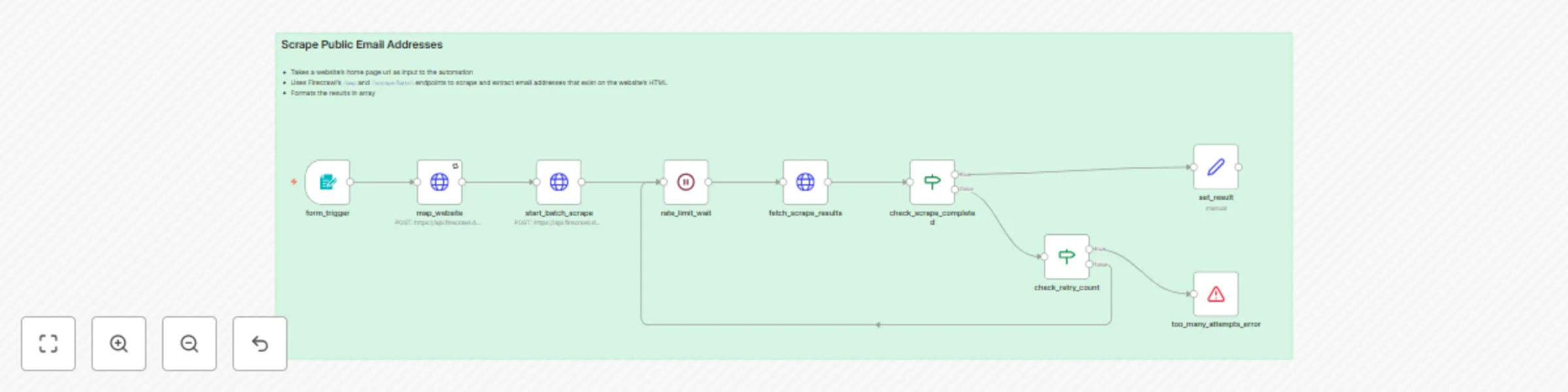
This workflow automatically discovers and extracts email addresses from any website by:
The automation handles rate limiting, retries failed requests, and filters out invalid or hidden email addresses to ensure you get quality results.
AuthorizationBearer YOUR_API_KEYSearch parameters: Modify the search parameter in the map_website node to target different page types (currently searches for "about contact company authors team")
Extraction limits: Adjust the limit parameter to scrape more or fewer pages per website
Retry logic: The workflow includes retry logic with a 12-attempt limit - modify the check_retry_count node to change this
Output format: The set_result node formats the final output - customize this to match your preferred data structure
Email validation: The JSON schema in start_batch_scrape defines how emails are extracted - modify the prompt or schema for different extraction rules
The workflow is designed to be reliable and handle common edge cases like rate limiting and failed requests, making it production-ready for regular use.
This catalog entry is organized from the workflow JSON. The node-level section below shows the executable blocks available for review before importing the template.
| Workflow | Scrape public email addresses from any website using Firecrawl |
|---|---|
| Complexity | intermediate |
| Nodes | 10 |
| Categories | Lead Generation |
| Author | Lucas Walter |
| Published | 08 Jul 2025 |
Use the JSON export at /data/workflows/5786/5786.json as the source template for this automation.
Open n8n, import the downloaded JSON, and review each node before activating the workflow.
Replace placeholder credentials, API keys, webhook URLs, account IDs, and environment-specific values with your own settings.
Run the workflow manually or in a staging workspace, inspect node output, and confirm downstream systems receive the expected data.
Enable the workflow only after testing, then monitor executions, errors, and rate limits during the first production runs.
Review imported nodes carefully before activation. This catalog entry is intended to help you inspect the workflow structure, understand required services, and find related templates faster.
Node names, credentials, schedules, webhook paths, and external service limits may need adjustment for your workspace.
Who's it for This template is perfect for sales professionals, marketers, and business developers who need to quickly gather contact information from company websites. Whether you're building prosp...
Review the workflow JSON, configure any required credentials in n8n, and test the automation in a safe workspace before using it in production.
Yes. Use the block-by-block analysis and the downloadable JSON to inspect each node, then adjust credentials, prompts, schedules, filters, or destinations for your Lead Generation use case.