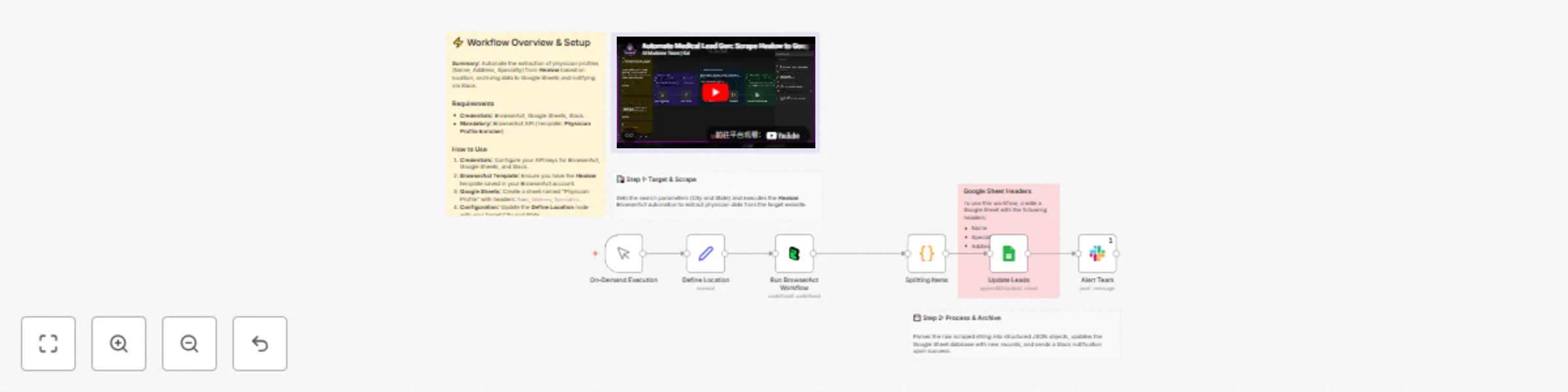
Scrape physician profiles from BrowserAct into Google Sheets and notify Slack

Workflow preview

Workflow preview
100%
Scrape physician profiles from BrowserAct into Google Sheets and notify Slack preview
Open on n8n.io

Important notice

This workflow is provided as-is. Please review and test before using in production.

1. Workflow Overview

Scrape physician profiles from BrowserAct to Google Sheets This workflow automates the process of building a targeted database of healthcare providers by scraping physician details for a specific l...

Best for

  • Lead Generation automation workflows
  • intermediate n8n builders looking for reusable templates

Tools used

n8n-nodes-base.code, n8n-nodes-base.set, n8n-nodes-base.stickynote, n8n-nodes-base.googlesheets, n8n-nodes-base.slack, n8n-nodes-browseract.browseract, n8n-nodes-base.manualtrigger

Source and attribution

This workflow is cataloged by N8N Workflows and links back to its original n8n.io source page by Madame AI Team | Kai.

Original n8n.io source

1.1 Workflow description

Title
Scrape physician profiles from BrowserAct into Google Sheets and notify Slack
Workflow name
Scrape physician profiles from BrowserAct into Google Sheets and notify Slack

Scrape physician profiles from BrowserAct to Google Sheets

This workflow automates the process of building a targeted database of healthcare providers by scraping physician details for a specific location and syncing them to your records. It leverages BrowserAct to extract data from healthcare directories and ensures your database stays clean by preventing duplicate entries.

Target Audience

Medical recruiters, pharmaceutical sales representatives, lead generation specialists, and healthcare data analysts.

How it works

  1. Define Location: The workflow starts by setting the target Location and State in a Set node.
  2. Scrape Data: A BrowserAct node executes a task (using the "Physician Profile Enricher" template) to search a healthcare directory (e.g., Healow) for doctors matching the criteria.
  3. Parse JSON: A Code node takes the raw string output from the scraper and parses it into individual JSON objects.
  4. Update Database: The workflow uses a Google Sheets node to append new records or update existing ones based on the physician's name, preventing duplicates.
  5. Notify Team: A Slack node sends a message to a specific channel to confirm the batch job has finished successfully.

How to set up

  1. Configure Credentials: Connect your BrowserAct, Google Sheets, and Slack accounts in n8n.
  2. Prepare BrowserAct: Ensure the Physician Profile Enricher template is saved in your BrowserAct account.
  3. Setup Google Sheet: Create a new Google Sheet with the required headers (listed below).
  4. Select Spreadsheet: Open the Google Sheets node and select your newly created file and sheet.
  5. Set Variables: Open the Define Location node and input your target Location (City) and State.
  6. Configure Notification: Open the Slack node and select the channel where you want to receive alerts.

Google Sheet Headers

To use this workflow, create a Google Sheet with the following headers:

  • Name
  • Specialty
  • Address

Requirements

  • BrowserAct account with the Physician Profile Enricher template.
  • Google Sheets account.
  • Slack account.

How to customize the workflow

  1. Change the Data Source: Modify the BrowserAct template to scrape a different directory (e.g., Zocdoc or WebMD) and update the Google Sheet columns accordingly.
  2. Switch Notifications: Replace the Slack node with a Microsoft Teams, Discord, or Email node to suit your team's communication preferences.
  3. Enrich Data: Add an AI Agent node after the Code node to format addresses or research the specific clinics listed.

Need Help?


Workflow Guidance and Showcase Video

1.2 Logical Blocks

This catalog entry is organized from the workflow JSON. The node-level section below shows the executable blocks available for review before importing the template.

2. Block-by-Block Analysis

Block 1 - Splitting Items

Type / Role
n8n-nodes-base.code - code
Config choices
Version 2

Block 2 - Define Location

Type / Role
n8n-nodes-base.set - set
Config choices
Version 3.4

Block 3 - Documentation

Type / Role
n8n-nodes-base.stickyNote - stickyNote
Config choices
Version 1

Block 4 - Step 1 Explanation

Type / Role
n8n-nodes-base.stickyNote - stickyNote
Config choices
Version 1

Block 5 - Step 2 Explanation

Type / Role
n8n-nodes-base.stickyNote - stickyNote
Config choices
Version 1

Block 6 - Sticky Note

Type / Role
n8n-nodes-base.stickyNote - stickyNote
Config choices
Version 1

Block 7 - Update Leads

Type / Role
n8n-nodes-base.googleSheets - googleSheets
Config choices
Version 4.7

Block 8 - Alert Team

Type / Role
n8n-nodes-base.slack - slack
Config choices
Version 2.4

Block 9 - Run BrowserAct Workflow

Type / Role
n8n-nodes-browseract.browserAct - browserAct
Config choices
Version 1

Block 10 - On-Demand Execution

Type / Role
n8n-nodes-base.manualTrigger - manualTrigger
Config choices
Version 1

Block 11 - Sticky Note1

Type / Role
n8n-nodes-base.stickyNote - stickyNote
Config choices
Version 1

3. Summary Table

Workflow Scrape physician profiles from BrowserAct into Google Sheets and notify Slack
Complexity intermediate
Nodes 11
Categories Lead Generation
Author Madame AI Team | Kai
Published 01 Jan 2026

4. Reproducing the Workflow from Scratch

  1. 1. Download the workflow JSON

    Use the JSON export at /data/workflows/12345/12345.json as the source template for this automation.

  2. 2. Import the template into n8n

    Open n8n, import the downloaded JSON, and review each node before activating the workflow.

  3. 3. Configure credentials and variables

    Replace placeholder credentials, API keys, webhook URLs, account IDs, and environment-specific values with your own settings.

  4. 4. Test with sample data

    Run the workflow manually or in a staging workspace, inspect node output, and confirm downstream systems receive the expected data.

  5. 5. Activate and monitor

    Enable the workflow only after testing, then monitor executions, errors, and rate limits during the first production runs.

5. General Notes & Resources

Review imported nodes carefully before activation. This catalog entry is intended to help you inspect the workflow structure, understand required services, and find related templates faster.

Node names, credentials, schedules, webhook paths, and external service limits may need adjustment for your workspace.

Frequently asked questions

What does Scrape physician profiles from BrowserAct into Google Sheets and notify Slack do?

Scrape physician profiles from BrowserAct to Google Sheets This workflow automates the process of building a targeted database of healthcare providers by scraping physician details for a specific l...

What do I need before importing this workflow?

Review the workflow JSON, configure any required credentials in n8n, and test the automation in a safe workspace before using it in production.

Can I customize this workflow?

Yes. Use the block-by-block analysis and the downloadable JSON to inspect each node, then adjust credentials, prompts, schedules, filters, or destinations for your Lead Generation use case.