Block 1 - Remove Duplicate URLs
- Type / Role
- n8n-nodes-base.removeDuplicates - removeDuplicates
- Config choices
- Version 1.1


 Early Deal
This workflow is provided as-is. Please review and test before using in production.
Who is this template for? This workflow template is designed for sales, marketing, and business development professionals who want a cost effective and efficient way to generate leads. By leveragin...
n8n-nodes-base.removeduplicates, n8n-nodes-base.splitinbatches, n8n-nodes-base.httprequest, n8n-nodes-base.code, n8n-nodes-base.filter, n8n-nodes-base.aggregate, n8n-nodes-base.splitout, n8n-nodes-base.googlesheets
This workflow is cataloged by N8N Workflows and links back to its original n8n.io source page by Akram Kadri.
Original n8n.io sourceThis workflow template is designed for sales, marketing, and business development professionals who want a cost-effective and efficient way to generate leads. By leveraging n8n core nodes, it scrapes business emails from Google Maps without relying on third-party APIs or paid services, ensuring there are no additional costs involved.
Ideal for small business owners, freelancers, and agencies, this template automates the process of collecting contact information for targeted outreach, making it a powerful tool for anyone looking to scale their lead generation efforts without incurring extra expenses.
You can watch the video tutorial here: https://youtu.be/HaiO-UeiKBA
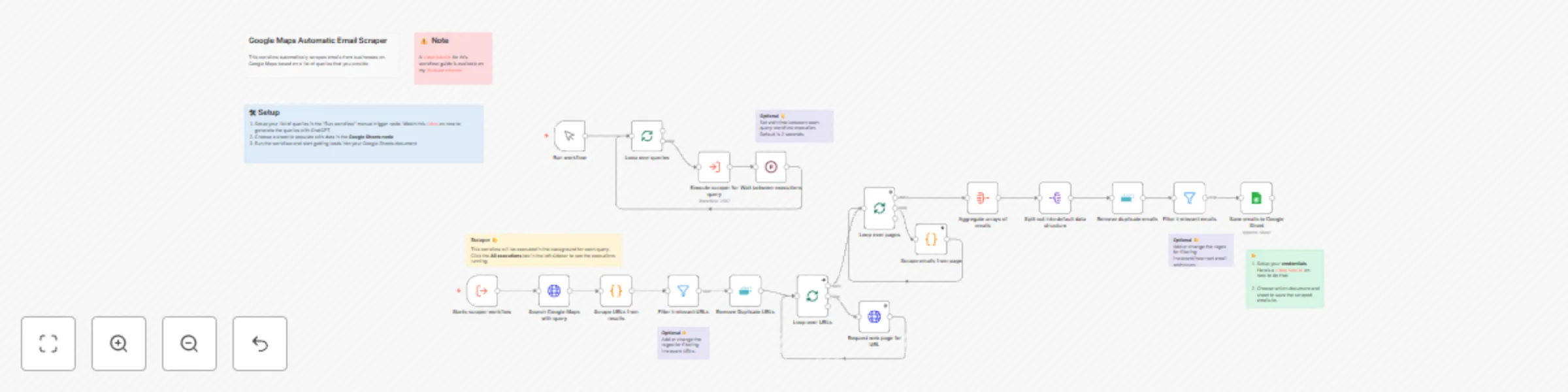
This template streamlines email scraping from Google Maps using only n8n core nodes, ensuring a completely free and self-contained solution. Here’s how it operates:
You provide a list of queries, each consisting of keywords related to the type of business you want to target and the specific region or subregion you’re interested in.
The workflow processes each query one at a time. For each query, it triggers a sub-workflow dedicated to handling the scraping tasks.
Using these queries, the workflow scrapes Google Maps to collect URLs of business listings matching the provided criteria.
The workflow then fetches the HTML pages of the collected URLs for further processing.
Using a Code Node with custom JavaScript, the workflow runs regular expressions on the HTML content to extract business email addresses.
Add Queries: Open the first node, "Run Workflow" and input a list of queries, each containing the business keywords and the target region.
Configure the Google Sheets Node: Open the Google Sheets node and select a document and specific sheet where the scraped results will be saved.
Run the workflow: Click on "Test workflow" and watch your Google Sheets document gradually receive business email addresses.
You can adjust the regular expressions in the Code Node to refine the email extraction logic or add logic to extract other kinds of information.
This catalog entry is organized from the workflow JSON. The node-level section below shows the executable blocks available for review before importing the template.
Showing the first 24 of 26 workflow blocks. Download the JSON for the full node graph.
| Workflow | Scrape business emails from Google Maps without the use of any third party APIs |
|---|---|
| Complexity | advanced |
| Nodes | 26 |
| Categories | Lead Generation |
| Author | Akram Kadri |
| Published | 24 Nov 2024 |
Use the JSON export at /data/workflows/2567/2567.json as the source template for this automation.
Open n8n, import the downloaded JSON, and review each node before activating the workflow.
Replace placeholder credentials, API keys, webhook URLs, account IDs, and environment-specific values with your own settings.
Run the workflow manually or in a staging workspace, inspect node output, and confirm downstream systems receive the expected data.
Enable the workflow only after testing, then monitor executions, errors, and rate limits during the first production runs.
Review imported nodes carefully before activation. This catalog entry is intended to help you inspect the workflow structure, understand required services, and find related templates faster.
Node names, credentials, schedules, webhook paths, and external service limits may need adjustment for your workspace.
Who is this template for? This workflow template is designed for sales, marketing, and business development professionals who want a cost effective and efficient way to generate leads. By leveragin...
Review the workflow JSON, configure any required credentials in n8n, and test the automation in a safe workspace before using it in production.
Yes. Use the block-by-block analysis and the downloadable JSON to inspect each node, then adjust credentials, prompts, schedules, filters, or destinations for your Lead Generation use case.