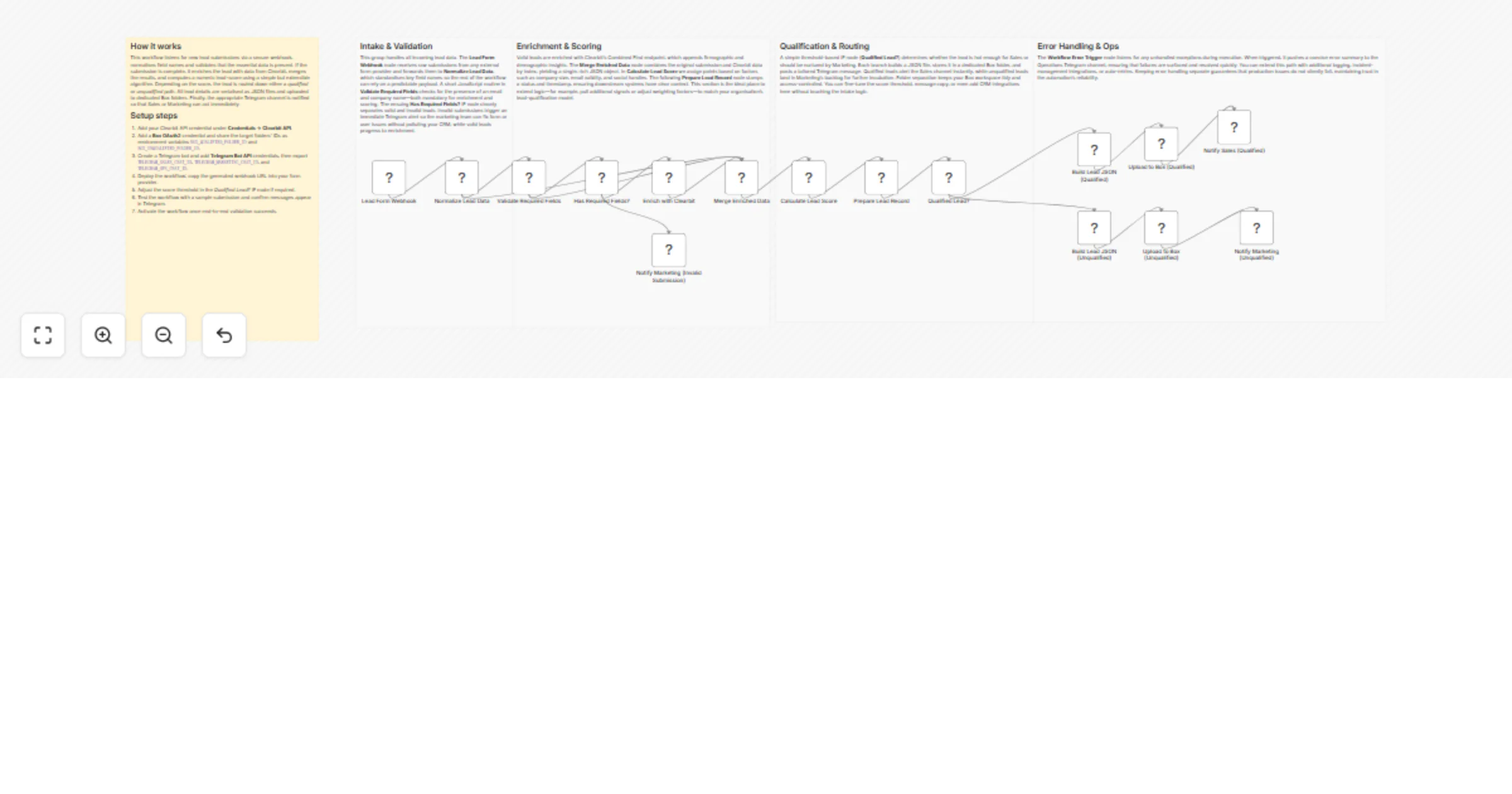
Score and route leads with Telegram alerts and Box storage

Workflow preview

Workflow preview
100%
Score and route leads with Telegram alerts and Box storage preview
Open on n8n.io

1. Workflow Overview

Lead Scoring Pipeline with Telegram and Box This workflow ingests incoming lead data from a form submission webhook, enriches each lead with external data sources, applies a custom scoring algorith...

Best for

  • Lead Generation automation workflows
  • AI Summarization automation workflows
  • advanced n8n builders looking for reusable templates

Tools used

n8n-nodes-base.stickynote, n8n-nodes-base.webhook, n8n-nodes-base.set, n8n-nodes-base.code, n8n-nodes-base.if, n8n-nodes-base.httprequest, n8n-nodes-base.merge, n8n-nodes-base.box

Source and attribution

This workflow is cataloged by N8N Workflows and links back to its original n8n.io source page by vinci-king-01.

Original n8n.io source

1.1 Workflow description

Title
Score and route leads with Telegram alerts and Box storage
Workflow name
Score and route leads with Telegram alerts and Box storage

Lead Scoring Pipeline with Telegram and Box

This workflow ingests incoming lead data from a form submission webhook, enriches each lead with external data sources, applies a custom scoring algorithm, and automatically stores the enriched record in Box while notifying your sales team in Telegram. It is designed to give you a real-time, end-to-end lead-qualification pipeline without writing any glue code.

Pre-conditions/Requirements

Prerequisites

  • n8n instance (self-hosted or n8n.cloud)
  • ScrapeGraphAI community node installed (not directly used in this template but required by marketplace listing rules)
  • Telegram Bot created via BotFather
  • Box account (Developer App or User OAuth2)
  • Publicly accessible URL (for the Webhook trigger)
  • Optional: Enrichment API account (e.g., Clearbit, PDL) for richer scoring data

Required Credentials

Credential Scope Purpose
Telegram Bot Token Bot Send scored-lead alerts
Box OAuth2 Credentials App Level Upload enriched lead JSON/CSV
(Optional) Enrichment API Key REST Append firmographic & technographic data

Environment Variables (Recommended)

Variable Example Description
LEAD_SCORE_THRESHOLD 75 Minimum score that triggers a Telegram alert
BOX_FOLDER_ID 123456789 Destination folder for lead files

How it works

This workflow listens for new form submissions, enriches each contact with external data, calculates a lead score based on configurable criteria, and routes the lead through one of two branches: high-value leads trigger an instant Telegram alert and are archived to Box, while low-value leads are archived only. Errors are captured by an Error Trigger for post-mortem analysis.

Key Steps:

  • Webhook Trigger: Receives raw form data (name, email, company, etc.).
  • Set node – Normalization: Renames fields and initializes default values.
  • HTTP Request – Enrichment: Calls an external enrichment API to augment data.
  • Merge node: Combines original and enriched data into a single object.
  • Code node – Scoring: Runs JavaScript to calculate a numeric lead score.
  • If node – Qualification Gate: Checks if score ≥ LEAD_SCORE_THRESHOLD.
  • Telegram node: Sends alert message to your sales channel for high-scoring leads.
  • Box node: Uploads the enriched JSON (or CSV) file into a specified folder.
  • Error Trigger: Captures any unhandled errors and notifies ops (optional).
  • Sticky Notes: Explain scoring logic and credential placement (documentation aids).

Set up steps

Setup Time: 15-25 minutes

  1. Create Telegram Bot & Get Token
  • Talk to BotFather → /newbot → copy the provided token.
  1. Create a Box Developer App
  • Enable OAuth2 → add https://api.n8n.cloud/oauth2-credential/callback (or your own) as redirect URI.
  1. Install Required Community Nodes
  • From n8n editor → “Install” → search “ScrapeGraphAI” → install.
  1. Import the Workflow JSON
  • Click “Import” → paste the workflow file → save.
  1. Configure the Webhook URL in Your Form Tool
  • Copy the production URL generated by the Webhook node → add it as form action.
  1. Set Environment Variables
  • In n8n (Settings → Environment) add LEAD_SCORE_THRESHOLD and BOX_FOLDER_ID.
  1. Fill in All Credentials
  • Telegram: paste bot token.
  • Box: complete OAuth2 flow.
  • Enrichment API: paste key in the HTTP Request node headers.
  1. Activate Workflow
  • Toggle “Activate”. Submit a test form to verify Telegram/Box outputs.

Node Descriptions

Core Workflow Nodes:

  • Webhook – Entry point; captures incoming JSON payload from the form.
  • Set (Normalize Fields) – Maps raw keys to standardized ones (firstName, email, etc.).
  • HTTP Request (Enrichment) – Queries external service for firmographic data.
  • Merge (Combine Data) – Merges the two JSON objects (form + enrichment).
  • Code (Scoring) – Calculates lead score using weighted attributes.
  • If (Score Check) – Branches flow based on the score threshold.
  • Telegram – Sends high-score alerts to a specified chat ID.
  • Box – Saves a JSON/CSV file of the enriched lead to cloud storage.
  • Error Trigger – Executes if any preceding node fails.
  • Sticky Notes – Inline documentation for quick reference.

Data Flow:

  1. WebhookSetHTTP RequestMergeCodeIf
  2. If (true)Telegram
  3. If (always)Box
  4. Error (from any node) → Error Trigger

Customization Examples

Change Scoring Logic

// Inside the Code node
const { jobTitle, companySize, technologies } = items[0].json;
let score = 0;

if (jobTitle.match(/(CTO|CEO|Founder)/i)) score += 50;
if (companySize > 500) score += 20;
if (technologies.includes('AWS')) score += 10;

// Bonus: subtract points if free email domain
if (items[0].json.email.endsWith('@gmail.com')) score -= 30;

return [{ json: { ...items[0].json, score } }];

Use a Different Storage Provider (e.g., Google Drive)

// Replace Box node with Google Drive node
{
 "node": "Google Drive",
 "operation": "upload",
 "fileName": "lead_{{$json.email}}.json",
 "folderId": "1A2B3C..."
}

Data Output Format

The workflow outputs structured JSON data:

{
 "firstName": "Ada",
 "lastName": "Lovelace",
 "email": "[email protected]",
 "company": "Analytical Engines Inc.",
 "companySize": 250,
 "jobTitle": "CTO",
 "technologies": ["AWS", "Docker", "Node.js"],
 "score": 82,
 "qualified": true,
 "timestamp": "2024-04-07T12:34:56.000Z"
}

Troubleshooting

Common Issues

  1. Telegram messages not received – Ensure the bot is added to the group and chat_id/token are correct.
  2. Box upload fails with 403 – Check folder permissions; verify OAuth2 tokens have not expired.
  3. Webhook shows 404 – The workflow is not activated or the URL was copied in “Test” mode instead of “Production”.

Performance Tips

  • Batch multiple form submissions using the “SplitInBatches” node to reduce API-call overhead.
  • Cache enrichment responses (Redis, n8n Memory) to avoid repeated lookups for the same domain.

Pro Tips:

  • Add an n8n “Wait” node between enrichment calls to respect rate limits.
  • Use Static Data to store domain-level enrichment results for even faster runs.
  • Tag Telegram alerts with emojis based on score (🔥 Hot Lead for >90).

This is a community-contributed n8n workflow template provided “as-is.” Always test thoroughly in a non-production environment before deploying to live systems.

1.2 Logical Blocks

This catalog entry is organized from the workflow JSON. The node-level section below shows the executable blocks available for review before importing the template.

2. Block-by-Block Analysis

Block 1 - ⚡️ Lead Scoring Overview

Type / Role
n8n-nodes-base.stickyNote - stickyNote
Config choices
Version 1

Block 2 - 📥 Intake & Validation

Type / Role
n8n-nodes-base.stickyNote - stickyNote
Config choices
Version 1

Block 3 - 🧠 Enrichment & Scoring

Type / Role
n8n-nodes-base.stickyNote - stickyNote
Config choices
Version 1

Block 4 - 🚦 Qualification & Routing

Type / Role
n8n-nodes-base.stickyNote - stickyNote
Config choices
Version 1

Block 5 - 🛠️ Error Handling

Type / Role
n8n-nodes-base.stickyNote - stickyNote
Config choices
Version 1

Block 6 - Lead Form Webhook

Type / Role
n8n-nodes-base.webhook - webhook
Config choices
Version 1

Block 7 - Normalize Lead Data

Type / Role
n8n-nodes-base.set - set
Config choices
Version 3.4

Block 8 - Validate Required Fields

Type / Role
n8n-nodes-base.code - code
Config choices
Version 2

Block 9 - Has Required Fields?

Type / Role
n8n-nodes-base.if - if
Config choices
Version 2

Block 10 - Enrich with Clearbit

Type / Role
n8n-nodes-base.httpRequest - httpRequest
Config choices
Version 4.2

Block 11 - Merge Enriched Data

Type / Role
n8n-nodes-base.merge - merge
Config choices
Version 2.1

Block 12 - Calculate Lead Score

Type / Role
n8n-nodes-base.code - code
Config choices
Version 2

Block 13 - Prepare Lead Record

Type / Role
n8n-nodes-base.set - set
Config choices
Version 3.4

Block 14 - Qualified Lead?

Type / Role
n8n-nodes-base.if - if
Config choices
Version 2

Block 15 - Build Lead JSON (Qualified)

Type / Role
n8n-nodes-base.code - code
Config choices
Version 2

Block 16 - Upload to Box (Qualified)

Type / Role
n8n-nodes-base.box - box
Config choices
Version 1

Block 17 - Notify Sales (Qualified)

Type / Role
n8n-nodes-base.telegram - telegram
Config choices
Version 1.2

Block 18 - Build Lead JSON (Unqualified)

Type / Role
n8n-nodes-base.code - code
Config choices
Version 2

Block 19 - Upload to Box (Unqualified)

Type / Role
n8n-nodes-base.box - box
Config choices
Version 1

Block 20 - Notify Marketing (Unqualified)

Type / Role
n8n-nodes-base.telegram - telegram
Config choices
Version 1.2

Block 21 - Notify Marketing (Invalid Submission)

Type / Role
n8n-nodes-base.telegram - telegram
Config choices
Version 1.2

3. Summary Table

Workflow Score and route leads with Telegram alerts and Box storage
Complexity advanced
Nodes 21
Categories Lead Generation, AI Summarization
Author vinci-king-01
Published 28 Jan 2026

4. Reproducing the Workflow from Scratch

  1. 1. Download the workflow JSON

    Use the JSON export at /data/workflows/13065/13065.json as the source template for this automation.

  2. 2. Import the template into n8n

    Open n8n, import the downloaded JSON, and review each node before activating the workflow.

  3. 3. Configure credentials and variables

    Replace placeholder credentials, API keys, webhook URLs, account IDs, and environment-specific values with your own settings.

  4. 4. Test with sample data

    Run the workflow manually or in a staging workspace, inspect node output, and confirm downstream systems receive the expected data.

  5. 5. Activate and monitor

    Enable the workflow only after testing, then monitor executions, errors, and rate limits during the first production runs.

5. General Notes & Resources

Review imported nodes carefully before activation. This catalog entry is intended to help you inspect the workflow structure, understand required services, and find related templates faster.

Node names, credentials, schedules, webhook paths, and external service limits may need adjustment for your workspace.

Frequently asked questions

What does Score and route leads with Telegram alerts and Box storage do?

Lead Scoring Pipeline with Telegram and Box This workflow ingests incoming lead data from a form submission webhook, enriches each lead with external data sources, applies a custom scoring algorith...

What do I need before importing this workflow?

Review the workflow JSON, configure any required credentials in n8n, and test the automation in a safe workspace before using it in production.

Can I customize this workflow?

Yes. Use the block-by-block analysis and the downloadable JSON to inspect each node, then adjust credentials, prompts, schedules, filters, or destinations for your Lead Generation, AI Summarization use case.