Score and route leads with Clearbit, Mattermost and Trello

Workflow preview

Workflow preview
100%
Score and route leads with Clearbit, Mattermost and Trello preview
Open on n8n.io

1. Workflow Overview

Lead Scoring Pipeline with Mattermost and Trello This workflow automatically enriches incoming form based leads, calculates a lead score from multiple data points, and then routes high value prospe...

Best for

  • Lead Generation automation workflows
  • AI Summarization automation workflows
  • advanced n8n builders looking for reusable templates

Tools used

n8n-nodes-base.stickynote, n8n-nodes-base.scheduletrigger, n8n-nodes-base.httprequest, n8n-nodes-base.code, n8n-nodes-base.splitinbatches, n8n-nodes-base.if, n8n-nodes-base.merge, n8n-nodes-base.trello

Source and attribution

This workflow is cataloged by N8N Workflows and links back to its original n8n.io source page by vinci-king-01.

Original n8n.io source

1.1 Workflow description

Title
Score and route leads with Clearbit, Mattermost and Trello
Workflow name
Score and route leads with Clearbit, Mattermost and Trello

Lead Scoring Pipeline with Mattermost and Trello

This workflow automatically enriches incoming form-based leads, calculates a lead-score from multiple data points, and then routes high-value prospects to a Mattermost alert channel while adding all leads to Trello for further handling. It centralizes lead intelligence and streamlines sales team triage—no manual spreadsheet work required.

Pre-conditions/Requirements

Prerequisites

  • n8n instance (self-hosted or n8n cloud)
  • ScrapeGraphAI community node installed
  • Active Trello and Mattermost workspaces
  • Lead-capture form or webhook that delivers JSON payloads

Required Credentials

  • Trello API Key & Token – Access to the board/list where cards will be created
  • Mattermost Access Token – Permission to post messages in the target channel
  • (Optional) Clearbit / Apollo / 3rd-party enrichment keys – If you replace the sample enrichment HTTP requests

Specific Setup Requirements

Variable Purpose Example Value
MM_CHANNEL_ID Mattermost channel to post high-score leads leads-alerts
TRELLO_BOARD_ID Board where new cards are added 62f1d...
TRELLO_LIST_ID_HOT Trello list for hot leads Hot Deals
TRELLO_LIST_ID_BACKLOG Trello list for all other leads New Leads
LEAD_SCORE_THRESHOLD Score above which a lead is considered hot 70

How it works

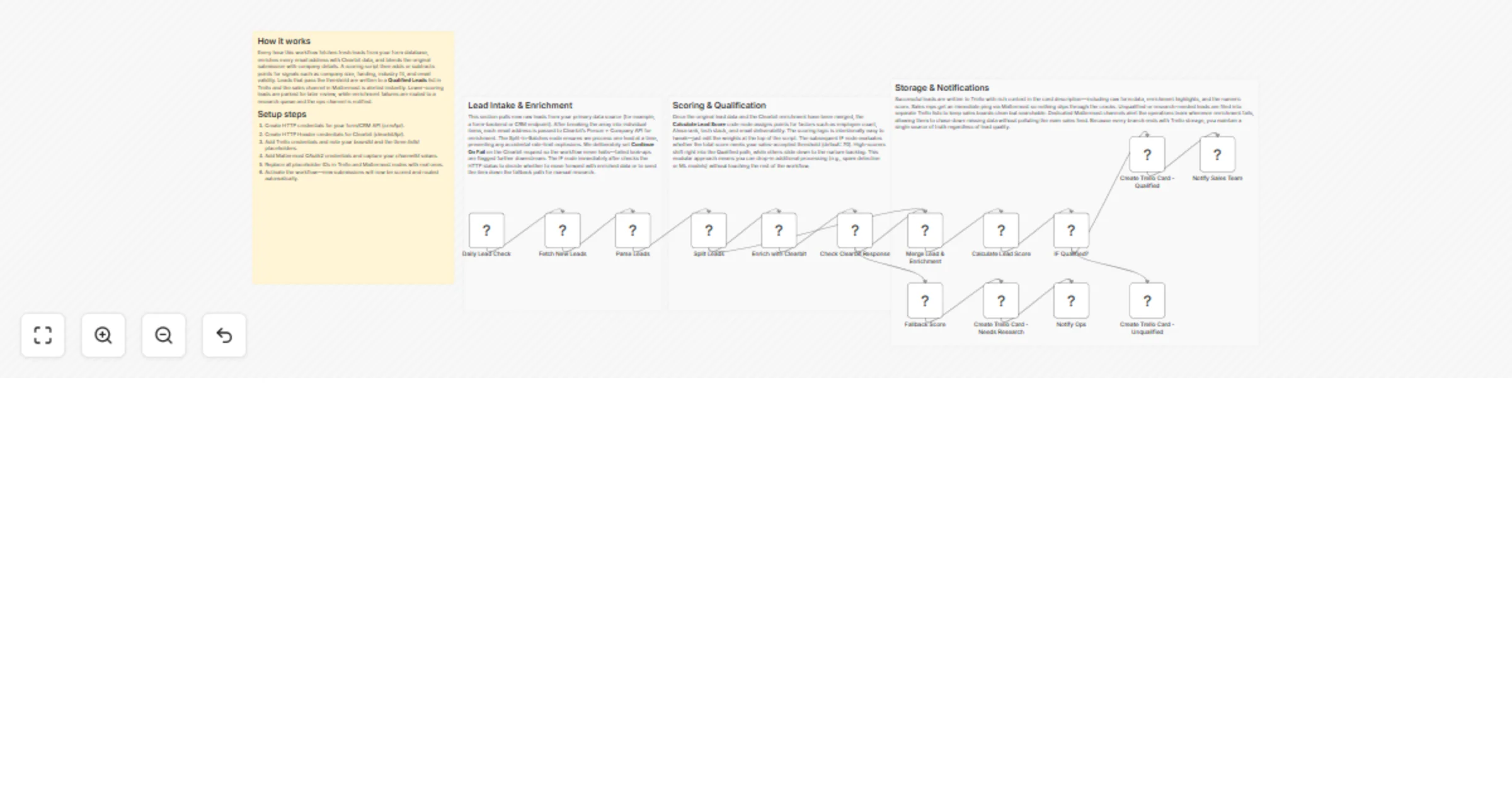
This workflow grabs new leads at a defined interval, enriches each lead with external data, computes a custom score, and routes the lead: high-scorers trigger a Mattermost alert and are placed in a “Hot Deals” list, while the rest are stored in a “Backlog” list on Trello. All actions are fully automated and run unattended once configured.

Key Steps:

  • Schedule Trigger: Runs every 15 minutes to poll for new form submissions.
  • HTTP Request – Fetch Leads: Retrieves the latest unprocessed leads from your form backend or CRM API.
  • Split In Batches: Processes leads 20 at a time to respect API rate limits.
  • HTTP Request – Enrich Lead: Calls external enrichment (e.g., Clearbit) to append company and person data.
  • Code – Calculate Score: JavaScript that applies weightings to enriched attributes and outputs a numeric score.
  • IF – Score Threshold: Branches flow based on LEAD_SCORE_THRESHOLD.
  • Mattermost Node: Sends a rich-text message with lead details for high-score prospects.
  • Trello Node (Hot List): Creates a Trello card in the “Hot Deals” list for high-value leads.
  • Trello Node (Backlog): Creates a Trello card in the “New Leads” list for everyone else.
  • Merge & Flag Processed: Marks leads as processed to avoid re-processing in future runs.

Set up steps

Setup Time: 10–15 minutes

  1. Import the Workflow: Download the JSON template and import it into n8n.
  2. Create / Select Credentials:
  • Add your Trello API key & token under Trello API credentials.
  • Add your Mattermost personal access token under Mattermost API credentials.
  1. Configure Environment Variables: Set MM_CHANNEL_ID, TRELLO_BOARD_ID, TRELLO_LIST_ID_HOT, TRELLO_LIST_ID_BACKLOG, and LEAD_SCORE_THRESHOLD in n8n → Settings → Environment.
  2. Form Backend Endpoint: Update the first HTTP Request node with the correct URL and authentication for your form or CRM.
  3. (Optional) Enrichment Provider: Replace the sample enrichment HTTP Request with your chosen provider’s endpoint and credentials.
  4. Test Run: Execute the workflow manually with a sample payload to ensure Trello cards and Mattermost messages are produced.
  5. Activate: Enable the workflow; it will now run on the defined schedule.

Node Descriptions

Core Workflow Nodes:

  • Schedule Trigger – Triggers workflow every 15 minutes.
  • HTTP Request (Fetch Leads) – Pulls unprocessed leads.
  • SplitInBatches – Limits processing to 20 leads per batch.
  • HTTP Request (Enrich Lead) – Adds firmographic & technographic data.
  • Code (Calculate Score) – JavaScript scoring algorithm; outputs score field.
  • IF (Score ≥ Threshold) – Determines routing path.
  • Mattermost – Sends formatted message with lead summary & score.
  • Trello (Create Card) – Adds lead as a card to the appropriate list.
  • Merge (Flag Processed) – Updates source system to mark lead as processed.

Data Flow:

  1. Schedule Trigger → HTTP Request (Fetch Leads) → SplitInBatches
  2. → HTTP Request (Enrich Lead) → Code (Calculate Score) → IF
  3. IF (Yes) → Mattermost → Trello (Hot List)
  4. IF (No) → Trello (Backlog)
  5. Both branches → Merge (Flag Processed)

Customization Examples

Adjust Scoring Weights

// Code node: adjust weights to change scoring logic
const weights = {
 industry: 15,
 companySize: 25,
 jobTitle: 20,
 intentSignals: 40
};

Dynamic Trello List Mapping

// Use a Lookup table instead of IF node
const mapping = {
 hot: 'TRELLO_LIST_ID_HOT',
 cold: 'TRELLO_LIST_ID_BACKLOG'
};
items[0].json.listId = mapping[items[0].json.segment];
return items;

Data Output Format

The workflow outputs structured JSON data:

{
 "leadId": "12345",
 "email": "[email protected]",
 "score": 82,
 "priority": "hot",
 "trelloCardUrl": "https://trello.com/c/abc123",
 "mattermostPostId": "78yzk9n8ppgkkp"
}

Troubleshooting

Common Issues

  1. Trello authentication fails – Ensure the token has write access and that the API key & token pair belong to the same Trello account.
  2. Mattermost message not sent – Confirm the token can post in the target channel and that MM_CHANNEL_ID is correct.

Performance Tips

  • Batch leads in groups of 20–50 to avoid enrichment API rate-limit errors.
  • Cache enrichment responses for repeat domains to reduce API calls.

Pro Tips:

  • Add a second IF node to send ultra-high (>90) scores directly to an account executive via email.
  • Store raw enrichment responses in a database for future analytics.
  • Use n8n’s built-in Execution Data Save to debug edge-cases without rerunning external API calls.

1.2 Logical Blocks

This catalog entry is organized from the workflow JSON. The node-level section below shows the executable blocks available for review before importing the template.

2. Block-by-Block Analysis

Block 1 - Workflow Overview

Type / Role
n8n-nodes-base.stickyNote - stickyNote
Config choices
Version 1

Block 2 - Intake & Enrichment Note

Type / Role
n8n-nodes-base.stickyNote - stickyNote
Config choices
Version 1

Block 3 - Scoring Note

Type / Role
n8n-nodes-base.stickyNote - stickyNote
Config choices
Version 1

Block 4 - Storage & Alerts Note

Type / Role
n8n-nodes-base.stickyNote - stickyNote
Config choices
Version 1

Block 5 - Daily Lead Check

Type / Role
n8n-nodes-base.scheduleTrigger - scheduleTrigger
Config choices
Version 1.1

Block 6 - Fetch New Leads

Type / Role
n8n-nodes-base.httpRequest - httpRequest
Config choices
Version 4.2

Block 7 - Parse Leads

Type / Role
n8n-nodes-base.code - code
Config choices
Version 2

Block 8 - Split Leads

Type / Role
n8n-nodes-base.splitInBatches - splitInBatches
Config choices
Version 3

Block 9 - Enrich with Clearbit

Type / Role
n8n-nodes-base.httpRequest - httpRequest
Config choices
Version 4.2

Block 10 - Check Clearbit Response

Type / Role
n8n-nodes-base.if - if
Config choices
Version 2

Block 11 - Merge Lead & Enrichment

Type / Role
n8n-nodes-base.merge - merge
Config choices
Version 2.1

Block 12 - Calculate Lead Score

Type / Role
n8n-nodes-base.code - code
Config choices
Version 2

Block 13 - IF Qualified?

Type / Role
n8n-nodes-base.if - if
Config choices
Version 2

Block 14 - Create Trello Card - Qualified

Type / Role
n8n-nodes-base.trello - trello
Config choices
Version 1

Block 15 - Notify Sales Team

Type / Role
n8n-nodes-base.mattermost - mattermost
Config choices
Version 1

Block 16 - Create Trello Card - Unqualified

Type / Role
n8n-nodes-base.trello - trello
Config choices
Version 1

Block 17 - Fallback Score

Type / Role
n8n-nodes-base.code - code
Config choices
Version 2

Block 18 - Create Trello Card - Needs Research

Type / Role
n8n-nodes-base.trello - trello
Config choices
Version 1

Block 19 - Notify Ops

Type / Role
n8n-nodes-base.mattermost - mattermost
Config choices
Version 1

3. Summary Table

Workflow Score and route leads with Clearbit, Mattermost and Trello
Complexity advanced
Nodes 19
Categories Lead Generation, AI Summarization
Author vinci-king-01
Published 16 Jan 2026

4. Reproducing the Workflow from Scratch

  1. 1. Download the workflow JSON

    Use the JSON export at /data/workflows/12751/12751.json as the source template for this automation.

  2. 2. Import the template into n8n

    Open n8n, import the downloaded JSON, and review each node before activating the workflow.

  3. 3. Configure credentials and variables

    Replace placeholder credentials, API keys, webhook URLs, account IDs, and environment-specific values with your own settings.

  4. 4. Test with sample data

    Run the workflow manually or in a staging workspace, inspect node output, and confirm downstream systems receive the expected data.

  5. 5. Activate and monitor

    Enable the workflow only after testing, then monitor executions, errors, and rate limits during the first production runs.

5. General Notes & Resources

Review imported nodes carefully before activation. This catalog entry is intended to help you inspect the workflow structure, understand required services, and find related templates faster.

Node names, credentials, schedules, webhook paths, and external service limits may need adjustment for your workspace.

Frequently asked questions

What does Score and route leads with Clearbit, Mattermost and Trello do?

Lead Scoring Pipeline with Mattermost and Trello This workflow automatically enriches incoming form based leads, calculates a lead score from multiple data points, and then routes high value prospe...

What do I need before importing this workflow?

Review the workflow JSON, configure any required credentials in n8n, and test the automation in a safe workspace before using it in production.

Can I customize this workflow?

Yes. Use the block-by-block analysis and the downloadable JSON to inspect each node, then adjust credentials, prompts, schedules, filters, or destinations for your Lead Generation, AI Summarization use case.