Scheduled Walmart product scraping to Google Sheets with ScrapeOps
Workflow preview


 Early Deal
DISCOUNT 20%

Important notice
This workflow is provided as-is. Please review and test before using in production.
Overview
Overview
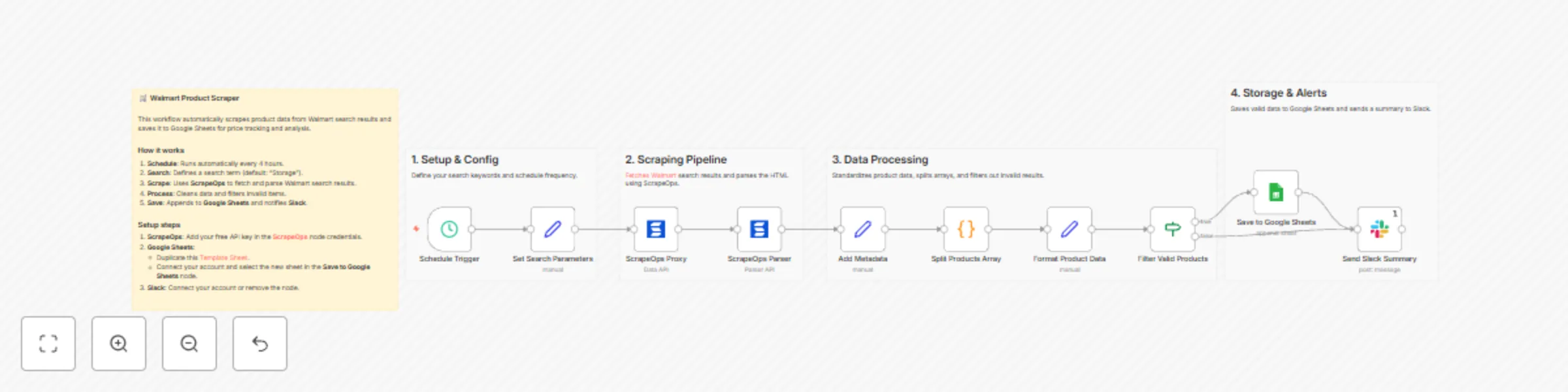
This n8n template automates Walmart product discovery and sends clean results to Google Sheets on a fixed schedule (default: every 4 hours). It uses ScrapeOps Proxy API for resilient page fetches (with JS render + scroll) and ScrapeOps Parser API for structured data extraction (title, price, rating, reviews, image, URL, sponsored flag). The result is a repeatable, low-maintenance workflow for market research, price monitoring, and assortment tracking; ideal for ops and growth teams that need fresh data without babysitting scrapers.
Who is this for?
- E-commerce operators tracking price & inventory signals
- Market/competitive analysts building price baskets and trend views
- Growth & SEO teams validating product coverage and SERP facets
- No-code/low-code builders who prefer visual pipelines over custom code
What problems it solves
- Reliability: Offloads JS rendering and scrolling to ScrapeOps to reduce breakage.
- Structure: Normalizes fields for analysis-ready rows in Sheets.
- Scale: Runs on a timer; no manual downloading or copy-paste.
- Speed to value: Simple setup, minimal credentials, immediate output.
How it works
- Schedule triggers every 4 hours.
- Keyword builds a Walmart search URL.
- ScrapeOps Proxy API fetches HTML (render + scroll).
- ScrapeOps Parser API extracts structured product fields.
- Validate & format rows; drop empties/bad prices.
- Append to Google Sheets for reporting/dashboards.
- (Optional) Slack posts a summary with your results link.
Set up steps (~5–10 minutes)
- Google Sheets: Duplicate the template and paste your link in the Google Sheets node.
- ScrapeOps API: Get a free key here and add it under Credentials → ScrapeOps API. See docs.
- Keyword: Update the search term in Set Search Parameters.
- (Optional) Configure the Slack node or remove it.
Pre-conditions
- n8n instance running with outbound internet access.
- Google account with access to the destination Sheet.
- ScrapeOps account + API key with sufficient quota.
- Basic familiarity with editing node parameters in n8n.
Disclaimer
This template uses ScrapeOps as a community node. You are responsible for complying with Walmart’s Terms of Use, robots directives, and applicable laws in your jurisdiction. Scraping targets may change at any time; adjust render/scroll/wait settings and parsers as needed. Use responsibly for legitimate business purposes.