Block 1 - Sentiment Analysis
- Type / Role
- @n8n/n8n-nodes-langchain.sentimentAnalysis - sentimentAnalysis
- Config choices
- Version 1.1


 Early Deal
This workflow is provided as-is. Please review and test before using in production.
This n8n template demonstrates how to deploy an AI workflow in production while simultaneously running a robust, data driven Evaluation Framework to ensure quality and optimize costs. Use Cases Mod...
@n8n/n8n-nodes-langchain.sentimentanalysis, n8n-nodes-base.gmail, n8n-nodes-base.gmailtrigger, n8n-nodes-base.evaluationtrigger, n8n-nodes-base.splitinbatches, @n8n/n8n-nodes-langchain.lmchatgooglegemini, n8n-nodes-base.evaluation, n8n-nodes-base.stickynote
This workflow is cataloged by N8N Workflows and links back to its original n8n.io source page by Mihai Farcas.
Original n8n.io sourceThis n8n template demonstrates how to deploy an AI workflow in production while simultaneously running a robust, data-driven Evaluation Framework to ensure quality and optimize costs.
Model Comparison: Quickly A/B test different LLM models (e.g., Gemini 3 Pro vs. Flash Lite) for speed and cost efficiency against your specific task.
Prompt Regression: Ensure that tweaks to your system prompt do not introduce new errors or lower the accuracy of your lead categorization.
Production Safety: Guarantee that test runs never trigger real-world actions like sending emails to a client or sales team.
A configured Gmail Trigger (or equivalent email trigger).
A Google Gemini account for the LLM models.
An n8n Data Table containing your "Golden Dataset" of test cases and ground truths.
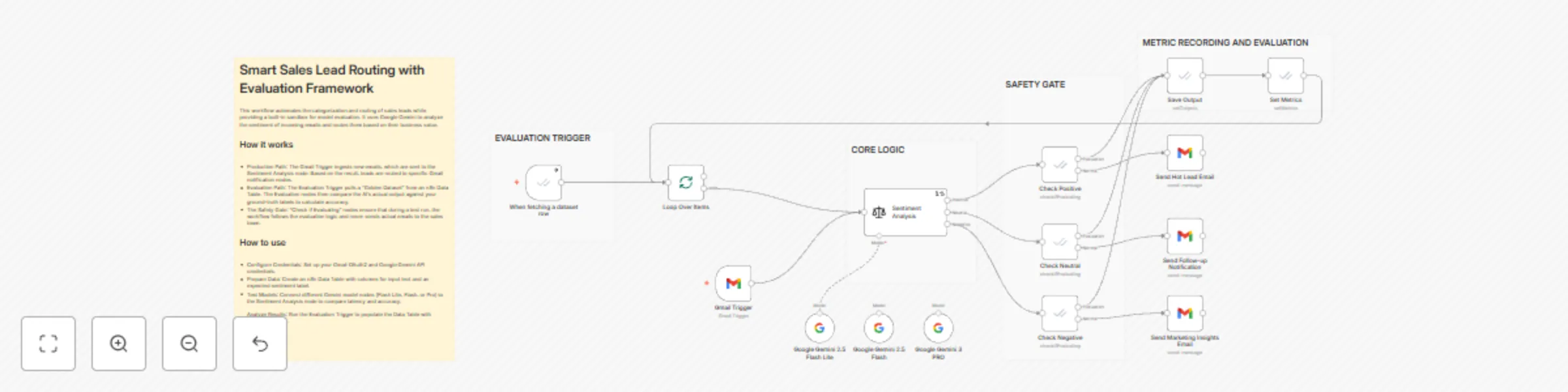
The workflow contains two distinct, parallel execution paths:
The Gmail Trigger monitors for new emails.
The email text is routed through the Sentiment Analysis node, which categorizes the lead as Positive, Neutral, or Negative.
Check if Evaluating nodes verify the current execution mode. If it is not an evaluation run (the Fail branch), the lead is routed to the corresponding Send Email node for action.
The When fetching a dataset row trigger pulls test cases (input text and expected sentiment/ground truth) from an n8n Data Table.
Each test case loops through the same Sentiment Analysis node.
The Check if Evaluating nodes route this path to the Success branch, skipping the real email actions.
The Save Output node writes the model's prediction to the Data Table.
The Set Metrics node uses the Categorization metric to compare the prediction against the ground truth, returning a score (0 or 1) to measure accuracy.
Model Switching: Multiple Google Gemini Chat Model nodes are connected via the Model input on the Sentiment Analysis node, allowing you to easily swap and compare models without changing the core logic.
Edge Case Handling: The System Prompt Template in the Sentiment Analysis node is customized to handle tricky inputs, such as negative feedback about a competitor that should be classified as a Positive lead.
Metrics: The workflow uses the built-in Categorization metric, which is ideal for classification tasks like sentiment analysis, to provide objective evidence of performance.
This catalog entry is organized from the workflow JSON. The node-level section below shows the executable blocks available for review before importing the template.
| Workflow | Sales lead routing with Gemini Sentiment Analysis & Model Evaluation Framework |
|---|---|
| Complexity | advanced |
| Nodes | 20 |
| Categories | Lead Generation, AI Summarization |
| Author | Mihai Farcas |
| Published | 15 Dec 2025 |
Use the JSON export at /data/workflows/11832/11832.json as the source template for this automation.
Open n8n, import the downloaded JSON, and review each node before activating the workflow.
Replace placeholder credentials, API keys, webhook URLs, account IDs, and environment-specific values with your own settings.
Run the workflow manually or in a staging workspace, inspect node output, and confirm downstream systems receive the expected data.
Enable the workflow only after testing, then monitor executions, errors, and rate limits during the first production runs.
Review imported nodes carefully before activation. This catalog entry is intended to help you inspect the workflow structure, understand required services, and find related templates faster.
Node names, credentials, schedules, webhook paths, and external service limits may need adjustment for your workspace.
This n8n template demonstrates how to deploy an AI workflow in production while simultaneously running a robust, data driven Evaluation Framework to ensure quality and optimize costs. Use Cases Mod...
Review the workflow JSON, configure any required credentials in n8n, and test the automation in a safe workspace before using it in production.
Yes. Use the block-by-block analysis and the downloadable JSON to inspect each node, then adjust credentials, prompts, schedules, filters, or destinations for your Lead Generation, AI Summarization use case.