Block 1 - Remote ok
- Type / Role
- n8n-nodes-base.httpRequest - httpRequest
- Config choices
- Version 4.2


 Early Deal
This workflow is provided as-is. Please review and test before using in production.
Remote Job Automation Workflow Automatically fetch, clean, and broadcast the latest remote job listings — powered by RemoteOK, Airtable, and Telegram. Key Features Seamless Data Fetching: Pul...
n8n-nodes-base.httprequest, n8n-nodes-base.code, n8n-nodes-base.telegram, n8n-nodes-base.scheduletrigger, n8n-nodes-base.airtable, n8n-nodes-base.stickynote
This workflow is cataloged by N8N Workflows and links back to its original n8n.io source page by Puspak.
Original n8n.io source🚀 Remote Job Automation Workflow Automatically fetch, clean, and broadcast the latest remote job listings — powered by RemoteOK, Airtable, and Telegram.
🔧 Key Features Seamless Data Fetching: Pulls the latest job listings from the RemoteOK API using an HTTP Request node.
Smart Data Processing (via Code Node):
Filters out irrelevant metadata
Cleans and sanitizes job descriptions (e.g., HTML tags, special characters)
Handles malformed or encoded text gracefully
Extracts and formats salary ranges for clarity
Airtable Integration (Upsert):
Stores each job as a unique record using job ID
Avoids duplication through conditional upserts using Airtable's Personal Access Token
Telegram Bot Broadcasting:
Automatically formats and sends job posts to a Telegram group or channel
Keeps your community or team updated in real-time
📦 Tech Stack RemoteOK API – source of curated remote job listings
Airtable – lightweight, accessible job database
Telegram Bot API – for real-time job notifications
n8n – workflow automation engine to tie everything together
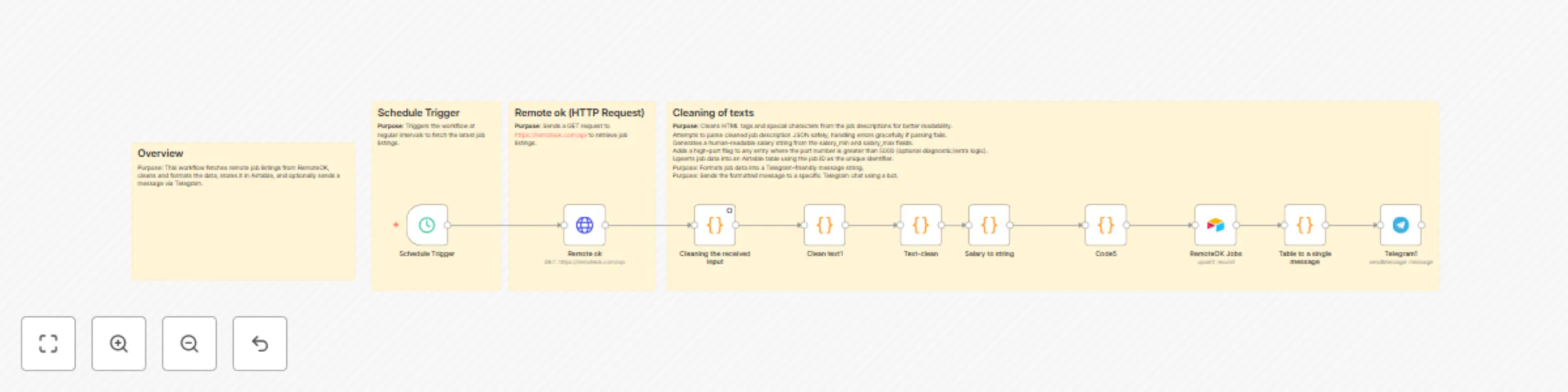
🔁 Workflow Overview Fetch Jobs from RemoteOK API
Clean & Normalize job descriptions and metadata
Extract Salary ranges and standardize them
Upsert to Airtable (avoiding duplicates)
Format Post for visual clarity
Send to Telegram via bot integration
🧠 Perfect For Remote job boards or aggregators
Recruitment agencies/startups
Developers building personal job feeds
Communities or channels sharing curated remote opportunities
Automating newsletters or job digests
✅ Benefits
Near real-time updates
Minimal maintenance
Full control and extensibility with n8n
This catalog entry is organized from the workflow JSON. The node-level section below shows the executable blocks available for review before importing the template.
| Workflow | Remote job updates pipeline with RemoteOK, Airtable, and Telegram |
|---|---|
| Complexity | intermediate |
| Nodes | 14 |
| Categories | HR |
| Author | Puspak |
| Published | 25 May 2025 |
Use the JSON export at /data/workflows/4383/4383.json as the source template for this automation.
Open n8n, import the downloaded JSON, and review each node before activating the workflow.
Replace placeholder credentials, API keys, webhook URLs, account IDs, and environment-specific values with your own settings.
Run the workflow manually or in a staging workspace, inspect node output, and confirm downstream systems receive the expected data.
Enable the workflow only after testing, then monitor executions, errors, and rate limits during the first production runs.
Review imported nodes carefully before activation. This catalog entry is intended to help you inspect the workflow structure, understand required services, and find related templates faster.
Node names, credentials, schedules, webhook paths, and external service limits may need adjustment for your workspace.
Remote Job Automation Workflow Automatically fetch, clean, and broadcast the latest remote job listings — powered by RemoteOK, Airtable, and Telegram. Key Features Seamless Data Fetching: Pul...
Review the workflow JSON, configure any required credentials in n8n, and test the automation in a safe workspace before using it in production.
Yes. Use the block-by-block analysis and the downloadable JSON to inspect each node, then adjust credentials, prompts, schedules, filters, or destinations for your HR use case.