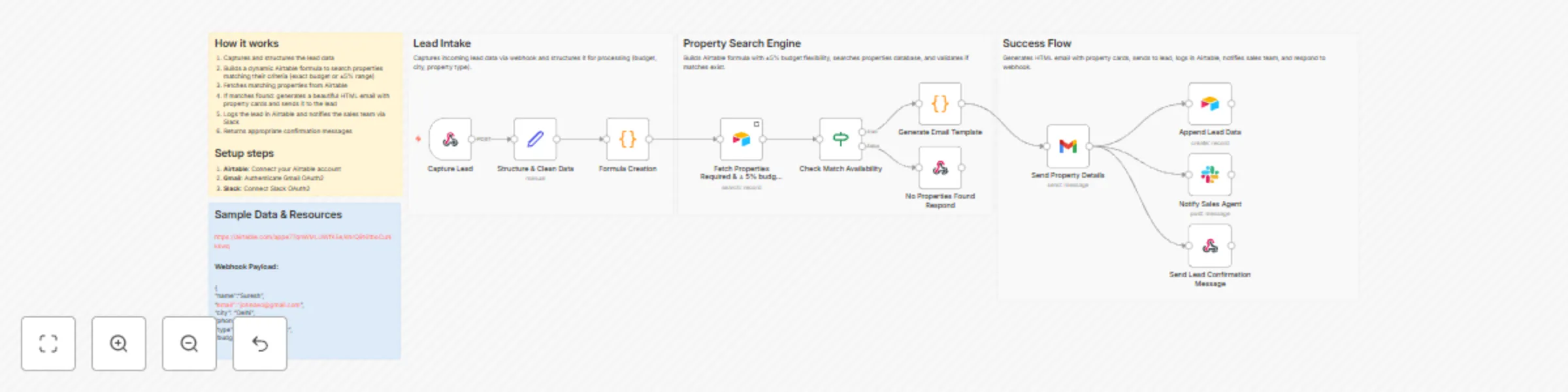
Real estate property matching & lead management with Airtable, Gmail and Slack

Workflow preview

Workflow preview
100%
Real estate property matching & lead management with Airtable, Gmail and Slack preview
Open on n8n.io

Important notice

This workflow is provided as-is. Please review and test before using in production.

1. Workflow Overview

What problem does this workflow solve? Real estate leads move fast. Manually matching buyer requirements with available properties, sending details, updating CRM records, and notifying sales team...

Best for

  • Lead Generation automation workflows
  • advanced n8n builders looking for reusable templates

Tools used

n8n-nodes-base.webhook, n8n-nodes-base.set, n8n-nodes-base.code, n8n-nodes-base.if, n8n-nodes-base.gmail, n8n-nodes-base.airtable, n8n-nodes-base.slack, n8n-nodes-base.respondtowebhook

Source and attribution

This workflow is cataloged by N8N Workflows and links back to its original n8n.io source page by InfyOm Technologies.

Original n8n.io source

1.1 Workflow description

Title
Real estate property matching & lead management with Airtable, Gmail and Slack
Workflow name
Real estate property matching & lead management with Airtable, Gmail and Slack

✅ What problem does this workflow solve?

Real estate leads move fast. Manually matching buyer requirements with available properties, sending details, updating CRM records, and notifying sales teams often causes delays and missed opportunities.

This workflow automates property discovery, lead management, and team notifications, ensuring buyers get instant results and sales teams can follow up immediately.


⚙️ What does this workflow do?

  • Captures buyer property requirements from a website form.
  • Cleans and standardizes search data automatically.
  • Matches buyer criteria with relevant properties from Airtable.
  • Emails matched properties to the buyer instantly.
  • Stores lead details in Airtable for CRM tracking.
  • Notifies the sales team on Slack in real time.

💡 Main Use Cases

  • Automatically match buyer requirements with properties in Airtable.
  • Send personalised property listings to buyers via email.
  • Store and track every lead centrally for sales follow-up.
  • Notify agents instantly to improve response speed.
  • Increase conversions with faster, automated engagement.

🧠 How It Works – Step by Step

1. Website Form Submission

A buyer submits a property inquiry form with:

  • Location / City
  • Property type (Apartment, Villa, Commercial, etc.)
  • Budget
  • Contact details

The workflow is triggered instantly via webhook.


2. Data Cleaning & Standardization

Submitted inputs are cleaned and structured:

  • Budget is normalised
  • City and property type are standardised
  • Data is prepared for property matching

3. Property Matching (Airtable)

  • A dynamic matching formula is generated.
  • Airtable is searched for relevant properties.
  • Matching includes a ±5% budget tolerance for flexibility.

4. Send Matched Properties to Buyer

  • A rich, formatted email is generated automatically.
  • Includes property images, price, location, features, and a “View More Details” link.
  • Email is sent instantly to the buyer.

5. Lead Storage in Airtable

  • Buyer details and preferences are stored in the Buyers table.
  • Lead status is set to New for CRM tracking and follow-up.

6. Sales Team Notification

  • A Slack message is sent to the sales channel with:
    • Buyer details
    • Contact information
    • City and preferred property type
  • Agents can respond immediately to maximize conversion.

🗂 Integrations Used

  • Webhook – Capture property inquiry submissions
  • Airtable – Property database and lead CRM
  • Gmail – Email delivery to buyers
  • Slack – Real-time sales team alerts
  • n8n Code Nodes – Dynamic matching logic and email generation

👤 Who can use this?

This workflow is ideal for:

  • 🏢 Real estate agencies
  • 🏘 Property brokers
  • 📈 Sales-driven real estate teams
  • 🚀 PropTech startups

If your team wants faster lead response and smarter property matching, this automation delivers both.


🚀 Benefits

  • ✅ No manual property searching
  • ✅ Faster response times
  • ✅ Centralised lead tracking
  • ✅ Real-time sales alerts
  • ✅ Better buyer experience

1.2 Logical Blocks

This catalog entry is organized from the workflow JSON. The node-level section below shows the executable blocks available for review before importing the template.

2. Block-by-Block Analysis

Block 1 - Capture Lead

Type / Role
n8n-nodes-base.webhook - webhook
Config choices
Version 2.1

Block 2 - Structure & Clean Data

Type / Role
n8n-nodes-base.set - set
Config choices
Version 3.4

Block 3 - Formula Creation

Type / Role
n8n-nodes-base.code - code
Config choices
Version 2

Block 4 - Check Match Availability

Type / Role
n8n-nodes-base.if - if
Config choices
Version 2.2

Block 5 - Generate Email Template

Type / Role
n8n-nodes-base.code - code
Config choices
Version 2

Block 6 - Send Property Details

Type / Role
n8n-nodes-base.gmail - gmail
Config choices
Version 2.1

Block 7 - Append Lead Data

Type / Role
n8n-nodes-base.airtable - airtable
Config choices
Version 2.1

Block 8 - Notify Sales Agent

Type / Role
n8n-nodes-base.slack - slack
Config choices
Version 2.3

Block 9 - Send Lead Confirmation Message

Type / Role
n8n-nodes-base.respondToWebhook - respondToWebhook
Config choices
Version 1.4

Block 10 - No Properties Found Respond

Type / Role
n8n-nodes-base.respondToWebhook - respondToWebhook
Config choices
Version 1.4

Block 11 - Sticky Note

Type / Role
n8n-nodes-base.stickyNote - stickyNote
Config choices
Version 1

Block 12 - Fetch Properties Required & ± 5% budget range

Type / Role
n8n-nodes-base.airtable - airtable
Config choices
Version 2.1

Block 13 - Workflow Overview

Type / Role
n8n-nodes-base.stickyNote - stickyNote
Config choices
Version 1

Block 14 - Lead Intake Section

Type / Role
n8n-nodes-base.stickyNote - stickyNote
Config choices
Version 1

Block 15 - Property Search Section

Type / Role
n8n-nodes-base.stickyNote - stickyNote
Config choices
Version 1

Block 16 - Success Response Section

Type / Role
n8n-nodes-base.stickyNote - stickyNote
Config choices
Version 1

3. Summary Table

Workflow Real estate property matching & lead management with Airtable, Gmail and Slack
Complexity advanced
Nodes 16
Categories Lead Generation
Author InfyOm Technologies
Published 18 Dec 2025

4. Reproducing the Workflow from Scratch

  1. 1. Download the workflow JSON

    Use the JSON export at /data/workflows/11914/11914.json as the source template for this automation.

  2. 2. Import the template into n8n

    Open n8n, import the downloaded JSON, and review each node before activating the workflow.

  3. 3. Configure credentials and variables

    Replace placeholder credentials, API keys, webhook URLs, account IDs, and environment-specific values with your own settings.

  4. 4. Test with sample data

    Run the workflow manually or in a staging workspace, inspect node output, and confirm downstream systems receive the expected data.

  5. 5. Activate and monitor

    Enable the workflow only after testing, then monitor executions, errors, and rate limits during the first production runs.

5. General Notes & Resources

Review imported nodes carefully before activation. This catalog entry is intended to help you inspect the workflow structure, understand required services, and find related templates faster.

Node names, credentials, schedules, webhook paths, and external service limits may need adjustment for your workspace.

Frequently asked questions

What does Real estate property matching & lead management with Airtable, Gmail and Slack do?

What problem does this workflow solve? Real estate leads move fast. Manually matching buyer requirements with available properties, sending details, updating CRM records, and notifying sales team...

What do I need before importing this workflow?

Review the workflow JSON, configure any required credentials in n8n, and test the automation in a safe workspace before using it in production.

Can I customize this workflow?

Yes. Use the block-by-block analysis and the downloadable JSON to inspect each node, then adjust credentials, prompts, schedules, filters, or destinations for your Lead Generation use case.