Qualify & verify leads with Google Gemini and sync to HubSpot from Jotform

Workflow preview

Workflow preview
100%
Qualify & verify leads with Google Gemini and sync to HubSpot from Jotform preview
Open on n8n.io

Important notice

This workflow is provided as-is. Please review and test before using in production.

1. Workflow Overview

AI Enhanced Lead Qualification & HubSpot Synchronization (Jotform to HubSpot) Stop wasting time on bad leads and manual research. This advanced n8n workflow automates your entire lead qualifica...

Best for

  • Lead Generation automation workflows
  • AI Chatbot automation workflows
  • advanced n8n builders looking for reusable templates

Tools used

n8n-nodes-base.stickynote, n8n-nodes-base.hubspot, n8n-nodes-base.jotformtrigger, n8n-nodes-base.gmail, n8n-nodes-base.httprequest, @n8n/n8n-nodes-langchain.informationextractor, @n8n/n8n-nodes-langchain.lmchatgooglegemini, @n8n/n8n-nodes-langchain.googlegemini

Source and attribution

This workflow is cataloged by N8N Workflows and links back to its original n8n.io source page by Zain Khan.

Original n8n.io source

1.1 Workflow description

Title
Qualify & verify leads with Google Gemini and sync to HubSpot from Jotform
Workflow name
Qualify & verify leads with Google Gemini and sync to HubSpot from Jotform

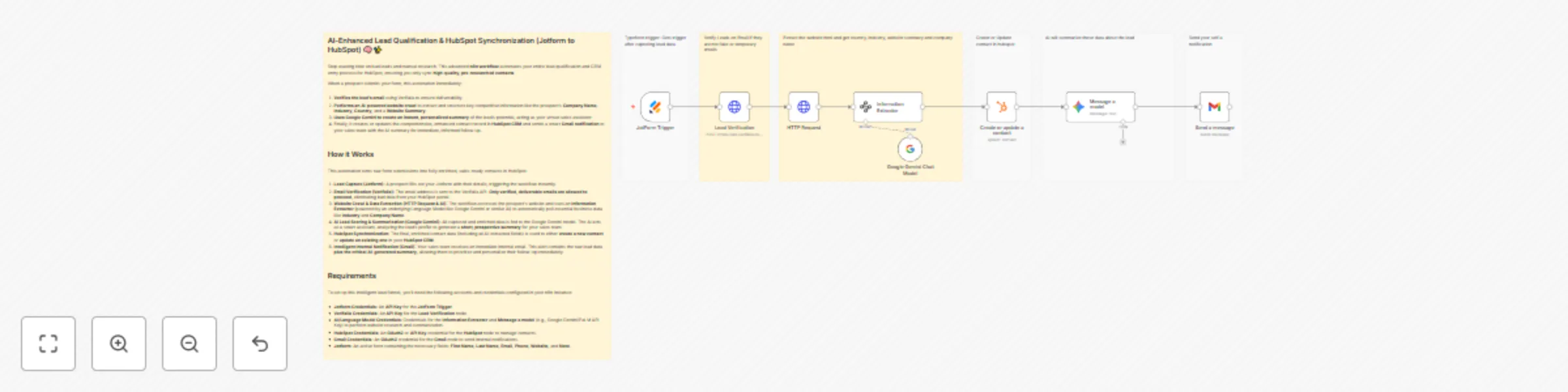
AI-Enhanced Lead Qualification & HubSpot Synchronization (Jotform to HubSpot) 🧠✨

Stop wasting time on bad leads and manual research. This advanced n8n workflow automates your entire lead qualification and CRM entry process for HubSpot, ensuring you only sync high-quality, pre-researched contacts.

When a prospect submits your form, this automation immediately:

  1. Verifies the lead's email using Verifalia to ensure deliverability.
  2. Performs an AI-powered website crawl to extract and structure key competitive information like the prospect's Company Name, Industry, Country, and a Website Summary.
  3. Uses Google Gemini to create an instant, personalized summary of the lead's potential, acting as your virtual sales assistant.
  4. Finally, it creates or updates the comprehensive, enhanced contact record in HubSpot CRM and sends a smart Gmail notification to your sales team with the AI summary for immediate, informed follow-up.

How it Works

This automation turns raw form submissions into fully enriched, sales-ready contacts in HubSpot:

  1. Lead Capture (Jotform): A prospect fills out your Jotform with their details, triggering the workflow instantly.
  2. Email Verification (Verifalia): The email address is sent to the Verifalia API. Only verified, deliverable emails are allowed to proceed, eliminating bad data from your HubSpot portal.
  3. Website Crawl & Data Extraction (HTTP Request & AI): The workflow accesses the prospect's website and uses an Information Extractor (powered by an underlying Language Model like Google Gemini or similar AI) to automatically pull essential business data like Industry and Company Name.
  4. AI Lead Scoring & Summarization (Google Gemini): All captured and enriched data is fed to the Google Gemini model. The AI acts as a smart assistant, analyzing the lead's profile to generate a short, prospective summary for your sales team.
  5. HubSpot Synchronization: The final, enriched contact data (including all AI-extracted fields) is used to either create a new contact or update an existing one in your HubSpot CRM.
  6. Intelligent Internal Notification (Gmail): Your sales team receives an immediate internal email. This alert contains the raw lead data plus the critical AI-generated summary, allowing them to prioritize and personalize their follow-up immediately.

Requirements

To set up this intelligent lead funnel, you'll need the following accounts and credentials configured in your n8n instance:

  • Jotform Credentials: An API Key for the JotForm Trigger. Sign up for Jotform here: https://www.jotform.com/?partner=zainurrehman
  • Verifalia Credentials: An API Key for the Lead Verification node.
  • AI/Language Model Credentials: Credentials for the Information Extractor and Message a model (e.g., Google Gemini/PaLM API Key) to perform website research and summarization.
  • HubSpot Credentials: An OAuth2 or API Key credential for the HubSpot node to manage contacts.
  • Gmail Credentials: An OAuth2 credential for the Gmail node to send internal notifications.
  • Jotform: An active form containing the necessary fields: First Name, Last Name, Email, Phone, Website, and Note.

1.2 Logical Blocks

This catalog entry is organized from the workflow JSON. The node-level section below shows the executable blocks available for review before importing the template.

2. Block-by-Block Analysis

Block 1 - Sticky Note

Type / Role
n8n-nodes-base.stickyNote - stickyNote
Config choices
Version 1

Block 2 - Sticky Note1

Type / Role
n8n-nodes-base.stickyNote - stickyNote
Config choices
Version 1

Block 3 - Sticky Note6

Type / Role
n8n-nodes-base.stickyNote - stickyNote
Config choices
Version 1

Block 4 - Create or update a contact

Type / Role
n8n-nodes-base.hubspot - hubspot
Config choices
Version 2.1

Block 5 - JotForm Trigger

Type / Role
n8n-nodes-base.jotFormTrigger - jotFormTrigger
Config choices
Version 1

Block 6 - Send a message

Type / Role
n8n-nodes-base.gmail - gmail
Config choices
Version 2.1

Block 7 - Lead Verification

Type / Role
n8n-nodes-base.httpRequest - httpRequest
Config choices
Version 4.2

Block 8 - Sticky Note4

Type / Role
n8n-nodes-base.stickyNote - stickyNote
Config choices
Version 1

Block 9 - HTTP Request

Type / Role
n8n-nodes-base.httpRequest - httpRequest
Config choices
Version 4.2

Block 10 - Information Extractor

Type / Role
@n8n/n8n-nodes-langchain.informationExtractor - informationExtractor
Config choices
Version 1.2

Block 11 - Sticky Note2

Type / Role
n8n-nodes-base.stickyNote - stickyNote
Config choices
Version 1

Block 12 - Google Gemini Chat Model

Type / Role
@n8n/n8n-nodes-langchain.lmChatGoogleGemini - lmChatGoogleGemini
Config choices
Version 1

Block 13 - Sticky Note5

Type / Role
n8n-nodes-base.stickyNote - stickyNote
Config choices
Version 1

Block 14 - Message a model

Type / Role
@n8n/n8n-nodes-langchain.googleGemini - googleGemini
Config choices
Version 1

Block 15 - Sticky Note3

Type / Role
n8n-nodes-base.stickyNote - stickyNote
Config choices
Version 1

3. Summary Table

Workflow Qualify & verify leads with Google Gemini and sync to HubSpot from Jotform
Complexity advanced
Nodes 15
Categories Lead Generation, AI Chatbot
Author Zain Khan
Published 15 Oct 2025

4. Reproducing the Workflow from Scratch

  1. 1. Download the workflow JSON

    Use the JSON export at /data/workflows/9732/9732.json as the source template for this automation.

  2. 2. Import the template into n8n

    Open n8n, import the downloaded JSON, and review each node before activating the workflow.

  3. 3. Configure credentials and variables

    Replace placeholder credentials, API keys, webhook URLs, account IDs, and environment-specific values with your own settings.

  4. 4. Test with sample data

    Run the workflow manually or in a staging workspace, inspect node output, and confirm downstream systems receive the expected data.

  5. 5. Activate and monitor

    Enable the workflow only after testing, then monitor executions, errors, and rate limits during the first production runs.

5. General Notes & Resources

Review imported nodes carefully before activation. This catalog entry is intended to help you inspect the workflow structure, understand required services, and find related templates faster.

Node names, credentials, schedules, webhook paths, and external service limits may need adjustment for your workspace.

Frequently asked questions

What does Qualify & verify leads with Google Gemini and sync to HubSpot from Jotform do?

AI Enhanced Lead Qualification & HubSpot Synchronization (Jotform to HubSpot) Stop wasting time on bad leads and manual research. This advanced n8n workflow automates your entire lead qualifica...

What do I need before importing this workflow?

Review the workflow JSON, configure any required credentials in n8n, and test the automation in a safe workspace before using it in production.

Can I customize this workflow?

Yes. Use the block-by-block analysis and the downloadable JSON to inspect each node, then adjust credentials, prompts, schedules, filters, or destinations for your Lead Generation, AI Chatbot use case.