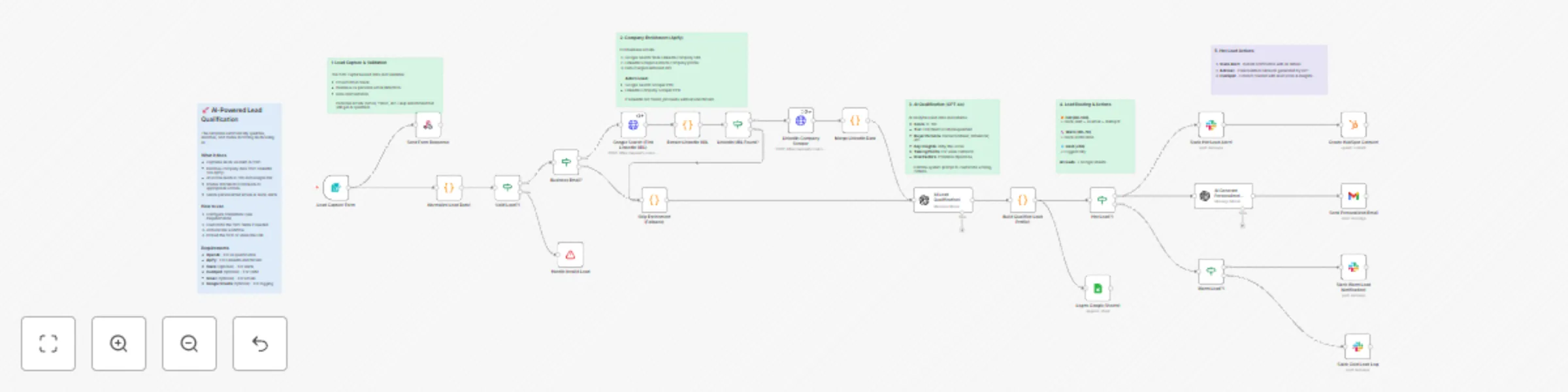
Qualify & enrich leads with GPT-4 and LinkedIn data for intelligent routing

Workflow preview

Workflow preview
100%
Qualify & enrich leads with GPT-4 and LinkedIn data for intelligent routing preview
Open on n8n.io

Important notice

This workflow is provided as-is. Please review and test before using in production.

1. Workflow Overview

AI Powered Lead Qualification & Enrichment Pipeline Who is this for? This template is perfect for: Marketing Teams looking to automatically qualify inbound leads from campaigns Sales Teams wanti...

Best for

  • Lead Generation automation workflows
  • AI Summarization automation workflows
  • advanced n8n builders looking for reusable templates

Tools used

n8n-nodes-base.formtrigger, n8n-nodes-base.respondtowebhook, n8n-nodes-base.if, n8n-nodes-base.code, n8n-nodes-base.slack, @n8n/n8n-nodes-langchain.openai, n8n-nodes-base.hubspot, n8n-nodes-base.googlesheets

Source and attribution

This workflow is cataloged by N8N Workflows and links back to its original n8n.io source page by AK Pasnoor.

Original n8n.io source

1.1 Workflow description

Title
Qualify & enrich leads with GPT-4 and LinkedIn data for intelligent routing
Workflow name
Qualify & enrich leads with GPT-4 and LinkedIn data for intelligent routing

AI-Powered Lead Qualification & Enrichment Pipeline

🎯 Who is this for?

This template is perfect for:

  • Marketing Teams looking to automatically qualify inbound leads from campaigns
  • Sales Teams wanting to prioritize high-value prospects instantly
  • Agencies offering lead qualification as a service to clients
  • SaaS Companies routing trial signups to appropriate nurture sequences
  • B2B Service Providers scoring and enriching leads from multiple sources

💡 What problem does it solve?

Manual lead qualification is slow, inconsistent, and expensive. Sales teams waste hours on unqualified leads while hot prospects go cold. This workflow:

  • Eliminates manual research - Automatically enriches company data via LinkedIn
  • Scores leads instantly - AI analyzes 15+ data points to score 0-100
  • Routes intelligently - Hot leads get instant alerts, warm leads enter nurture
  • Personalizes outreach - AI generates custom emails based on company context

⚡ What this workflow does

1. Lead Capture & Validation

  • Captures leads via built-in n8n Form (embeddable on any website)
  • Validates email format and detects business vs personal emails
  • Normalizes data from various field naming conventions

2. Company Enrichment via Apify

  • Uses Google Search to find company's LinkedIn profile
  • Scrapes LinkedIn for industry, size, description, specialties, and more
  • Gracefully skips enrichment for personal emails (Gmail, Yahoo, etc.)

3. AI Lead Qualification (GPT-4.1)

  • Scores leads 0-100 based on buying signals
  • Assigns tier: Hot (80+), Warm (60-79), Cold (40-59), Disqualified (<40)
  • Identifies buyer persona (Decision Maker, Influencer, Champion, etc.)
  • Generates personalized talking points and risk factors

4. Intelligent Routing & Actions

  • Hot Leads: Instant Slack alert + AI-generated personalized email + HubSpot contact
  • Warm Leads: Slack notification for nurture sequence
  • Cold Leads: Logged for future reference
  • All Leads: Recorded to Google Sheets with full qualification data

🔧 Setup

Required Credentials

Service Purpose
OpenAI AI qualification & email generation
Apify Google Search + LinkedIn scraping

Optional Credentials

Service Purpose
Slack Lead alerts and notifications
HubSpot CRM contact creation
Gmail Sending personalized emails
Google Sheets Lead database logging

Apify Setup

  1. Create account at apify.com
  2. Get API token from Settings → Integrations
  3. Open the Apify HTTP nodes and replace YOUR_API_KEY with the API token obtained in the above step

Apify Actors Used

  • Google Search Scraper PPR (Actor ID: G9PR1B1upfS0mRvp0) - ~$0.004/search
  • LinkedIn Company Scraper PPR (Actor ID: G9y3V8J1hXYJTf1Ho) - ~$0.02/company

Total cost: ~$0.02-0.03 per enriched lead

📊 Lead Scoring Criteria

Score Tier What it means
80-100 🔥 Hot Strong buying signals, budget confirmed, urgent timeline
60-79 🌡️ Warm Good fit, some buying signals, needs nurturing
40-59 ❄️ Cold Potential fit but unclear intent
0-39 ⛔ Disqualified Poor fit, spam, or invalid

🎨 Customization

Modify Form Fields

Edit the "Lead Capture Form" node to add/remove fields for your use case.

Adjust AI Scoring

Edit the system prompt in "AI Lead Qualification" to customize:

  • Score thresholds for your industry
  • Buyer persona definitions
  • Custom qualification criteria

Add Integrations

Easily extend with:

  • Pipedrive, Salesforce, or other CRMs
  • Email sequences (Mailchimp, ActiveCampaign)
  • SMS notifications (Twilio)
  • Calendar booking (Calendly)

📈 Example Output

{
  "qualification": {
    "score": 85,
    "tier": "Hot",
    "buyerPersona": "Decision Maker",
    "urgencyLevel": "High"
  },
  "insights": {
    "keyInsights": [
      "VP-level with direct budget authority",
      "Company in growth phase (51-200 employees)",
      "Industry aligned with our ICP"
    ],
    "talkingPoints": [
      "Reference their sustainability focus",
      "Highlight ROI for mid-market companies"
    ]
  }
}

🙋 Need Help?

  • Check the sticky notes in the workflow for section-by-section guidance
  • Ensure Apify credentials are properly configured
  • Test with a business email (not Gmail/Yahoo) to see full enrichment

Created by Agentical AI - AI Automation Agency specializing in workflow automation and AI solutions.

1.2 Logical Blocks

This catalog entry is organized from the workflow JSON. The node-level section below shows the executable blocks available for review before importing the template.

2. Block-by-Block Analysis

Block 1 - Lead Capture Form

Type / Role
n8n-nodes-base.formTrigger - formTrigger
Config choices
Version 2.1

Block 2 - Send Form Response

Type / Role
n8n-nodes-base.respondToWebhook - respondToWebhook
Config choices
Version 1.1

Block 3 - Business Email?

Type / Role
n8n-nodes-base.if - if
Config choices
Version 2

Block 4 - Extract LinkedIn URL

Type / Role
n8n-nodes-base.code - code
Config choices
Version 2

Block 5 - LinkedIn URL Found?

Type / Role
n8n-nodes-base.if - if
Config choices
Version 2

Block 6 - Merge LinkedIn Data

Type / Role
n8n-nodes-base.code - code
Config choices
Version 2

Block 7 - Skip Enrichment (Fallback)

Type / Role
n8n-nodes-base.code - code
Config choices
Version 2

Block 8 - Slack Cold Lead Log

Type / Role
n8n-nodes-base.slack - slack
Config choices
Version 2.1

Block 9 - Normalize Lead Data1

Type / Role
n8n-nodes-base.code - code
Config choices
Version 2

Block 10 - Valid Lead?1

Type / Role
n8n-nodes-base.if - if
Config choices
Version 2

Block 11 - AI Lead Qualification1

Type / Role
@n8n/n8n-nodes-langchain.openAi - openAi
Config choices
Version 1.4

Block 12 - Build Qualified Lead Profile1

Type / Role
n8n-nodes-base.code - code
Config choices
Version 2

Block 13 - Hot Lead?1

Type / Role
n8n-nodes-base.if - if
Config choices
Version 2

Block 14 - Slack Hot Lead Alert1

Type / Role
n8n-nodes-base.slack - slack
Config choices
Version 2.1

Block 15 - Warm Lead?1

Type / Role
n8n-nodes-base.if - if
Config choices
Version 2

Block 16 - AI Generate Personalized Email1

Type / Role
@n8n/n8n-nodes-langchain.openAi - openAi
Config choices
Version 1.4

Block 17 - Create HubSpot Contact1

Type / Role
n8n-nodes-base.hubspot - hubspot
Config choices
Version 2

Block 18 - Slack Warm Lead Notification1

Type / Role
n8n-nodes-base.slack - slack
Config choices
Version 2.1

Block 19 - Log to Google Sheets1

Type / Role
n8n-nodes-base.googleSheets - googleSheets
Config choices
Version 4.4

Block 20 - Google Search (Find LinkedIn URL)

Type / Role
n8n-nodes-base.httpRequest - httpRequest
Config choices
Version 4.2

Block 21 - LinkedIn Company Scraper

Type / Role
n8n-nodes-base.httpRequest - httpRequest
Config choices
Version 4.2

Block 22 - Send Personalized Email

Type / Role
n8n-nodes-base.gmail - gmail
Config choices
Version 2.1

Block 23 - Handle Invalid Lead

Type / Role
n8n-nodes-base.stopAndError - stopAndError
Config choices
Version 1

Block 24 - Sticky Note

Type / Role
n8n-nodes-base.stickyNote - stickyNote
Config choices
Version 1

Showing the first 24 of 29 workflow blocks. Download the JSON for the full node graph.

3. Summary Table

Workflow Qualify & enrich leads with GPT-4 and LinkedIn data for intelligent routing
Complexity advanced
Nodes 29
Categories Lead Generation, AI Summarization
Author AK Pasnoor
Published 04 Dec 2025

4. Reproducing the Workflow from Scratch

  1. 1. Download the workflow JSON

    Use the JSON export at /data/workflows/11493/11493.json as the source template for this automation.

  2. 2. Import the template into n8n

    Open n8n, import the downloaded JSON, and review each node before activating the workflow.

  3. 3. Configure credentials and variables

    Replace placeholder credentials, API keys, webhook URLs, account IDs, and environment-specific values with your own settings.

  4. 4. Test with sample data

    Run the workflow manually or in a staging workspace, inspect node output, and confirm downstream systems receive the expected data.

  5. 5. Activate and monitor

    Enable the workflow only after testing, then monitor executions, errors, and rate limits during the first production runs.

5. General Notes & Resources

Review imported nodes carefully before activation. This catalog entry is intended to help you inspect the workflow structure, understand required services, and find related templates faster.

Node names, credentials, schedules, webhook paths, and external service limits may need adjustment for your workspace.

Frequently asked questions

What does Qualify & enrich leads with GPT-4 and LinkedIn data for intelligent routing do?

AI Powered Lead Qualification & Enrichment Pipeline Who is this for? This template is perfect for: Marketing Teams looking to automatically qualify inbound leads from campaigns Sales Teams wanti...

What do I need before importing this workflow?

Review the workflow JSON, configure any required credentials in n8n, and test the automation in a safe workspace before using it in production.

Can I customize this workflow?

Yes. Use the block-by-block analysis and the downloadable JSON to inspect each node, then adjust credentials, prompts, schedules, filters, or destinations for your Lead Generation, AI Summarization use case.