A

AK Pasnoor

3
Workflows

Workflows by AK Pasnoor
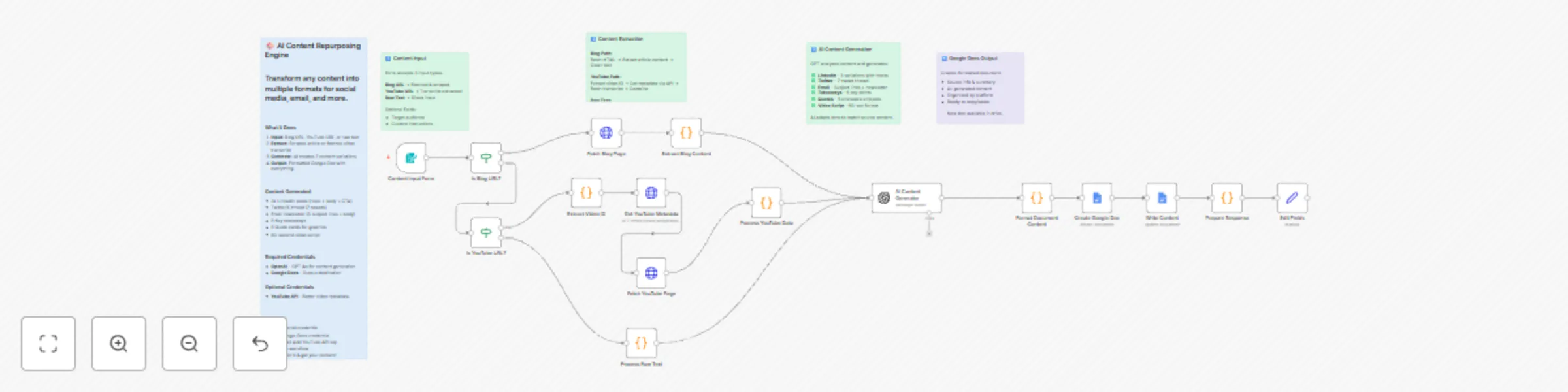
Workflow preview: Repurpose blog & YouTube content to social media with GPT-5.1 and Google Docs
Free advanced

Repurpose blog & YouTube content to social media with GPT-5.1 and Google Docs

Transform blog posts, YouTube videos, or any text into LinkedIn posts, Twitter threads, email newsletters, and more with GPT-5.1 ### Who is this for? - **Content creators** who want to maximize reach from every piece of content - **Marketing teams** repurposing long-form content for social media - **Founders & executives** sharing thought leadership across platforms - **Agencies** creating multi-platform content packages for clients - **Solopreneurs** who need to be everywhere but have limited time ### What problem does it solve? Creating platform-specific content is time-consuming. A single blog post could become LinkedIn posts, Twitter threads, email newsletters, and video scripts-but manually adapting content for each platform takes hours. This workflow automates the entire process. Drop in a URL or paste your content, and get 7+ ready-to-use content pieces in under 2 minutes. ### What this workflow does **Step 1: Content Input** - Submit via simple web form - Accepts blog URLs, YouTube URLs, or raw text - Optional: specify target audience and custom instructions **Step 2: Smart Extraction** - **Blog posts:** Fetches and extracts article content, removes navigation/ads - **YouTube videos:** Gets video metadata and description via YouTube API - **Raw text:** Processes directly with automatic title detection **Step 3: AI Content Generation** GPT-4.1/5.1 analyzes your content and generates platform-optimized variations: | Output | What You Get | |--------|-------------| | **LinkedIn Posts** | 3 variations (story-driven, list format, contrarian angle) | | **Twitter/X Thread** | 7-tweet thread + alternative hook for A/B testing | | **Email Newsletter** | 3 subject lines + preview text + full body | | **Key Takeaways** | 5 actionable bullet points | | **Quote Cards** | 5 shareable quotes ready for graphics | | **Video Script** | 60-second script (hook → problem → solution → CTA) | **Step 4: Google Docs Output** - Everything saved to a beautifully formatted Google Doc - Organized by platform - Copy, customize, and publish! ### Outputs Generated **LinkedIn Posts (3 variations):** - Story-driven emotional hook - List/tips format for engagement - Contrarian/hot take angle - Each includes: hook, body, CTA, hashtags **Twitter/X Thread (7 tweets):** - Scroll-stopping hook - Logical flow through your key points - Clear CTA at the end - Alternative hook for A/B testing **Email Newsletter:** - 3 subject line options (curiosity, benefit, direct) - Preview text - Conversational body copy - Clear CTA **Key Takeaways:** - 5 actionable insights - Perfect for bullet points, carousels, or summaries **Quote Cards:** - 5 impactful, shareable quotes - Context included for each - Ready for Canva/social graphics **Video Script:** - 60-second format - Hook → Problem → Solution → Proof → CTA structure - Visual suggestions included ### Setup Instructions #### Required Credentials **1. OpenAI API** - Get your API key from [platform.openai.com](https://platform.openai.com) - Add as "OpenAI API" credential in n8n - Used for: Content generation (GPT-4o) **2. Google Docs** - Create OAuth2 credentials in Google Cloud Console - Enable Google Docs API - Add as "Google Docs OAuth2" credential in n8n - Used for: Saving generated content #### Optional Credentials **3. YouTube OAuth2 (use same clientId and secret as above)** - Enable YouTube Data API v3 - Add a new "YouTube OAuth2 API" credential: - Client ID and Secret, same as above - Used for: Better video metadata extraction ### How to Use 1. **Import the workflow** into your n8n instance 2. **Configure credentials** (OpenAI required, Google Docs required, YouTube optional) 3. **Activate the workflow** 4. **Open the form URL** (shown in Form Trigger node) 5. **Submit your content:** - Select content type (Blog URL, YouTube URL, or Raw Text) - Paste URL or content - (Optional) Add target audience - (Optional) Add custom instructions 6. **Get your Google Doc link** with all generated content! ### Customization Options **Modify the AI prompt:** - Edit "AI Content Generator" node - Adjust tone guidelines - Add industry-specific instructions - Change output formats **Change output destination:** - Replace Google Docs with Notion, Airtable, or other platforms - Add Slack notification with summary - Email the doc link **Add more platforms:** - Instagram captions - Pinterest descriptions - Podcast show notes ### Example Use Case **Input:** - Blog post URL: `https://example.com/10-tips-for-startup-founders` - Target audience: "First-time startup founders" - Instructions: "Focus on practical, actionable advice" **Output (in ~90 seconds):** - 3 LinkedIn posts with founder-focused hooks - 7-tweet thread breaking down the top tips - Email newsletter to subscribers - 5 quotable insights for graphics - 60-second video script for TikTok/Reels ### Estimated Costs | Service | Cost | |---------|------| | OpenAI (GPT-5.1) | ~$0.01-0.03 per generation | | YouTube API | Free (10,000 queries/day) | | Google Docs API | Free | **Total per use:** ~$0.02-0.04 ### Tips for Best Results 1. **Longer content = better output** - Articles with 1000+ words generate richer variations 2. **YouTube videos need captions** - Videos without captions may have limited output 3. **Specify your audience** - Adding target audience improves relevance significantly 4. **Use custom instructions** - Guide the AI toward your preferred tone and focus ### Support Questions or need customization? Contact [Agentical AI](https://agenticalai.com) ---

A
AK Pasnoor
Content Creation
8 Dec 2025
121
0
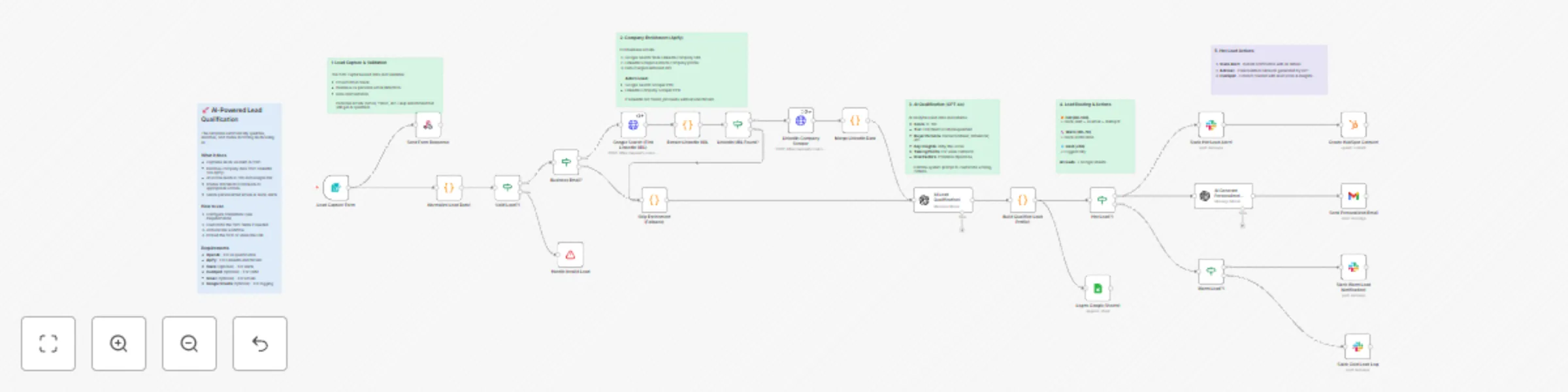
Workflow preview: Qualify & enrich leads with GPT-4 and LinkedIn data for intelligent routing
Free advanced

Qualify & enrich leads with GPT-4 and LinkedIn data for intelligent routing

# AI-Powered Lead Qualification & Enrichment Pipeline ## 🎯 Who is this for? This template is perfect for: - **Marketing Teams** looking to automatically qualify inbound leads from campaigns - **Sales Teams** wanting to prioritize high-value prospects instantly - **Agencies** offering lead qualification as a service to clients - **SaaS Companies** routing trial signups to appropriate nurture sequences - **B2B Service Providers** scoring and enriching leads from multiple sources ## 💡 What problem does it solve? Manual lead qualification is slow, inconsistent, and expensive. Sales teams waste hours on unqualified leads while hot prospects go cold. This workflow: - **Eliminates manual research** - Automatically enriches company data via LinkedIn - **Scores leads instantly** - AI analyzes 15+ data points to score 0-100 - **Routes intelligently** - Hot leads get instant alerts, warm leads enter nurture - **Personalizes outreach** - AI generates custom emails based on company context ## ⚡ What this workflow does ### 1. Lead Capture & Validation - Captures leads via built-in n8n Form (embeddable on any website) - Validates email format and detects business vs personal emails - Normalizes data from various field naming conventions ### 2. Company Enrichment via Apify - Uses Google Search to find company's LinkedIn profile - Scrapes LinkedIn for industry, size, description, specialties, and more - Gracefully skips enrichment for personal emails (Gmail, Yahoo, etc.) ### 3. AI Lead Qualification (GPT-4.1) - Scores leads 0-100 based on buying signals - Assigns tier: Hot (80+), Warm (60-79), Cold (40-59), Disqualified (<40) - Identifies buyer persona (Decision Maker, Influencer, Champion, etc.) - Generates personalized talking points and risk factors ### 4. Intelligent Routing & Actions - **Hot Leads**: Instant Slack alert + AI-generated personalized email + HubSpot contact - **Warm Leads**: Slack notification for nurture sequence - **Cold Leads**: Logged for future reference - **All Leads**: Recorded to Google Sheets with full qualification data ## 🔧 Setup ### Required Credentials | Service | Purpose | |---------|---------| | OpenAI | AI qualification & email generation | | Apify | Google Search + LinkedIn scraping | ### Optional Credentials | Service | Purpose | |---------|---------| | Slack | Lead alerts and notifications | | HubSpot | CRM contact creation | | Gmail | Sending personalized emails | | Google Sheets | Lead database logging | ### Apify Setup 1. Create account at [apify.com](https://apify.com) 2. Get API token from Settings → Integrations 3. Open the Apify HTTP nodes and replace YOUR_API_KEY with the API token obtained in the above step ### Apify Actors Used - **Google Search Scraper PPR** (Actor ID: `G9PR1B1upfS0mRvp0`) - ~$0.004/search - **LinkedIn Company Scraper PPR** (Actor ID: `G9y3V8J1hXYJTf1Ho`) - ~$0.02/company **Total cost**: ~$0.02-0.03 per enriched lead ## 📊 Lead Scoring Criteria | Score | Tier | What it means | |-------|------|---------------| | 80-100 | 🔥 Hot | Strong buying signals, budget confirmed, urgent timeline | | 60-79 | 🌡️ Warm | Good fit, some buying signals, needs nurturing | | 40-59 | ❄️ Cold | Potential fit but unclear intent | | 0-39 | ⛔ Disqualified | Poor fit, spam, or invalid | ## 🎨 Customization ### Modify Form Fields Edit the "Lead Capture Form" node to add/remove fields for your use case. ### Adjust AI Scoring Edit the system prompt in "AI Lead Qualification" to customize: - Score thresholds for your industry - Buyer persona definitions - Custom qualification criteria ### Add Integrations Easily extend with: - Pipedrive, Salesforce, or other CRMs - Email sequences (Mailchimp, ActiveCampaign) - SMS notifications (Twilio) - Calendar booking (Calendly) ## 📈 Example Output ```json { "qualification": { "score": 85, "tier": "Hot", "buyerPersona": "Decision Maker", "urgencyLevel": "High" }, "insights": { "keyInsights": [ "VP-level with direct budget authority", "Company in growth phase (51-200 employees)", "Industry aligned with our ICP" ], "talkingPoints": [ "Reference their sustainability focus", "Highlight ROI for mid-market companies" ] } } ``` ## 🙋 Need Help? - Check the sticky notes in the workflow for section-by-section guidance - Ensure Apify credentials are properly configured - Test with a business email (not Gmail/Yahoo) to see full enrichment --- **Created by [Agentical AI](https://agenticalai.com)** - AI Automation Agency specializing in workflow automation and AI solutions.

A
AK Pasnoor
Lead Generation
4 Dec 2025
102
0
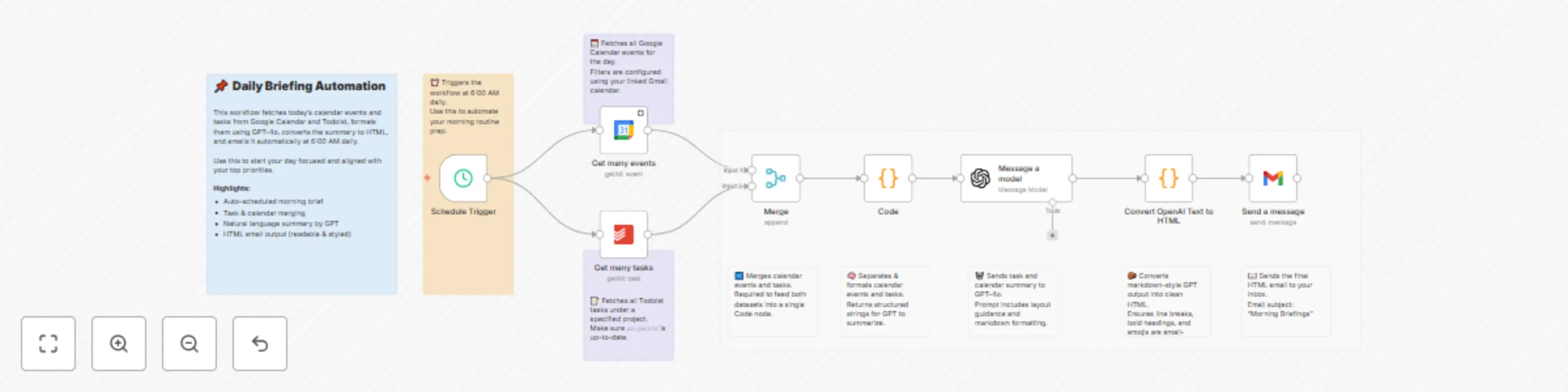
Workflow preview: Automated daily briefing with Todoist, Google Calendar & GPT-4o via Gmail
Free advanced

Automated daily briefing with Todoist, Google Calendar & GPT-4o via Gmail

Put your productivity on autopilot with this workflow. ## How it works This workflow generates a beautifully formatted **daily briefing email** every morning at 6:00 AM by combining your **Todoist tasks** and **Google Calendar events**, summarizing them using **GPT-4o**, and sending them as a clean **HTML email**. It includes: - Auto-fetching today's tasks and events - Formatting them for context - Generating a motivational summary with GPT-4o - Converting the output into styled HTML - Emailing it to you daily --- ## Set up steps 1. Connect your **Google Calendar** and **Todoist** accounts 2. Set your **project ID** in the Todoist node 3. Customize the OpenAI prompt or email template if needed 4. Enable the **Schedule Trigger** to automate daily runs All configuration logic and summaries are explained in **sticky notes** inside the workflow. No external tools required. Just plug, personalize, and automate your day!

A
AK Pasnoor
Personal Productivity
18 Jul 2025
1764
0