Provision new employee accounts to Google Workspace, Slack, Jira, and Salesforce

Workflow preview

Workflow preview
100%
Provision new employee accounts to Google Workspace, Slack, Jira, and Salesforce preview
Open on n8n.io

Important notice

This workflow is provided as-is. Please review and test before using in production.

1. Workflow Overview

Provision new employee accounts to Google Workspace, Slack, Jira, and Salesforce This workflow streamlines the employee onboarding process by automatically provisioning user accounts across your or...

Best for

  • HR automation workflows
  • intermediate n8n builders looking for reusable templates

Tools used

n8n-nodes-base.webhook, n8n-nodes-base.set, n8n-nodes-base.gsuiteadmin, n8n-nodes-base.slack, n8n-nodes-base.switch, n8n-nodes-base.jira, n8n-nodes-base.salesforce, n8n-nodes-base.merge

Source and attribution

This workflow is cataloged by N8N Workflows and links back to its original n8n.io source page by yuta tokumitsu.

Original n8n.io source

1.1 Workflow description

Title
Provision new employee accounts to Google Workspace, Slack, Jira, and Salesforce
Workflow name
Provision new employee accounts to Google Workspace, Slack, Jira, and Salesforce

Provision new employee accounts to Google Workspace, Slack, Jira, and Salesforce

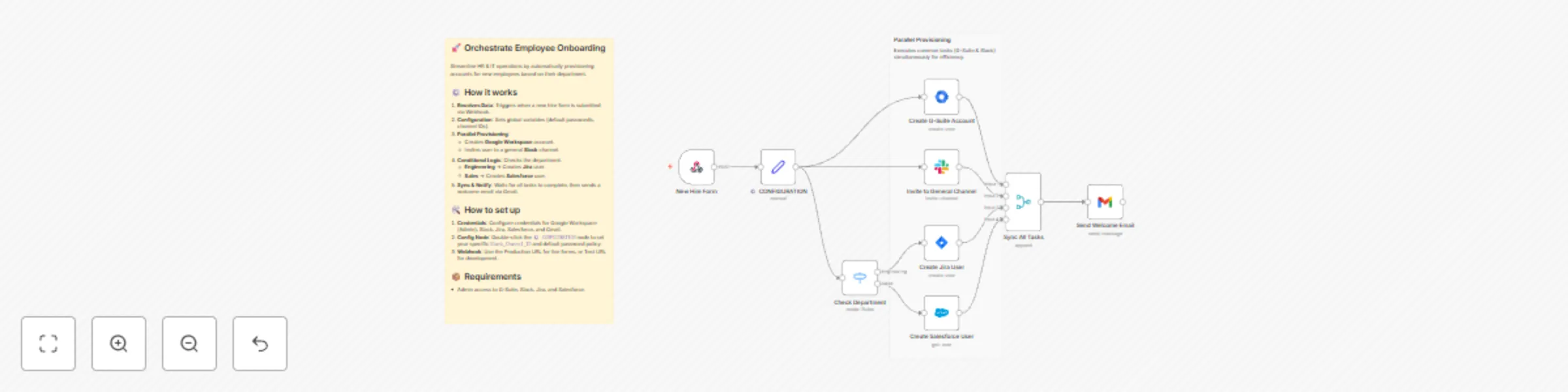
This workflow streamlines the employee onboarding process by automatically provisioning user accounts across your organization's tech stack. By connecting HR input to IT operations, it eliminates manual data entry, reduces errors, and ensures new hires have access to the right tools from day one.

Depending on the employee's department, the workflow intelligently routes the provisioning process to create specific accounts (e.g., Jira for Engineering, Salesforce for Sales) alongside standard company-wide access.

Who is it for

  • IT Administrators looking to automate identity management and access provisioning.
  • HR Operations Managers who want to speed up the onboarding handover process.
  • Startup Founders needing a scalable way to manage new hire accounts without expensive SaaS management tools.

How it works

  1. Data Intake: The workflow is triggered by a Webhook (connected to a form like Typeform, Google Forms, or BambooHR) containing the new hire's details.
  2. Configuration: A central "Set" node establishes global variables, such as the default temporary password, welcome email subject, and the main Slack channel ID.
  3. Core Provisioning: It simultaneously creates a Google Workspace account and invites the user to a general Slack channel.
  4. Department Routing: A generic logic switch checks the department field:
    • If Engineering: It creates a Jira user.
    • If Sales: It creates a Salesforce user.
  5. Notification: Once all accounts are successfully provisioned, the workflow uses a generic email service (Gmail node) to send a welcome email to the new employee with their login details.

How to set up

  1. Credentials: You will need to configure credentials for the following nodes: Google Workspace Admin, Slack API, Jira Software, Salesforce, and Gmail (or your preferred email provider).
  2. Configuration: Open the node named ⚙️ CONFIGURATION. Update the Slack_Channel_ID (where new users are invited) and the Default_Password to match your company's security policy.
  3. Webhook: Copy the Webhook URL from the start node and add it to your HR form or applicant tracking system.

Requirements

  • n8n: Version 1.0 or later recommended.
  • Access: Admin privileges for Google Workspace, Slack, Jira, and Salesforce to generate the necessary API keys/tokens.

How to customize the workflow

  • Add Departments: Edit the "Check Department" Switch node to add routes for Marketing, Finance, etc., and connect them to relevant apps (e.g., HubSpot, Xero).
  • Change Notification: Swap the Gmail node for Microsoft Outlook or Slack DM depending on how you notify managers.
  • Enhance Security: Add a step to force a password reset on the first login if the identity provider supports it.

1.2 Logical Blocks

This catalog entry is organized from the workflow JSON. The node-level section below shows the executable blocks available for review before importing the template.

2. Block-by-Block Analysis

Block 1 - New Hire Form

Type / Role
n8n-nodes-base.webhook - webhook
Config choices
Version 2.1

Block 2 - ⚙️ CONFIGURATION

Type / Role
n8n-nodes-base.set - set
Config choices
Version 3.4

Block 3 - Create G-Suite Account

Type / Role
n8n-nodes-base.gSuiteAdmin - gSuiteAdmin
Config choices
Version 1

Block 4 - Invite to General Channel

Type / Role
n8n-nodes-base.slack - slack
Config choices
Version 2.4

Block 5 - Check Department

Type / Role
n8n-nodes-base.switch - switch
Config choices
Version 3.4

Block 6 - Create Jira User

Type / Role
n8n-nodes-base.jira - jira
Config choices
Version 1

Block 7 - Create Salesforce User

Type / Role
n8n-nodes-base.salesforce - salesforce
Config choices
Version 1

Block 8 - Sync All Tasks

Type / Role
n8n-nodes-base.merge - merge
Config choices
Version 3.2

Block 9 - Send Welcome Email

Type / Role
n8n-nodes-base.gmail - gmail
Config choices
Version 2.2

Block 10 - Main Description

Type / Role
n8n-nodes-base.stickyNote - stickyNote
Config choices
Version 1

Block 11 - Step 2 Note

Type / Role
n8n-nodes-base.stickyNote - stickyNote
Config choices
Version 1

3. Summary Table

Workflow Provision new employee accounts to Google Workspace, Slack, Jira, and Salesforce
Complexity intermediate
Nodes 11
Categories HR
Author yuta tokumitsu
Published 24 Dec 2025

4. Reproducing the Workflow from Scratch

  1. 1. Download the workflow JSON

    Use the JSON export at /data/workflows/12090/12090.json as the source template for this automation.

  2. 2. Import the template into n8n

    Open n8n, import the downloaded JSON, and review each node before activating the workflow.

  3. 3. Configure credentials and variables

    Replace placeholder credentials, API keys, webhook URLs, account IDs, and environment-specific values with your own settings.

  4. 4. Test with sample data

    Run the workflow manually or in a staging workspace, inspect node output, and confirm downstream systems receive the expected data.

  5. 5. Activate and monitor

    Enable the workflow only after testing, then monitor executions, errors, and rate limits during the first production runs.

5. General Notes & Resources

Review imported nodes carefully before activation. This catalog entry is intended to help you inspect the workflow structure, understand required services, and find related templates faster.

Node names, credentials, schedules, webhook paths, and external service limits may need adjustment for your workspace.

Frequently asked questions

What does Provision new employee accounts to Google Workspace, Slack, Jira, and Salesforce do?

Provision new employee accounts to Google Workspace, Slack, Jira, and Salesforce This workflow streamlines the employee onboarding process by automatically provisioning user accounts across your or...

What do I need before importing this workflow?

Review the workflow JSON, configure any required credentials in n8n, and test the automation in a safe workspace before using it in production.

Can I customize this workflow?

Yes. Use the block-by-block analysis and the downloadable JSON to inspect each node, then adjust credentials, prompts, schedules, filters, or destinations for your HR use case.